

Security News
Happy Birthday, Shai-Hulud
It has been one year since Shai-Hulud made its first appearance on npm.
By Sarah Gooding - Sep 18, 2026
novada-mcp
Advanced tools
One MCP server for all web data. Search, scrape, crawl, proxy, and AI research in one install.
This folder IS the npm package published as
novada-mcp— a local stdio MCP server (npx novada-mcp). It lives inside the novada-mcp monorepo; the hostedmcp.novada.comwrapper is in../hosted-server/.
One MCP server for the entire live web. Search, extract, scrape, crawl, proxy, browser automation, and AI-powered research — behind a single hosted connection, or one local install if you'd rather run it yourself.




Quickstart · Get your key · How to choose a tool · Troubleshooting · Why Novada · Links
✅ Works with any MCP client — Claude, Cursor, Windsurf, VS Code, or npx locally | 🎯 15 typed per-platform scrapers — Amazon, Google, LinkedIn, TikTok, … each a closed operation enum, so an agent can't call an invalid op |
| 🎁 $10 free credits — no credit card needed — up to 1,000 calls/month | ⚡ Hosted-first, zero install — point at one URL, or self-host in one command |
Novada is hosted-first — there's nothing to install. Point your client at the hosted URL and you're done. Every client below also has a local self-host fallback (npx novada-mcp) if you'd rather run the server yourself.
Security note: the hosted URL contains your API key in the
?apikey=parameter — treat it like a password. Never share it, never post it publicly, and never configure it as a shared or organization-level connector. Header-capable clients: preferAuthorization: Bearer <key>instead — it keeps the key out of URLs and access logs.
Novada.https://mcp.novada.com/mcp?apikey=YOUR_KEY
claude.ai runs entirely in the browser, so only the hosted endpoint applies here — there's no local variant for this client.
Uses the same Settings → Connectors → Add custom connector flow as claude.ai above — paste the same hosted URL. Prefer a config file instead? Edit claude_desktop_config.json:
Hosted:
{
  "mcpServers": {
    "novada": {
      "url": "https://mcp.novada.com/mcp?apikey=YOUR_KEY"
    }
  }
}
Local (self-host):
{
  "mcpServers": {
    "novada": {
      "command": "npx",
      "args": ["-y", "novada-mcp"],
      "env": { "NOVADA_API_KEY": "your_key" }
    }
  }
}
Hosted:
claude mcp add --transport http novada "https://mcp.novada.com/mcp?apikey=YOUR_KEY"
Local (self-host):
claude mcp add novada -e NOVADA_API_KEY=your_key -- npx -y novada-mcp
Edit ~/.cursor/mcp.json (global) or .cursor/mcp.json (project-scoped):
Hosted:
{
  "mcpServers": {
    "novada": {
      "url": "https://mcp.novada.com/mcp?apikey=YOUR_KEY"
    }
  }
}
Local (self-host):
{
  "mcpServers": {
    "novada": {
      "command": "npx",
      "args": ["-y", "novada-mcp"],
      "env": { "NOVADA_API_KEY": "your_key" }
    }
  }
}
Edit ~/.codeium/windsurf/mcp_config.json:
Hosted:
{
  "mcpServers": {
    "novada": {
      "serverUrl": "https://mcp.novada.com/mcp?apikey=YOUR_KEY"
    }
  }
}
Local (self-host):
{
  "mcpServers": {
    "novada": {
      "command": "npx",
      "args": ["-y", "novada-mcp"],
      "env": { "NOVADA_API_KEY": "your_key" }
    }
  }
}
Edit .vscode/mcp.json (top-level key is servers, not mcpServers):
Hosted:
{
  "servers": {
    "novada": {
      "type": "http",
      "url": "https://mcp.novada.com/mcp?apikey=YOUR_KEY"
    }
  }
}
Local (self-host):
{
  "servers": {
    "novada": {
      "type": "stdio",
      "command": "npx",
      "args": ["-y", "novada-mcp"],
      "env": { "NOVADA_API_KEY": "your_key" }
    }
  }
}
novada_setup()                                          — validates your key, shows balance
novada_search({query: "Claude MCP tutorials"})          — web search
novada_extract({url: "https://example.com"})            — read any URL
novada_research({question: "how do MCP servers work?"}) — parallel multi-source research
Self-hosting? Always use
npx -y novada-mcp(not a global install) — a globally installed binary can silently shadow the package and run an old cached version.
novada_account({section: "balance"}) or novada_setup().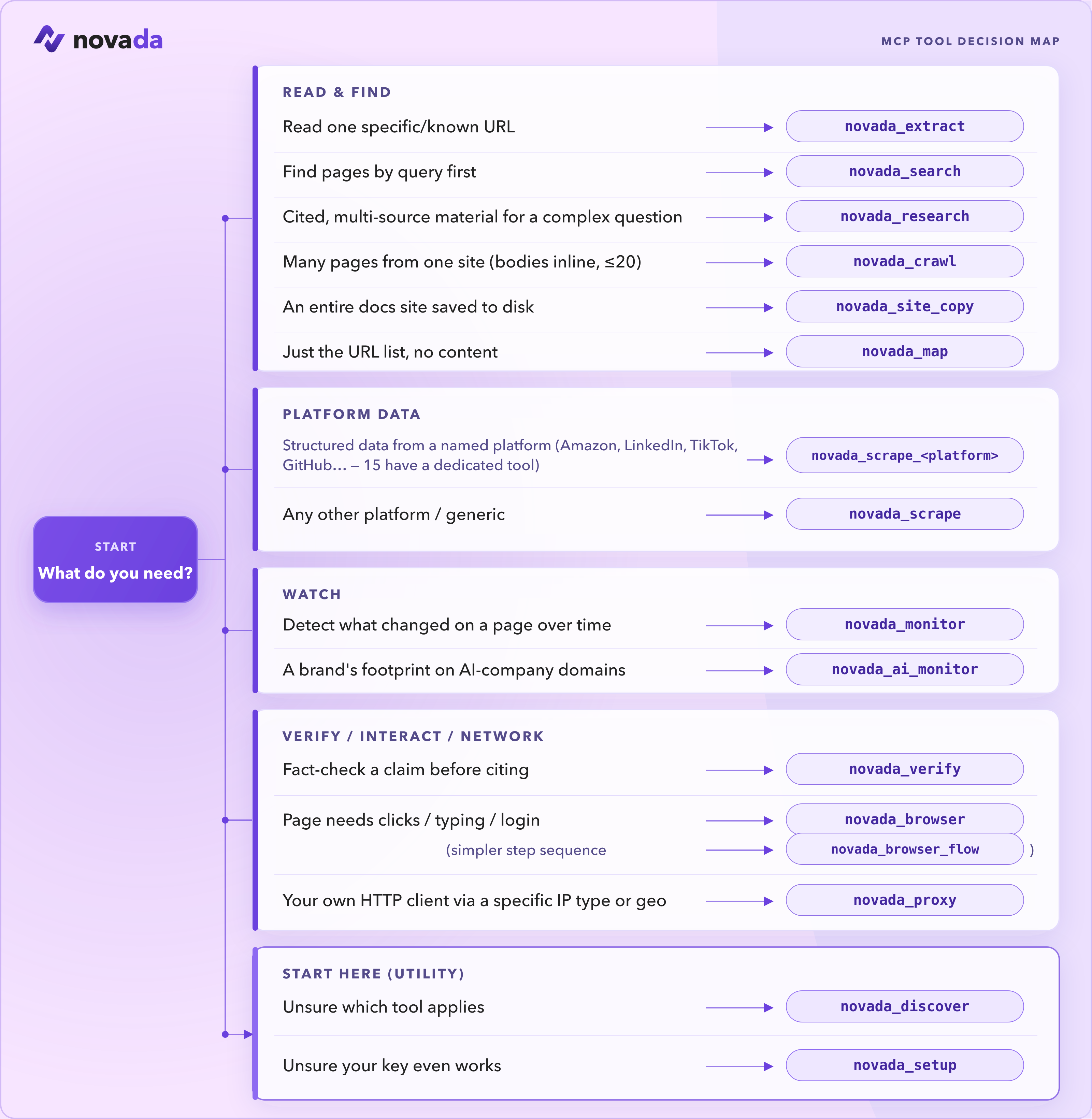
These are the tools you reach for most:
| Tool | Use it when |
|---|---|
novada_setup | First run — validate your key and see your balance. Start here. |
novada_search | Find pages by query (google / duckduckgo / yandex; time, domain, geo filters). |
novada_extract | Read one known URL — or up to 10 in parallel — through anti-bot pages. |
novada_research | Answer a complex question — parallel multi-source search + extraction in one call. |
novada_scrape | Structured records from 16 platforms (Amazon, LinkedIn, TikTok, …). Plus 15 typed per-platform tools — novada_scrape_amazon, _google, _linkedin, … — each a closed operation enum. |
novada_crawl | Pull content from a bounded set of related pages (≤20) on one site. |
novada_map | Discover what URLs exist on a site before fetching. |
novada_browser | Interact with a page — click, type, screenshot, run JS. |
novada_proxy | Route your own HTTP client through a specific IP type / country / session. |
Not sure? Call novada_discover and it returns the full catalog with each tool's status.
📚 Full reference — all 38 tools →
38 tools across 6 categories. Self-host (npx novada-mcp) exposes all 38. The hosted default surface (mcp.novada.com) exposes 30 — the same registry minus 8 tools that don't apply to a stateless serverless endpoint: novada_browser_flow (needs a persistent browser session), novada_site_copy (writes files to disk), novada_ip_whitelist / novada_static_ip_mgmt / novada_capture_apikey (write-gated account ops), novada_session_stats / novada_search_feedback (per-process in-memory state), and novada_verify — it is core-derived, not a hand-curated subset. Call novada_discover on your connection to see exactly what's available on it.
| Tool | Local (npx novada-mcp) | Hosted (mcp.novada.com) |
|---|---|---|
novada_search | ✅ | ✅ |
novada_extract | ✅ | ✅ |
novada_crawl | ✅ | ✅ |
novada_research | ✅ | ✅ |
novada_map | ✅ | ✅ |
novada_site_copy | ✅ | ❌ writes to local disk |
novada_search_feedback | ✅ | ❌ per-process in-memory state |
novada_scrape | ✅ | ✅ |
novada_scrape_amazon … _perplexity (15 platform tools) | ✅ | ✅ |
novada_ai_monitor | ✅ | ✅ |
novada_monitor | ✅ | ✅ |
novada_verify | ✅ | ❌ not on novada_discover's hosted listing |
novada_proxy | ✅ | ✅ |
novada_browser | ✅ | ✅ |
novada_browser_flow | ✅ | ❌ needs a persistent browser session |
novada_account | ✅ | ✅ |
novada_proxy_account_create | ✅ | ❌ write-gated account op |
novada_proxy_account_list | ✅ | ✅ |
novada_ip_whitelist | ✅ | ❌ write-gated account op |
novada_capture_apikey | ✅ | ❌ write-gated account op |
novada_static_ip_mgmt | ✅ | ❌ write-gated account op |
novada_discover | ✅ | ✅ |
novada_setup | ✅ | ✅ |
novada_session_stats | ✅ | ❌ per-process in-memory state |
Full per-tool reference (same column) → docs/TOOLS.md.
Only relevant if you're running npx novada-mcp yourself — hosted users only need the ?apikey= URL.
| Variable | Required | Purpose |
|---|---|---|
NOVADA_API_KEY | Yes | Covers search, extract, crawl, scrape, research, browser, and account tools. |
NOVADA_BROWSER_WS | No | Browser API WebSocket URL. Auto-provisioned from your API key if not set. |
NOVADA_PROXY_ENDPOINT | No | Proxy host:port. Required only if you use novada_proxy with your own HTTP client. |
NOVADA_TOOLS | No | Load specific tools only, e.g. "search,extract,research". |
NOVADA_GROUPS | No | Load tool groups, e.g. "search,proxy,browser". Groups: search, proxy, browser, scraper, health, account. |
claude mcp list; for other clients, check the connector/server status in settings.https://mcp.novada.com/mcp?apikey=YOUR_KEY with your real key substituted — a placeholder or malformed URL fails silently in some clients.npx -y novada-mcp (never a global install) — a stale globally-installed binary can silently shadow the package and run an old cached version with a different tool list.novada_discover once connected. Hosted and self-host expose different catalogs, so a "missing" tool may simply not be on the surface you're connected to.novada_setup() or check the dashboard.mcp.novada.com is allowed.novada_setup() — it validates your key against the live account API and tells you exactly what's wrong. It never hard-errors on a missing key, so if you see something else, read the returned agent_instruction.novada_account({section: "summary"}) for both at once, or section: "balance" / section: "plans" for just one.novada_search.operation is verified-working — operations we can't currently deliver are marked and excluded, not left in to fail on you mid-task.src/tools/registry.ts is the single source of truth for the tool catalog; a test asserts the registered tools, the wired tools, and the novada_discover output can never diverge.confirm:true write-gate. Every mutating tool (proxy sub-account creation, IP whitelist changes, static IP purchases, capture-key resets) requires an explicit two-step confirmation — no silent writes.novada_discover and novada_setup are tools your agent can call itself to find the right tool or validate a key, without ever reading this README.vs Firecrawl / Tavily (measured, not marketing):
npx -y novada-mcp cold-starts with no key; novada_setup walks you to one only when a tool needs it.anti_bot:kasada) instead of a generic error, so an agent can branch on it.MIT
FAQs
One MCP server for all web data. Search, scrape, crawl, proxy, and AI research in one install.
The npm package novada-mcp receives a total of 90 weekly downloads. As such, novada-mcp popularity was classified as not popular.
We found that novada-mcp demonstrated a healthy version release cadence and project activity because the last version was released less than a year ago. It has 1 open source maintainer collaborating on the project.
Security News
It has been one year since Shai-Hulud made its first appearance on npm.

Research
/Security News
Operators behind PolinRider used a compromised GitHub account to plant malware in four development versions of a Packagist package with 700,000+ downloads.

Security News
GitHub Actions now supports cache-mode, a least-privilege control on the Actions cache aimed at the cache poisoning technique behind recent compromises.