Tooling for converting, validating, and parsing OpenAPI, Swagger, and Postman API definitions.





Installation
npm install oas-normalize
Usage
import OASNormalize from 'oas-normalize';
const oas = new OASNormalize(
'https://raw.githubusercontent.com/OAI/OpenAPI-Specification/master/examples/v3.0/petstore-expanded.yaml',
);
await oas
.validate()
.then(() => {
})
.catch(err => {
console.error(err);
});
[!WARNING]
Support for Postman collections is experimental. If you've supplied a Postman collection to the library, it will always be converted to OpenAPI, using @readme/postman-to-openapi before doing any bundling, validating, etc.
.load()
Load and retrive the API definition that oas-normalize was initialized with. Every method of oas-normalize utilizes this internally however if you would like to retrieve the original API definition supplied (for example if all you had was a URL, a file path, or a buffer), you can use .load() to automatically resolve and return its contents.
const file = await oas.load();
console.log(file);
.bundle()
Bundle up the given API definition, resolving any external $ref pointers in the process.
const definition = await oas.bundle();
console.log(definition);
.convert()
Convert a given API definition into an OpenAPI definition JSON object.
await oas
.convert()
.then(definition => {
console.log(definition);
})
.catch(err => {
console.error(err);
});
.deref()
Dereference the given API definition, resolving all $ref pointers in the process.
const definition = await oas.bundle();
console.log(definition);
.validate()
Validate a given API definition. This supports Swagger 2.0 and OpenAPI 3.x API definitions, as well as Postman 2.x collections.
try {
await oas.validate();
} catch (err) {
console.error(err);
}
Error Handling
All errors will be thrown as a ValidationError exception with contextual error messages that direct the user to the line(s) where their errors are present:
OpenAPI schema validation failed.

REQUIRED must have required property 'url'

   7 |   },
   8 |   "servers": [
>  9 |     {
     |     ^ ☹️  url is missing here!
  10 |       "urll": "http://petstore.swagger.io/v2"
  11 |     }
  12 |   ],
If you also wish to treat certain errors as warnings you can do so by supplying your .validate() call with a @readme/openapi-parser ruleset:
try {
  const result = await oas.validate({
    parser: {
      validate: {
        rules: {
          openapi: {
            'path-parameters-not-in-path': 'warning',
          },
        },
      },
    },
  });

  if (result.warnings.length) {
    console.warn('🚸 The API is valid but has some warnings.');
    console.warn(result.warnings);
  } else {
    console.log('🍭 The API is valid!');
  }
} catch (err) {
  console.error(err);
}
If you want to always receive a ValidationResult object back (which includes a flag that indicates if the supplied API definition is valid or not), you can set the shouldThrowIfInvalid option to false:
const result = await oas.validate({ shouldThrowIfInvalid: false });
console.log(result);
[!NOTE]
For full documentation on the available rulesets, as well as tooling to transform ValidateResult objects into a human-readable strings, check out the documentation for @readme/openapi-parser.
.version()
Load and retrieve version information about a supplied API definition.
const { specification, version } = await oas.version();
console.log(specification);
console.log(version);
Options
Enable local paths
For security reasons, you need to opt into allowing fetching by a local path. To enable this supply the enablePaths option to the class instance:
const oas = new OASNormalize('./petstore.json', { enablePaths: true });
Colorized errors
If you wish errors from .validate() to be styled and colorized, supply colorizeErrors: true to the class instance:
const oas = new OASNormalize('https://example.com/petstore.json', {
  colorizeErrors: true,
});
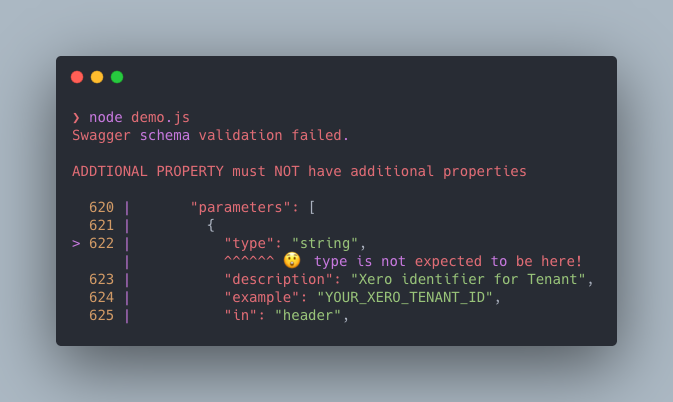
When enabled thrown validation error messages will now resemble the following: