ppu-indra-ocr







Indra OCR in TypeScript. Images and PDFs in; markdown, plain text, line boxes and layout blocks out. The whole Indra OCR pipeline by Datalab runs on ONNX Runtime: page orientation, deskew, line detection, recognition, reading order, layout and markdown. Runs anywhere JavaScript runs: Node.js, Bun, Deno, web browsers, web workers, browser extensions, and React Native (iOS/Android). Docker & CLI supported. Try it in your browser.
Need it as an HTTP service? Dockerized? Spin up the REST API here: apps/serve. Need a CLI instead? See Command Line. Are you an AI agent? Learn the API quickly with the skill in the skill-ppu-indra-ocr folder.
[!WARNING]
Read Datalab's license before you use this package.
This package runs the Indra OCR model weights by Datalab. The weights are
not under this package's Apache-2.0 license. They are under Datalab's
modified OpenRAIL-M license, and you accept it when the library downloads
them for you. You may not use the weights at all if:
- your organization had more than USD 20M in revenue last year, or has
raised more than USD 20M, unless your use is personal or research; or
- your organization offers any product or service that competes with
Datalab. This clause has no exception for personal use or research.
You are responsible for your own compliance. Read
LICENSE-STATUS.md for the terms, our open request to
Datalab, and what may change. This is a community project. Datalab does not
endorse it.
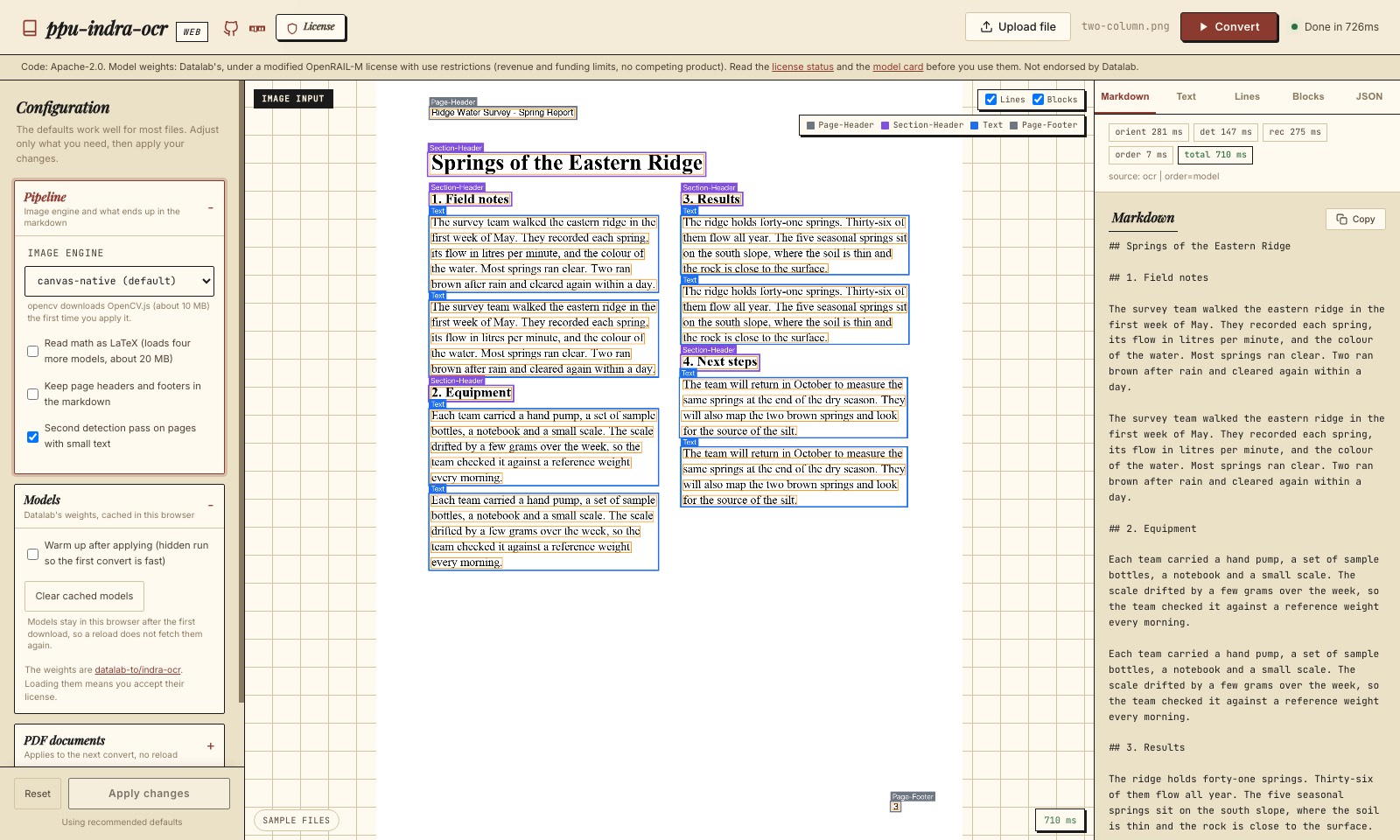
import { IndraOcrService } from "ppu-indra-ocr";

const service = new IndraOcrService();
await service.initialize();

const page = await service.convert(await Bun.file("scan.png").arrayBuffer());
console.log(page.markdown);

await service.destroy();
Table of Contents
Why ppu-indra-ocr?
- The whole page, not just the text. Orientation (vertical writing too), deskew up to 45 degrees, line detection, recognizers for Latin, CJK, right-to-left and other scripts, reading order, layout labels, and markdown with headings, lists and tables, in one
convert() call.
- PDFs too. Uses a PDF's text layer where it can be trusted and OCR where it cannot, page by page.
- Small models. About 9 MB of ONNX models load at start; the other script recognizers and the language models load when a page needs them. Pinned to one upstream revision per model preset:
v1.1 (Indra OCR 1.1, the default) or v3.1 (the first release).
- Matches the reference. On the
opencv engine, line text, layout blocks and markdown match the Python indra-ocr exactly on every test page. See How the Port Is Checked.
- Runs everywhere, Node.js, Bun, Deno, web browsers, web workers, browser extensions, and React Native (iOS/Android), on the same runtime adapters as ppu-paddle-ocr.
- Composable. Every stage is a method, so you can run one stage, swap a stage, or chain your own pipeline.
- TypeScript, full type definitions.
Runtime Support
The same package, the same API, every JavaScript runtime:
| Node.js | npm install ppu-indra-ocr onnxruntime-node | npm package |
| Bun | bun add ppu-indra-ocr onnxruntime-node | npm package |
| Deno | deno add jsr:@snowfluke/ppu-indra-ocr | JSR package |
| Web browser | npm install ppu-indra-ocr onnxruntime-web (import /web subpath) | Live demo |
| Web worker | Same as web; the /web subpath runs in workers. | Web Workers |
| Browser extension | Same as web; bundle ppu-indra-ocr/web with your extension's bundler. | Web / Browser Support |
| Mobile (React Native) | npm install ppu-indra-ocr onnxruntime-react-native @shopify/react-native-skia (import /mobile subpath) | React Native |
| PDF input (any of the above) | npm install @embedpdf/pdfium (import /pdf subpath) | PDF Input |
Installation
npm install ppu-indra-ocr onnxruntime-node onnxruntime-web
Omit onnxruntime-node or onnxruntime-web depending on your target environment (Node/Bun vs browser). Add @embedpdf/pdfium for PDF input.
The first initialize() downloads the base models (about 9 MB, 29 MB with math) from Datalab's Hugging Face repository, pinned to one revision, and caches them in ~/.cache/ppu-indra-ocr on Node and Bun. The CJK, right-to-left and other-script recognizers (5 to 10 MB each) and the language models (12 to 19 MB each) download the first time a page needs them. That can happen on the first page: on a Latin receipt, one unsure line can pull rec_rtl.onnx and lm.npz (about 20 MB) in the middle of convert(). IndraOcrService.downloadModels() (or ppu-indra-ocr download-models) fetches them all up front.
When the models download, you accept Datalab's license for the weights.
Check LICENSE-STATUS.md first.
CLI (global install)
npm install -g ppu-indra-ocr onnxruntime-node
ppu-indra-ocr convert scan.png
This puts a ppu-indra-ocr command on your PATH. See Command Line for all commands.
Notes on the global install
onnxruntime-node is required. It is an optional peer dependency (native binaries), so install it alongside the CLI. Add @embedpdf/pdfium globally too if you want PDF input.- bun: ensure
~/.bun/bin is on your PATH (npm's global bin usually already is).
- Updates are manual. Re-run the install with
@latest to upgrade.
- Node or Bun must be present. This is the Node/Bun build, not a standalone binary. For that, see Standalone Binaries below.
Standalone Binaries
Every release attaches self-contained executables, no Node, Bun, or npm install required. Download, extract, run:
curl -L https://github.com/PT-Perkasa-Pilar-Utama/ppu-indra-ocr/releases/latest/download/ppu-indra-ocr-linux-x64.tar.gz | tar xz
./ppu-indra-ocr-linux-x64 convert scan.png
ppu-indra-ocr-linux-x64.tar.gz | Linux x86-64 (glibc; Debian, Ubuntu, Fedora, ...) |
ppu-indra-ocr-linux-arm64.tar.gz | Linux ARM64 (glibc; Raspberry Pi OS 64-bit, AWS Graviton, ...) |
ppu-indra-ocr-darwin-arm64.tar.gz | macOS on Apple Silicon |
ppu-indra-ocr-windows-x64.zip | Windows x86-64 (contains the .exe) |
Intel Macs and Alpine (musl) are not covered, onnxruntime ships no darwin-x64 or musl builds; use npx/bunx there.
Size, slim variant, and OS warnings
- Size and first run. 53-69 MB download depending on the platform, about 165 MB extracted on macOS (the executable embeds the Bun runtime, ONNX Runtime, pdfium and the image engines). Models still download to
~/.cache/ppu-indra-ocr on first run, exactly like the npm CLI.
- Slim variant. Each target also ships a
-slim archive (e.g. ppu-indra-ocr-linux-x64-slim.tar.gz) that excludes the OpenCV engine: about 30 MB smaller extracted, 4-5 MB smaller to download. It always uses the canvas-native engine and rejects --engine opencv. Pick slim for disk and memory footprint; pick full if you want results that match the Python reference exactly.
- macOS Gatekeeper. The binaries are ad-hoc signed but not Apple-notarized. If macOS blocks a downloaded binary, clear the quarantine flag:
xattr -d com.apple.quarantine ./ppu-indra-ocr-darwin-arm64 (or right-click, Open, once).
- Windows SmartScreen. Unrecognized-app warning on first run: "More info", then "Run anyway".
Verify a download (Sigstore + SLSA)
Both checks run against the archive, before extraction; both artifacts are attached per release.
cosign verify-blob ppu-indra-ocr-linux-x64.tar.gz \
--bundle ppu-indra-ocr-linux-x64.tar.gz.sigstore.json \
--certificate-identity-regexp "github.com/PT-Perkasa-Pilar-Utama/ppu-indra-ocr" \
--certificate-oidc-issuer https://token.actions.githubusercontent.com
gh attestation verify ppu-indra-ocr-linux-x64.tar.gz --repo PT-Perkasa-Pilar-Utama/ppu-indra-ocr
Core Usage
Basic Conversion
import { IndraOcrService } from "ppu-indra-ocr";

const service = new IndraOcrService({ verbose: true });
await service.initialize();

const page = await service.convert(await Bun.file("./assets/receipt.jpg").arrayBuffer());
console.log(page.markdown);

await service.destroy();
convert takes encoded image bytes (ArrayBuffer or Uint8Array: PNG, JPEG, WebP and the other formats your canvas decodes), a canvas, or gray pixels { data: Uint8Array, width, height }.
For a single image, ocr() and detect() manage a short-lived service for you. Create an IndraOcrService when processing more than one image so the models remain initialized between calls.
import { detect, ocr } from "ppu-indra-ocr";
const page = await ocr(imageBytes);
const boxes = await detect(imageBytes);
The Page Result
type Page = {
markdown: string | null;
text: string;
lines: { box: [x0, y0, x1, y1]; text: string; conf: number }[];
blocks: { label: BlockLabel; bbox: [x0, y0, x1, y1]; text: string }[];
source: "ocr" | "text" | "hybrid" | "error";
note: string;
rotation: number;
skew: number;
timings: Record<string, number>;
};
Block labels: Text, Section-Header, Page-Header, Page-Footer, List-Group, Table, Caption, Footnote, Table-Of-Contents, Form. Page headers and footers are left out of the markdown unless you pass furniture: true; they stay in lines and blocks. Boxes are in the upright page's pixels.
Running the Stages Yourself
const { turns } = await service.orient(image);
const { image: upright, skew } = await service.straighten(image, turns);
const boxes = (await service.detect(upright)).map(([x0, y0, x1, y1]) => [x0, y0, x1, y1] as const);
const lines = await service.recognize(upright, boxes);
const texts = lines.map((l) => l.text);
const { order, cls, same } = await service.order(boxes, texts, upright.width, upright.height);
recognize takes boxes from any detector, one line per box. Boxes should hug the text: the recognizer crops 0.3 x the box height on each side and 0.2 x above and below (on v1.1 the main recognizer also sees 1.6 x the height above and below as context). Trim boxes that carry their own padding first; PaddleOCR's boxes, for example, are padded to 1.8 x the text height. For a vertical page, pass the page turned by straighten(image, 4) and recognize(image, boxes, true).
toMarkdown, joinLines and orderXYCut are exported as plain functions. service.pipeline gives the lower-level stages (line splitting, assembly) when you need them. readMath(image, boxes) reads boxes as text with inline LaTeX on a service created with math: true.
Custom Models
Every model file has a role. Pass models to read some or all of them from file paths (Node/Bun), URLs, or ArrayBuffers; files you leave out come from the default repository:
import { IndraOcrService, MODEL_FILES } from "ppu-indra-ocr";
const service = new IndraOcrService({
models: { det: "./models/det.onnx" },
});
const local = new IndraOcrService({
models: Object.fromEntries(
Object.entries(MODEL_FILES).map(([role, file]) => [role, `/opt/indra-models/${file}`])
),
});
Roles: det, rec, script, orient, order, meta; the script recognizers recCjk, recRtl, recWorld; the language models lm, lmCjk, lmWorld; and with math mathCls, mathEnc, mathDecInit, mathDecStep, mathMeta. MODEL_FILES maps each role to its file name, MODEL_PRESETS holds each preset's pinned commit and file list, and defaultModelUrl(role, preset) gives the default URL. A role the preset does not have (v3.1 has no recRtl) and that you do not pass stays off.
Detection Only
detect() runs only the detection model, no recognition, and returns the line boxes it finds with their scores. Useful when you only need layout (where the text is), or want to feed the boxes into your own pipeline.
const boxes = await service.detect(imageBytes);
detect() runs on the image as given. Run orient and straighten first when the input may be turned or tilted. Also available as the CLI detect command and the serve app's POST /v1/detect, see Command Line and apps/serve.
Command Line
The package ships a bin, so you can OCR without writing any code. In a project that has ppu-indra-ocr and onnxruntime-node installed, bunx/npx resolve the local install directly; for zero-install runs use npx -p onnxruntime-node -p ppu-indra-ocr ppu-indra-ocr <args> or a global install:
bunx ppu-indra-ocr convert paper.pdf
bunx ppu-indra-ocr convert "scans/*.png" --out results/
bunx ppu-indra-ocr convert scan.png --format json --pretty
bunx ppu-indra-ocr convert paper.pdf --mode ocr --math --timings
bunx ppu-indra-ocr detect receipt.jpg
npx -p onnxruntime-node -p ppu-indra-ocr ppu-indra-ocr convert scan.png
bunx ppu-indra-ocr convert scan.png --model v3.1
bunx ppu-indra-ocr convert scan.png --no-lm
bunx ppu-indra-ocr download-models
bunx ppu-indra-ocr clear-cache
bunx ppu-indra-ocr models
--format md|text|json, --out <dir> | convert | Output format; one file per input (.md, .txt, .jsonl) |
--math, --keep-furniture, --engine, --timings | convert | Math as LaTeX, keep headers and footers, engine, timings |
--mode auto|ocr|text, --dpi, --max-pages, --password | PDFs | Text layer or OCR, render resolution, page cap, password |
--no-image-ocr | PDFs | Skip OCR inside images on text-layer pages |
--model v1.1|v3.1, --no-lm | all commands | Model preset; no language models |
--model-dir <dir>, --execution-providers <list> | all commands | Read models from a folder; ONNX providers (e.g. cuda,cpu) |
-o/--output <file>, --pretty, -q/--quiet, --verbose | all commands | Output destination and format, logging |
Converted text goes to stdout; progress and logs go to stderr, so output pipes cleanly. Exit codes: 0 success, 1 runtime error, 2 usage error.
Run bunx ppu-indra-ocr help for the full reference.
Batch Conversion
convertBatch() runs convert() over many images with bounded concurrency: at most concurrency images are decoded and in flight at once, so memory stays in check. Results come back index-aligned to the inputs, whatever order they finish in.
const pages = await service.convertBatch([buf1, buf2, buf3]);
pages.forEach((p, i) => console.log(i, p.markdown));
| More images in flight | { concurrency: 2 } |
| One bad image not to kill the batch | { settle: true } |
| Progress or cancellation | { onProgress, signal } |
| Results as they finish | convertStream() |
| An input list too big for memory | pass an Iterable or AsyncIterable |
Full surface: BatchOptions.
Concurrency. Defaults to 1. Each page allocates large tensors (a whole page goes through detection at a 1024 px long side, then layout and reading order), so more pages at once mostly add memory. Raise it only after measuring on your hardware.
Failures. With settle: true the call never rejects; each slot becomes { index, status, value | reason }:
const results = await service.convertBatch(images, { settle: true });
for (const r of results) {
  if (r.status === "fulfilled") console.log(r.value.markdown);
  else console.error("failed:", r.reason);
}
Progress and cancellation use the usual primitives:
const ac = new AbortController();
await service.convertBatch(images, {
  signal: ac.signal,
  onProgress: (done, total) => console.log(`${done}/${total}`),
});
Streaming. convertStream() yields each result as it finishes, so the whole batch is never buffered. Each item carries its input index for reordering:
for await (const item of service.convertStream(images)) {
  if (item.status === "fulfilled") console.log(item.index, item.value.markdown);
}
Both methods accept any Iterable or AsyncIterable of inputs, so a directory walk or a queue never has to be materialized in memory at once.
PDF Input
import { IndraOcrService } from "ppu-indra-ocr";
import { convertPdf, isPdf } from "ppu-indra-ocr/pdf";

const service = new IndraOcrService();
await service.initialize();

const pages = isPdf(bytes)
  ? await convertPdf(service, bytes, { mode: "auto" })
  : [await service.convert(bytes)];
mode | "auto" | auto: the text layer where it passes the checks, OCR elsewhere. ocr: always OCR. text: the text layer even when the checks fail |
dpi | 200 | Render resolution for OCR |
imageOcr | true | On text-layer pages, OCR lines with no text-layer characters (text in images) |
maxPages | all | Read at most this many pages |
password | - | Password of an encrypted PDF |
The text layer is checked first: invisible text (an OCR layer), broken font maps, right-to-left letters stored in visual order, and runs with no ink under them send the page to OCR. So does a legacy-font layer (Kruti Dev or DevLys for Hindi, Bijoy for Bangla) that stores Latin codes while the page shows another script: the script model checks up to six of its lines against their images (upstream measures about 5 ms a page). A table set sideways, a page turned by its /Rotate, and vertical writing are read upright from the text layer; sideways labels inside a page become their own lines. A page that fails comes back with source: "error" and the reason in note; a file that cannot be opened throws. pdfium runs as WebAssembly (@embedpdf/pdfium); a browser fetches its wasm from jsDelivr unless you pass pdfium: await loadPdfium(wasmBytesOrUrl). isPdf(bytes) is exported from every entry to route files without loading pdfium. On Node and Bun, set PPU_INDRA_OCR_PDFIUM_WASM to a local pdfium.wasm path to load it from there instead of node_modules.
Math
const service = new IndraOcrService({ math: true });
A classifier finds lines that hold math, and an attention decoder reads them as text with inline LaTeX (we have $x _ { i } \leq 1$). A reading replaces a line only when it holds math and its mean token probability is 0.9 or more. Math loads four more models and is slower on pages that have it.
Orientation and Deskew
There is nothing to compose: convert() measures the tilt on a page preview, turns the page upright with orient.onnx (90, 180 and 270 degree turns) and straightens tilts up to 45 degrees before detection, on both presets. page.rotation and page.skew report what was undone, and boxes come back in the upright page's pixels. A page set in vertical columns (Chinese, Japanese) is read turned, columns as lines, with page.vertical set and boxes on the page as it is. Call service.orient() and service.straighten() directly when you want those stages alone. For general image preprocessing (grayscale, thresholding, contours), see ppu-ocv.
Processing Engine
Two image processing backends are available for resizing and warping:
"opencv" | Node and Bun | Yes | OpenCV.js through ppu-ocv. Results match the Python reference. |
"canvas-native" | Web, mobile | No | Plain TypeScript. Smaller; within a token-F1 of 0.98 of the reference. |
const service = new IndraOcrService();
const service = new IndraOcrService({ engine: "canvas-native" });
The opencv engine runs the same OpenCV release (5.0) as the reference. On the web, engine: "opencv" needs OpenCV.js on the page first; the library does not fetch it (about 10 MB):
<script src="https://cdn.jsdelivr.net/npm/@techstark/opencv-js@5.0.0-release.1/dist/opencv.js"></script>
Without OpenCV.js on globalThis.cv, initialize() throws and says so.
Web / Browser Support
Import from ppu-indra-ocr/web for browser-native capabilities (HTMLCanvasElement, OffscreenCanvas, fetch buffering).
Using a Bundler (Vite, Webpack, etc.)
import { IndraOcrService } from "ppu-indra-ocr/web";
const service = new IndraOcrService();
await service.initialize();
const file = document.getElementById("upload").files[0];
const page = await service.convert(await file.arrayBuffer());
console.log(page.markdown);
Models are fetched from the default URLs or from models.
Web Workers
Keep the service inside a worker and send image bytes across the boundary, so inference never blocks the main thread:
import { IndraOcrService } from "ppu-indra-ocr/web";
const service = new IndraOcrService();
const ready = service.initialize();
self.onmessage = async (event: MessageEvent<ArrayBuffer>) => {
await ready;
const page = await service.convert(event.data);
self.postMessage(page);
};
const worker = new Worker(new URL("./worker.ts", import.meta.url), {
type: "module",
});
worker.onmessage = (event) => console.log(event.data.markdown);
const bytes = await file.arrayBuffer();
worker.postMessage(bytes, [bytes]);
Notes:
- A worker is the right home for OCR. On the main thread, inference blocks the page until the whole image is done.
- Cross-origin isolation still governs WASM threading, see Multithreaded WASM. It is a property of the page, not of the worker.
isWebWorker() is exported if you need to branch on the scope yourself.
import { isWebWorker } from "ppu-indra-ocr/web";
CDN (No Bundler)
See the live demo for a complete ESM/CDN setup with an import map.
WebGPU Acceleration
ONNX Runtime runs on WASM unless you ask for more. To try WebGPU, opt in with the providers the browser supports:
import {
IndraOcrService,
getDefaultWebExecutionProviders,
isWebGpuAvailable,
} from "ppu-indra-ocr/web";
if (await isWebGpuAvailable()) console.log("WebGPU supported");
const service = new IndraOcrService({
session: { executionProviders: await getDefaultWebExecutionProviders() },
});
If session creation with the requested providers fails, the service rebuilds the session on wasm; pass session.onSessionFallback to be told.
The WASM binaries are always required, even when WebGPU is the primary provider. When ort.env.wasm.wasmPaths is unset, pages and workers load the jsDelivr copy of the exact onnxruntime-web version you loaded, so the loader and the binaries never disagree. To self-host them, set it before initialize():
ort.env.wasm.wasmPaths = "/ort/";
Multithreaded WASM (Cross-Origin Isolation)
ONNX Runtime runs WASM multithreaded only if the page is cross-origin isolated; otherwise numThreads is pinned to 1. Isolation needs two response headers:
Cross-Origin-Opener-Policy: same-origin
Cross-Origin-Embedder-Policy: require-corp
If you can set those headers server-side, do that. It is the correct fix and needs nothing from this package.
For static hosts that cannot (e.g. GitHub Pages), the package ships an opt-in coi-serviceworker that injects the headers client-side. Copy it to your served root and load it before anything else:
<script src="/coi-serviceworker.js"></script>
Resolve the shipped copy from the package, e.g. in a build step:
const swPath = import.meta.resolve("ppu-indra-ocr/coi-serviceworker.js");
The service worker reloads the page once on first visit to apply the headers, and rewrites all fetch responses. Don't use it if you already control your headers or run another service worker that conflicts.
React Native (Mobile)
Run the same OCR pipeline on iOS and Android via the ppu-indra-ocr/mobile entry. It uses onnxruntime-react-native (native JSI inference) and ppu-ocv/canvas-mobile (Skia-backed canvas) instead of their web counterparts, with the canvas-native engine.
npm install ppu-indra-ocr onnxruntime-react-native @shopify/react-native-skia
import { IndraOcrService } from "ppu-indra-ocr/mobile";
const service = new IndraOcrService();
await service.initialize();
const page = await service.convert(imageBuffer);
console.log(page.markdown);
await service.destroy();
Requirements. RN >= 0.74 / Expo SDK >= 51 (Hermes). Both peer packages ship native code, so you need a dev client or expo prebuild. Expo Go is not supported.
Hardware acceleration is opt-in, mobile inference runs on CPU by default. There is no WebGPU on React Native:
new IndraOcrService({ session: { executionProviders: ["nnapi"] } });
Camera capture is out of scope. Pass a decoded frame from react-native-vision-camera or expo-camera as an ArrayBuffer.
Why the mobile entry is on npm but not JSR
onnxruntime-react-native and @shopify/react-native-skia are native React Native modules that only resolve through npm/Metro, and JSR's Deno-based publish cannot resolve them (React Native itself cannot consume JSR packages). So the mobile entry is excluded from the JSR package. Install via npm/yarn/bun as shown above.
Models and Language Support
Model Presets
A preset is one pinned revision of datalab-to/indra-ocr and the files it holds. Both run on the same pipeline, ported from indra-ocr 1.1.2.
v1.1 (default) | v1.1.0 | 9 MB | Handwriting, 80+ languages (CJK, right-to-left and other script recognizers), language models, vertical pages |
v3.1 | v3.1 | 18 MB | The first release (Indra OCR 1.0): Latin, Cyrillic, Greek, Devanagari, Bengali and Chinese |
import { IndraOcrService, MODEL_PRESETS } from "ppu-indra-ocr";
const service = new IndraOcrService({ model: "v3.1" });
const noLm = new IndraOcrService({ lm: false });
console.log(MODEL_PRESETS["v1.1"].revision);
The language models (lm) re-read lines a recognizer is unsure of with a beam search, which mostly helps handwriting. They are on by default on Node and Bun and off on the web and React Native, where each is a 12 to 19 MB download. React Native has no DecompressionStream, which reading them needs.
Indra OCR Models
Indra OCR is a small CPU pipeline with a 1M-parameter line recognizer. The v1.1 files, downloaded and cached on first use:
det | det.onnx | 0.4 MB | at start | Text line detection |
rec | rec.onnx | 5.0 MB | at start | Main recognizer: Latin, Cyrillic, Greek, Latin handwriting |
script | script.onnx | 0.2 MB | at start | Script classifier: routes each line to its recognizer |
orient | orient.onnx | 0.4 MB | at start | Page orientation and vertical writing |
order | order.onnx | 3.0 MB | at start | Reading order, layout labels and blocks |
meta | meta.json | 0.2 MB | at start | Vocabularies and input settings |
recCjk | rec_cjk.onnx | 10.2 MB | first CJK line | Chinese, Japanese, Korean |
recRtl | rec_rtl.onnx | 4.8 MB | first RTL line | Arabic, Persian, Urdu, Pashto, Hebrew |
recWorld | rec_world.onnx | 5.6 MB | first line of its scripts | Indic scripts, Thai, Lao, Khmer, Myanmar, Sinhala, Georgian, Armenian, Ethiopic |
lm | lm.npz | 15.7 MB | first unsure line | Language model of the main recognizer (with lm) |
lmCjk | lm_cjk.npz | 19.0 MB | first unsure line | Language model of the CJK recognizer (with lm) |
lmWorld | lm_world.npz | 11.6 MB | first unsure line | Language model of the other-script recognizer (with lm) |
v3.1 has det, rec, recCjk (9.3 MB, Chinese only), script, orient, order and meta. With math: true, five more files load in either preset: mathcls.onnx, math_enc.onnx, math_dec_init.onnx, math_dec_step.onnx and math_meta.json (about 20 MB).
The weights are Datalab's, under their own license. Unmodified mirrors with the license and attribution: models/ (v3.1) and models/v1.1/ in this repository, and snowfluke/ppu-indra-ocr-models on Hugging Face.
Cache Location (Node / Bun)
Models are cached under ~/.cache/ppu-indra-ocr:
| macOS | ~/.cache/ppu-indra-ocr |
| Linux | ~/.cache/ppu-indra-ocr |
| Windows | C:\Users\<username>\.cache\ppu-indra-ocr |
Each file lands in a subdirectory named after a digest of its source URL, so two models that share a file name never collide.
await IndraOcrService.downloadModels({ model: "v1.1", math: false, lm: true });
Clear it with ppu-indra-ocr clear-cache.
In the browser, model files are fetched via fetch() on every page load and rely on the browser's HTTP cache. For persistent offline caching, use a Service Worker or store the ArrayBuffer in IndexedDB and pass it through models.
Languages
There is no language option: the script model routes each line to the recognizer of its script group, and a line it is unsure of is read by the main recognizer too, the more confident reading winning.
- OCR on v1.1 (scans and images): Latin (Hausa, Fula, Akan, Azerbaijani, Uzbek, Vietnamese and Yoruba tone marks included), Cyrillic, Greek, Chinese, Japanese, Korean, Arabic, Persian, Urdu, Pashto, Hebrew, the Indic scripts, Thai, Lao, Khmer, Myanmar, Sinhala, Georgian, Armenian and Ethiopic. Right-to-left lines come out in logical order, and right-to-left pages read their right column first.
- OCR on v3.1: Latin, Cyrillic, Greek, Devanagari, Bengali and Chinese.
- PDF text layer: any script.
Model Output Limitations
From the upstream model card: Indra OCR is built for speed on clean print. Complex tables (merged or spanning cells, no ruling lines), cursive and faint pencil handwriting, degraded scans and very wide pages read poorly.
Upstream's picture regions (Page.pictures,  in the markdown) need a detector with a picture channel. The v1.1 detector has none, so this port leaves them out.
Configuration Reference
IndraOptions
import type { IndraOptions } from "ppu-indra-ocr";

export type IndraOptions = {
  model?: "v1.1" | "v3.1";
  models?: ModelSources;
  lm?: boolean;
  math?: boolean;
  furniture?: boolean;
  adaptive?: boolean;
  engine?: "opencv" | "canvas-native";
  session?: SessionOptions;
  verbose?: boolean;
};
model | "v1.1" | "v3.1" | "v1.1" | Model preset, see Model Presets |
models | ModelSources | Datalab's repository, pinned | Per-file sources, see below |
lm | boolean | true on Node/Bun, false web and mobile | Re-read unsure lines with the language models |
math | boolean | false | Read math lines as LaTeX (four more models) |
furniture | boolean | false | Keep page headers and footers in the markdown |
adaptive | boolean | true | Second detection pass on pages with small text |
engine | "opencv" | "canvas-native" | "opencv" on Node/Bun, else "canvas-native" | Image engine (see above) |
session | SessionOptions | CPU, CPU memory arena off | ONNX Runtime session options |
verbose | boolean | false | Log loading and stage steps to the console |
ModelSources
A partial map from file role to a source: a URL, a file path (Node/Bun only), or an ArrayBuffer. Roles left out use defaultModelUrl(role, preset).
det, rec, script, orient, order, meta | string | ArrayBuffer | pinned default | The base files |
recCjk, recRtl, recWorld | string | ArrayBuffer | pinned default | Script recognizers (on use) |
lm, lmCjk, lmWorld | string | ArrayBuffer | pinned default | Language models (with lm) |
mathCls, mathEnc, mathDecInit, mathDecStep, mathMeta | string | ArrayBuffer | pinned default | The math files (with math) |
BatchOptions
Options of convertBatch() / convertStream().
concurrency | number | 1 | Max images in flight. |
settle | boolean | false | When true, a failed image yields { status: "rejected", reason } instead of throwing. |
signal | AbortSignal | - | Cancels the batch; pending images are not scheduled and the call rejects. |
onProgress | (done, total?) => void | - | Called after each image settles, with the running count and total (if known). |
ConvertPdfOptions
Options of convertPdf(): mode, dpi, imageOcr, maxPages and password (see PDF Input), plus pdfium, a module from loadPdfium() that is otherwise loaded once and reused. PDFIUM_VERSION names the @embedpdf/pdfium release the package is tested with.
SessionOptions
Any valid ONNX Runtime InferenceSession.SessionOptions property is accepted. ppu-indra-ocr changes one default:
executionProviders | string[] | ExecutionProviderConfig[] | ORT's | Execution providers for inference (CPU on Node/Bun, WASM on the web). |
enableCpuMemArena | boolean | false | Off: the arena keeps each page's peak memory; turning it on trades memory for speed. |
onSessionFallback | (error: unknown) => void | - | Called when the requested providers fail and the session is rebuilt on cpu/wasm. |
onSessionFallback is the only non-ORT property. It is stripped before the options reach ONNX Runtime. Use it when you run your own accelerator ladder and need to know that a GPU provider was dropped instead of reading a log line:
let degraded: unknown = null;
const service = new IndraOcrService({
session: {
executionProviders: [{ name: "cuda", deviceId: 0 }, "cpu"],
onSessionFallback: (error) => (degraded ||= error),
},
});
await service.initialize();
if (degraded) {
}
It can fire once per model session.
Model host mirror
Built-in models download from Datalab's Hugging Face repository. That host rate-limits by IP, which shows up as HTTP 429 Too Many Requests from shared addresses such as CI runners.
Set PPU_INDRA_OCR_MODEL_MIRROR=1 and a download that exhausts its retries falls back to the GitHub copy in models/ (v3.1) or models/v1.1/, which serve byte-identical files:
PPU_INDRA_OCR_MODEL_MIRROR=1 bun run your-script.ts
It is off by default. GitHub LFS bandwidth is a monthly budget, so turn it on where request volume is bounded and known. A model URL you pass yourself is never rewritten.
Benchmark
Benches use a small zero-dependency harness (bench/harness.ts): in-process timing, round-robin scheduling across rounds so thermal/GC drift hits every task equally, reporting the median plus min/max/stddev. Run bun task bench.
Representative results on Apple M1 / Bun 1.4.2 (9 rounds) at the shipped defaults (v1.1 models), convert() per page, opencv and canvas-native:
task                       median      +/-stddev        min        max
----------------------------------------------------------------------
opencv two-column           396.9 ms      90.4 ms   382.7 ms   597.1 ms
opencv table                309.9 ms      23.4 ms   295.3 ms   350.9 ms
opencv receipt              203.0 ms      36.9 ms   195.8 ms   282.8 ms
canvas-native two-column    768.9 ms      16.9 ms   740.7 ms   786.4 ms
canvas-native table         571.1 ms      28.0 ms   553.6 ms   624.6 ms
canvas-native receipt       309.2 ms      15.4 ms   302.8 ms   340.9 ms
two-column and table are 1700 x 2200 test pages (US letter at 200 dpi); receipt is assets/receipt.jpg, a 720 x 1280 phone photo. Times include orientation, deskew, detection, recognition, reading order and markdown. The 1.1 pipeline costs 50 to 180 ms more per page than 0.1.x: its skew search covers 45 degrees in some 80 image rotations (about 115 ms on opencv), and the main recognizer reads a window three lines tall.
Against ppu-paddle-ocr
bench/vs-paddle.ts runs both libraries with their default options, each alone in its own process, and scores the output against transcripts. Apple M1 / Bun 1.4.2, ppu-paddle-ocr 6.6.1, Indra on the v1.1 models. Three accuracy measures, because they disagree for good reasons: char-F1 counts the characters read and ignores order and spacing; token-F1 counts whole words, so a dropped space costs; CER ignores case and spaces but counts order.
Document pages (bun bench/vs-paddle.ts: the test pages plus the receipt, 5 rounds each):
| two-column.png | 415 / 582 | 1.000 / 1.000 | 1.000 / 0.972 | 0.001 / 0.683 |
| rotated-90.png | 493 / 418 | 1.000 / 0.000 | 1.000 / 0.000 | 0.001 / 1.000 |
| rotated-180.png | 386 / 506 | 1.000 / 0.579 | 1.000 / 0.016 | 0.001 / 0.784 |
| table.png | 309 / 323 | 1.000 / 1.000 | 1.000 / 1.000 | 0.033 / 0.007 |
| chinese.png | 318 / 249 | 1.000 / 1.000 | 1.000 / 1.000 | 0.000 / 0.000 |
| receipt.jpg | 214 / 148 | 0.985 / 0.997 | 0.835 / 0.954 | 0.015 / 0.003 |
Paddle reads across both columns on one line (CER 0.683 on two-column) and does not turn pages upright by default. On the real receipt photo, Paddle reads a few characters Indra misses.
SROIE receipts (SROIE_DIR=... bun bench/vs-paddle.ts: 50 receipts, every 12th of the ICDAR 2019 SROIE set; measured with 0.1.2 on the v3.1 models, not yet re-run on v1.1):
| Indra | 188 | 822 | 1162 MB | 0.973 | 0.848 | 0.156 |
| Paddle | 220 | 434 | 1368 MB | 0.972 | 0.753 | 0.123 |
Both read the characters equally well. Indra keeps the spaces between words (token-F1 better on 40 of 50 receipts, worse on 7); Paddle's lower CER comes from line order, because SROIE transcripts move values away from their labels. Indra's slow tail is the 35-megapixel scans in the set, where shrinking the full image dominates.
How the Port Is Checked
scripts/golden/ renders test pages and records every stage of the Python reference (indra-ocr 1.1.2) on them, once on each preset's models: orientation, skew, detection, recognition, script routing, language-model beam search, reading order, the text layer and the final page. The pages cover every script group, a light-on-dark title, a right-to-left page, a vertical page, a page tilted 30 degrees, and PDFs with a sideways table, a /Rotate page, Hebrew and vertical text layers, and a Hindi page whose text layer stores Latin codes. The tests compare this package with those goldens. On the opencv engine the line text, blocks and markdown match exactly, and the line boxes agree to an IoU of 0.98 or better (0.9 on deskewed pages, where the reference's cv2 warps through a platform-specific code path). The canvas-native engine stays within a token-F1 of 0.98.
Ecosystem
ppu-indra-ocr is part of a family of document-processing libraries for JavaScript runtimes, all from PT Perkasa Pilar Utama:
| ppu-paddle-ocr | PaddleOCR (PP-OCRv6) text detection and recognition in every JavaScript runtime; the scaffold of this library. |
| ppu-ocv | Chainable image processing on OpenCV.js, plus canvas utilities that run in Node, Bun, browsers, and extensions. |
| ppu-pdf | PDF text extraction (digital and scanned) with coordinates, line grouping, and page-to-canvas/PNG rendering. |
| ppu-doclayout | Document layout analysis with PaddlePaddle PP-DocLayout (tables, figures, text regions). |
| ppu-doc-correction | Document image correction: page orientation, geometric unwarping (UVDoc), and text-line orientation. |
| ppu-uniface | Face detection, recognition, verification, alignment, and anti-spoofing (a port of Python's Uniface). |
| ppu-yolo-onnx-inference | YOLOv11 object detection in Bun/Node and browsers; no Python or PyTorch required. |
Contributing
See CONTRIBUTING.md for setup instructions, code-quality requirements, and the pull request process.
License
- Code: Apache-2.0, see LICENSE and NOTICE. The pipeline is a TypeScript port of datalab-to/indra (Apache-2.0). The library scaffold comes from ppu-paddle-ocr.
- Model weights: Datalab, modified OpenRAIL-M, see models/LICENSE and models/README.md. The license's use restrictions apply to you and to anyone you pass the weights or a service on them to.
- License status: LICENSE-STATUS.md records our request to Datalab and what may change. It is subject to change.
- Indra OCR is made by Datalab. For commercial use beyond the license, or the highest accuracy, see their platform.
Support
Open an issue.
Scripts
Recommended development environment is Linux-based. Library template: https://github.com/aquapi/lib-template
bun task build | bun run scripts/build.ts | Emit .js and .d.ts to lib/. |
bun task prepare-publish | bun run scripts/prepare-publish.ts | Stage package.json, README.md and notices into lib/. |
bun task bench | bun run scripts/bench.ts | Run *.bench.ts files. |
bun bench/vs-paddle.ts | - | Compare with ppu-paddle-ocr on document pages or SROIE. |
bun run build:pages | build + playground/build-pages.ts | Assemble the playground for Cloudflare. |
To run a specific benchmark file:
bun task bench index