

Security News
RubyGems Adds Cooldown Feature to Bundler for Newly Published Gems
RubyGems and Bundler 4.0.13 introduced an opt-in cooldown feature that delays newly published gems during dependency resolution.
By Sarah Gooding - Jun 05, 2026
react-native-bars
Advanced tools
Components to control your app status and navigation bars.
Inspired by the built-in StatusBar module and react-native-transparent-status-and-navigation-bar by @MoOx (Thanks to them 💖).





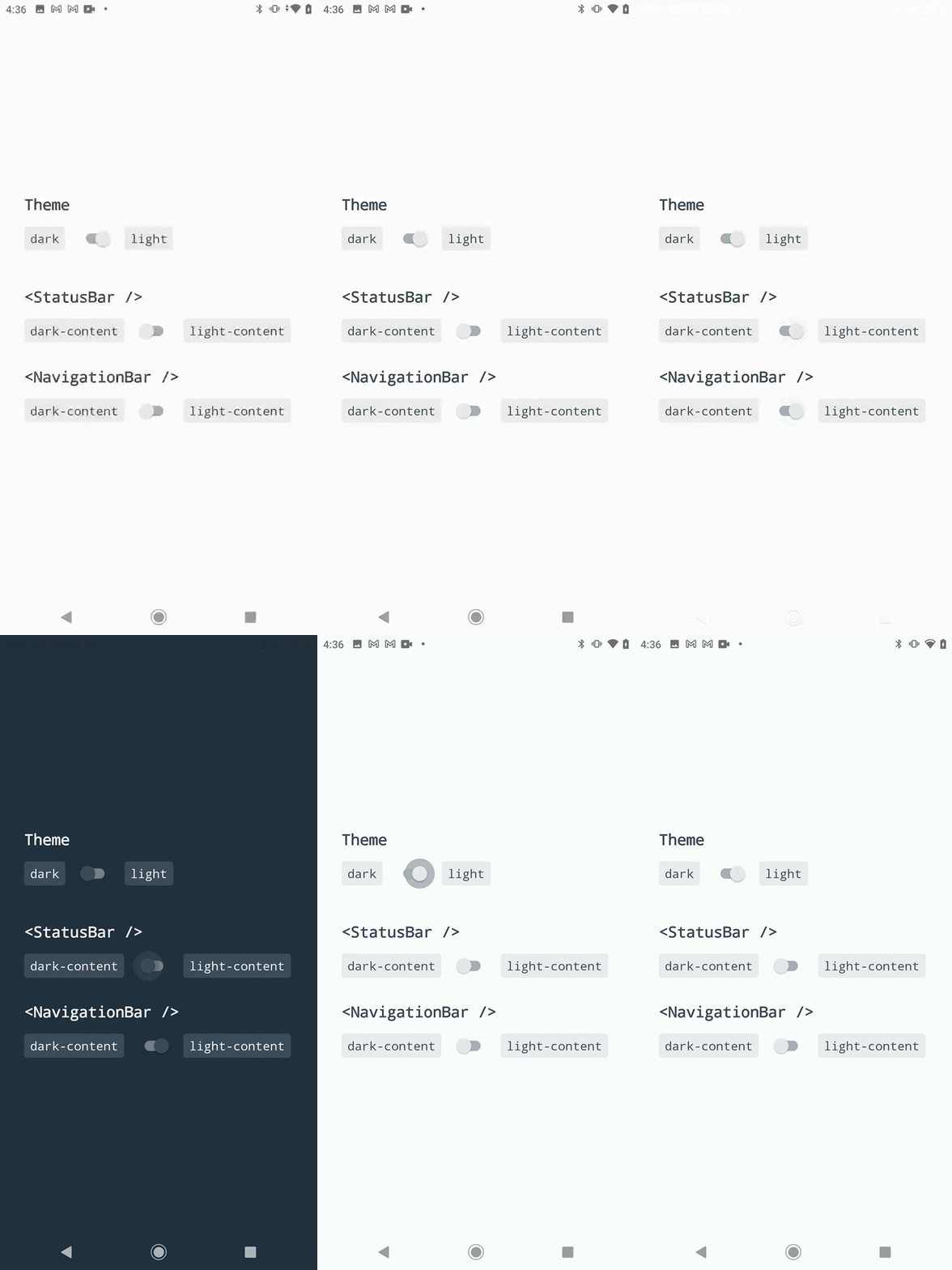
This library follows the React Native releases support policy.
It is supporting the latest version, and the two previous minor series.
$ npm install --save react-native-bars
# --- or ---
$ yarn add react-native-bars
This module will works best with:
ℹ️ For react-native < 0.70 setup, use latest v1 and follow this README.
android/app/src/main/java/com/yourprojectname/MainActivity.java file:// …
// Add these required imports:
import android.os.Bundle;
import com.zoontek.rnbars.RNBars;
public class MainActivity extends ReactActivity {
// …
@Override
protected void onCreate(Bundle savedInstanceState) {
super.onCreate(savedInstanceState); // or super.onCreate(null) with react-native-screens
RNBars.init(this, "dark-content"); // initialize with initial bars styles (could be light-content)
}
}
android/app/src/main/res/values/styles.xml file:<resources xmlns:tools="http://schemas.android.com/tools"><!-- use tools -->
<!-- make AppTheme inherit from Theme.EdgeToEdge -->
<style name="AppTheme" parent="Theme.EdgeToEdge">
<!-- … -->
<!-- set bars initial styles: true = dark-content, false = light-content -->
<item name="android:windowLightStatusBar" tools:targetApi="m">true</item>
<item name="android:windowLightNavigationBar" tools:targetApi="o_mr1">true</item>
</style>
</resources>
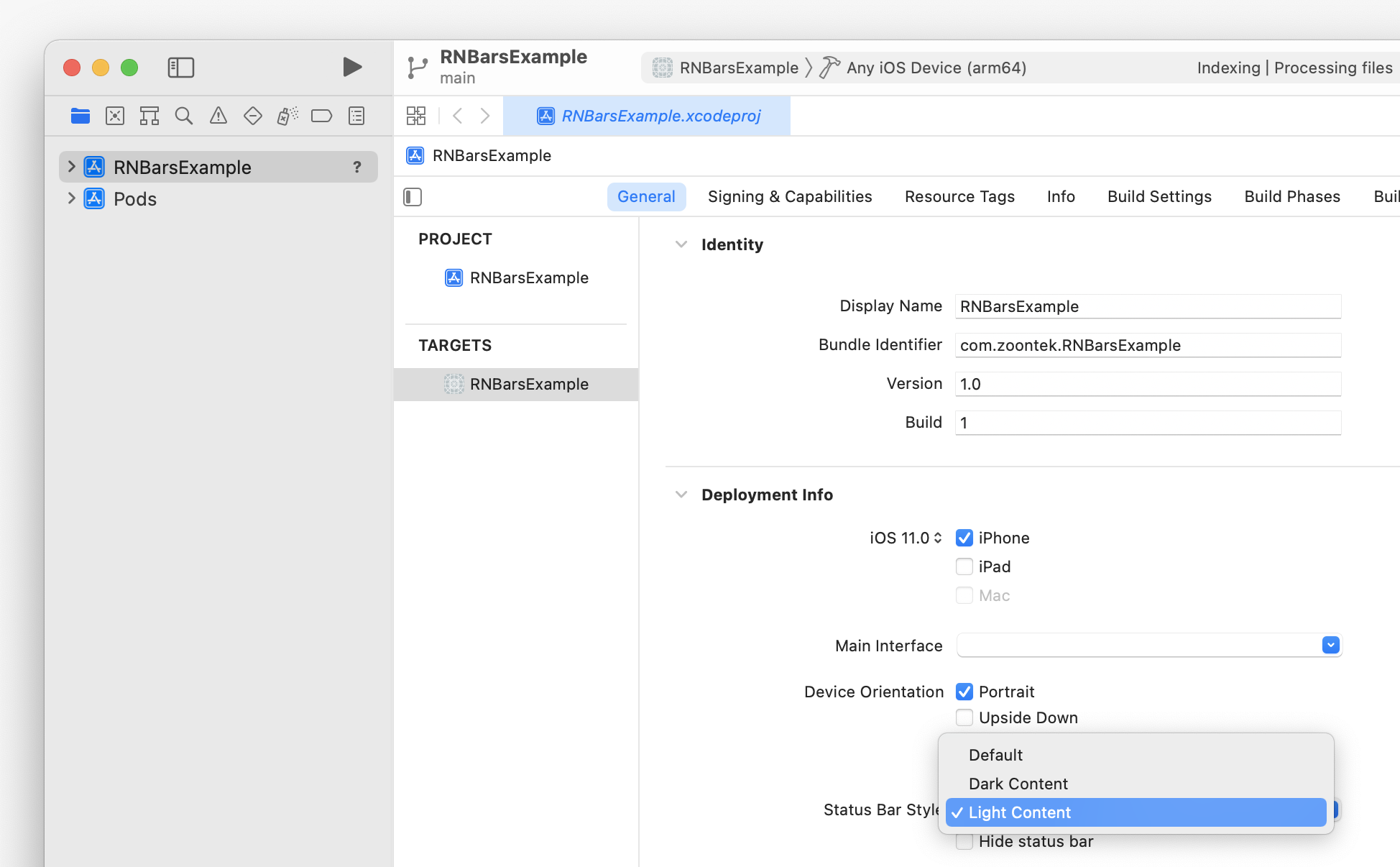
To set the initial status bar style, go to Xcode > General > Deployment Info:
import { NavigationBar, StatusBar, SystemBars } from "react-native-bars";

const App = () => {
  return (
    <>
      <StatusBar animated={true} barStyle="light-content" />
      <NavigationBar barStyle="light-content" />

      {/* Or, to update both with one component: */}
      <SystemBars animated={true} barStyle="light-content" />
    </>
  );
};
<StatusBar />A component to control your app status bar.
import { StatusBar } from "react-native-bars";

type StatusBarProps = {
  // Should transition between status bar property changes be animated? (has no effect on Android)
  animated?: boolean;
  // Sets the color of the status bar content
  barStyle: "light-content" | "dark-content";
};

const App = () => (
  <>
    <StatusBar animated={true} barStyle="dark-content" />
    {/* … */}
  </>
);
const entry: StatusBarProps = StatusBar.pushStackEntry(
  props /*: StatusBarProps*/,
);
StatusBar.popStackEntry(entry/*: StatusBarProps*/): void;
const entry: StatusBarProps = StatusBar.replaceStackEntry(
  entry /*: StatusBarProps*/,
  props /*: StatusBarProps*/,
);
<NavigationBar />A component to control your app navigation bar. It has no effect on iOS and Android < 8.1.
import { NavigationBar } from "react-native-bars";

type NavigationBarProps = {
  // Sets the color of the navigation bar content
  barStyle: "light-content" | "dark-content";
};

const App = () => (
  <>
    <NavigationBar barStyle="dark-content" />
    {/* … */}
  </>
);
const entry: NavigationBarProps = NavigationBar.pushStackEntry(
  props /*: NavigationBarProps*/,
);
NavigationBar.popStackEntry(entry/*: NavigationBarProps*/): void;
const entry: NavigationBarProps = NavigationBar.replaceStackEntry(
  entry /*: NavigationBarProps*/,
  props /*: NavigationBarProps*/,
);
<SystemBars />A component to control both your app status and navigation bars.
import { SystemBars } from "react-native-bars";

type SystemBarsProps = {
  // Should transition between bars property changes be animated? (has no effect on Android)
  animated?: boolean;
  // Sets the color of the bars content
  barStyle: "light-content" | "dark-content";
};

const App = () => (
  <>
    <SystemBars animated={true} barStyle="dark-content" />
    {/* … */}
  </>
);
This module is provided as is, I work on it in my free time.
If you or your company uses it in a production app, consider sponsoring this project 💰. You also can contact me for premium enterprise support: help with issues, prioritize bugfixes, feature requests, etc.
FAQs
Components to control your app status and navigation bars.
The npm package react-native-bars receives a total of 463 weekly downloads. As such, react-native-bars popularity was classified as not popular.
We found that react-native-bars demonstrated a not healthy version release cadence and project activity because the last version was released a year ago. It has 1 open source maintainer collaborating on the project.
Did you know?

Socket for GitHub automatically highlights issues in each pull request and monitors the health of all your open source dependencies. Discover the contents of your packages and block harmful activity before you install or update your dependencies.
Security News
RubyGems and Bundler 4.0.13 introduced an opt-in cooldown feature that delays newly published gems during dependency resolution.

Security News
pnpm 11.5 now recognizes npm staged publish approvals in release metadata, preventing those releases from being mistaken for lower-trust package publishes.

Security News
Federal audit finds NIST lacked a plan to clear the NVD backlog, wasted funds on duplicate work, and delayed use of CISA data.