react-native-sqlite-storage
SQLite Native Plugin for React Native
Inspired by fantastic work done by Chris Brody I did not want to re-invent the wheel. The original Cordova plugin was written so well and adhered to latest WebSQL API that there was no need to come up with anything much different. So the Cordova plugin was ported to React Native.
This is iOS binding only for now. Initial release - fully working. Tested so far with Simulators.
Supports transactions.
#Version History
v2.0 - Upcoming - full support for Promise API. Backward compatible with Callbacks.
v1.0 - Intial release with full support of all operations based on plan JavaScript callbacks.
#How to use:
Step 1. npm install --save react-native-sqlite-storage
Step 2. Drag the SQLite Xcode project as a dependency project into your React Native XCode project
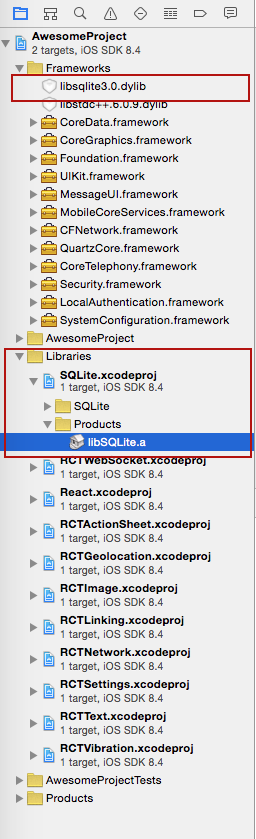
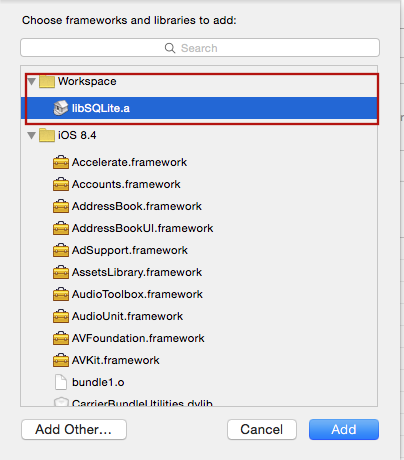
Step 3. Add libSQLite.a (from Workspace location) to the required Libraries and Frameworks.
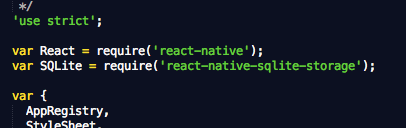
Step 4. Add var SQLite = require('react-native-sqlite-storage') to your index.ios.js
Step 5. Add JS application code to use SQLite API in your index.ios.js etc. Here is some sample code. For full working example see test/index.ios.callback.js. Please note that Promise based API is now supported as well with full examples in the working React Native app under test/index.ios.promise.js
errorCB(err) {
console.log("SQL Error: " + err);
},
successCB() {
console.log("SQL executed fine");
},
openCB() {
console.log("Database OPENED");
},
var db = SQLite.openDatabase("test.db", "1.0", "Test Database", 200000, openCB, errorCB);
db.transaction((tx) => {
tx.executeSql('SELECT * FROM Employees a, Departments b WHERE a.department = b.department_id', [], (tx, results) => {
console.log("Query completed");
var len = results.rows.length;
for (let i = 0; i < len; i++) {
let row = results.rows.item(i);
console.log(`Employee name: ${row.name}, Dept Name: ${row.deptName}`);
}
});
});
Enjoy!
#Original Cordova SQLite Bindings from Chris Brody
https://github.com/litehelpers/Cordova-sqlite-storage
The issues and limitations for the actual SQLite can be found on this site.




