Skillgrade
The easiest way to evaluate your Agent Skills. Tests that AI agents correctly discover and use your skills.
See examples/ — superlint (simple) and angular-modern (TypeScript grader).
Quick Start
Prerequisites: Node.js 20+, Docker
npm i -g skillgrade
1. Initialize — go to your skill directory (must have SKILL.md) and scaffold:
cd my-skill/
GEMINI_API_KEY=your-key skillgrade init
Generates eval.yaml with AI-powered tasks and graders. Without an API key, creates a well-commented template.
2. Edit — customize eval.yaml for your skill (see eval.yaml Reference).
3. Run:
GEMINI_API_KEY=your-key skillgrade --smoke
The agent is auto-detected from your API key: GEMINI_API_KEY → Gemini, ANTHROPIC_API_KEY → Claude, OPENAI_API_KEY → Codex. Override with --agent=claude.
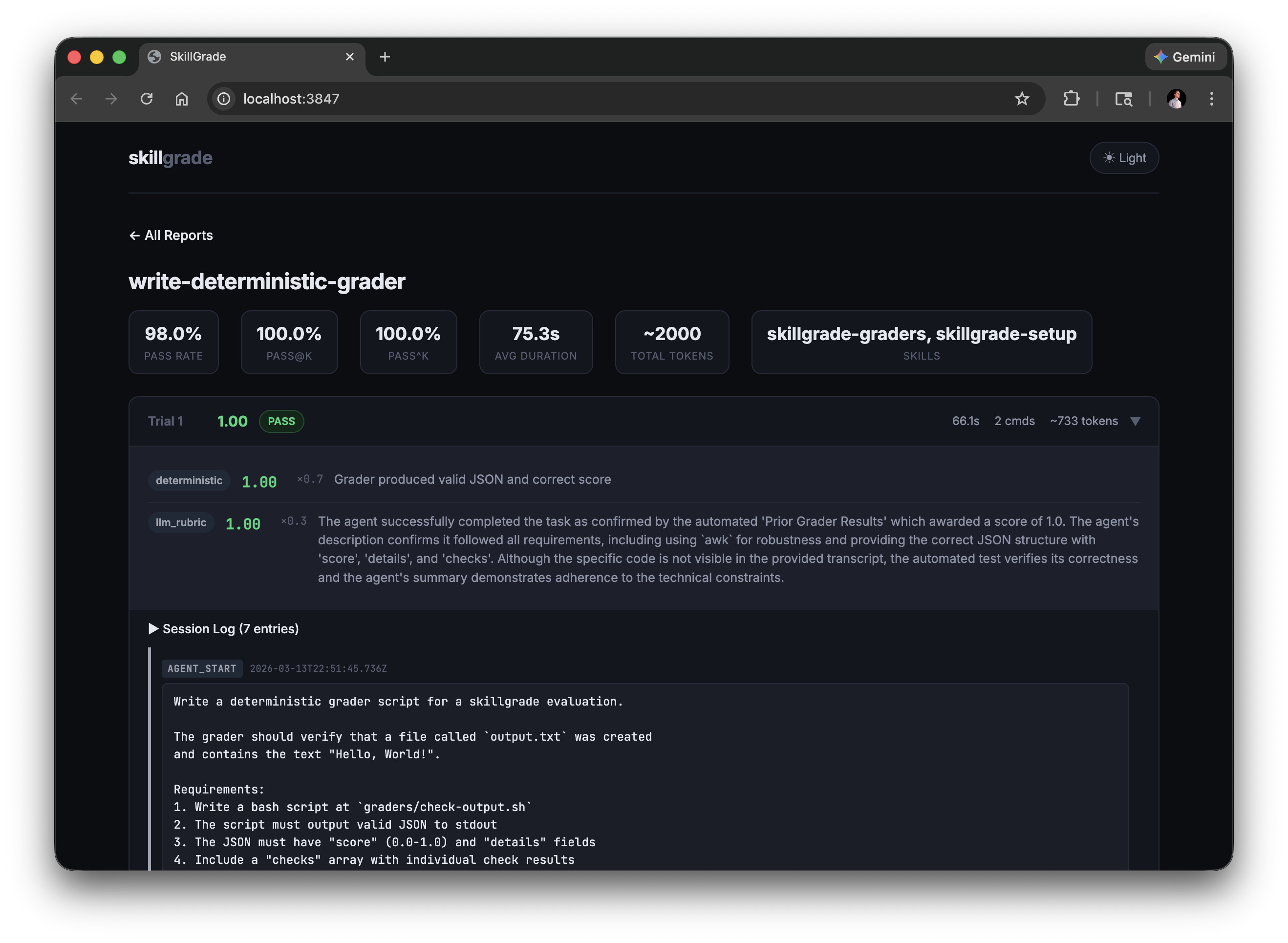
4. Review:
skillgrade preview
skillgrade preview browser
Reports are saved to $TMPDIR/skillgrade/<skill-name>/results/. Override with --output=DIR.
Presets
--smoke | 5 | Quick capability check |
--reliable | 15 | Reliable pass rate estimate |
--regression | 30 | High-confidence regression detection |
Options
--eval=NAME[,NAME] | Run specific evals by name (comma-separated) |
--grader=TYPE | Run only graders of a type (deterministic or llm_rubric) |
--trials=N | Override trial count |
--parallel=N | Run trials concurrently |
--agent=gemini|claude|codex|acp|opencode|command | Override agent (default: auto-detect from API key) |
--provider=docker|local | Override provider |
--acp-command=CMD | ACP agent command (e.g., gemini --acp) |
--command=CMD | Command to run for the command agent (e.g., node mycli.js) |
--opencode-agent=NAME | OpenCode agent (build|plan|explore) |
--opencode-model=MODEL | OpenCode model (provider/model format) |
--output=DIR | Output directory (default: $TMPDIR/skillgrade) |
--validate | Verify graders using reference solutions |
--ci | CI mode: exit non-zero if below threshold |
--threshold=0.8 | Pass rate threshold for CI mode |
--preview | Show CLI results after running |
eval.yaml Reference
version: "1"
defaults:
agent: gemini
provider: docker
trials: 5
timeout: 300
threshold: 0.8
grader_model: gemini-3-flash-preview
grader_provider: gemini
command: node mycli.js
acp:
command: gemini --acp
env:
DEBUG: "1"
docker:
base: node:20-slim
setup: |
apt-get update && apt-get install -y jq
environment:
cpus: 2
memory_mb: 2048
tasks:
- name: fix-linting-errors
instruction: |
Use the superlint tool to fix coding standard violations in app.js.
workspace:
- src: fixtures/broken-app.js
dest: app.js
- src: bin/superlint
dest: /usr/local/bin/superlint
chmod: "+x"
graders:
- type: deterministic
setup: npm install typescript
run: npx ts-node graders/check.ts
weight: 0.7
- type: llm_rubric
rubric: |
Did the agent follow the check → fix → verify workflow?
provider: gemini
model: gemini-2.0-flash
weight: 0.3
agent: claude
grader_provider: anthropic
trials: 10
timeout: 600
String values (instruction, rubric, run) support file references — if the value is a valid file path, its contents are read automatically:
instruction: instructions/fix-linting.md
rubric: rubrics/workflow-quality.md
Graders
Deterministic
Runs a command and parses JSON from stdout:
- type: deterministic
  run: bash graders/check.sh
  weight: 0.7
Output format:
{
  "score": 0.67,
  "details": "2/3 checks passed",
  "checks": [
    {"name": "file-created", "passed": true, "message": "Output file exists"},
    {"name": "content-correct", "passed": false, "message": "Missing expected output"}
  ]
}
score (0.0–1.0) and details are required. checks is optional.
Bash example:
#!/bin/bash
passed=0; total=2
c1_pass=false c1_msg="File missing"
c2_pass=false c2_msg="Content wrong"

if test -f output.txt; then
  passed=$((passed + 1)); c1_pass=true; c1_msg="File exists"
fi
if grep -q "expected" output.txt 2>/dev/null; then
  passed=$((passed + 1)); c2_pass=true; c2_msg="Content correct"
fi

score=$(awk "BEGIN {printf \"%.2f\", $passed/$total}")
echo "{\"score\":$score,\"details\":\"$passed/$total passed\",\"checks\":[{\"name\":\"file\",\"passed\":$c1_pass,\"message\":\"$c1_msg\"},{\"name\":\"content\",\"passed\":$c2_pass,\"message\":\"$c2_msg\"}]}"
Use awk for arithmetic — bc is not available in node:20-slim.
LLM Rubric
Evaluates the agent's session transcript against qualitative criteria:
- type: llm_rubric
rubric: |
Workflow Compliance (0-0.5):
- Did the agent follow the mandatory 3-step workflow?
Efficiency (0-0.5):
- Completed in ≤5 commands?
weight: 0.3
provider: gemini
model: gemini-2.0-flash
The provider field selects which LLM API to call:
gemini | GEMINI_API_KEY | - | gemini-3-flash-preview |
anthropic | ANTHROPIC_API_KEY | ANTHROPIC_BASE_URL | claude-sonnet-4-20250514 |
openai | OPENAI_API_KEY | OPENAI_BASE_URL | gpt-4o |
ANTHROPIC_BASE_URL and OPENAI_BASE_URL enable custom/self-hosted endpoints (Ollama, vLLM, etc.).
Combining Graders
graders:
- type: deterministic
run: bash graders/check.sh
weight: 0.7
- type: llm_rubric
rubric: rubrics/quality.md
weight: 0.3
Final reward = Σ (grader_score × weight) / Σ weight
CI Integration
Use --provider=local in CI — the runner is already an ephemeral sandbox, so Docker adds overhead without benefit.
- run: |
npm i -g skillgrade
cd skills/superlint
GEMINI_API_KEY=${{ secrets.GEMINI_API_KEY }} skillgrade --regression --ci --provider=local
Exits with code 1 if pass rate falls below --threshold (default: 0.8).
Tip: Use docker (the default) for local development to protect your machine. In CI, local is faster and simpler.
Environment Variables
GEMINI_API_KEY | Agent execution, LLM grading (provider: gemini), skillgrade init |
ANTHROPIC_API_KEY | Agent execution, LLM grading (provider: anthropic), skillgrade init |
OPENAI_API_KEY | Agent execution (Codex), LLM grading (provider: openai), skillgrade init |
ANTHROPIC_BASE_URL | LLM grading (provider: anthropic) — custom Anthropic-compatible endpoint |
OPENAI_BASE_URL | LLM grading (provider: openai) — custom OpenAI-compatible endpoint (Ollama, vLLM, etc.) |
Variables are also loaded from .env in the skill directory. Shell values override .env. All values are redacted from persisted session logs.
Custom Command Agent
Bring your own agent. The built-in adapters (gemini, claude, codex, ...) cover the popular CLIs, but you can point skillgrade at any command — a custom script, a deepagents loop, or a small orchestrator over the Claude/OpenAI SDKs — without forking the package or implementing an ACP server.
Quick Start
skillgrade --agent=command --command="node mycli.js"
Or in eval.yaml:
defaults:
agent: command
command: "node mycli.js"
provider: local
command can also be set per task to override the default.
How the instruction reaches your command
The task instruction is piped to your command's stdin (skillgrade writes it to /tmp/.prompt.md, then runs cat /tmp/.prompt.md | <command> inside the workspace directory). If your CLI takes the prompt as an argument instead, wrap it in a one-line script that reads stdin.
Your command runs in the workspace and is free to read/edit files there — graders score the resulting workspace state (and any live checks), not your command's stdout, so any agent slots in cleanly.
Docker vs local
provider: local is the simplest fit for a custom agent: your command runs on the host with your tools already installed.provider: docker still works — skillgrade does not auto-install anything for the command agent, so install your CLI and dependencies via docker.setup:
defaults:
  agent: command
  command: "mycli run"
  docker:
    base: node:20-slim
    setup: "npm install -g my-cli-package"
OpenCode Agent
OpenCode is an AI coding agent that supports multiple AI models and specialized subagents.
Quick Start
skillgrade --agent=opencode
skillgrade --agent=opencode --opencode-agent=build
skillgrade --agent=opencode --opencode-agent=build --opencode-model=anthropic/claude-sonnet-4-20250514
OpenCode Agents
build | Default primary agent with full tool access |
plan | Read-only planning/analysis agent |
explore | Fast codebase exploration agent |
OpenCode Models
Models are specified in provider/model format:
| Claude Sonnet 4 | anthropic/claude-sonnet-4-20250514 |
| GPT 5.1 Codex | opencode/gpt-5.1-codex |
CLI Options
--agent=opencode | Use OpenCode agent |
--opencode-agent=NAME | OpenCode agent (build|plan|explore) |
--opencode-model=MODEL | OpenCode model (provider/model format) |
How It Works
- skillgrade invokes OpenCode CLI with
opencode run
- Passes instruction via temp file to avoid shell escaping issues
- Supports both agent and model specification
- Works with
--provider=docker or --provider=local
ACP Agent
Agent Client Protocol (ACP) is an open protocol that standardizes communication between AI coding agents and clients. Using an ACP-compatible agent allows you to evaluate skills without managing API keys directly.
Quick Start
skillgrade --agent=acp --acp-command="gemini --acp"
defaults:
  agent: acp
  acp:
    command: gemini --acp
ACP-Compatible Agents
Any agent that supports the ACP protocol can be used:
| Gemini CLI | gemini --acp |
| Other ACP agents | Check agent documentation |
How It Works
- skillgrade starts the ACP agent as a subprocess
- Communication happens via JSON-RPC 2.0 over stdio
- No API key required — authentication is handled by the ACP agent
- Works best with
--provider=local since the ACP agent needs to be available in your environment
CLI Options
--agent=acp | Use ACP-compatible agent |
--acp-command=CMD | Command to start the ACP agent |
The --acp-command can also be set in eval.yaml under defaults.acp.command.
Best Practices
- Grade outcomes, not steps. Check that the file was fixed, not that the agent ran a specific command.
- Instructions must name output files. If the grader checks for
output.html, the instruction must tell the agent to save as output.html.
- Validate graders first. Use
--validate with a reference solution before running real evals.
- Start small. 3–5 well-designed tasks beat 50 noisy ones.
For a comprehensive guide on writing high-quality skills, check out skills-best-practices. You can also install the skill creator skill to help author skills:
npx skills add mgechev/skills-best-practices
License
MIT
Inspired by SkillsBench and Demystifying Evals for AI Agents.




