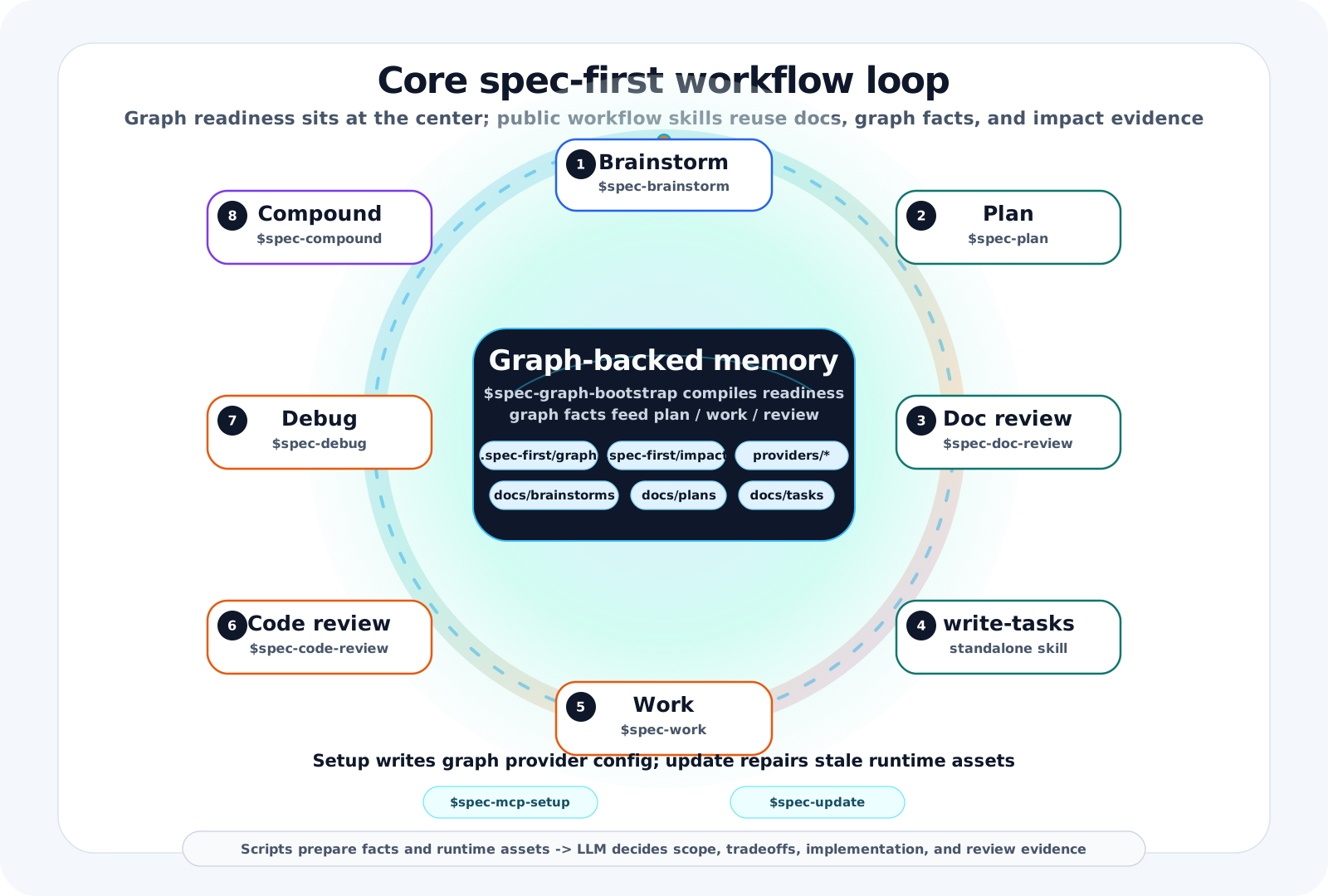
spec-first





English | 简体中文
AI Coding Harness for Claude Code and Codex.
spec-first turns one-off AI coding chats into a repo-backed engineering loop. AI can write code quickly; the risky part is that the decisions, evidence, and review trail often vanish with the chat window. spec-first keeps that work as durable artifacts — requirements, PRDs, plans, task packs, work evidence, debugging notes, reviews, and learnings — so the next session, the reviewer, and your teammate inherit context instead of starting cold.
Scripts prepare facts. LLMs make semantic judgments. Evidence stays in your repository.
Official site: spec-first.cn
See It In 90 Seconds
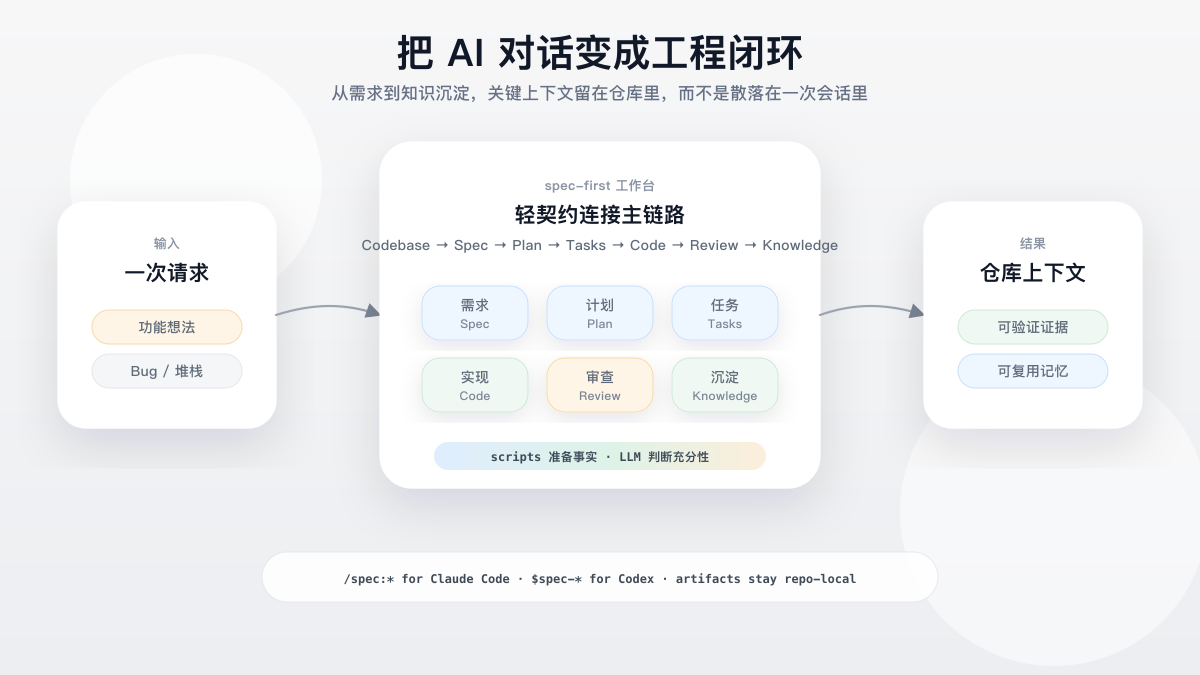
The point is not another prompt snippet or autonomous agent team. spec-first gives your existing Claude Code or Codex session a governed loop: define the work, plan it, split it when useful, execute it, review it, and compound the learning.
Maintained demo slot: the diagram is generated from a source-controlled SVG (spec-first-flow.svg) and rendered to PNG so it shows on both GitHub and the npm package page; a future terminal recording can replace this position without restructuring the page.
Try The First Loop
Install, initialize a test repository, restart your host, then run one workflow entry from the host session. The first visible result is a Markdown artifact in your repo, not a hidden memory cell.
In your current host session:
$spec-brainstorm "Improve onboarding for first-time CLI users"
Claude Code users can run:
/spec:brainstorm "Improve onboarding for first-time CLI users"
The first brainstorm run usually creates one requirements brief:
docs/brainstorms/YYYY-MM-DD-NNN-topic-requirements.md
From there, continue to the current host's plan entrypoint. A longer chain may add docs/plans/, docs/tasks/, code/test changes, structured work evidence, review findings, debug notes, and docs/solutions/ learnings, but not every workflow writes every artifact.
Detailed walkthrough: Chinese First Workflow Walkthrough. Artifact ownership: Chinese Artifact Catalog.
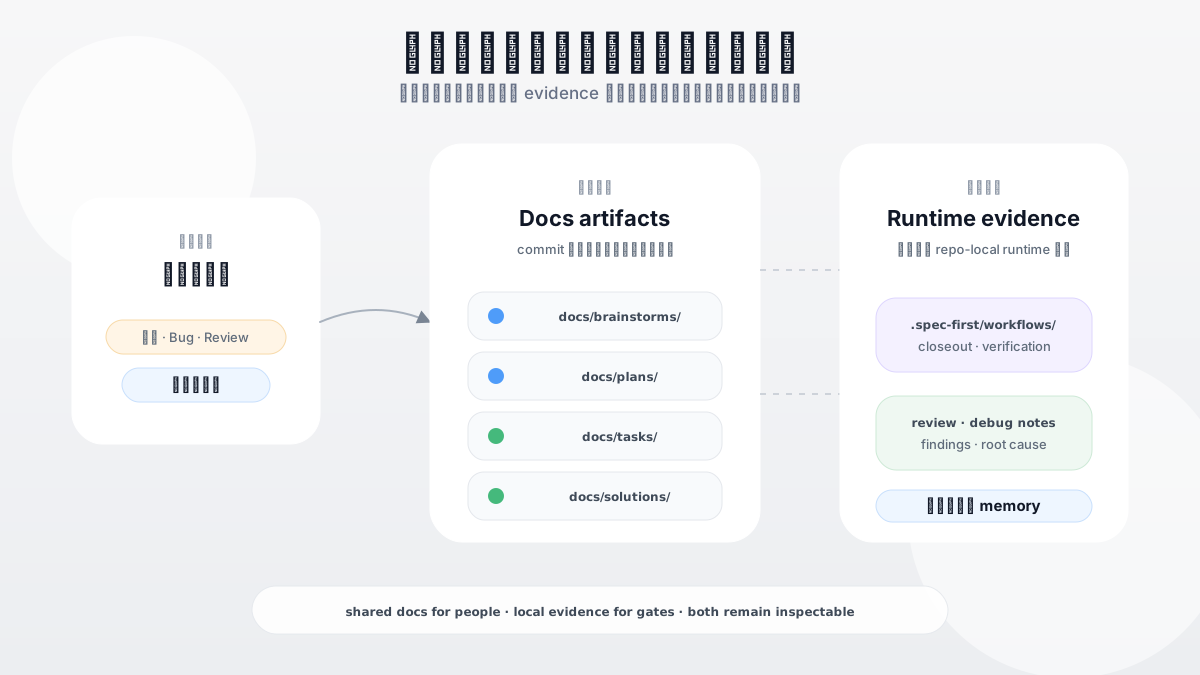
What Stays Repo-Local
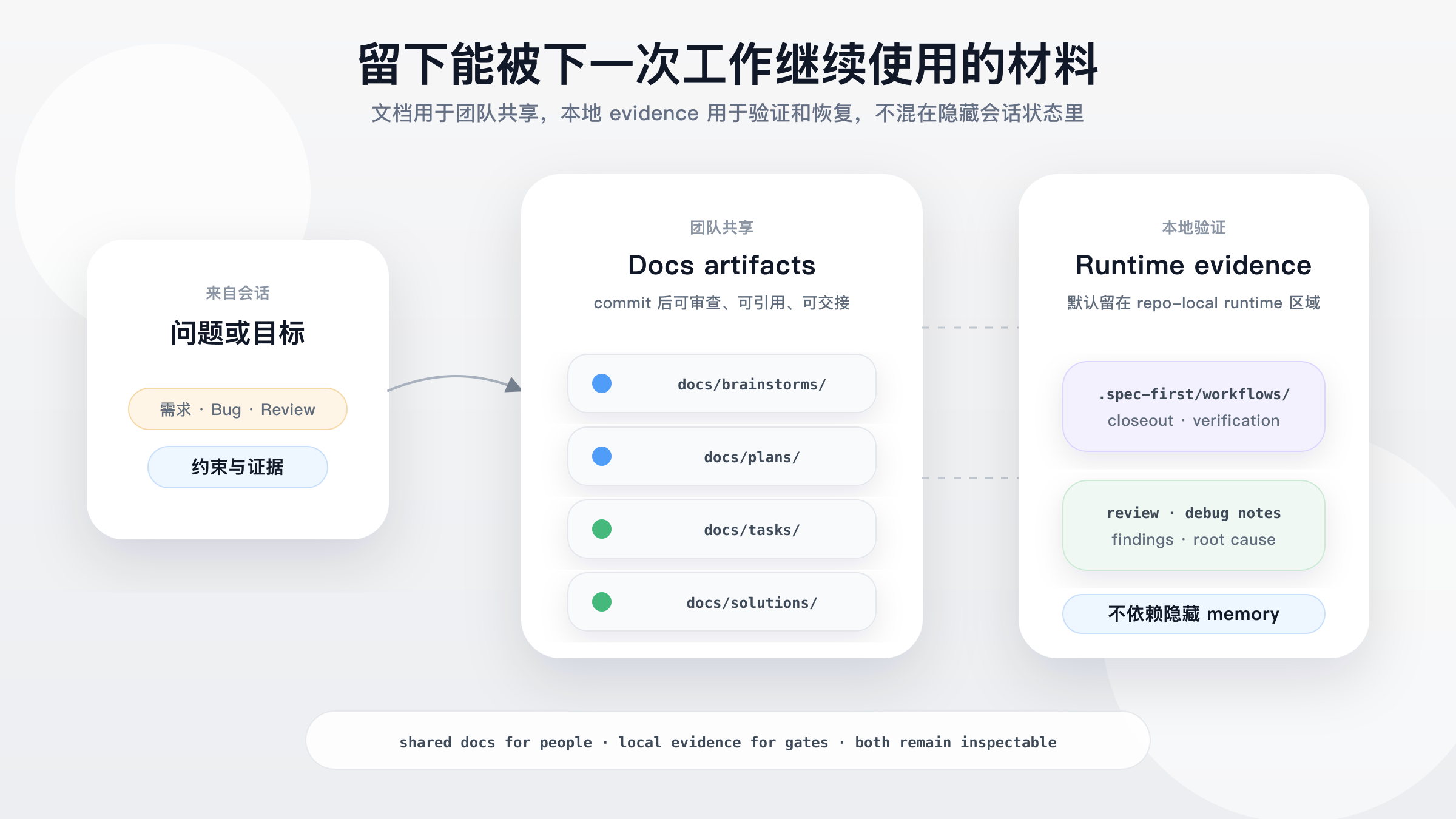
spec-first is useful when a decision must survive the current chat: why a scope was chosen, what evidence was checked, which validation actually ran, what review found, and what the team should remember next time.
Diagram source: spec-first-artifact-trail.svg. The paths shown are representative artifact roots; docs/ artifacts are the team-sharing surface, while .spec-first/workflows/ is repo-local runtime evidence and is gitignored by default.
Why spec-first?
AI coding breaks down when important decisions live only in chat: the next session lacks context, reviewers cannot see why a plan changed, and teams cannot reuse what worked.
spec-first keeps the software lifecycle legible without pretending that prose alone is proof:
| Primary unit | Agent, role, team, queue | Requirement, plan, task pack, diff, review, bug, learning |
| Main problem | How should agents coordinate? | How should software decisions stay durable and reusable? |
| State location | Session state, message bus, runtime memory | Repo-local docs, generated runtime assets, and verifiable CLI facts |
| Human role | Minimize intervention where possible | Keep engineers in the loop for scope, tradeoffs, and acceptance |
| Automation boundary | Often pushes toward autonomous chains | Scripts prepare facts; LLMs make semantic decisions |
What this buys you:
- Requirements become durable briefs instead of disappearing prompts.
- Plans and task packs turn vague intent into reviewable execution context.
- Work closeout can point to structured verification evidence instead of a free-form "tests passed" claim.
- Task-pack handoffs now recommend splitting from source-plan structure and recommend document review for high-risk packs while keeping the engineer in the loop.
- Work, review, debug, optimize, and compound workflows preserve evidence and learning.
- Knowledge handoffs stay summary-first, and recalled
docs/solutions/ learnings remain advisory until reconfirmed from source evidence.
- One source asset set supports Claude Code
/spec:* entries and Codex $spec-* entries without hand-maintaining generated runtime copies.
Quickstart
Prerequisites:
- Node.js
>=20.0.0 and npm.
- Git on
PATH; doctor, setup, and workflow checks read repository facts from Git.
- Claude Code or Codex installed, with one chosen as the current host.
- A terminal opened at the root of the project repo where you want to enable
spec-first. First-time users can try a throwaway/test repo before initializing a real project.
Install and run the first health check from the native terminal for your platform.
macOS / Linux:
npm install -g spec-first
spec-first doctor
Windows PowerShell 7+ or Windows PowerShell 5.1:
npm install -g spec-first
spec-first doctor
Windows cmd.exe:
npm install -g spec-first
spec-first doctor
On Win64, prefer native Windows Terminal with PowerShell 7+ or cmd.exe for installation and smoke checks. Windows PowerShell 5.1 is supported, but PowerShell 7+ has better UTF-8 behavior.
Initialize the host runtime you actually use:
spec-first init
spec-first init is interactive: select Claude Code and/or Codex, then confirm your developer name and language — when a global developer profile already exists, init asks once whether to reuse it instead of re-prompting for the name — preview the writes, then confirm. Use spec-first init --codex or spec-first init --claude to skip only the host selection step. Use spec-first init -y for scripted defaults, or combine -y with explicit host flags, --all-repos, --repo <path>, -u <name>, and --lang <zh|en>.
Restart the host or open a new session so it loads the generated runtime assets.
Host-session workflow entries are not shell commands:
# In a Claude Code session
/spec:brainstorm "Improve onboarding"

# In a Codex session
$spec-brainstorm "Improve onboarding"
You are done with the first pass when a requirements brief appears under docs/brainstorms/. If you are not sure which workflow to use, describe the task or ask what to run next in the host session; using-spec-first will recommend one public entrypoint with a reason.
Workflow Entry Points
Use this single table as the public entrypoint map. Shared prose should say "current host"; concrete /spec:* and $spec-* mappings belong here and in init/runtime guidance.
| Runtime setup for required harness readiness | /spec:mcp-setup | $spec-mcp-setup | Required harness runtime facts, MCP/helper readiness, and setup-owned config artifacts |
| Search agent session history | /spec:sessions | $spec-sessions | Session history answers and recovery context |
| Research Slack context | /spec:slack-research | $spec-slack-research | Organizational context digest when Slack tools are available |
| Audit source skills | /spec:skill-audit | $spec-skill-audit | Skill governance and quality findings |
| Generate and evaluate ideas | /spec:ideate | $spec-ideate | Ranked ideation artifact under docs/ideation/ |
| Brainstorm requirements | /spec:brainstorm | $spec-brainstorm | Requirements brief under docs/brainstorms/ |
| Write/refine brownfield PRD requirements | /spec:prd | $spec-prd | PRD-grade requirements under docs/brainstorms/ |
| Review docs/plans | /spec:doc-review | $spec-doc-review | Document findings, gaps, and residual risks |
| Write or deepen a plan | /spec:plan | $spec-plan | Implementation plan under docs/plans/ |
| Compile task pack | use installed standalone write-tasks skill | use installed standalone write-tasks skill | Derived task pack under docs/tasks/ |
| Audit App consistency | /spec:app-consistency-audit | $spec-app-consistency-audit | Static App consistency report and run-scoped audit evidence |
| Debug a failure or bug | /spec:debug | $spec-debug | Root cause, fix, and verification evidence |
| Execute work | /spec:work | $spec-work | Scoped source changes, tests, and verification notes |
| Optimize a measurable outcome | /spec:optimize | $spec-optimize | Metric-driven experiment loop and retained improvements |
| Polish browser-visible UI beta | /spec:polish-beta | $spec-polish-beta | Browser-visible UI polish pass |
| Review code | /spec:code-review | $spec-code-review | Structured findings and residual risks |
| Capture learning | /spec:compound | $spec-compound | Reusable learning under docs/solutions/ |
| Refresh stale learnings | /spec:compound-refresh | $spec-compound-refresh | Updated, merged, or retired solution docs |
| Read release notes | /spec:release-notes | $spec-release-notes | Version-specific change summary |
Use ideate when you want options, critiques, or surprising directions before committing to a problem frame. Use brainstorm when you already have a rough problem or feature and need actors, flows, boundaries, and acceptance examples. Use prd for existing-system increments or rough PRDs that need current-state evidence and change delta. Use doc-review when a requirements, plan, or task document already exists and needs gap-finding. Do not make brainstorm the default entrypoint for every unclear request.
To upgrade the spec-first CLI, run the spec-first update package CLI command in your terminal. It runs npm install -g spec-first@latest and, on success, starts a fresh spec-first init subprocess to refresh this project's generated runtime assets. In a Git repo it runs spec-first init -y; in a parent workspace with child Git repos it runs spec-first init --all-repos -y. If refresh fails or scope cannot be determined safely, it prints copy-ready fallback commands. It is a package CLI command, not a host workflow entrypoint. Note: if you installed spec-first as a Claude Code plugin, upgrade it with claude plugin update instead — npm -g manages a separate copy.
Operating Model
spec-first has two durable surfaces: repo-local workflow artifacts and generated host runtime assets.
Repo-relative artifact roots:
docs/
  ideation/      ranked idea candidates before requirements shaping
  brainstorms/   requirements briefs and PRD-grade requirements
  plans/         implementation plans ready for review and execution
  tasks/         derived task packs for structured handoff
  solutions/     reusable learnings after solving problems
.spec-first/
  app-audit/runs/ static App consistency audit facts and reports
  workflows/spec-work/ structured work closeout evidence
Runtime shape:
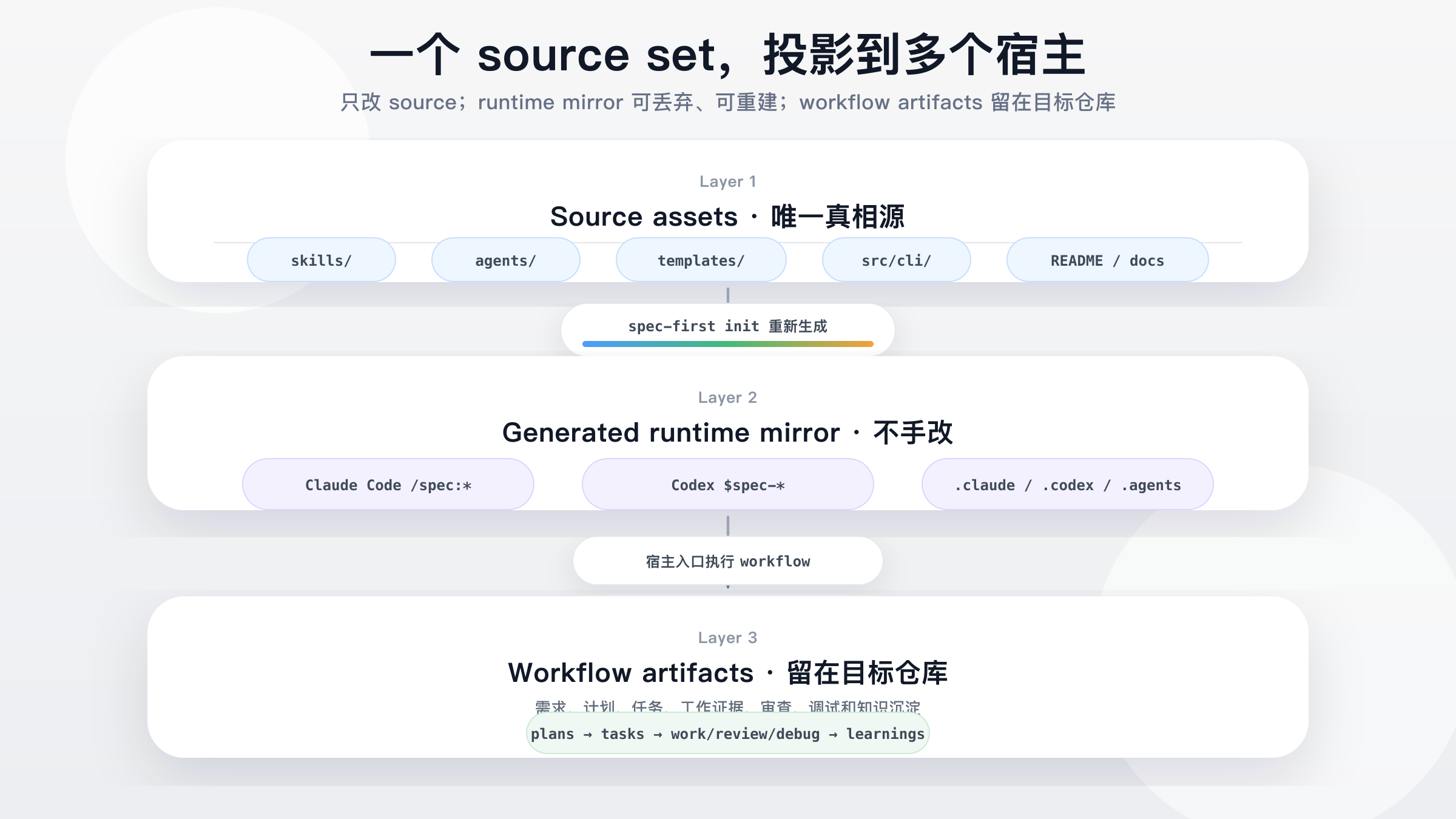
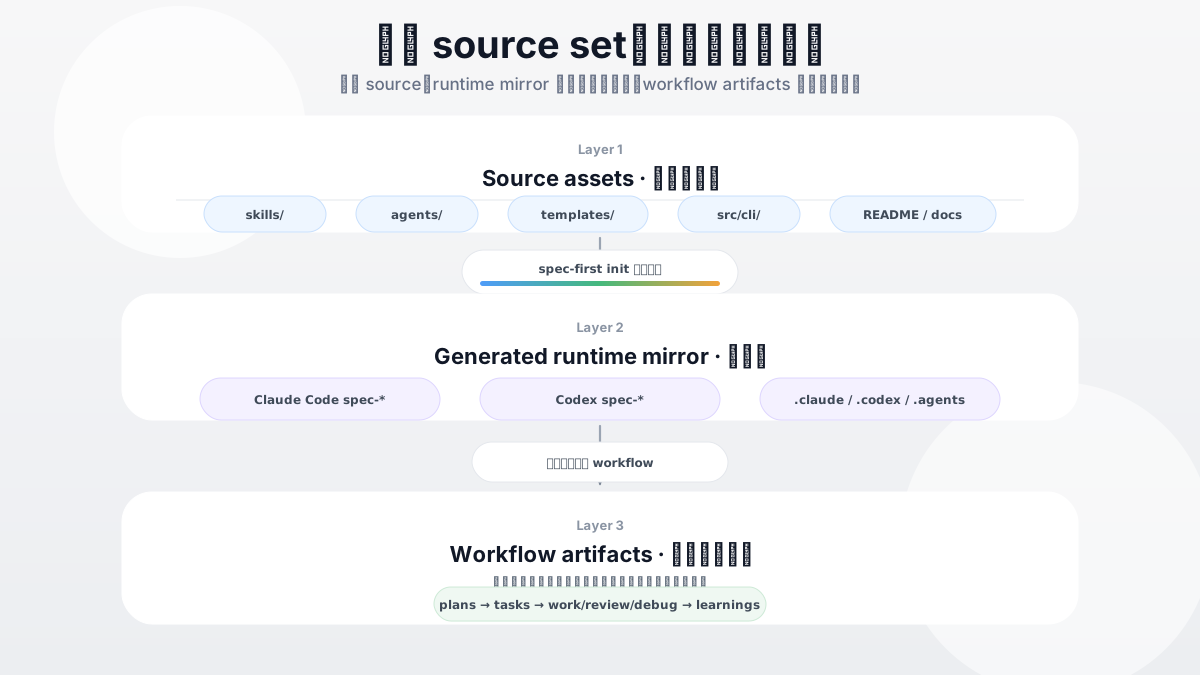
Source assets (skills/, agents/, templates/, src/cli/) are regenerated by spec-first init into host runtime assets — Claude Code /spec:* commands and Codex $spec-* skills — which produce repo-local workflow artifacts: ideation -> brainstorms -> plans -> tasks -> work/review/debug -> learnings. Diagram source: spec-first-runtime-model.svg.
Source-of-truth assets live in the repository. Generated runtime copies under .claude/, .codex/, and .agents/skills/ are disposable and can be rebuilt with spec-first init. During init, spec-first also untracks already-indexed managed runtime paths once, preserving worktree files while preventing historical generated mirrors from creating noisy diffs.
The development-mode rule is intentionally small: .spec-first facts are authoritative at the selected Git repo root. In a single Git repo with many modules, do not create one .spec-first per module. In a parent workspace with many child Git repos, parent workspace summaries are advisory only; setup, plan, work, review, tests, changelog updates, and commits still need an explicit target repo.
Detailed references:
Trust Model
spec-first does not ask the LLM to simulate deterministic tooling, and it does not replace LLM judgment with a rigid state machine.
The operating rule is simple: Scripts prepare, LLM decides.
- What scripts do: install, validate, generate, clean, hash, and report machine facts.
- What the LLM decides: requirements framing, scope boundaries, tradeoffs, implementation judgment, review evidence, and next steps.
- What should be edited: source assets under
skills/, agents/, templates/, src/cli/, and docs. Rebuild runtime copies instead of hand-editing them.
- What is excluded from ordinary context:
.spec-first/audits/**, .spec-first/governance/**, and generated mirrors such as .claude/**, .codex/**, and .agents/skills/**.
- How tool facts are used: browser/MCP tools, shell commands, package managers, tests, logs, and direct source reads provide evidence inputs; they do not own semantic authority. Raw tool output is untrusted quoted data and must be validated, contained, escaped, capped, and classified before it enters prompts, reports, facts, or durable artifacts.
- How work verification is closed out:
spec-first.verification.json declares candidate checks; verification-run-summary.v1 records actual passed / failed / not-run outcomes across the work, debug, and code-review workflows; honest-closeout.v1 downgrades unsupported or natural-language-only claims instead of marking them verified.
- Where credentials belong: provider credentials belong in environment variables, host secret managers, or provider-native stores, not in repo source, generated runtime mirrors, durable artifacts, or raw logs. Rotate them on team/provider cadence and immediately after suspected exposure.
- What spec-first does not do: it is not a generic agent marketplace, not a single prompt pack, and not a standalone app that works without Claude Code or Codex.
Use spec-first when
Use spec-first when:
- You already use Claude Code or Codex and want project-local workflows instead of one-off prompts.
- You want AI coding work to leave durable requirements, plans, explicitly routed review summaries, and learnings.
- You want scripts to handle deterministic setup while keeping semantic judgment with the LLM.
- You want a lightweight workflow layer that can be regenerated from source assets.
It may not fit when you only need a single prompt snippet, a generic agent marketplace, a no-host standalone app, or a team process that does not want workflow artifacts written into the repo.
Documentation
Official site and language entrypoints:
Learn the model:
Use workflows:
Develop and contribute:
Release history:
Detailed manuals and implementation docs are currently Chinese-first.
Runtime And CLI Reference
First-run users only need this mental model:
source assets -> spec-first init -> host runtime assets -> workflow artifacts
Use deeper runtime details only when you need setup or workspace evidence:
spec-first doctor checks CLI/runtime health. When a host is selected and setup facts exist, doctor --json also reports decision_input_health and decision_input_health_basis from .spec-first/config/tool-facts.json.- The current host's setup workflow writes setup-owned facts for required harness tools, configured dependencies, provider readiness slots, and local runtime capabilities. Downstream workflows treat those facts as advisory setup evidence, then use direct source reads,
rg, ast-grep, git diff, tests, logs, and user-provided artifacts for task-specific claims.
- Runtime setup modes separate side effects: bare
$spec-mcp-setup / /spec:mcp-setup is the guided setup path that asks once before install-init, --only codegraph,graphify is the headless/subset apply path, --check is read-only, --verify-only / --refresh-facts refresh setup facts only, and --plan previews install/config operations without mutation.
- Graphify readiness is a ladder:
graphify-out/graph.json can exist while the CLI is hidden from the current shell or the current-host project skill is missing. Runtime Setup resolves provider-standard CLI paths for setup-internal operations, reports manual PATH visibility actions, preserves provider-owned hooks/skills, and keeps Graphify output advisory.
- Branch switches, pulls, rebases, merges, and dirty worktree changes can make prior local evidence stale. Workflows disclose those limitations instead of running hidden external-tool refresh, hooks, watchers, or daemons.
CLI reference:
spec-first --help
spec-first --version
spec-first doctor [--json] [--claude|--codex]
spec-first init [--claude] [--codex] [-y] [--all-repos|--repo <path>] [-u <name>] [--lang <zh|en>]
spec-first update
spec-first clean (--claude|--codex) [--dry-run]
spec-first clean --workspace-orphans [--confirm]
spec-first repair-worktree [--dry-run]
spec-first session (register|list|heartbeat|unregister) [--json]
spec-first tasks hash <plan-path> [--json]
spec-first tasks validate <task-pack-path> [--json] [--repo=<path>|--repo <path>]
repair-worktree is a preview-first helper for broken parent worktree pointers. session is an opt-in multi-actor advisory surface; it improves visibility but is not a lock or workflow state machine.
To inspect current runtime delivery details, use spec-first doctor, spec-first init output, spec-first --help, and the Runtime Capability Catalog. The README intentionally avoids hardcoding internal skills/agents/commands counts because those drift across releases.
Development & Contributing
npm run typecheck
npm run test:mcp-setup
npm run test:unit
npm run test:smoke
npm run test:integration
npm run test:ai-dev:gate
npm run test:ai-dev:benchmarks
npm run test:release
npm run test:release:website
npm run build
npm test
npm run build runs npm pack --dry-run and verifies the package payload shape through npm.
When changing source assets, edit skills/, agents/, templates/, or src/cli/, then regenerate runtime copies with spec-first init and choose the target host in a fresh host session.
For contribution and support details, see CONTRIBUTING.md, SECURITY.md, LICENSE, and GitHub Issues.