See It In 90 Seconds
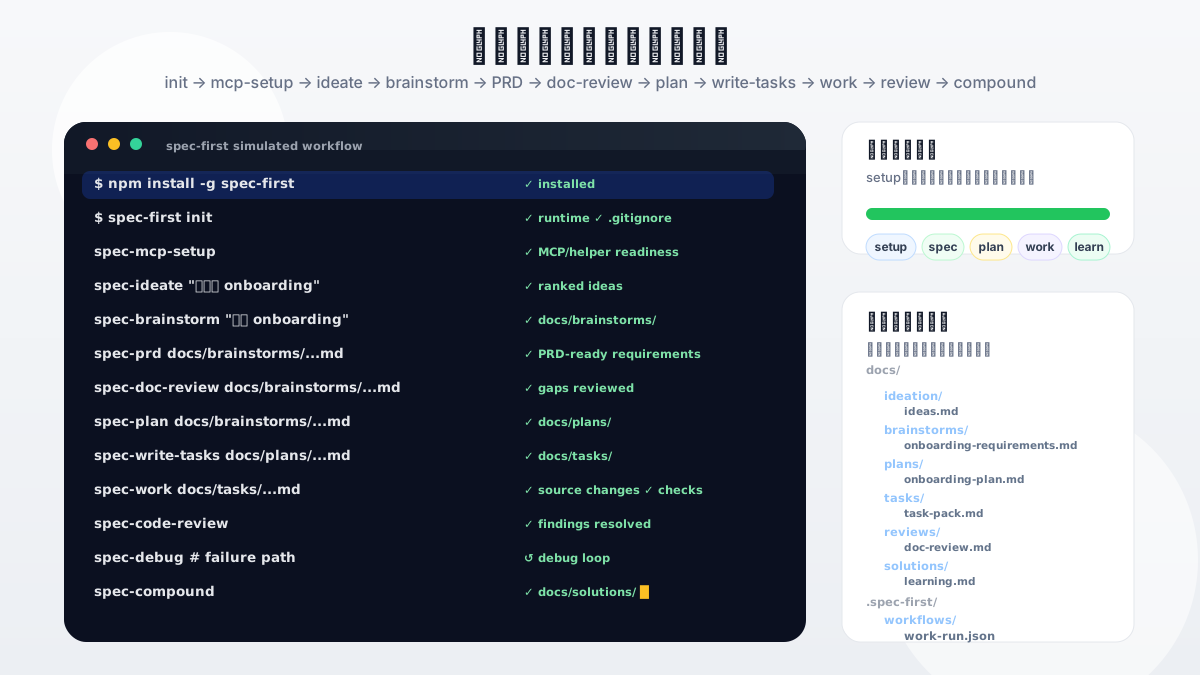
The first thing to evaluate is not an agent count or a prompt library. It is whether a workflow leaves something durable behind. A healthy first loop gives your existing Claude Code or Codex session a governed path: define the work, plan it, split it when useful, execute it, review it, and compound the learning.
The smallest success is intentionally concrete: after install and init, run one host workflow and inspect the Markdown artifact it writes under your repo, usually in docs/brainstorms/ or docs/plans/. Deeper governance is available later; the first test is whether the work becomes inspectable.
Simulated demo path: install → init → mcp-setup → ideate → brainstorm → prd → doc-review → plan → write-tasks → work → code-review → compound; mcp-setup is the readiness/setup step to run when helper or MCP facts are missing, debug is shown as a side loop for test failures or unclear root causes, and inspectable Markdown artifacts remain in the repository. Animation source: spec-first-cli-workflow-demo.svg.
Quickstart
Install, initialize, and run your first workflow in about 5 minutes.
Prerequisites:
- Node.js
>=20.0.0 and npm.
- Git on
PATH; doctor, setup, and workflow checks read repository facts from Git.
- Claude Code or Codex installed, with one chosen as the current host.
- A terminal opened at the root of the project repo where you want to enable
spec-first. First-time users can try a throwaway/test repo before initializing a real project.
Step 1 — Install and check health
macOS / Linux:
npm install -g spec-first
spec-first doctor
Windows PowerShell 7+ or Windows PowerShell 5.1:
npm install -g spec-first
spec-first doctor
Windows cmd.exe:
npm install -g spec-first
spec-first doctor
On Win64, prefer native Windows Terminal with PowerShell 7+ or cmd.exe for installation and smoke checks. Windows PowerShell 5.1 is supported, but PowerShell 7+ has better UTF-8 behavior.
Expected: doctor reports no blocking issues. If issues appear, follow the printed suggestions before continuing.
Step 2 — Initialize the host runtime
spec-first init
Select your host (Claude Code and/or Codex), confirm your developer name and language, then confirm the writes.
Expected: init lists the generated runtime paths under .claude/, .codex/, or .agents/skills/. Generated copies can be rebuilt any time with spec-first init.
If the host reports missing helper or MCP readiness facts, run /spec:mcp-setup in Claude Code or $spec-mcp-setup in Codex before continuing.
For all init options (flags, scripted mode, multi-repo), see the full Quickstart guide.
Step 3 — Restart the host
Restart the host or open a new session so it loads the generated runtime assets. Host-session workflow entries are not shell commands — they run inside the Claude Code or Codex session, not in your terminal.
Step 4 — Run your first workflow
Start with brainstorm — it is the most natural first entry and writes a visible artifact you can immediately inspect:
# In a Claude Code session
/spec:brainstorm "describe your first task here"

# In a Codex session
$spec-brainstorm "describe your first task here"
Step 5 — Verify success
After the brainstorm completes, check your repo for a new file:
docs/brainstorms/YYYY-MM-DD-NNN-<topic>-requirements.md
That file is your first artifact. The work is now repo-local, inspectable, and ready to hand off to planning. From here, continue to the current host's plan entrypoint.
For subsequent tasks, use this quick route to pick the right entrypoint:
| A rough idea, feature, or product change | /spec:brainstorm or $spec-brainstorm |
| An existing PRD, requirement note, or brownfield change request | /spec:prd or $spec-prd |
| A bug, failing test, stack trace, or abnormal behavior | /spec:debug or $spec-debug |
| A settled plan, task pack, or scoped implementation request | /spec:work or $spec-work |
| A document, plan, task pack, diff, or implementation that needs review | /spec:doc-review, $spec-doc-review, /spec:code-review, or $spec-code-review |
Detailed manuals are Chinese-first; this README is the English quick path. Walkthrough: Chinese First Workflow Walkthrough. Artifact ownership: Chinese Artifact Catalog.
What You Get
A typical workflow chain produces these repo-local artifacts:
docs/
  ideation/      ranked ideas and exploration notes
  brainstorms/   requirements briefs and PRD-grade requirements
  plans/         implementation plans ready for review and execution
  tasks/         derived task packs for structured handoff
  reviews/       document and code review findings
  solutions/     reusable learnings after solving problems
.spec-first/
  workflows/     structured work closeout evidence (gitignored by default)
Not every workflow writes every artifact. The first run writes one file under docs/brainstorms/. Deeper chains add plans, tasks, code changes, review findings, and learnings over time — all inspectable, all in your repository.
Workflow Entry Points
The main engineering loop: Codebase → Spec → Plan → Tasks → Code → Review → Knowledge.
| Requirements from a rough idea | /spec:brainstorm | $spec-brainstorm | docs/brainstorms/ |
| Requirements from an existing PRD | /spec:prd | $spec-prd | docs/brainstorms/ |
| Implementation plan | /spec:plan | $spec-plan | docs/plans/ |
| Split a plan into executable tasks | /spec:write-tasks | $spec-write-tasks | docs/tasks/ |
| Execute scoped work | /spec:work | $spec-work | source changes + evidence |
| Review code | /spec:code-review | $spec-code-review | structured findings |
| Review docs or plans | /spec:doc-review | $spec-doc-review | structured findings |
| Capture reusable learning | /spec:compound | $spec-compound | docs/solutions/ |
Support entrypoints (on demand): /spec:mcp-setup (runtime environment plus required harness and MCP/helper readiness), /spec:debug, /spec:optimize, /spec:ideate, /spec:compound-refresh, /spec:polish-beta, /spec:write-skill.
→ Full entrypoint reference with routing rules
The Problem
AI can write code quickly. The expensive part is preserving the judgment around the code: why this scope, what evidence was checked, which review findings mattered, and what the next agent or teammate should inherit.
Without a repo-backed trail, that context disappears with the chat window. The next session starts cold, reviewers cannot see why a plan changed, and teams cannot reuse what worked. spec-first keeps that work as durable artifacts: requirements, PRDs, plans, task packs, work evidence, debugging notes, reviews, and learnings.
Why spec-first?
spec-first keeps the software lifecycle legible without pretending that prose alone is proof. It is not trying to replace Claude Code or Codex; it gives those hosts a project-local harness.
| What do I get after the first run? | A better chat answer or agent transcript | A repo-local artifact such as a requirements brief or plan |
| Where do decisions and evidence live? | Session state, message bus, runtime memory | Repo-local docs, generated runtime assets, and verifiable CLI facts |
| What does the human review? | Often the final diff or agent output | Requirements, plans, task packs, diffs, review findings, bugs, and learnings |
| Who enforces mechanical boundaries? | Mostly model discipline or custom glue | Scripts enforce deterministic invariants and prepare facts; LLMs make semantic decisions above that floor |
| How do Claude Code and Codex stay aligned? | Separate setup and prompt maintenance | One source asset set regenerates both host runtime surfaces |
Current mechanisms you can inspect today:
- Requirements become durable briefs instead of disappearing prompts.
- Plans and task packs turn vague intent into reviewable execution context.
- Work closeout can point to structured verification evidence instead of a free-form "tests passed" claim.
- Task-pack handoffs now recommend splitting from source-plan structure and recommend document review for high-risk packs while keeping the engineer in the loop.
- Work, review, debug, optimize, and compound workflows preserve evidence and learning.
- Knowledge handoffs stay summary-first, and recalled
docs/solutions/ learnings remain advisory until reconfirmed from source evidence.
- Team standards live as source docs under
docs/contracts/team-standards.md and docs/standards/**; workflows pick the confirmed rules in scope rather than adding a new entrypoint.
- One source asset set supports Claude Code
/spec:* entries and Codex $spec-* entries without hand-maintaining generated runtime copies.
These are current repo mechanisms, not measured adoption-outcome claims. Trust the artifacts, tests, and source/runtime boundaries before trusting any marketing sentence.
Operating Model
spec-first has two durable surfaces: repo-local workflow artifacts and generated host runtime assets.
Source assets (skills/, agents/, templates/, src/cli/) are regenerated by spec-first init into host runtime assets — producing repo-local workflow artifacts: ideation -> brainstorms -> plans -> tasks -> work/review/debug -> learnings.
Generated runtime copies under .claude/, .codex/, and .agents/skills/ are disposable and can be rebuilt with spec-first init.
Detailed references:
Trust Model
Scripts enforce deterministic invariants; scripts prepare facts; the LLM decides semantic adequacy above that floor.
- What scripts do: enforce mechanically decidable invariants, install, validate, generate, report machine facts.
- What the LLM decides: requirements framing, scope boundaries, tradeoffs, implementation judgment, review evidence.
- What is excluded from ordinary context:
.spec-first/audits/**, .spec-first/governance/**, and generated mirrors such as .claude/**, .codex/**, and .agents/skills/**.
→ Full trust model and verification contracts
Use spec-first when
Use spec-first when:
- You already use Claude Code or Codex and want project-local workflows instead of one-off prompts.
- You want AI coding work to leave durable requirements, plans, explicitly routed review summaries, and learnings.
- You want scripts to handle deterministic setup and enforce machine-checkable boundaries while keeping semantic judgment with the LLM.
- You want a lightweight workflow layer that can be regenerated from source assets.
It may not fit when you only need a single prompt snippet, a generic agent marketplace, a no-host standalone app, or a team process that does not want workflow artifacts written into the repo.
Documentation
Get started
Understand the model
Detailed manuals and implementation docs are currently Chinese-first.
Runtime And CLI Reference
First-run users: source assets -> spec-first init -> host runtime assets -> workflow artifacts.
Key commands:
spec-first doctor
spec-first init
spec-first update
spec-first clean
→ Full CLI reference with all flags and options
Development & Contributing
npm run typecheck
npm run test:mcp-setup
npm run test:unit
npm run test:smoke
npm run test:integration
npm run test:ai-dev:gate
npm run test:ai-dev:benchmarks
npm run test:release
npm run test:release:website
npm run build
npm test
npm run build runs npm pack --dry-run and verifies the package payload shape through npm.
When changing source assets, edit skills/, agents/, templates/, or src/cli/, then regenerate runtime copies with spec-first init and choose the target host in a fresh host session.
For contribution and support details, see CONTRIBUTING.md, SECURITY.md, LICENSE, and GitHub Issues.