spec-first
把 AI coding 会话变成可信、由项目拥有的变更。
spec-first 是面向 Claude Code、Codex、Kiro、Qoder、Cursor 与 OpenCode 的仓库原生 AI Coding Harness。宿主仍负责写代码;spec-first 负责保留意图、约束执行范围、让完成声明受证据约束,并把已验证工作沉淀为可复用的项目知识。





English | 简体中文
快速开始 | 选择 Workflow | 用户手册 | 官方网站
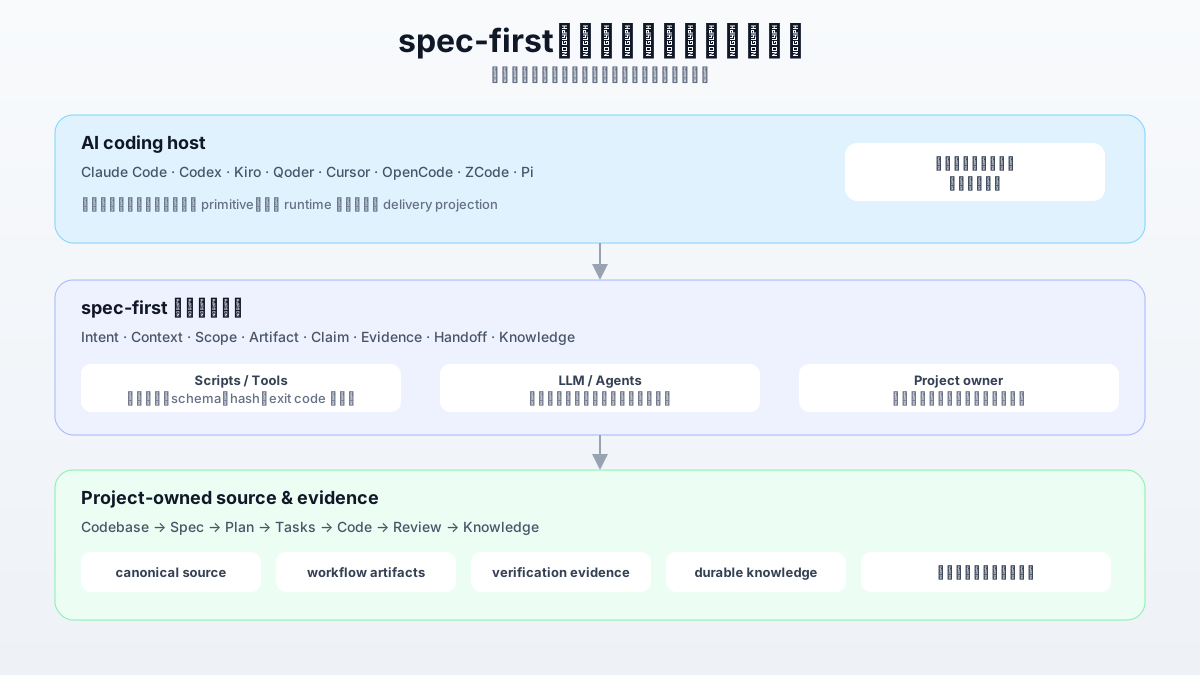
Intent -> Spec -> Plan -> Tasks -> Code -> Review -> Knowledge
为什么使用 spec-first?
AI 已经能快速生成代码。更难的问题是保留代码背后的判断:用户到底要什么、为什么选择这个范围、实际运行过哪些检查、还有什么不确定,以及下一次会话应该继承什么。
| 会话结束后,意图与取舍随之消失 | 需求和计划作为可检查文档保留在仓库中 |
| 下一位 Agent 需要从头重建上下文 | plan、task pack、findings 与 source refs 持续传递上下文 |
| “测试通过”只是一句对话声明 | 收尾可以指向真实运行的命令、exit code 和脱敏日志 |
| 更换宿主就要重建 workflow prompts | 一套 canonical source 向各宿主投射相同的 spec-* 标识 |
| 已解决问题最终变成被遗忘的历史 | 合格经验可以带来源和失效条件沉淀为项目知识 |
它不是一套僵硬研发流程,而是一份围绕关键出口建立的轻量契约:mutation、verification、handoff、source/runtime ownership 和 durable learning。
快速开始
你需要 Node.js >=20.0.0、npm、Git,以及至少一个受支持的 AI coding 宿主。以下终端命令应在需要启用的 Git 仓库根目录执行。
1. 安装并初始化
npm install -g spec-first
spec-first quickstart
quickstart 会检查 Node.js、Git 和已安装的宿主 CLI,再进入既有 init 流程。只有恰好发现一个宿主时才自动选择,否则由你交互式选择。它不会在宿主会话之外替你运行 LLM workflow。
需要显式或脚本化初始化时:
spec-first doctor
spec-first init --codex -y -u <name> --lang <zh|en>
init 会在写入前预览受管 runtime 文件。本次选中宿主的 skills、agents、commands、hooks、pointer 和 state 默认保持 Git 可见,建议 review 后跟随项目提交,让团队获得相同的宿主投影。init 不会自动 stage 或 untrack 文件。多宿主、多仓、dry-run 和预览宿主用法见完整快速开始指南。
2. 重启宿主
重启已选择的宿主或新开会话,让它发现生成的 runtime assets。下面的 spec-* 入口运行在宿主会话中,不是 shell 子命令。对于 Cursor 和 OpenCode 这类 preview 宿主,生成 runtime assets 不等于宿主 loader 已发现它们;如果重启后看不到入口,请运行 spec-first doctor --verbose,并核对 Runtime Capability Catalog。
3. 准备 Runtime
spec-runtime-setup
Runtime Setup 会安装或验证 required harness runtime、MCP servers、helper tools、providers 和项目 readiness facts。首次 workflow 前先运行一次;后续只在宿主、provider、helper 配置或 setup facts 变化时重跑。
4. 生成第一个可检查产物
spec-brainstorm "改进 CLI 新用户的 onboarding"
对于这个非平凡示例,spec-brainstorm 通常会在范围确认后写入 requirements-only unified plan:
docs/plans/YYYY-MM-DD-NNN-<type>-<topic>-plan.md
如果本轮没有值得持久化的决策,workflow 可以合法地不创建文档;这不表示运行失败。若生成了该文件,它就是首次可检查信号:意图已经由项目拥有、可以审查,并可继续交给 spec-plan 原位深化。
从 Prompt 到可信变更
两类常见输入可以汇合到同一条实施路径:
粗略想法 -> spec-brainstorm --\
已有 PRD -> spec-prd ----------+-> spec-plan -> [spec-write-tasks] -> spec-work -> spec-code-review -> spec-compound
spec-brainstorm 从粗略想法确定做什么;有值得持久化的决策时,写入 requirements-only unified plan。spec-prd 是已有 PRD 或 brownfield 请求的替代入口,不是 spec-brainstorm 之后的必经步骤。spec-doc-review 是跨阶段的可选 review lane,可在 requirements、implementation-ready plan 或 task pack 形成后插入,并返回结构化文档 findings。spec-plan 确定怎么做,把同一份 plan 原位深化为 implementation-ready。spec-write-tasks 在大型、并行或交接密集的工作中可选地派生 task pack;plan 仍是权威来源。spec-work 执行范围明确的工作,并为实际运行过的检查记录验证证据。spec-code-review 返回结构化 findings,不会静默获得 commit 或 landing 权限。spec-compound 只把合格经验提升为持久项目知识。
这是一张地图,不是强制状态机。应从当前意图最匹配的入口开始;当入口不清楚时,using-spec-first 会选择一个公开 workflow。
仓库会留下什么
每个 producer 只拥有明确的 artifact surface:
docs/
  ideation/      spec-ideate 生成的候选方向排序
  brainstorms/   spec-prd 生成的 clarified PRD artifacts
  plans/         requirements-only 与 implementation-ready unified plans
  tasks/         从 plan 派生的可选 task packs
  solutions/     合格且可复用的经验
.spec-first/
  workflows/     条件式验证证据(默认 gitignore)
持久文档属于项目。宿主 runtime assets 是可重建的 delivery projection,不是 canonical source,但默认跟随用户项目提交;行为修改应回到 source,再用 spec-first init 刷新投影。
Review findings 通常在会话内返回;code review 的完整协调产物使用 OS 临时目录。只有 workflow 实际执行 targeted commands 或命中持久证据触发条件时,才会在 .spec-first/workflows/ 写入 repo-local evidence。任何 artifact 只能证明其直接证据覆盖的 claim。
选择合适的 Workflow
| 准备或修复 required runtime readiness | spec-runtime-setup | setup facts 与具体下一步 |
| 探索多个可能方向 | spec-ideate | docs/ideation/ 中的排序结果 |
| 把粗略想法收敛为确定需求 | spec-brainstorm | docs/plans/ 中的 requirements-only plan |
| 澄清已有 PRD 或 brownfield 请求 | spec-prd | docs/brainstorms/ 中的 planning-readiness artifact |
| 审查需求、计划或 task pack | spec-doc-review | 结构化文档 findings |
| 为已确定需求决定实现方式 | spec-plan | docs/plans/ 中的 implementation-ready plan |
| 为大型计划派生可执行交接 | spec-write-tasks | docs/tasks/ 中的可选 task pack |
| 执行 plan、brief、task pack 或明确工作项 | spec-work | 源码变更与验证证据 |
| 诊断失败、回归或 flaky test | spec-debug | 根因、修复与验证证据 |
| 审查 diff、branch 或 PR | spec-code-review | 结构化代码 findings 与 residual risks |
| 沉淀或刷新可复用经验 | spec-compound / spec-compound-refresh | docs/solutions/ 中的合格知识 |
其他入口覆盖浏览器 dogfood、UI polish、指标驱动优化、App 一致性审查、跨会话 handoff、项目规则、产品战略、Skill 编写,以及经显式授权后直达 green PR 的 hands-off 路径。完整清单见公开入口与 Skill 目录。
信任如何建立
spec-first 把事实、判断和授权分开,避免让一次模型回答同时冒充三者。
| 确定性事实 | scripts 与 tools | 路径、Git 状态、hash、schema、exit code、runtime generation 和 receipts |
| 语义判断 | LLM 与人 | 需求、scope、取舍、架构、review 结论和业务价值 |
| 副作用授权 | 项目 owner / 当前请求 | 本地 mutation、worker dispatch、commit、push、外部通信和 knowledge promotion |
五条规则让三层保持一致:
- Evidence over confidence:模型自信、生成 artifact 或 source test 通过,都只能证明直接 evidence 覆盖的范围。
- Gate the exits, not the thinking:推理保持灵活;mutation、verification、handoff、source/runtime 和 knowledge 出口保持明确。
- Source first:修改
skills/、templates/、src/cli/ 和 checked-in docs,通过重建修复 generated runtime,而不是把 mirror 当 source patch。
- Bounded autonomy:长时或高影响工作必须带 scope、权限、checkpoint、停止条件和恢复边界。
- Reversible learning:只有带来源、适用边界和失效条件的经验才能进入 durable knowledge。
完整模型见项目角色契约、Source/Runtime 边界、Verification Summary 合同和 Honest Closeout 合同。
宿主支持
Runtime delivery 和宿主实机证据是不同声明。能够生成投射,并不自动证明宿主 loader 已正确发现和调用它。
| Claude Code | 主要支持宿主 | 交互式 init 或 --claude |
| Codex | 主要支持宿主 | 交互式 init 或 --codex |
| Kiro | opt-in preview | --kiro |
| Qoder | opt-in preview | --qoder |
| Cursor | opt-in generated_runtime_preview;本机 loader journey 尚未验证 | --cursor |
| OpenCode | opt-in generated_runtime_preview;同版本 loader journey 尚未验证 | --opencode |
运行 spec-first doctor --verbose 查看当前项目的 runtime facts。自动生成的 Runtime Capability Catalog是详细支持状态的权威参考。
适用边界
当团队已经使用 AI coding 宿主,并希望在不同会话或宿主之间保留项目内意图、可检查交接、明确 review 边界、受证据约束的完成声明和可复用经验时,适合使用 spec-first。
如果你只需要一次性 prompt、不允许在仓库中写入 workflow artifacts、想要独立 coding 应用,或期待中心化流程引擎替你决定产品优先级和架构,它通常没有必要。
相关文档
CLI 参考
spec-first doctor
spec-first quickstart
spec-first init
spec-first update
spec-first clean
spec-first plans audit --status completed --json
运行 spec-first --help 查看全部 package CLI 选项。主要支持宿主通常会在 init 并重启后发现 Workflow 入口;Cursor 和 OpenCode 的 preview 投射仍可能无法被 loader 发现。以 spec-first doctor --verbose 和 Runtime Capability Catalog 为准。
开发与贡献
npm run typecheck
npm run test:unit
npm run test:smoke
npm run test:integration
npm run test:release
npm run build
npm run build 会执行 npm pack --dry-run 并验证发布包内容。Source 变更应发生在 canonical source surfaces;只有 runtime source 变化时才通过 spec-first init 重新生成 runtime copies。
项目使用 MIT License。更多信息见版本记录与 GitHub Issues。
加入社区
- 微信群:扫码加入交流群,与其他用户和维护者讨论用法与反馈。
- 公众号:关注
spec-first,获取版本更新与实践文章。