

Security News
Ruby's Bundler 4.0.18 Extends Cooldown to bundle lock and bundle cache
The supply chain control that delays freshly published gems now covers lockfile generation and gem vendoring in Ruby projects.
By Sarah Gooding - Aug 06, 2026
Passive network watcher — tells you in plain English what's on your network, and taps you on the shoulder when something new shows up.
A passive watcher that tells you, in plain English, what's on your network — and taps you on the shoulder when something new shows up.


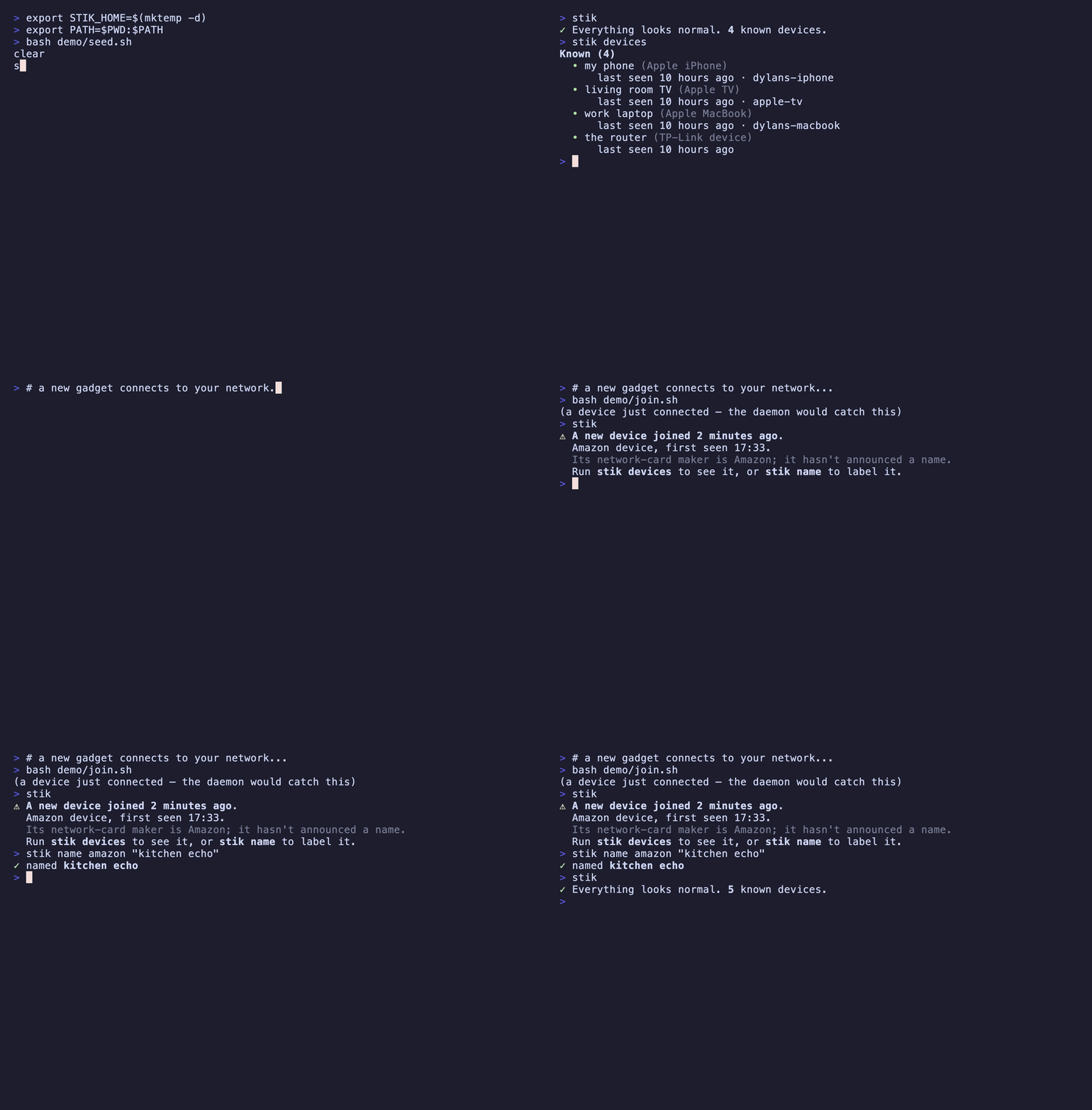
nmap tells you what's on your network right now. stik remembers what's normal, and tells you when that changes.
Every other tool in this space — Wireshark, nmap, tcpdump — hands you evidence and leaves you to draw the conclusion. Nobody knows what a4:83:e7:2f:11:0c is. Everybody knows what "Dylan's iPhone" is. stik exists to produce that second sentence.
⚠ A new device joined 2 minutes ago.
  Amazon device, first seen 17:34.
  Its network-card maker is Amazon; it hasn't announced a name.
  Run `stik devices` to see it, or `stik name` to label it.
stik is a single Go binary. It uses libpcap for capture (bundled on macOS; libpcap0.8 ships on most Linux desktops).
# from source (needs Go 1.26+ and libpcap headers) — installs a binary named `stik`
go install github.com/adamsjack711-ux/stik-cli/cmd/stik@latest

# or clone + make
git clone https://github.com/adamsjack711-ux/stik-cli
cd stik-cli && make install   # builds and installs to /usr/local/bin
On Debian/Ubuntu, building from source needs the pcap headers: sudo apt install libpcap-dev.
Packet capture requires elevated privileges. On macOS you can grant your user access to the BPF devices once (Wireshark's ChmodBPF helper does this) instead of running as root; otherwise run stik with sudo.
First run walks you through your network, one device at a time. This is the whole idea: it builds the baseline of "normal", and it gets you to actually look at what's connected — usually for the first time.
$ stik

👋  Welcome to stik. Let's learn what's on your network.
Listening passively for 10s — stik only ever listens, it never sends traffic.

Found 8 devices on your network. Let's figure out what they are.

  1/8  Apple iPhone — "Dylans-iPhone"
       Its network-card maker is Apple.
       Is this yours?  [Y/n/skip] y
       name it: my phone
       ✓ saved as "my phone"

  2/8  Amazon device — no hostname
       Its network-card maker is Amazon; it hasn't announced a name.
       Is this yours?  [Y/n/skip] y
       name it: kitchen echo
       ✓ saved as "kitchen echo"
  ...
After that, stik is a one-line glance — and usually boring. Boring is the feature.
$ stik
✓ Everything looks normal. 8 known devices.
Leave the watcher running in the background, and you get a desktop notification the moment something unrecognized joins:
stik daemon
Because nobody watches a TUI all day. The alert comes to you.
| Command | What it does |
|---|---|
stik | Status: is anything new? (runs the setup wizard on first use) |
stik devices | List every device in plain terms (--verbose for MACs & details) |
stik watch | Live view; new devices highlight as they appear |
stik daemon | Background watcher; fires a desktop notification on a new device |
stik name <who> | Name a device — match by name, hostname, IP, or MAC |
stik forget <who> | Remove a device from the registry |
$ stik devices
Known (4)
  • my phone (Apple iPhone)
      last seen 2 minutes ago · dylans-iphone
  • living room TV (Apple TV)
      last seen just now · apple-tv
  • work laptop (Apple MacBook)
      last seen 5 minutes ago · dylans-macbook
  • the router (TP-Link device)
      last seen just now
stik is deliberately narrow, and says so up front:
That narrowness is the honest shape of the problem, not a limitation stik is hiding. See Design notes for why.
Three broadcast protocols, combined into one sentence:
Dylans-iPhone.local) — free, high-quality identity.android-dhcp-14.Then it writes the verdict: "Apple iPhone", "Amazon device", "unknown device (Espressif — likely IoT)", or — when a phone is using a randomized address — "device with a private address".
The interesting decisions, and why they went the way they did.
The prime directive: output the conclusion, not the evidence. A tool that prints unrecognized OUI a4:83:e7 has made the human do the work. stik prints "a device we don't recognize." Raw MACs, IPs, and DHCP fingerprints exist, but they live behind --verbose. If a design choice makes the output more technically complete but less humanly legible, it's the wrong choice.
On a switched network, one host cannot see another host's unicast traffic; the switch simply doesn't deliver it. The only ways around that are port mirroring (needs switch access you usually don't have) or ARP spoofing — telling every device you're the router so their traffic flows through you. Spoofing is an attack technique. stik will not do it.
So stik confines itself to what any device on the LAN can legitimately hear: broadcast and multicast. That's a real limit, and stik states it plainly rather than overclaiming. Explaining the boundary you chose not to cross is the honest way to build a tool like this.
When a device joins a network it sends a DHCP request containing a Parameter Request List (option 55): the specific options it wants, in a specific order. That order is baked into each OS's DHCP client and barely changes between versions — so 1,3,6,15,26,28,51,58,59,43 says "Android" and 1,121,3,6,15,119,252,95,44,46 says "Apple". stik preserves the order exactly, because the order is the signal. (Option 60, the vendor class, is an even more direct hint when a device sends one.)
Modern phones rotate their MAC address per network to resist tracking. A randomized MAC has an invented prefix, so an OUI lookup will either fail or — worse — coincidentally match some real vendor and confidently report the wrong thing. stik checks the locally-administered bit (0x02 of the first octet) first. If it's set, stik doesn't trust the OUI at all and says "device with a private address" — unless mDNS gave a real name, in which case the name wins. Getting this right is the difference between a demo and a tool.
Everything stik persists lives in a single JSON file (~/.stik/devices.json), and exactly one package (internal/store) ever touches it. Writes are atomic — a sibling temp file is written and then renamed over the target — so a crash or a second process can never leave a half-written, unparseable registry behind. A corrupt file is backed up and the registry starts fresh rather than wedging the tool. The store's interface is tiny on purpose: a SQLite backend could replace it without a single command changing.
The IEEE manufacturer database (~40,000 prefixes) is compressed and embedded in the binary at build time. stik never phones home to identify a device — which matters, because you might be pointing it at a network you don't trust.
make build      # build ./stik
make test       # go test ./...
make vet        # go vet
make oui        # regenerate the embedded IEEE OUI table
The dissectors are tested against real serialized packet bytes (ARP, mDNS, DHCP) rather than mocks — the same frames libpcap would hand them. Lane-free logic like OUI lookup, randomized-MAC detection, known-vs-new, atomic writes, and corrupt-store recovery all have focused unit tests.
Record the demo GIF with vhs:
bash demo/record.sh
MIT — see LICENSE. Built for networks you own.
FAQs
Passive network watcher — tells you in plain English what's on your network, and taps you on the shoulder when something new shows up.
The npm package stik-cli receives a total of 6 weekly downloads. As such, stik-cli popularity was classified as not popular.
We found that stik-cli demonstrated a healthy version release cadence and project activity because the last version was released less than a year ago. It has 1 open source maintainer collaborating on the project.
Did you know?

Socket for GitHub automatically highlights issues in each pull request and monitors the health of all your open source dependencies. Discover the contents of your packages and block harmful activity before you install or update your dependencies.
Security News
The supply chain control that delays freshly published gems now covers lockfile generation and gem vendoring in Ruby projects.

Security News
During a UK cyber test, a Mythos 5 agent used sockpuppets, social engineering, and prompt injection to try to get a maintainer to merge malware.

Company News
Socket is now in the AWS Security Hub Extended plan. Adopt it through AWS, apply committed spend, and block malicious open source packages.