stik
A passive watcher that tells you, in plain English, what's on your network — and taps you on the shoulder when something new shows up.


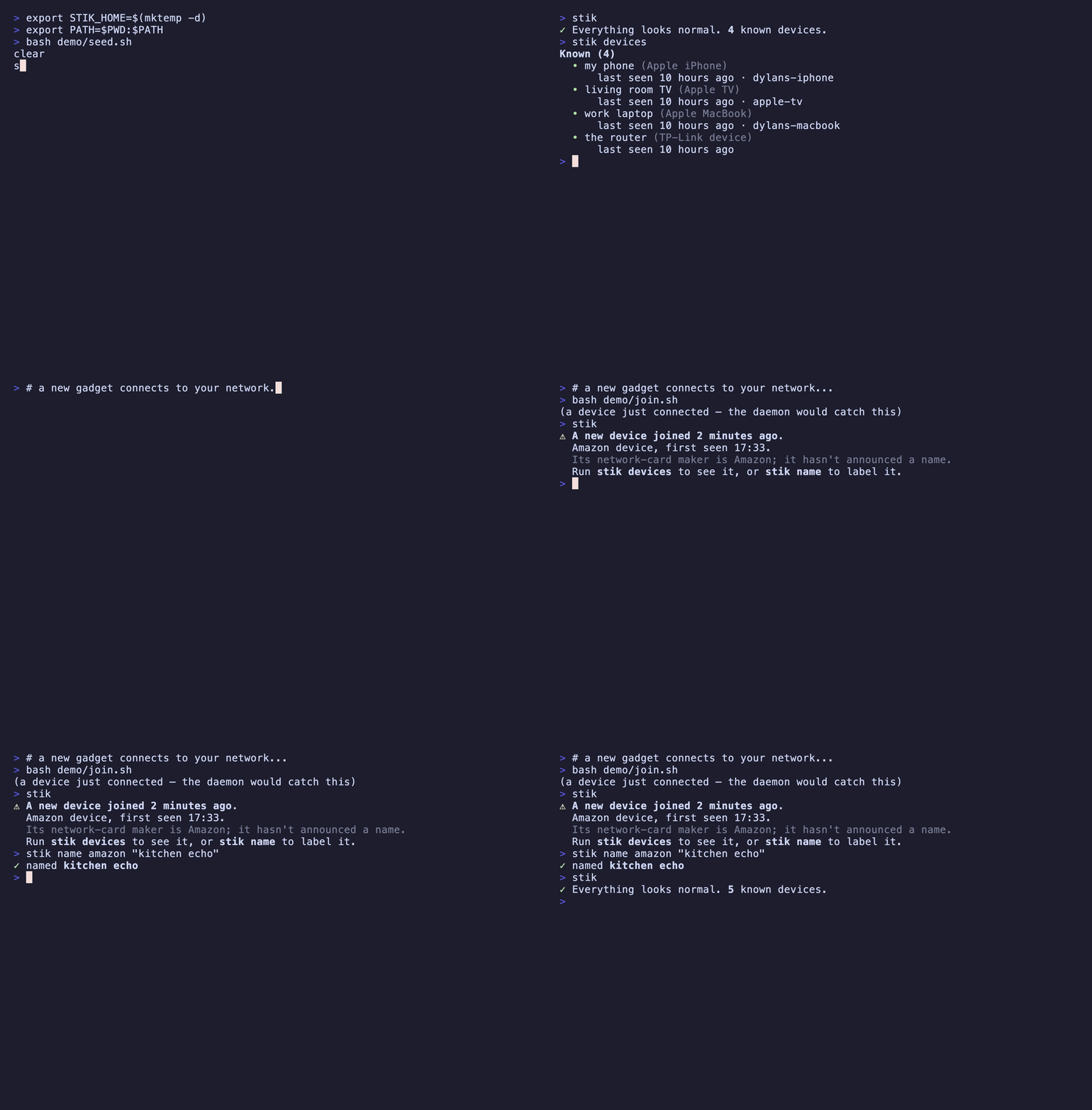
nmap tells you what's on your network right now.
stik remembers what's normal, and tells you when that changes.
Every other tool in this space — Wireshark, nmap, tcpdump — hands you evidence and leaves you to draw the conclusion. Nobody knows what a4:83:e7:2f:11:0c is. Everybody knows what "Dylan's iPhone" is. stik exists to produce that second sentence.
⚠ A new device joined 2 minutes ago.
  Amazon device, first seen 17:34.
  Its network-card maker is Amazon; it hasn't announced a name.
  Run `stik-net devices` to see it, or `stik-net name` to label it.
Install
stik-net is a single Go binary. It uses libpcap for capture (bundled on macOS; libpcap0.8 ships on most Linux desktops). The npm package is stik-cli; the installed command is stik-net (the bare stik name belongs to an unrelated tool).
npm install -g stik-cli
go install github.com/adamsjack711-ux/stik-cli/cmd/stik-net@latest
git clone https://github.com/adamsjack711-ux/stik-cli
cd stik-cli && make install
On Debian/Ubuntu, building from source needs the pcap headers: sudo apt install libpcap-dev. The prebuilt Linux binaries link libpcap dynamically, so a runtime host needs the shared library — sudo apt install libpcap0.8 (already present on most desktops).
Packet capture requires elevated privileges. On macOS you can grant your user access to the BPF devices once (Wireshark's ChmodBPF helper does this) instead of running as root; otherwise run stik-net with sudo.
30-second quickstart
First run walks you through your network, one device at a time. This is the whole idea: it builds the baseline of "normal", and it gets you to actually look at what's connected — usually for the first time.
$ stik-net

👋  Welcome to stik-net. Let's learn what's on your network.
Listening passively for 10s — stik-net only ever listens, it never sends traffic.

Found 8 devices on your network. Let's figure out what they are.

  1/8  Apple iPhone — "Dylans-iPhone"
       Its network-card maker is Apple.
       Is this yours?  [Y/n/skip] y
       name it: my phone
       ✓ saved as "my phone"

  2/8  Amazon device — no hostname
       Its network-card maker is Amazon; it hasn't announced a name.
       Is this yours?  [Y/n/skip] y
       name it: kitchen echo
       ✓ saved as "kitchen echo"
  ...
After that, stik-net is a one-line glance — and usually boring. Boring is the feature.
$ stik-net
✓ Everything looks normal. 8 known devices.
Leave the watcher running in the background, and you get a desktop notification the moment something unrecognized joins:
stik-net daemon
Because nobody watches a TUI all day. The alert comes to you.
Where the alert goes
By default the daemon fires a native desktop notification. But a passive watcher's
natural home is a headless box — a Pi, a homelab server — where there's no desktop
to notify. So stik-net daemon can push the alert to you instead, with --notify
(repeatable) or the STIK_NOTIFY environment variable:
stik-net daemon --notify desktop
stik-net daemon --notify ntfy://ntfy.sh/my-home-alerts
stik-net daemon --notify https://hooks.example.com/xyz
stik-net daemon --notify desktop --notify ntfy://my-home-alerts
STIK_NOTIFY="ntfy://my-home-alerts,https://hooks.example.com/xyz" stik-net daemon
Webhook payloads are a small JSON object, ready to route anywhere:
{
  "event": "new_device",
  "mac": "a4:83:e7:9f:2c:10",
  "ip": "192.168.1.42",
  "name": "Apple iPhone",
  "vendor": "Apple, Inc.",
  "private": false,
  "first_seen": "2026-08-08T15:02:00Z",
  "interface": "en0"
}
Run it at boot
To keep watching across reboots without re-launching by hand, install it as a
service — a launchd LaunchDaemon on macOS, a systemd unit on Linux. Both run as
root (packet capture needs it), so use sudo:
sudo stik-net
sudo stik-net service install --notify ntfy://ntfy.sh/my-home-alerts
sudo stik-net service status
sudo stik-net service uninstall
Because a background service can't reach your desktop's notifier, point it at an
ntfy or webhook target. The service runs off its own root-owned copy of your
baseline (so it never leaves a root-owned file in ~/.stik); re-run install
to refresh that copy after you name new devices.
Two tampering signals
The daemon also watches for two tampering signals, both urgent:
- Rogue DHCP server (
"event": "rogue_dhcp") — a host handing out leases that
isn't your trusted router. A home network has exactly one DHCP server; a second
is the tell of a misconfigured device or an attacker.
- ARP spoofing (
"event": "arp_spoof") — an IP address suddenly claimed by a
different MAC while its previous owner is still active. That concurrent second
claimant is the classic man-in-the-middle move (e.g. impersonating your gateway
to intercept traffic). Slow, legitimate DHCP reassignment doesn't trip it —
only a live conflict does. Still passive: stik-net never sends a probe.
Commands
stik-net | Status: is anything new? (runs the setup wizard on first use) |
stik-net devices | List every device in plain terms (--verbose for MACs & details) |
stik-net watch | Live view; new devices highlight as they appear |
stik-net daemon | Background watcher; alerts on a new device, rogue DHCP, or ARP spoofing (--notify for desktop / ntfy / webhook) |
stik-net service <cmd> | install / uninstall / status the boot service (needs sudo) |
stik-net name <who> | Name a device — match by name, hostname, IP, or MAC |
stik-net forget <who> | Remove a device from the registry |
$ stik-net devices
Known (4)
  • my phone (Apple iPhone)
      last seen 2 minutes ago · dylans-iphone
  • living room TV (Apple TV)
      last seen just now · apple-tv
  • work laptop (Apple MacBook)
      last seen 5 minutes ago · dylans-macbook
  • the router (TP-Link device)
      last seen just now
What stik can — and can't — see
stik is deliberately narrow, and says so up front:
- Passive only. It listens; it never transmits. No ARP scanning, no ARP spoofing, no port scanning. This is a hard line.
- Broadcast/multicast only. On a switched network you physically cannot see other devices' unicast traffic — the switch doesn't forward it to your port. stik reads only the protocols every device on the LAN legitimately broadcasts: ARP, mDNS (5353), and DHCP (67/68).
- For networks you own. Point it at your own home or lab network.
That narrowness is the honest shape of the problem, not a limitation stik is hiding. See Design notes for why.
How stik identifies a device
Three broadcast protocols, combined into one sentence:
- ARP → the MAC↔IP pairing. The ground truth of who's on the wire.
- mDNS → hostnames. Apple and many IoT devices announce themselves constantly (
Dylans-iPhone.local) — free, high-quality identity.
- DHCP → the set and order of requested options is a fingerprint that often reveals the OS even when nothing else does, plus a vendor-class string like
android-dhcp-14.
- OUI → the first three bytes of the MAC map to a manufacturer, via the embedded IEEE registry (no network fetch — stik works on a network it doesn't trust).
Then it writes the verdict: "Apple iPhone", "Amazon device", "unknown device (Espressif — likely IoT)", or — when a phone is using a randomized address — "device with a private address".
Design notes
The interesting decisions, and why they went the way they did.
Verdicts, not packets
The prime directive: output the conclusion, not the evidence. A tool that prints unrecognized OUI a4:83:e7 has made the human do the work. stik prints "a device we don't recognize." Raw MACs, IPs, and DHCP fingerprints exist, but they live behind --verbose. If a design choice makes the output more technically complete but less humanly legible, it's the wrong choice.
Passive, and broadcast-only — the limit stik refuses to cross
On a switched network, one host cannot see another host's unicast traffic; the switch simply doesn't deliver it. The only ways around that are port mirroring (needs switch access you usually don't have) or ARP spoofing — telling every device you're the router so their traffic flows through you. Spoofing is an attack technique. stik will not do it.
So stik confines itself to what any device on the LAN can legitimately hear: broadcast and multicast. That's a real limit, and stik states it plainly rather than overclaiming. Explaining the boundary you chose not to cross is the honest way to build a tool like this.
Why DHCP option ordering fingerprints an OS
When a device joins a network it sends a DHCP request containing a Parameter Request List (option 55): the specific options it wants, in a specific order. That order is baked into each OS's DHCP client and barely changes between versions — so 1,3,6,15,26,28,51,58,59,43 says "Android" and 1,121,3,6,15,119,252,95,44,46 says "Apple". stik preserves the order exactly, because the order is the signal. (Option 60, the vendor class, is an even more direct hint when a device sends one.)
Randomized MACs, and why naive vendor lookup lies
Modern phones rotate their MAC address per network to resist tracking. A randomized MAC has an invented prefix, so an OUI lookup will either fail or — worse — coincidentally match some real vendor and confidently report the wrong thing. stik checks the locally-administered bit (0x02 of the first octet) first. If it's set, stik doesn't trust the OUI at all and says "device with a private address" — unless mDNS gave a real name, in which case the name wins. Getting this right is the difference between a demo and a tool.
One storage module
Everything stik persists lives in a single JSON file (~/.stik/devices.json), and exactly one package (internal/store) ever touches it. Writes are atomic — a sibling temp file is written and then renamed over the target — so a crash or a second process can never leave a half-written, unparseable registry behind. A corrupt file is backed up and the registry starts fresh rather than wedging the tool. The store's interface is tiny on purpose: a SQLite backend could replace it without a single command changing.
Embedded OUI table, no runtime fetch
The IEEE manufacturer database (~40,000 prefixes) is compressed and embedded in the binary at build time. stik never phones home to identify a device — which matters, because you might be pointing it at a network you don't trust.
Development
make build
make test
make vet
make oui
The dissectors are tested against real serialized packet bytes (ARP, mDNS, DHCP) rather than mocks — the same frames libpcap would hand them. Lane-free logic like OUI lookup, randomized-MAC detection, known-vs-new, atomic writes, and corrupt-store recovery all have focused unit tests.
Record the demo GIF with vhs:
bash demo/record.sh
License
MIT — see LICENSE. Built for networks you own.




