

Security News
The Code You Didn't Write Is Still Yours to Defend
AI agents are pulling packages into environments no scanner is watching, creating exposure before security teams can see it.
By Brad Arkin - Jun 23, 2026
survey-map
Advanced tools
在线帮助文档地址:http://192.168.100.133:3000/#/
这是bugfix支线提交的代码 在安装前先登录公司的npm私服
npm login --registry=http://192.168.11.146:8073/repository/npm-all/
username:developer/uploader
password:  私服密码请联系组件开发或政务中台卢俊强获取
然后安装survey-map包
npm install -save survey-map --registry=http://192.168.11.146:8073/repository/npm-all/
major:主版本号 minor:次版本号 patch:补丁号 premajor:预备主版本 preminor:预备次版本 prepatch: 预备补丁版本 prerelease:预发布版本
npm version prepatch
请每隔一段时间清理下本地node_modules,否则会因为各自引入的包版本不一致,导致node_modules目录过大,导致安装第三方包、打包、发布版本耗时过久
npm install rimraf -g
npm run clean-lib
npm install
在main.js写入以下内容:
import SurveyMap from 'survey-map'
import 'survey-map/lib/survey-map.css'
import ElementUI from 'element-ui'
import  'shinegis-client/dist/styles/index.css'
import  'element-ui/lib/theme-chalk/index.css';

Vue.config.productionTip = false

Vue.use(SurveyMap);
Vue.use(ElementUI);
<template>
  <div id="app">
  <web-map ref="webmap"> </web-map>
  </div>
</template>
地图初始化参数,可选
                options: {
                center: '120.1448,30.2672',
                zoom: 17,
                zoomControl: true,
                scale: true,
                fullscreen: true,
                basemapcontrol: true,
                mouseposition: true,
                projection: "EPSG:4490",
                defaultmap: "c17c4b75-98c5-4359-80d1-3e9154834d95",
                basemaps: [
                    {
                    id: "c17c4b75-98c5-4359-80d1-3e9154834d95",
                    name: "影像",
                    thumbnailUrl: require("../../public/assets/img/basemap/satellite.png"),
                    layers: [{
                        id: "e4f24e5c-38ff-4bbd-8c4f-f2585eee047b1",
                        name: "img",
                        type: "tdt",
                        url: "http://t3.tianditu.gov.cn/img_c/wmts?tk=73f429c4c1d4550cdbac3def1243aa9c",
                        layerIdentifier: "TianDiTu.Satellite.Map"
                    },
                        {
                        id: "70e19c03-06a9-496c-8c76-7b5bd78b8a56",
                        name: "cia",
                        type: "tdt",
                        url: "http://t3.tianditu.gov.cn/cia_c/wmts?tk=73f429c4c1d4550cdbac3def1243aa9c",
                        layerIdentifier: "TianDiTu.Satellite.Annotion"
                        }
                    ]
                    }, {
                    id: "df6c94ad-c73f-4eda-96ff-362e23c763db",
                    name: "矢量",
                    thumbnailUrl: require("../../public/assets/img/basemap/street.png"),
                    layers: [{
                        id: "14ec2baf-a0df-428a-bb94-99a009dcdf4a",
                        name: "vec",
                        type: "tdt",
                        url: "http://t3.tianditu.com/vec_c/wmts?tk=73f429c4c1d4550cdbac3def1243aa9c",
                        layerIdentifier: "TianDiTu.Normal.Map"
                    },
                        {
                        id: "3fe7a518-afdc-4b2d-a6ea-2224584665e1",
                        name: "cva",
                        type: "tdt",
                        url: "http://t3.tianditu.com/cva_c/wmts?tk=73f429c4c1d4550cdbac3def1243aa9c",
                        layerIdentifier: "TianDiTu.Normal.Annotion"
                        }
                    ]
                    }],

                },
          }
图层目录配置参数,可选
[
{
"showIndex":1,
"parent":null,
"initChecked":"false",
"id":"00000001000100000001000000000000",
"label":"图层目录",
"tp":"directory",
"guid":"db125b76-5a90-2e5e-598c-6158173707b0",
"editing":false
},
{
"showIndex":2,
"parent":"00000001000100000001000000000000",
"initChecked":"false",
"id":"00000001000100010001000000000001",
"label":"数智可视化",
"tp":"directory",
"guid":"9e47bf66-c3da-748f-8672-e0fabc574422",
"editing":false
},
{
"showIndex":3,
"parent":"00000001000100010001000000000001",
"initChecked":"false",
"id":"00000001000100060001000000000001",
"label":"权调数据",
"tp":"directory",
"guid":"e81731c2-19af-f9e4-839e-7b4a53403835",
"editing":false
},
{
"showIndex":11,
"parent":"00000001000100060001000000000001",
"serverOrigin":"other",
"identifyField":[
{
"search":"OBJECTID,ZD_ID,DJQDM,DJQZH,ZD_SYQLX,ZD_TZM",
"lyr":"http://192.168.11.85:6080/arcgis/rest/services/330101/ST_ZD/MapServer/0",
"display":"OID,宗地内码,地籍区代码,地籍区主号,宗地使用权类型,宗地特征码",
"name":"0"
}
],
"mapIndex":11,
"geotype":"polygon",
"mobile":false,
"label":"宗地",
"mobileOpacity":false,
"type": "feature",
"visibleLayers":[
"0"
],
"isFit":false,
"isUserPictureLegend":false,
"topologyCheck":"0",
"layerTag":"ST_ZD",
"selectLayer":"",
"isSwitch":false,
"isFilter":false,
"initChecked":true,
"id":"9e725c9620a1469b8947eb68d2950fa1",
"opacity":1,
"showInfoWindow":true,
"tp":"layer",
"group":"2",
"guid":"00139827-bd84-4d07-b2a9-7a0ba69458a0",
"editing":true,
"url":"http://192.168.11.85:6080/arcgis/rest/services/330101/ST_ZD/MapServer/"
},
{
"showIndex":12,
"parent":"00000001000100060001000000000001",
"serverOrigin":"other",
"identifyField":[
{
"search":"OBJECTID",
"lyr":"http://192.168.11.85:6080/arcgis/rest/services/330101/YCZRZ/MapServer/0",
"display":"OBJECTID",
"name":"0"
}
],
"mapIndex":12,
"geotype":"polygon",
"mobile":false,
"label":"预测自然幢",
"mobileOpacity":false,
"type": "feature",
"visibleLayers":[
"0"
],
"isFit":false,
"isUserPictureLegend":false,
"topologyCheck":"0",
"layerTag":"YCZRZ",
"selectLayer":"",
"isSwitch":false,
"isFilter":false,
"initChecked":false,
"id":"3724f146-9d34-4553-b776-dd2f27895252",
"opacity":1,
"showInfoWindow":true,
"tp":"layer",
"group":"2",
"guid":"00139827-bd84-4d07-b2a9-7a0ba69458a0",
"editing":true,
"url":"http://192.168.11.85:6080/arcgis/rest/services/330101/YCZRZ/MapServer/"
},
{
"showIndex":13,
"parent":"00000001000100060001000000000001",
"serverOrigin":"other",
"identifyField":[
{
"search":"OBJECTID",
"lyr":"http://192.168.11.85:6080/arcgis/rest/services/330101/ST_ZRZ/MapServer/0",
"display":"OBJECTID",
"name":"0"
}
],
"mapIndex":13,
"geotype":"polygon",
"mobile":false,
"label":"自然幢",
"mobileOpacity":false,
"type": "feature",
"visibleLayers":[
"0"
],
"isFit":false,
"isUserPictureLegend":false,
"topologyCheck":"0",
"layerTag":"ST_ZRZ",
"selectLayer":"",
"isSwitch":false,
"isFilter":false,
"initChecked":false,
"id":"8c5108e3-5114-4985-aa43-ddec1dda8764",
"opacity":1,
"showInfoWindow":true,
"tp":"layer",
"group":"2",
"guid":"00139827-bd84-4d07-b2a9-7a0ba69458a0",
"editing":true,
"url":"http://192.168.11.85:6080/arcgis/rest/services/330101/ST_ZRZ/MapServer/"
},
{
"showIndex":14,
"parent":"00000001000100060001000000000001",
"serverOrigin":"other",
"identifyField":[
{
"search":"OBJECTID",
"lyr":"http://192.168.11.85:6080/arcgis/rest/services/330101/ST_LD/MapServer/0",
"display":"OBJECTID",
"name":"0"
}
],
"mapIndex":14,
"geotype":"polygon",
"mobile":false,
"label":"林地",
"mobileOpacity":false,
"type": "feature",
"visibleLayers":[
"0"
],
"isFit":false,
"isUserPictureLegend":false,
"topologyCheck":"0",
"layerTag":"ST_LD",
"selectLayer":"",
"isSwitch":false,
"isFilter":false,
"initChecked":false,
"id":"3d0c0d50-0496-4fcd-b37e-58f8b3d6aa27",
"opacity":1,
"showInfoWindow":true,
"tp":"layer",
"group":"2",
"guid":"00139827-bd84-4d07-b2a9-7a0ba69458a0",
"editing":true,
"url":"http://192.168.11.85:6080/arcgis/rest/services/330101/ST_LD/MapServer/"
},
{
"showIndex":15,
"parent":"00000001000100060001000000000001",
"serverOrigin":"other",
"identifyField":[
{
"search":"OBJECTID",
"lyr":"http://192.168.11.85:6080/arcgis/rest/services/330101/ST_ZH/MapServer/0",
"display":"OBJECTID",
"name":"0"
}
],
"mapIndex":16,
"geotype":"polygon",
"mobile":false,
"label":"宗海",
"mobileOpacity":false,
"type": "feature",
"visibleLayers":[
"0"
],
"isFit":false,
"isUserPictureLegend":false,
"topologyCheck":"0",
"layerTag":"ST_ZH",
"selectLayer":"",
"isSwitch":false,
"isFilter":false,
"initChecked":false,
"id":"9e725c9620a1469b8947eb68d2950fa1",
"opacity":1,
"showInfoWindow":true,
"tp":"layer",
"group":"2",
"guid":"00139827-bd84-4d07-b2a9-7a0ba69458a0",
"editing":true,
"url":"http://192.168.11.85:6080/arcgis/rest/services/330101/ST_ZH/MapServer/"
},
]
待完善
{
    innerToolbar:true,  //是否加载工具栏
        innerTools:{
            selectTool:true, //是否加载选择工具按钮
            identifyTool:true//是否加载i查询工具按钮
        }
}
| 参数名 | 说明 | 类型 | 默认值 | 可选值 |
|---|---|---|---|---|
| widgetInfo | 控制地图工具栏 | Object | - | - |
| mapConfig | 地图控制参数 | Object | - | - |
| tocConfig | 图层控制参数 | Array | - | - |
回调事件
| 事件名称 | 说明 | 回调参数 |
|---|---|---|
| mapInitialized | 容器初始化完毕时回调 | (gismap)回调GisMap对象 |
| mapConfiged | config初始化完毕时回调 | (customMap)回调CustomMap对象 |
| identifyListener | I查询回调 | 回调查询结果Object对象 |
| featureSelected | 选择图形后回调 | 回调选择结果Object对象 |
可使用方法,具体参数参考[http://192.168.10.195:3000/)
| 方法名 | 说明 | 参数 |
|---|---|---|
| zoomTo | 改变地图的中心点,比例尺 | (center,zoom)接受2个参数,1. 中心点[x,y] 2. 比例尺,均可为undefined |
| toggle | 实例根据layerid加载图层 | (layerid,isShow,isZoom)接受3个参数,1.id或者layerTag 2.boolean类型,表示新增或者移除, 3.是否缩放到图层 |
| changeBaseMap | 切换底图 | (basemap)想要显示的底图,详情见basemaps参数解析 |
| addConver | 添加遮罩实例 | (options)想要显示的底图,详情见参数 |
| getLayerById | 根据图层Id获取图层对象 | (id)图层的ID |
| getLayerByLayerTag | 根据图层layerTag获取图层对象 | (layerTag)图层的tag |
| getMapScale | 获取当前地图的比例尺 | - |
| getResolutionFromScale | 根据指定的比例尺换算分辨率 | (scale)比例尺) |
| getSelectFeatures | 获取选中的地块 | - |
| getCheckedLayers | 获取显示的图层 | - |
| addLinkMap | 添加联动地图实例 | (layer)想要联动的图层,详情见参数 |
| updateMapSize | map容器大小改变后重绘 | - |
| search | 支持对geoserver图层WFS、WMS和feature服务的这类矢量图层(VectorLayer)做查询定位实例 | (option)参数 |
| locateGeoJson | 根据geojson数据绘制图形并定位 | (geojson)) |
| locateTempGraphic | 根据已经绘制的图形唯一字段进行匹配并定位 | (obj){id:'XXX'}) |
| featureFlash | 定位图形并闪烁 | (feature,scale)接收两个参数 1要定位图形 2比例尺 |
| parseWKT | 将feature转为wkt格式数据 | (feature,isTransform)接收两个参数,1.feature 2.是否将经纬度坐标转成西安80 |
| 方法名 | 说明 | 参数 |
|---|---|---|
| toggleDistrict | 切换行政区后,地图组件往外回调事件 | Object {xzqmc:'西湖区'',xzqdm:'330103', key:0 } |
以下注意事项,主要解决打包时需要切换开发环境和生产环境的方案ID、用户ID
有GIS运维平台
无GIS与运维平台
config.json配置初始化话配置信息,包括地图、图层、权限控制等
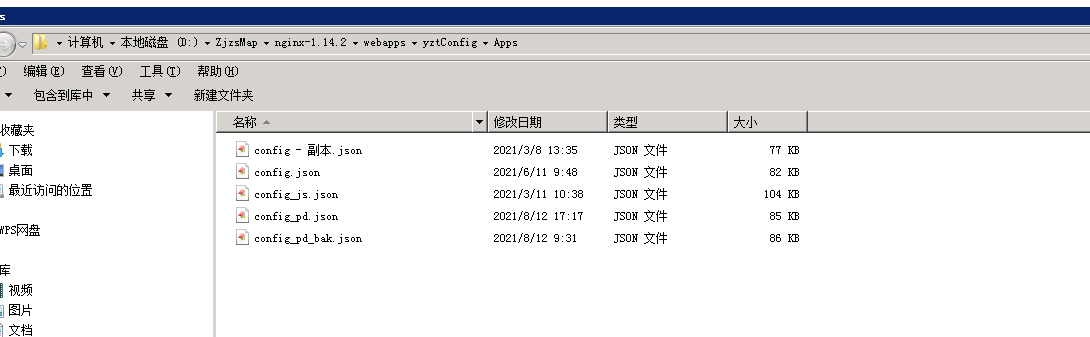
config.json 配置文件使用发布到外网。
可以将配置文件放到112服务器:D:\ZjzsMap\nginx-1.14.2\webapps\yztConfig\Apps
移动端需要的静态统计数据,也需要使用数据文件发布到外网
可以将配置文件放到112服务器:D:\ZjzsMap\nginx-1.14.2\webapps\yztConfig\Datas
FAQs
`在线帮助文档地址:http://192.168.100.133:3000/#/` ## 安装
We found that survey-map demonstrated a not healthy version release cadence and project activity because the last version was released a year ago. It has 3 open source maintainers collaborating on the project.
Did you know?

Socket for GitHub automatically highlights issues in each pull request and monitors the health of all your open source dependencies. Discover the contents of your packages and block harmful activity before you install or update your dependencies.
Security News
AI agents are pulling packages into environments no scanner is watching, creating exposure before security teams can see it.

Security News
GitHub Actions checkout now blocks risky pull_request_target checkouts by default to help prevent pwn request supply chain attacks.

Product
Socket now supports Custom Roles and Repository Access Permissions so organizations can control who can access specific repositories and actions.