

Product
Introducing Repository Access Permissions and Custom Roles
Socket now supports Custom Roles and Repository Access Permissions so organizations can control who can access specific repositories and actions.
By Joe Werle - Jun 19, 2026
sync-ai-clis
Advanced tools
Detect, install, and keep up to date multiple AI coding CLIs (Claude Code, Codex, Gemini, Kiro, Antigravity) with one command






English | 한국어
One command to detect, install, and keep your AI coding CLIs up to date — Claude Code, Codex, Gemini, Kiro, and Antigravity.
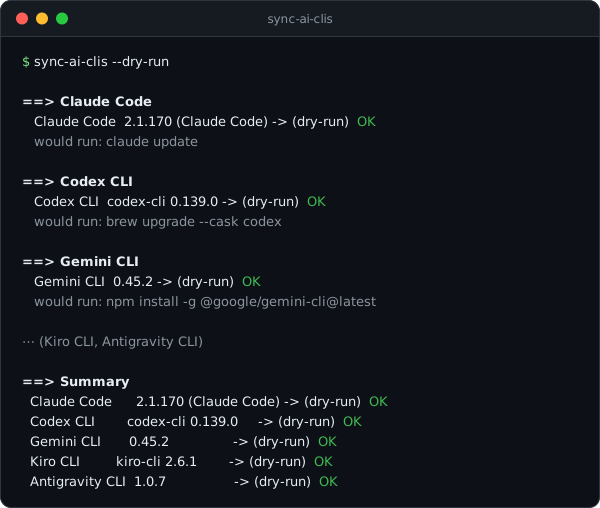
sync-ai-clis is a cross-platform (macOS · Windows · Linux) Rust CLI that reconciles your machine toward one state: every known AI CLI installed, working, and current. Installed tools get updated. Missing tools are installed after you consent. Then every tool is re-verified by actually running --version, which catches broken installs that command -v would miss.
Current status: released. list, doctor, check, --dry-run, and consent-based install/update all work, verified by 132 tests plus real-channel runs on Linux containers, macOS, and Windows CI. SPEC.md holds the full design — confirmed decisions, architecture, the per-tool install/update matrix, and the test and release strategy. It is the single source of truth for this repository.
| Area | Current Value |
|---|---|
| Purpose | Detect · install (with consent) · update · verify AI coding CLIs |
| Managed tools (v1) | claude, codex, gemini, kiro-cli, agy |
| Platforms | macOS · Windows · Linux |
| Stack | Rust (single binary) |
| Status | Released — engine verified on all three OSes (120 offline tests + real-channel CI) |
| Distribution | GitHub Releases · Homebrew tap · npm · crates.io · winget · Scoop · ghcr (Docker) |
| Tests | 120 offline tests + Docker distro matrix + 3-OS CI with real-channel runs |
| License | MIT |
| Author | hyeonbungi |
# Homebrew (macOS · Linux)
brew install hyeonbungi/tap/sync-ai-clis

# Shell installer (macOS · Linux)
curl --proto '=https' --tlsv1.2 -LsSf https://github.com/hyeonbungi/sync-ai-clis/releases/latest/download/sync-ai-clis-installer.sh | sh

# npm
npm install -g sync-ai-clis

# cargo
cargo install sync-ai-clis
# winget (Windows)
winget install hyeonbungi.sync-ai-clis

# Scoop (Windows)
scoop bucket add hyeonbungi https://github.com/hyeonbungi/scoop-bucket
scoop install sync-ai-clis

# PowerShell installer (Windows)
powershell -ExecutionPolicy Bypass -c "irm https://github.com/hyeonbungi/sync-ai-clis/releases/latest/download/sync-ai-clis-installer.ps1 | iex"
# Docker / devcontainers — bake AI CLIs into your image (static musl binary, amd64+arm64)
COPY --from=ghcr.io/hyeonbungi/sync-ai-clis:latest /sync-ai-clis /usr/local/bin/sync-ai-clis
RUN sync-ai-clis --yes --only claude,gemini
The contract from SPEC.md §6, fully implemented:
sync-ai-clis                 # default: update installed tools, ask (y/N) before installing missing ones
sync-ai-clis --yes, -y       # non-interactive: install missing + update everything (CI-friendly)
sync-ai-clis --no-install    # update only, never offer to install
sync-ai-clis --only claude,gemini
sync-ai-clis --except kiro
sync-ai-clis --dry-run       # print the exact commands, execute nothing
sync-ai-clis list            # known tools + installed/current version table (alias: status)
sync-ai-clis doctor          # read-only diagnosis: broken, duplicate, or shadowed installs
sync-ai-clis check           # read-only: is an update available? signals via exit code (CI/cron/prompt badge)
sync-ai-clis audit           # read-only: did a remote install script change? unified diff, --accept to re-baseline
sync-ai-clis --json          # machine-readable summary
--only, --except, and --json are global flags, so they also work after subcommands, for example sync-ai-clis doctor --only gemini --json.
Exit codes: 0 all OK · 1 any failure · 2 usage error (check and audit add 10 = an update is available / a script changed). Configuration lives in ~/.config/sync-ai-clis/config.toml, and flags win over config.
This tool runs remote official installers (curl | bash, irm | iex) and package-manager commands, so its security rules are spelled out rather than left implicit (SPEC.md §5.5):
--yes.--dry-run prints exactly the commands that would run.| Path | Purpose |
|---|---|
SPEC.md | Design source of truth: decisions, architecture, tool matrix, test strategy |
Cargo.toml, src/ | Rust crate — engine, tool registry, CLI (see SPEC.md §5) |
tests/ | Integration tests (OS × state command-selection matrix, binary smoke) |
docker/ | Linux integration matrix — the only place real installs run locally |
.github/workflows/ | 3-OS CI, real-channel integration, release pipeline, winget publish |
dist-workspace.toml | Release and packaging configuration (dist) |
cargo test                 # 120 offline tests — no network, no system changes
cargo fmt --check && cargo clippy --all-targets -- -D warnings
cargo run -- list          # read-only: detect tools and show versions
cargo run -- --dry-run     # show exactly what a sync would run, execute nothing
docker/run-matrix.sh       # real install/update integration (disposable containers only)
For the reasoning behind it — decisions, architecture, the per-tool command matrix, and the test strategy — see SPEC.md. Real installs and updates never run on a development machine; that is what the Docker matrix and CI runners are for.
[channels] overrides apply to update planning only. Missing-tool installs and doctor diagnostics still use the real detected state.This tool grew out of a personal macOS-only bash script (update-ai-clis) that updated and re-verified five AI CLIs. v1 generalizes it to three OSes, with consent-based installation of missing tools and public distribution channels.
MIT. See LICENSE.
FAQs
Detect, install, and keep up to date multiple AI coding CLIs (Claude Code, Codex, Gemini, Kiro, Antigravity) with one command
The npm package sync-ai-clis receives a total of 845 weekly downloads. As such, sync-ai-clis popularity was classified as not popular.
We found that sync-ai-clis demonstrated a healthy version release cadence and project activity because the last version was released less than a year ago. It has 1 open source maintainer collaborating on the project.
Did you know?

Socket for GitHub automatically highlights issues in each pull request and monitors the health of all your open source dependencies. Discover the contents of your packages and block harmful activity before you install or update your dependencies.
Product
Socket now supports Custom Roles and Repository Access Permissions so organizations can control who can access specific repositories and actions.

Product
Socket MCP now lets AI assistants review org alerts, investigate threats using the Socket threat feed, and inspect package files in addition to dependency scoring.

Product
Socket Firewall blocks malicious VS Code and Open VSX extensions before install, protecting developers from compromised editor marketplaces.