Track every AI token — then bring your usage to life
An accurate, local-first token usage and cost dashboard for 27 AI coding tools — plus a desktop pet, 4 native widgets, and 15 achievement tracks. No cloud account, no API keys, no setup.
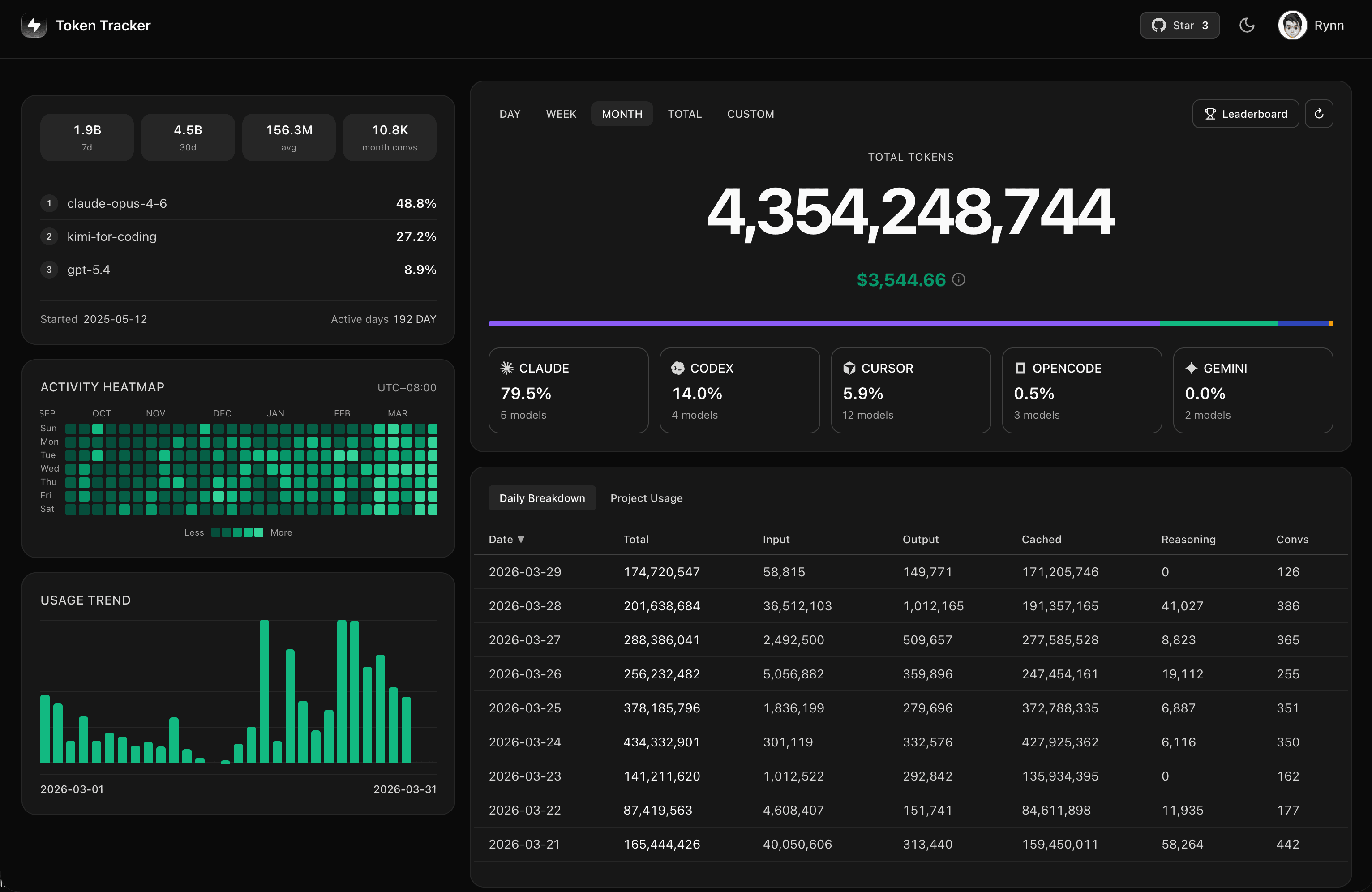
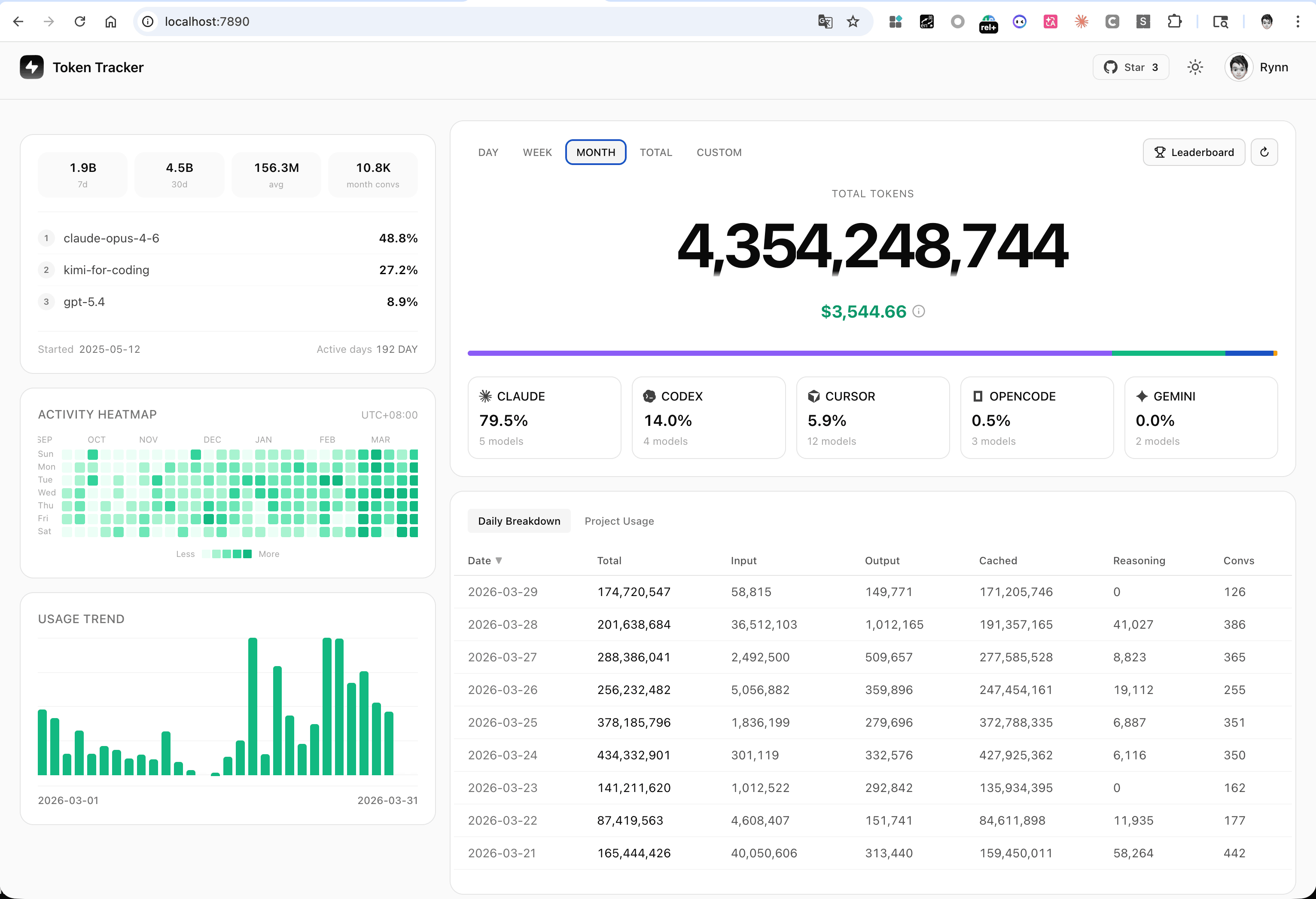
📊 See the token dashboard in action
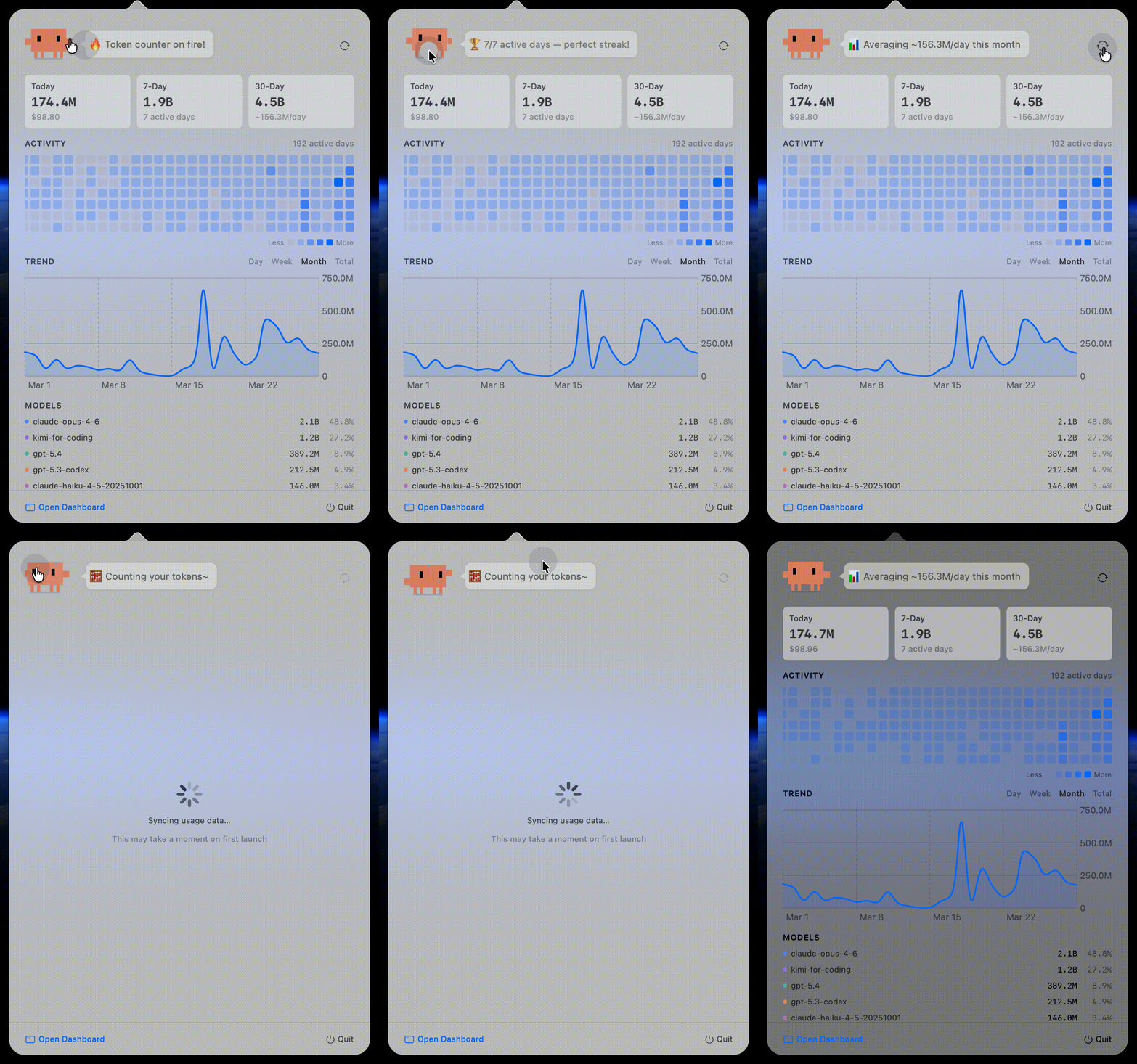
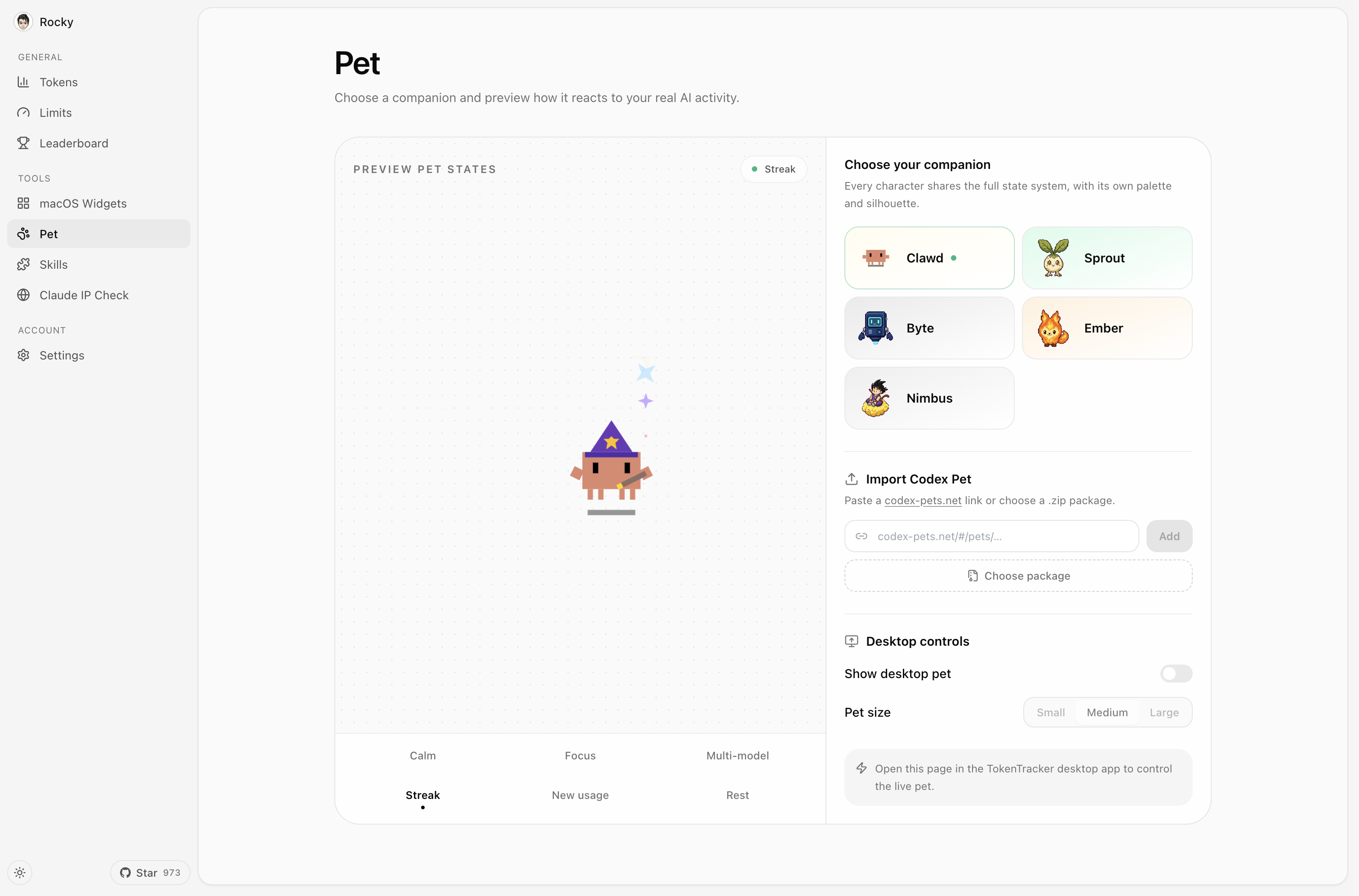
🐾 A living desktop companion Codes, celebrates streaks, follows your cursor, and rests when you do.
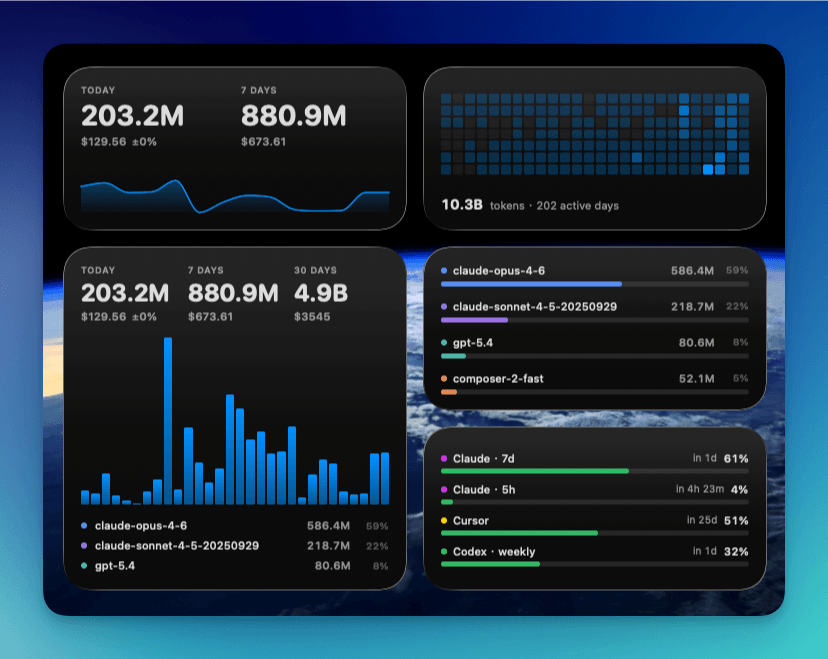
🧩 Four native widgets Usage, activity heatmap, top models, and rate limits at a glance.
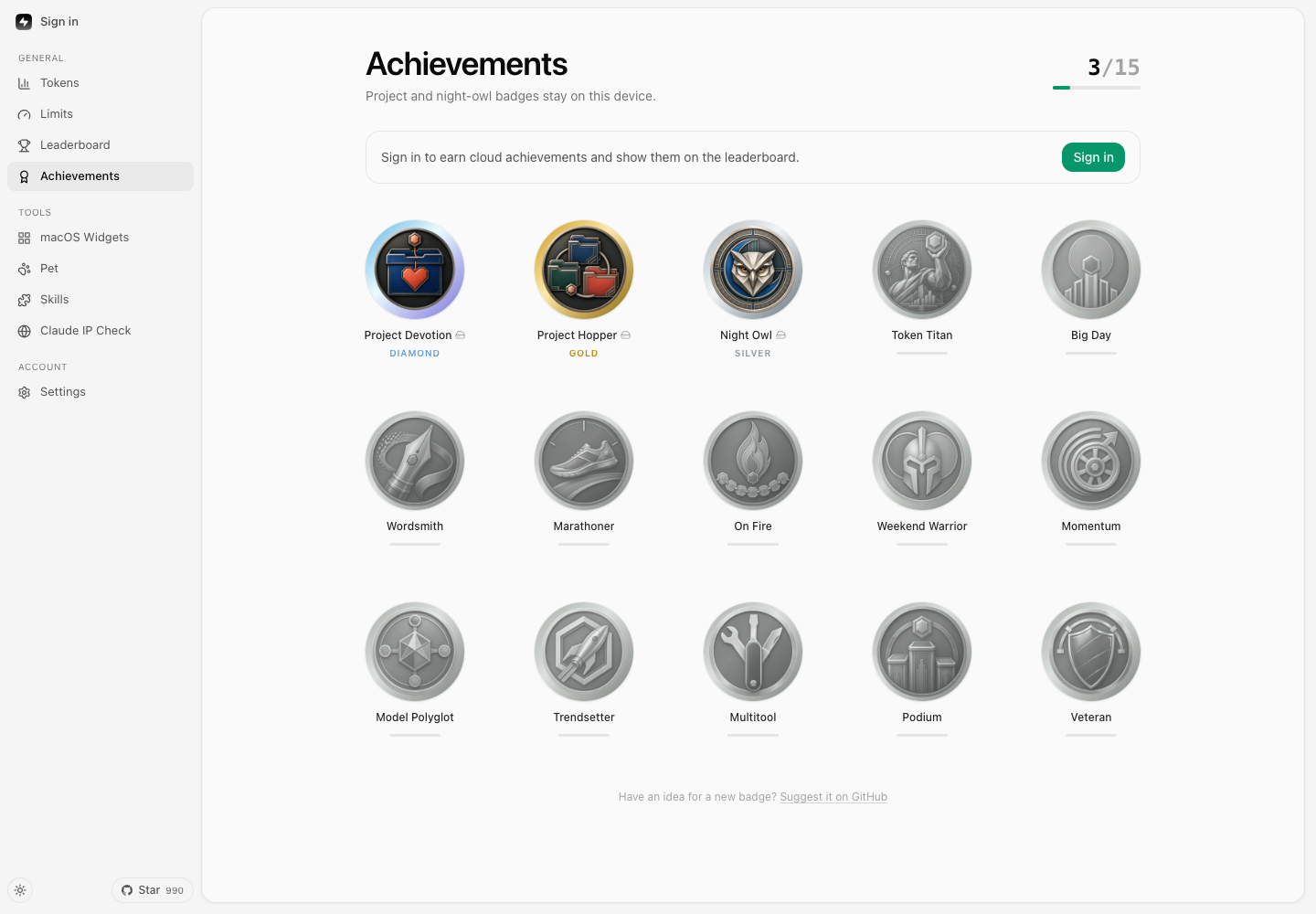
🏆 Unlock achievements from the way you actually code.
🎬 Meet TokenTracker
⭐ If TokenTracker saves you time, please star it on GitHub — it helps other developers find it.
⚡ Quick Start
Requirements: Node.js 20+ (CLI runs on macOS / Linux / Windows; native desktop app ships for both macOS (menu bar) and Windows (system tray). Cursor token reading uses the system sqlite3 CLI when available and falls back to node:sqlite on supported Node releases).
npx tokentracker-cli
That's it. First run installs hooks, syncs your data, and opens the dashboard at http://localhost:7680.
What you get in 30 seconds:
📊 A local dashboard at localhost:7680 with usage trends, model breakdown, cost analysis
🔌 Auto-detected hooks for every supported AI tool you have installed
🏠 100% local — no account, no API keys, no network calls (except optional leaderboard)
🧩 Optional: a Skills tab that browses 250+ public skills and syncs them across Claude · Codex · Grok · Antigravity · Gemini · OpenCode · Hermes
Want a native desktop app?
macOS — Download TokenTrackerBar.dmg → drag to Applications. Menu bar status icon, desktop widgets, and the dashboard in a WKWebView.
Windows — Download TokenTracker-Setup.exe → run the per-user installer (no admin needed). System-tray app with the dashboard in WebView2. Portable zip also on the releases page.
Install globally for shorter commands:
npm i -g tokentracker-cli
tokentracker # Open the dashboard
tokentracker sync# Manual sync
tokentracker status # Check hook status
tokentracker status --json # Machine-readable summary (pipe to jq, ingest from AI agents)
tokentracker status --light # Plain ASCII table (CI / SSH, no spinner)
tokentracker doctor # Health check
🍺 Homebrew (macOS)
Prefer brew? Install directly — no extra tap step needed:
# macOS menu bar app (DMG)
brew install --cask mm7894215/tokentracker/tokentracker

# CLI only
brew install mm7894215/tokentracker/tokentracker
Upgrade with brew upgrade --cask mm7894215/tokentracker/tokentracker. The tap auto-bumps within an hour of every new release.
✨ Features
🔌 27 AI tools out of the box — Claude Code, Codex CLI, Cursor, Gemini CLI, Antigravity, Kiro, OpenCode, OpenClaw, Every Code, Hermes Agent, GitHub Copilot, Kimi Code, CodeBuddy, WorkBuddy, Grok Build, oh-my-pi, pi, Craft Agents, Kilo CLI, Kilo Code, Roo Code, Zed Agent, Goose, Droid, Mimo Code, ZCode, AnythingLLM Desktop
🏠 100% local — Token data never leaves your machine. No account, no API keys.
🚀 Zero config — Hooks auto-install on first run. From zero to dashboard in 30 seconds.
🖥️ Native desktop app — macOS menu bar (+ widgets) and Windows system tray, each with an embedded server and the dashboard in a native webview
🐾 Desktop pet — A pixel companion powered by real coding activity: it works when you work, celebrates streaks, and sleeps when you rest
🎨 4 desktop widgets — Pin Usage / Activity Heatmap / Top Models / Usage Limits to your desktop
🏆 15 achievement tracks — Turn daily usage, streaks, tools, models, and milestones into collectible badges worth sharing
📈 Real-time rate limit tracking — Claude / Codex / Cursor / Gemini / Kiro / Copilot / Antigravity quota windows with reset countdowns
💰 Cost engine — 2,200+ models priced via LiteLLM (auto-refreshed daily) + curated overrides for niche tools (Kiro, Cursor Composer, Kimi, CodeBuddy hy3); 24h disk cache + bundled offline snapshot mean accurate USD without an internet connection. Models without published vendor pricing (e.g. Tencent hy3-preview) are tracked by tokens but show $0 cost until the vendor publishes a rate.
🌐 Optional leaderboard — Compare with developers worldwide; drag-to-reorder columns to focus on the providers you care about (opt-in, sign in to participate)
🔄 Cross-device account view — Opt in to cloud sync and the dashboard merges your usage across every machine you work on (laptop + desktop + server) into one combined view — totals, trends, heatmap and model breakdown all device-aggregated (opt-in, sign in; the default local-only experience stays instant and offline)
🧩 Optional Skills tab — browse 250+ public skills from anthropics/skills, ComposioHQ/awesome-claude-skills, skills.sh and any GitHub repo you add; sync them across Claude / Codex / Grok / Antigravity / Gemini / OpenCode / Hermes with named targets and one-click Undo
🔒 Privacy-first — Only token counts and timestamps. Never prompts, responses, or file contents.
🖼️ Showcase
Dashboard — usage trends, model breakdown, cost analysis
Desktop Widgets — pin usage to your desktop
Menu Bar App — animated Clawd companion + native panels
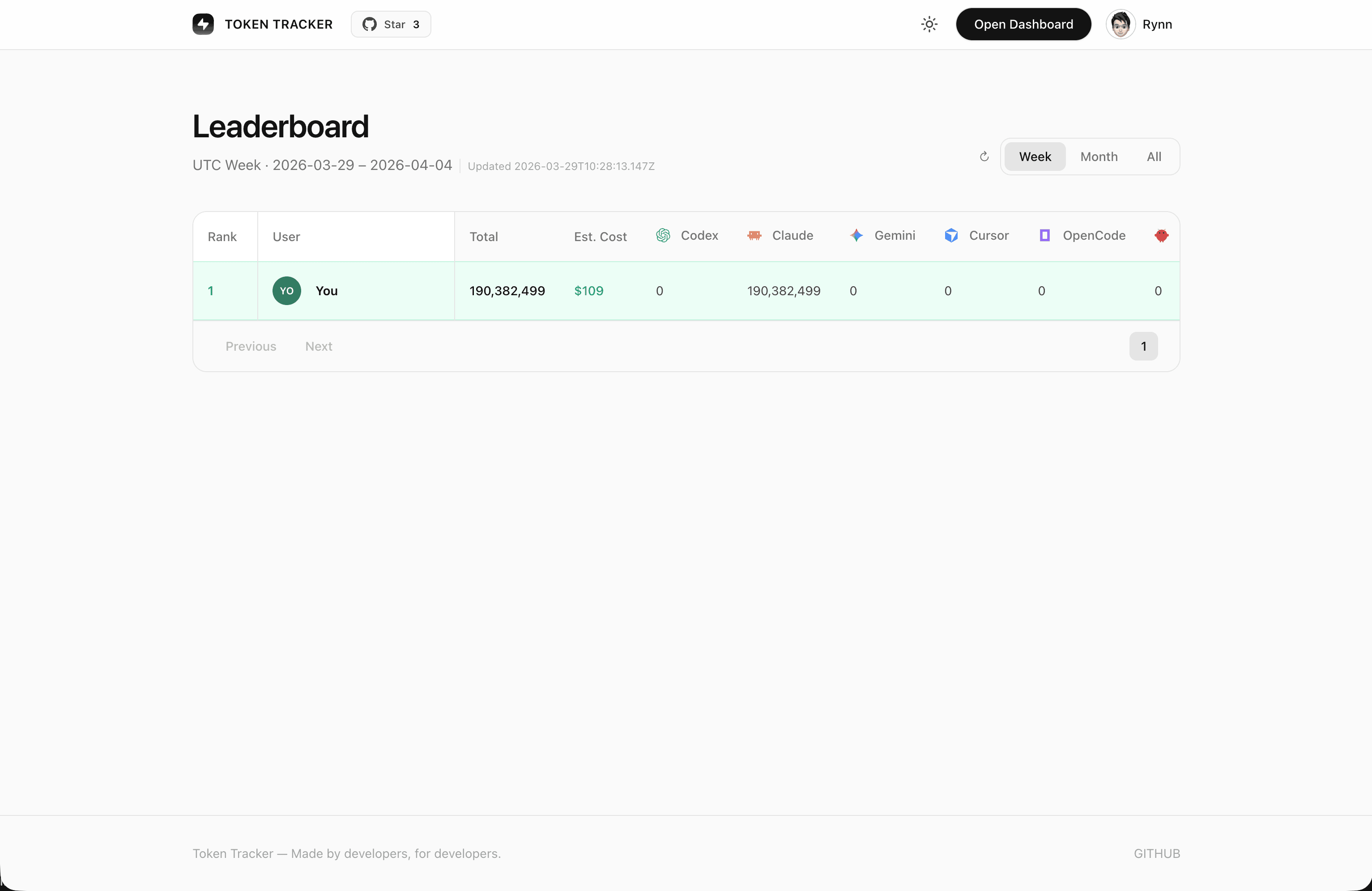
Global Leaderboard — compare with developers worldwide
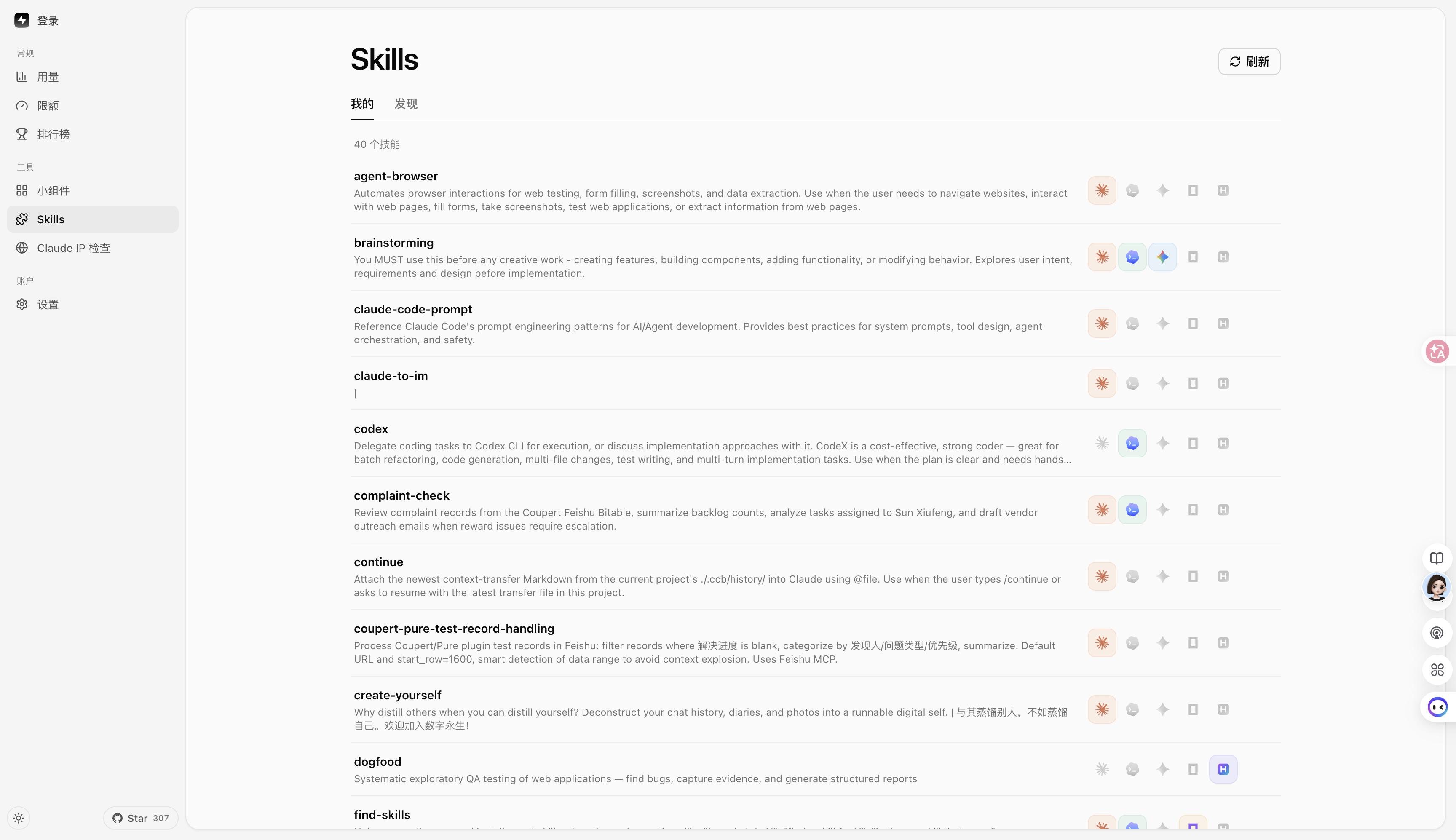
Skills Manager — browse 250+ public skills from GitHub & skills.sh, install once, sync to Claude / Codex / Grok / Antigravity / Gemini / OpenCode / Hermes. Per-target toggles, one-click Undo, no manual file copying.
Desktop Pet — a pixel companion that floats on your desktop and reacts to your real token burn: it codes when you code, celebrates streaks, and sleeps when you rest. Import community pets from codex-pets.net with a link or a .codex-pet.zip — V2 pets even turn their head to follow your cursor in 16 directions. macOS, Windows, and web.
Achievements — 15 tracks turn usage milestones, streaks, tools, and models into collectible badges — with progress visible before each unlock.
🔌 Supported AI Tools
Tool
Detection
Method
Claude Code
✅ Auto
SessionEnd hook in settings.json
Codex CLI
✅ Auto
TOML notify hook in config.toml
Cursor
✅ Auto
API + SQLite auth token
Kiro
✅ Auto
SQLite + JSONL hybrid
Gemini CLI
✅ Auto
SessionEnd hook
OpenCode
✅ Auto
Plugin system + SQLite
OpenClaw
✅ Auto
Session plugin
Every Code
✅ Auto
TOML notify hook
Hermes Agent
✅ Auto
SQLite sessions table (~/.hermes/state.db)
GitHub Copilot App / CLI
✅ Auto
Unified per-request SQLite usage (~/.copilot/session-store.db); App DB legacy baseline
Passive SQLite reader (~/.local/share/mimocode/mimocode.db, OpenCode-fork schema; counts only mimo-native turns — mirrored Claude/claude-mem history is excluded)
ZCode (Z.ai)
✅ Auto
Passive SQLite reader (~/.zcode/cli/db/db.sqlite, OpenCode-fork schema; counts only Z.ai/BigModel GLM turns — bundled Claude/Codex/Gemini sub-agents are excluded)
AnythingLLM Desktop
✅ Auto
Passive SQLite reader (anythingllm-desktop/storage/anythingllm.db; reads per-message token metrics only, never prompts or responses)
Do I need to install any plugin or hook manually? No. tokentracker (or tokentracker init) handles everything on first run:
Hook-based tools (Claude Code, Codex, Gemini, Every Code, CodeBuddy, WorkBuddy, Grok Build) — we write a SessionEnd hook or TOML notify entry into the tool's own config.
Plugin-based tools (OpenCode, OpenClaw) — plugins ship inside the npm package. OpenClaw's session plugin lives at ~/.tokentracker/tracker/openclaw-plugin/openclaw-session-sync/; we link and enable it via OpenClaw's own CLI, then set hooks.allowConversationAccess=true so OpenClaw permits the session-finished event that triggers sync. No download, no drag-and-drop.
Passive readers (Cursor, Kiro, Hermes, Kimi Code, Copilot, Grok Build, oh-my-pi, pi, Craft Agents, Kilo CLI, Kilo Code, Roo Code, Antigravity, Zed Agent, Goose, Droid, Mimo Code, ZCode, AnythingLLM Desktop) — nothing is installed into those tools. We only read files they already produce (SQLite DB, JSONL, OTEL export, session logs). Copilot App / CLI usage is read per request from ~/.copilot/session-store.db; data.db provides the one-time legacy adoption baseline and stays observe-only after the store becomes canonical, while the Chat extension and legacy CLI continue using OTEL. TokenTracker coordinates the sources so overlapping requests are counted once. Mixed App/CLI usage that predates adoption is retained as a github-copilot-legacy aggregate rather than assigned to a guessed request model.
Grok Build estimate — current local telemetry exposes cumulative updates.jsonltotalTokens, but not a stable prompt/output/cache split; signals.json remains a fallback with contextTokensUsed snapshots. TokenTracker estimates Grok cost until per-call usage details are available.
Run tokentracker status anytime to verify every integration's state. If something shows skipped, the detail column explains why (e.g. tool CLI not on PATH, config unreadable).
Missing your tool? Open an issue — adding new providers is usually one parser file away.
🆚 Why TokenTracker?
Looking for a ccusage alternative with a GUI? TokenTracker covers 27 tools (not just Claude Code), adds native macOS and Windows apps + desktop widgets, and de-duplicates token records correctly across providers — so your numbers match the providers' own billing.
TokenTracker
ccusage
Cursor stats
AI tools supported
27
1 (Claude)
1 (Cursor)
Local-first, no account
✅
✅
❌
Native desktop app
✅ macOS + Windows
❌
❌
Desktop widgets
✅ 4 widgets
❌
❌
Rate-limit tracking
✅ 7 providers
❌
Cursor only
Accurate multi-provider dedup
✅
❌ ¹
—
¹ reqId-based deduplication over-counts providers that omit a request ID (DeepSeek / Kimi / MiniMax / Claude sub-agents) by 1.6–3.7×. TokenTracker dedups on a composite key, so totals match each provider's own billing dashboard.
🏗️ How It Works
flowchart LR
    A["AI coding tools<br/>Claude Code · Codex · Cursor · Gemini · Kiro<br/>OpenCode · OpenClaw · Every Code · Hermes · Copilot<br/>Kimi Code · CodeBuddy · WorkBuddy · Grok Build · Kilo CLI · Kilo Code<br/>Antigravity · oh-my-pi · pi · Craft · Roo · Zed · Goose · Droid · Mimo · ZCode · AnythingLLM"]
    A -->|hooks trigger| B[Token Tracker]
    B -->|parse logs<br/>30-min UTC buckets| C[(Local SQLite)]
    C --> D[Web Dashboard]
    C --> E[Menu Bar App]
    C --> F[Desktop Widgets]
    C -.->|opt-in| G[(Cloud Leaderboard)]
AI CLI tools generate logs during normal use
Lightweight hooks detect changes and trigger sync (Cursor uses API instead of hooks)
Token counts parsed locally — never any prompt or response content
Aggregated into 30-minute UTC buckets
Dashboard, menu bar app, and widgets all read from the same local snapshot
🛡️ Privacy
Protection
Description
No content upload
Only token counts and timestamps. Never prompts, responses, or file contents.
Local-only by default
All data stays on your machine. The leaderboard is fully opt-in.
Two things phone home, both anonymous: (1) at most one daily heartbeat — a one-way hash of the machine id, app version, OS platform, and app shell (cli/mac/win); (2) anonymous dashboard pageview/feature events (PostHog — autocapture and session recording disabled, browser Do-Not-Track respected). Never token counts, model names, prompts, or paths. Audit src/lib/telemetry.js and dashboard/src/lib/analytics.js; one switch disables both on your machine: TOKENTRACKER_NO_TELEMETRY=1 (or DO_NOT_TRACK=1).
📦 Configuration
Most users never need this — defaults are sensible. For advanced setups:
Variable
Description
Default
TOKENTRACKER_DEBUG
Enable debug output (1 to enable)
—
TOKENTRACKER_NO_TELEMETRY
Disable all anonymous telemetry — daily heartbeat and dashboard analytics (1 to disable; the DO_NOT_TRACK standard is also respected)
—
TOKENTRACKER_HTTP_TIMEOUT_MS
HTTP timeout in milliseconds
20000
TOKENTRACKER_WSL_MODE
WSL install resolution behavior on Windows (for aggregating native and WSL installations). wsl-first (prefer WSL), native-first, wsl-only, native-only, both (aggregate both installs)
wsl-first
CODEX_HOME
Override Codex CLI directory
~/.codex
GEMINI_HOME
Override Gemini CLI directory
~/.gemini
TOKENTRACKER_GROK_HOME
Override Grok Build directory for the Grok integration and Skills Manager
~/.grok
GROK_HOME
Legacy Grok Build directory override, used when TOKENTRACKER_GROK_HOME is unset
~/.grok
TOKENTRACKER_ANTIGRAVITY_HOME
Force a single Antigravity Skills directory (auto-detects ~/.gemini/antigravity + ~/.gemini/antigravity-ide otherwise)
auto
🐧 Windows Subsystem for Linux (WSL) Auto-Discovery
If you run AI coding agents inside WSL on Windows, TokenTracker can auto-discover and aggregate metrics from both native Windows and WSL installations.
Configure this behavior using the TOKENTRACKER_WSL_MODE environment variable:
both (Recommended): Scans and aggregates metrics from both native Windows and WSL.
wsl-first (Default): Checks WSL first; if found, uses WSL metrics, otherwise falls back to Windows.
native-first: Checks native Windows first; if found, uses Windows metrics, otherwise falls back to WSL.
wsl-only: Scans WSL environment only.
native-only: Scans native Windows environment only.
[!NOTE]
Preference (-first) vs. Isolation (-only): Preference modes prioritize your choice but gracefully fall back to scanning the other environment if the tool is missing. Isolation modes strictly lock scanning to that single environment and ignore the other completely.
Supported providers for WSL auto-discovery and aggregation:
Dual-Install Aggregation (both mode):
File-list & Active CLIs: Every Code, Kimi (legacy & Code), Gemini CLI, Antigravity, OpenCode (JSON), Codex CLI, CodeBuddy, WorkBuddy, oh-my-pi (omp), pi, GitHub Copilot (OTEL), Roo Code, Craft, Kilo Code, Droid.
SQLite-based DBs: Hermes, Zed Agent, Goose, OpenCode (opencode.db), Kilo CLI, Mimo Code, ZCode, GitHub Copilot (App DB).
WSL Auto-Discovery (Preference/Isolation only, no dual aggregation):
Grok Build (dynamically selects either native or WSL depending on the mode, but does not aggregate both in both mode).
🛠️ Development
git clone https://github.com/mm7894215/TokenTracker.git
cd TokenTracker
npm install
# Build dashboard + run CLIcd dashboard && npm install && npm run build && cd ..
node bin/tracker.js
# Tests
npm test
Building the macOS App
cd TokenTrackerBar
npm run dashboard:build              # Build the dashboard bundle
./scripts/bundle-node.sh             # Bundle Node.js + tokentracker source
xcodegen generate                    # Generate the Xcode project
ruby scripts/patch-pbxproj-icon.rb   # Patch in the Icon Composer asset
xcodebuild -scheme TokenTrackerBar -configuration Release clean build
./scripts/create-dmg.sh              # Package the .app into a DMG
TokenTracker requires Node 20+. Check your version:
node --version
If lower, upgrade via nvm, fnm, or your package manager (brew upgrade node, apt install nodejs).
Port 7680 already in use
The dashboard server picks the next free port automatically (7681, 7682, ...) when 7680 is taken. The actual port is logged on startup. If you want to force a specific port:
PORT=7700 tokentracker serve
To find what's holding 7680:
lsof -i :7680
WSL2 note: on Windows hosts the Delivery Optimization service (DoSvc) listens on 7680, and under NAT networking the conflict is invisible from inside WSL — the server starts fine but the Windows browser reaches DoSvc instead. TokenTracker therefore defaults to 7681 when running under WSL (logged on startup).
A provider isn't being detected
Check the integration status:
tokentracker status
Then run the doctor for a deeper health check:
tokentracker doctor
If a provider shows as not configured even though you use it, try tokentracker activate-if-needed to re-run hook detection. If still missing, open an issue with the doctor output attached.
How to uninstall hooks and remove all config
tokentracker uninstall
This removes every hook TokenTracker installed across all detected AI tools, plus the local config and data. Safe to re-run.
macOS App
"TokenTrackerBar can't be opened" — unidentified developer
TokenTrackerBar is ad-hoc signed (not notarized with an Apple Developer ID — that requires a paid developer account). Gatekeeper blocks it on first launch.
Open System Settings → Privacy & Security
Scroll to the Security section — you'll see "TokenTrackerBar was blocked to protect your Mac."
Click Open Anyway
Confirm with Open in the follow-up dialog (you'll need to authenticate)
You only need to do this once. Older macOS alternative: right-click the app in Finder → Open → Open in the confirmation dialog.
"TokenTrackerBar is damaged and can't be opened"
This is Gatekeeper reacting to the com.apple.quarantine attribute macOS attaches to every downloaded file — not an actual problem. Clear it once with:
xattr -cr /Applications/TokenTrackerBar.app
After that the app opens normally.
"TokenTrackerBar wants to access data from other apps"
This is required for the Cursor and Kiro integrations. They store auth tokens / usage data inside their own ~/Library/Application Support/ folders, which macOS protects with the App Management permission.
✅ Click Allow if you use Cursor or Kiro
❌ Click Don't Allow if you don't — those providers will be silently skipped, everything else keeps working
Once granted, the permission is remembered. Note that ad-hoc signed builds re-prompt after each upgrade because each build has a new signing identity.
🪪 README Badges
Show off your token usage on your GitHub profile or project README.
To get YOUR_USER_ID:
Run tokentracker, open the dashboard, and sign in to the leaderboard.
Go to Settings → Account.
Use the User ID shown there. On headless machines, tokentracker device-login also writes the same user_id to ~/.tokentracker/tracker/config.json.
The link target defaults to the TokenTracker repo so every click helps other developers discover the tool. Swap it for your leaderboard profile, personal site, or https://www.tokentracker.cc if you'd rather route clicks elsewhere.
Renders shields.io-compatible badges with your current totals (60s cache):
Param
Values
Default
metric
tokens / cost / rank
tokens
period
week / month / total
total
style
flat / flat-square
flat
label
any short string
metric name
color
hex, e.g. ff6b35
brand green
Privacy: badges only resolve for profiles where leaderboard sharing is on (Settings → Account → Public profile). Private profiles get a "private" placeholder.
Local-first AI coding token usage and cost tracker for 27 tools, with a dashboard, desktop pet, widgets, achievements, and native macOS/Windows apps.
The npm package tokentracker-cli receives a total of 5,484 weekly downloads. As such, tokentracker-cli popularity was classified as popular.
We found that tokentracker-cli demonstrated a healthy version release cadence and project activity because the last version was released less than a year ago.It has 1 open source maintainer collaborating on the project.
Package last updated on 17 Jul 2026
Did you know?
Socket for GitHub automatically highlights issues in each pull request and monitors the health of all your open source dependencies. Discover the contents of your packages and block harmful activity before you install or update your dependencies.
The White House’s Gold Eagle Initiative aims to coordinate AI-discovered vulnerabilities, validate findings, and accelerate patching across critical software.