

Product
Introducing Repository Access Permissions and Custom Roles
Socket now supports Custom Roles and Repository Access Permissions so organizations can control who can access specific repositories and actions.
By Joe Werle - Jun 19, 2026
webpack-replace-loader
Advanced tools
A loader for replacing strings && 一个 Webpack 打包时用来替换字符串的 Loader
一个 webpack 打包时用来替换字符串的 webpack-loader 。
1 . 在使用 webpack 项目打包的时候,用来将开发环境的请求 URL 替换为 生产环境的 URL 。
2 . 项目统一查找调整页面配色样式 color , 将 #00ff00 替换为 #ff0700 。
3 . 大型项目中,依照打包策略在相关文件中写入不同内容。
webpack v5,请安装Tag: v5.0.0+ webpack v4,请安装Tag: v4.0.0+ (正在编写中) webpack v3,请安装Tag: v1.0.0+
将 webpack-replace-loader 作为依赖安装到项目:
npm install webpack-replace-loader --save-dev
配置webpack打包策略:
module: {
  loaders: [
    ...
    {
      test: /test\.js$/,
      loader: 'webpack-replace-loader',
      options: {
        arr: [
          {search: '$BaseUrl', replace: 'https://test.baiduu.com', attr: 'g'},
          {search: '$Title', replace: '百度一下,你就知道', attr: 'g'}
        ]
      }
    }
    ...
  ]
}
test.js :
 var title = '$Title';
 function showTitle () {
   document.title = title;
 }
通过以上 webpack 配置打包后生成 test.js :
var title = '百度一下,你就知道核心价值观';
function showTitle() {
  document.title = title;
}
在上例中,$Title 的作用仅仅是提供一个查找字符串的 锚点 ,并没有实际意义。
1 . 将 a.js 中的 BaseUrl 只替换第一个为 https://www.baidu.com/api/ ; Title 全部替换为 " 百度开放接口 " 。
2 . 将 b.js 中的 Location 全部替换为 " BeiJing " 。
module: {
  loaders: [
    ...
    {
      test: /a\.js$/,
      loader: 'webpack-replace-loader',
      options: {
        arr: [
          {search: 'BaseUrl', replace: 'https://www.baidu.com/api/'},
          {search: 'Title', replace: '百度开放接口', attr: 'g'}
        ]
      }
    },
    {
      test: /b\.js$/,
      loader: 'webpack-replace-loader',
      options: {
        search: 'Location',
        replace: 'https://www.baidu.com/api/',
        attr: 'g'
      }
    }
    ...
  ]
}
只要你的替换锚点不相同,你也可以合并写:
module: {
  loaders: [
    ...
    {
      test: /(a\.js|b.js|c\.js)$/,
      loader: 'webpack-replace-loader',
      options: {
        arr: [
          {search: 'BaseUrl', replace: 'https://www.baidu.com/api/'},
          {search: 'Title', replace: '百度开放接口', attr: 'g'}
          {search: 'Location', replace: 'BeiJing', attr: 'g'}
        ]
      }
    }
    ...
  ]
}
包括 .css 文件,.less 文件等 : 将color: red; 修改为 color: #0cff00;
.test {
  color: red;
}
配置:
options: {
  search: 'color: red;',
  replace: 'color: #0cff00;',
  attr: 'g'
}
替换后:
.test {
  color: #0cff00;
}
将 a.hml 文件 的 div 标签换为 span 标签。将 class text 换为 box :
<span>$DOM</span>
配置如下:
options: {
  arr: [
    {search: 'span', replace: 'div', attr: 'g'},
    {search: '$DOM', replace: `
      <span class="box">
        <span class="text">百度一下,你就知道</span>
      </span>
    `}
  ]
}
替换后:
<div>
  <span class="box">
    <span class="text">百度一下,你就知道</span>
  </span>
</div>
在 test 目录下进行执行:
npm install
npm run test
用浏览器打开:test/dist/index.html。
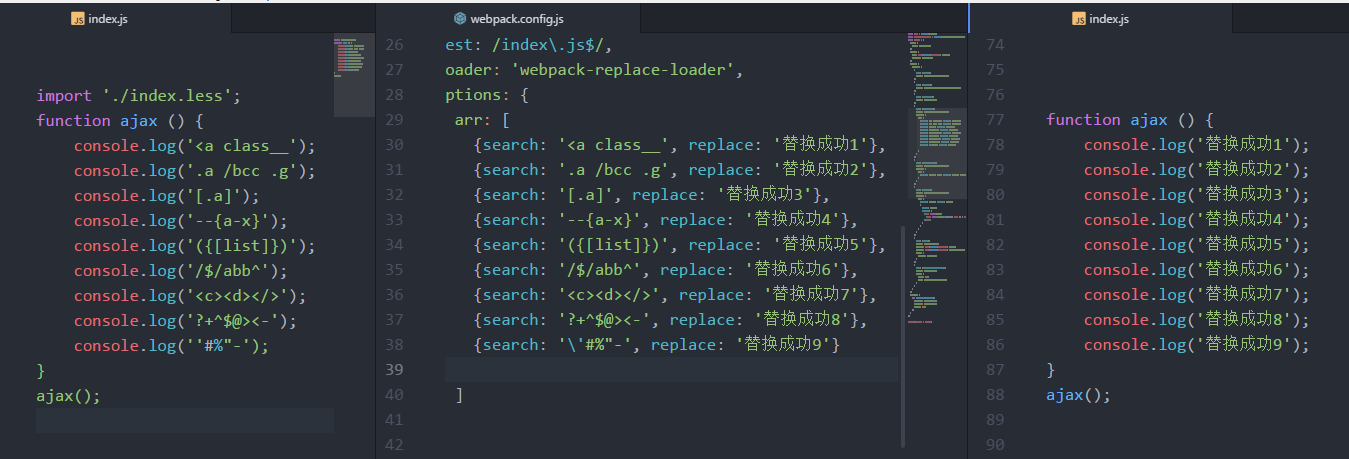
1.2版本后,已做全字符转义,包含但不限于下列情况均可替换。
search: '<a class__';
search: '.a /bcc .g';
search: '[.a]';
search: '--{a-x}';
search: '({[list]})';
search: '/$/abb^';
search: '<c><d></>';
search: '?+^$@><-';
FAQs
A loader for replacing strings && 一个 Webpack 打包时用来替换字符串的 Loader
The npm package webpack-replace-loader receives a total of 400 weekly downloads. As such, webpack-replace-loader popularity was classified as not popular.
We found that webpack-replace-loader demonstrated a not healthy version release cadence and project activity because the last version was released a year ago. It has 1 open source maintainer collaborating on the project.
Did you know?

Socket for GitHub automatically highlights issues in each pull request and monitors the health of all your open source dependencies. Discover the contents of your packages and block harmful activity before you install or update your dependencies.
Product
Socket now supports Custom Roles and Repository Access Permissions so organizations can control who can access specific repositories and actions.

Product
Socket MCP now lets AI assistants review org alerts, investigate threats using the Socket threat feed, and inspect package files in addition to dependency scoring.

Product
Socket Firewall blocks malicious VS Code and Open VSX extensions before install, protecting developers from compromised editor marketplaces.