

Product
Microsoft Teams Notifications Are Now Available in Socket
Socket can now send alerts and supply chain attack notifications to Microsoft Teams, with filters that route the right updates to each channel.
By Jeppe Hasseriis - Sep 01, 2026
wordpress-rest-admin
Advanced tools
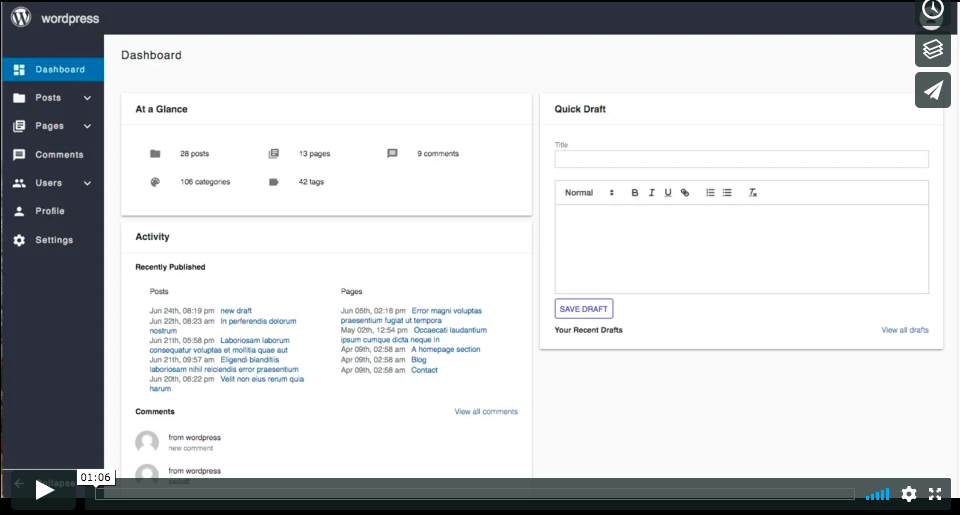
A frontend for admin area of WordPress, using WP REST API and React. It works with Self-Hosted WordPress.
A frontend for admin area of WordPress, using WP REST API and React. It works with Self-Hosted WordPress.
This project was bootstrapped with Create React App.
Make sure you have WP REST API and JWP plugin installed in your wordpress
git clone https://github.com/rnaga/wordpress-rest-admin.git .
npm install
npm start
cd /path/to/your/project
npm install
npm i wordpress-rest-admin
import WPAdmin from 'wordpress-rest-admin/WPAdmin';
import contents from 'wordpress-rest-admin/contents';
import loginLogo from './WordpressLogo.svg';
import headerLogo from './WordpressLogo.png';

...

<WPAdmin
  loginLogo={loginLogo}
  headerLogo={headerLogo}
  defaultContent={defaultContent}
  contents={contents}
/>
See example here
npm install yo -g
git clone https://github.com/rnaga/wordpress-rest-admin.git .
cd ./generator
npm link
There is "generator" directory in this repo. Go under the directory, then run "npm link" as above
yo wordpress-rest-admin:contents [mypage]
It creates new files under "contents" directory (see blow)

import mypage from './contents/mypage';

....

<WPAdmin contents={{mypage}} />

See example here
By default, the generated project uses the latest version of React.
You can refer to the React documentation for more information about supported browsers.
FAQs
A frontend for admin area of WordPress, using [WP REST API](https://v2.wp-api.org/) and [React](https://reactjs.org/). It works with Self-Hosted WordPress.
The npm package wordpress-rest-admin receives a total of 10 weekly downloads. As such, wordpress-rest-admin popularity was classified as not popular.
We found that wordpress-rest-admin demonstrated a not healthy version release cadence and project activity because the last version was released a year ago. It has 1 open source maintainer collaborating on the project.
Product
Socket can now send alerts and supply chain attack notifications to Microsoft Teams, with filters that route the right updates to each channel.

Security News
pnpm 12 rewrites the package manager in Rust, cutting install times by up to 90% while preserving pnpm 11 workflows and lockfiles.

Security News
Socket CTO Ahmad Nassri joins AppSec leaders at Black Hat to discuss active malware, package manager risks, and software supply chain defense.