AIContextBuilder (aicb)





Give coding agents a Roslyn-accurate map of your C#/.NET solution. aicb
answers questions about callers, implementations, dependency injection, tests,
side effects and change impact, then packs the relevant code into compact
Markdown for an LLM. It runs locally as an MCP server and CLI; a Windows desktop
app adds visual context selection, analysis and editing.
The software is closed source. This public repository contains its
documentation, licence and releases. It is free for individuals, education and
organizations below the licence thresholds.
See it answer a code question
Ask your coding agent:
What could be affected if I change ColorMixerService? Use AICB.
Or call the same tool from a terminal:
aicb call impact_of_change --sln C:/repo/App.sln --arg symbol=ColorMixerService
Abridged output from the bundled ColorMixer.SelectionLab sample:
{
  "symbol": "ColorMixerService",
  "resolvedKind": "type",
  "directCount": 1,
  "transitiveCount": 2,
  "risk": "low",
  "productionImpactCount": 2,
  "directImpact": { "items": ["DemoCompositionRoot"] }
}
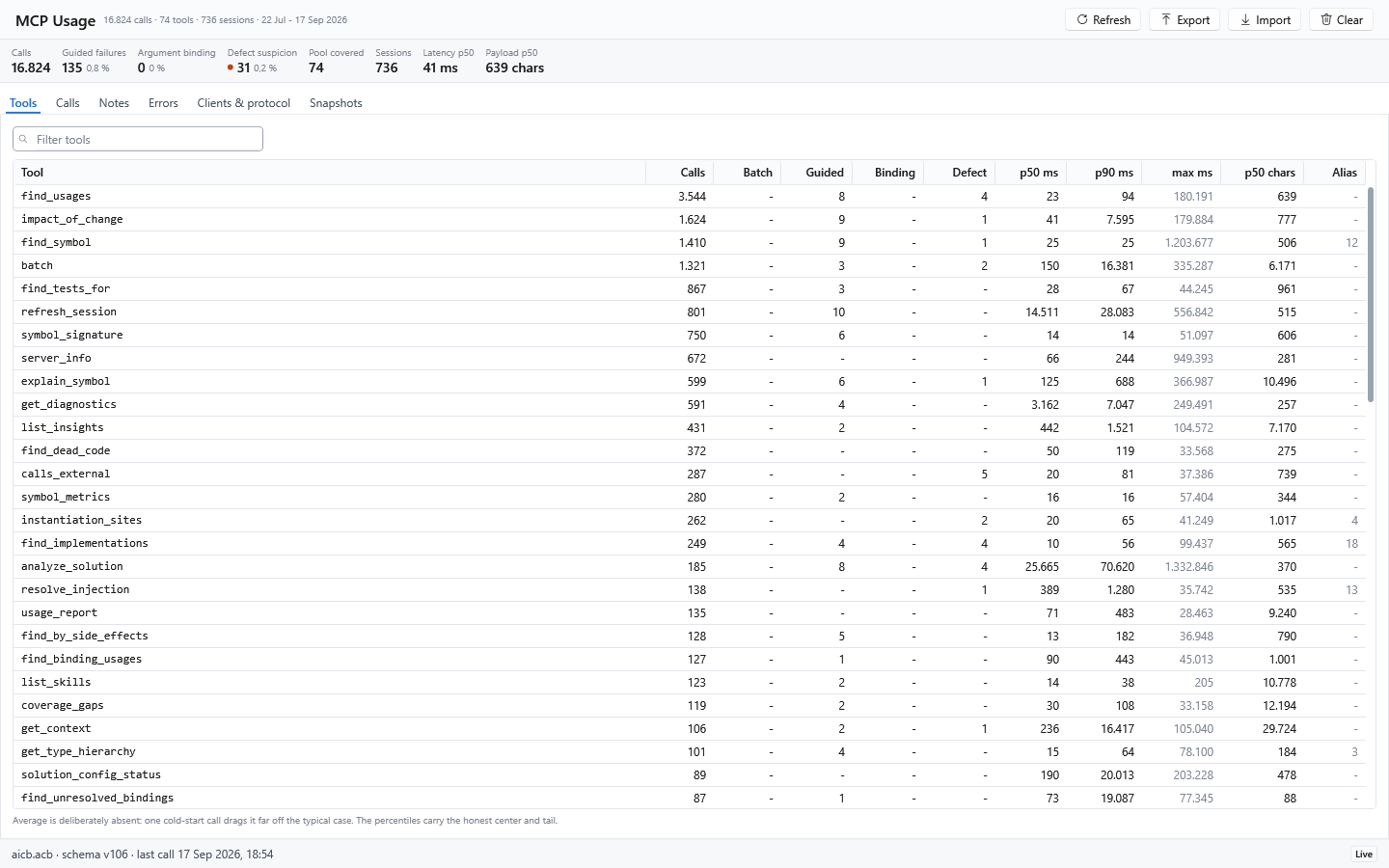
The desktop app's MCP Usage page records calls locally and separates guided
refusals from suspected defects:
That answer comes from the Roslyn symbol graph, not a substring search. AICB
distinguishes overloads, follows interface and override relationships, understands
partial types and records DI construction paths.
Build context that fits the task
AICB does more than answer individual symbol questions. It can assemble a focused,
task-specific context package for an agent instead of sending an unfiltered source
dump:
| Read one symbol in context | get_context | The symbol plus its direct dependencies and callees |
| Explore a named symbol with selected surroundings | explain_symbol | Callers, callees, implementations, tests or other requested dimensions |
| Pack context for a natural-language goal | pack_for_task | Goal-named symbols and their semantic neighbourhood |
| Prepare to edit | prepare_task | The goal-focused context plus covering tests and likely siblings such as a factory or validator |
| Check the response cost first | measure | The exact token count of one or more planned tool answers, without returning their large payloads |
The focused context tools accept a token budget. Explicitly named seed symbols
stay in the package; AICB first reduces method detail and then removes less-relevant
surrounding content when the budget is tight. It does not cut text in the middle of
a block, and a leading note discloses types, tests or siblings that were omitted.
Whole-document rendering can use the same budget pipeline through a pipeline profile,
including a configurable overshoot allowance and an optional trimming report.
The result is AI-Builder-MD: structured Markdown for an LLM, containing the
selected code together with symbol relationships, architecture graphs, semantic
metadata and provenance. It can use the established tag notation or YAML. See the
context-document guide
and the task-packing tools.
Add explicit meaning with AI annotations
AICB works without annotations. Where source structure and conventions are not
enough, optional <ai> tags in XML documentation let a developer state the intended
role of a type or method explicitly:
public sealed class OrderService
Annotations can describe semantics such as role, domain, architectural layer,
priority, stability, responsibility and side effects. Explicit values take
precedence over heuristic inference; sentinel values such as none can deliberately
suppress inference for one field. AICB preserves provenance so an agent can
distinguish source-derived facts, author-provided meaning and inferred hints. The
AI annotation reference
documents the supported forms and fields.
How analysis and memory work
.sln / .slnx / .slnf + C# + XAML/AXAML
                 ↓
        MSBuild + Roslyn semantic models
                 ↓
  AICB facts and consolidated semantic indexes
                 ↓
 individual answers or budgeted AI-Builder-MD
AICB is more than a response cache around Roslyn. During analysis it walks the
solution's C# documents, records declarations, calls, type references and other
facts, then consolidates caller and type fan-in, implementations, resolved markup
references and transitive side-effect classifications. Tools traverse or project
that warm model for a particular question; context tools select and render a
task-specific slice. This does not mean that every possible answer or runtime
relationship is precomputed.
An MCP session belongs to one aicb mcp process and pins both the analyzed graph
and its Roslyn workspace. A second server process builds its own session. The
desktop app, CLI and MCP server use the same analysis and rendering engine and can
share configuration and persisted snapshots through the local database, but they
do not share one live in-memory graph. Within one session, only one refresh runs at
a time; concurrent callers join it. A source-only edit can take the incremental
path, replaying changed document text without reloading the workspace. When that
path is unavailable, or when force: true is requested, AICB fully reloads it.
What the model can and cannot prove
- AICB analyzes statically visible C# and selected XAML/AXAML relationships. Code
reached only through reflection, runtime assembly scanning, dynamic configuration
or an external consumer can remain invisible.
- DI analysis recognizes statically readable Microsoft-DI-shaped registrations;
runtime-produced registrations are disclosed as dynamic or unknown rather than
invented.
- XAML binding analysis resolves paths only where the source and data type are safe
to establish. Unknown scopes are skipped conservatively.
- A reported side effect is a conservative static contact classification propagated
through known call edges. It is not general data-flow, taint or runtime state
analysis.
- Responses disclose stale sessions, unresolved projects and capped result sets.
Read
staleness, incompleteProjects, totalFound and truncated before treating
an empty or short answer as proof.
The question-first architecture, limits and evidence guide
explains what lives in memory, how refresh and context selection work, which claims
are measured, and which benchmarks have not yet been published.
Where it helps
| Who calls or uses this? | find_usages |
| What is the blast radius of a change? | impact_of_change |
| Where is this interface implemented or overridden? | find_implementations, find_overrides |
| Which tests exercise this symbol? | find_tests_for |
| What gets injected here? | resolve_injection |
| Which code has side effects or calls an external API? | find_by_side_effects, calls_external |
| What context does an agent need for this task? | explain_symbol, prepare_task, pack_for_task |
| How large would these answers be before I pull them? | measure |
| Where is this property or resource used in XAML/AXAML? | find_binding_usages, find_resource_usages |
| Which markup bindings cannot be resolved safely? | find_unresolved_bindings |
| What changed between two analyzed states? | semantic_diff, diff_review |
| Does this change set violate a policy or public contract? | evaluate_change_set, compare_public_api |
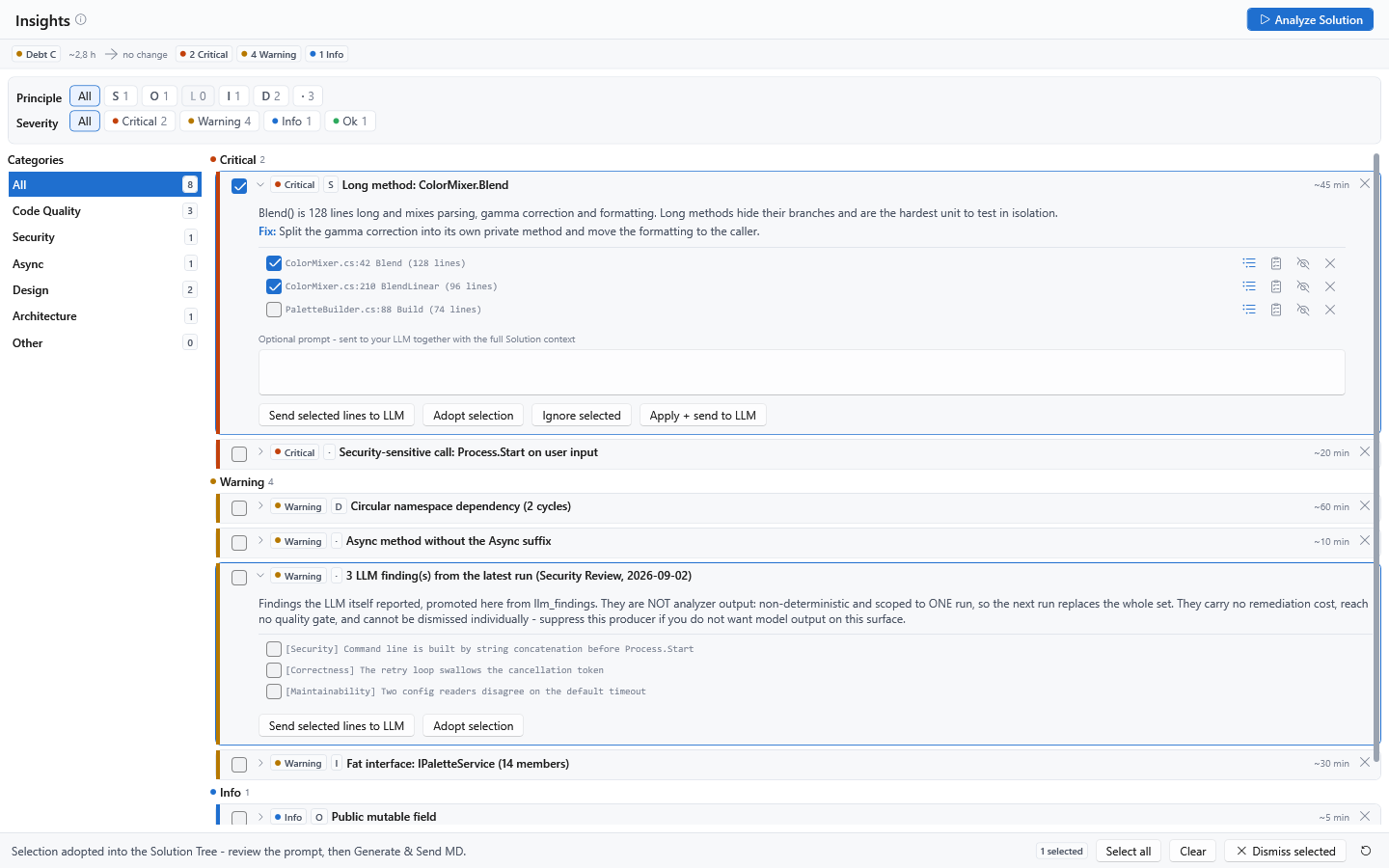
The desktop app turns code-quality, security, design and architecture findings
into an actionable review queue:
AICB is most useful for non-trivial C#/.NET solutions and semantic questions that
plain text search cannot answer reliably. It is not a general-purpose code search
tool and does not analyze non-.NET projects. The first question opens and analyzes
the solution, which can take seconds to minutes; later questions reuse the warm
session.
A safe agent workflow
An agent can use AICB without memorizing the tool catalog:
- Call
server_info to verify the connection and detect binary or configuration
drift. Use list_skills for the complete capability map or docs() for the
built-in operating manual.
- Start an edit task with
prepare_task to collect the named symbols, relevant
context, covering tests and likely sibling implementations within one budget.
- Before changing a symbol that other code names, call
impact_of_change; use
find_tests_for when the task bundle does not give enough test evidence.
- Make and save the change. Then call
refresh_session before
get_diagnostics, so diagnostics compile the post-edit graph rather than the
previous session state.
- Finish with the repository's real build and test commands.
get_diagnostics
reports Roslyn compiler diagnostics, not third-party analyzer or runtime results.
For several independent read-only questions, batch reuses one session and returns
one bounded response. Use measure first when the likely response size matters.
Reproducible analysis, CI and review
| Give every developer and agent the same solution rules | Commit <Solution>.aicb.json next to the solution. It carries layers, namespace exclusions, test detection, suppressions and analysis scope. Use solution_config_status → init_solution_config → apply_solution_config; aicb init does not create this file. |
| Enforce a quality threshold in CI | Run aicb analyze -s App.sln -o context.md --fail-on "critical>0 OR debt>120min". A failed gate returns exit code 6 and still writes the context document for diagnosis. |
| Compare an in-place change with a baseline | Call save_session before the edit, then refresh_session and compare_with_previous; use diff_public_contract when the public API is the contract that matters. |
| Review two live analyzed states | semantic_diff reports structural changes. diff_review adds blast radius, tests and newly introduced findings with a policy verdict. These two-session tools require the Full Select profile. |
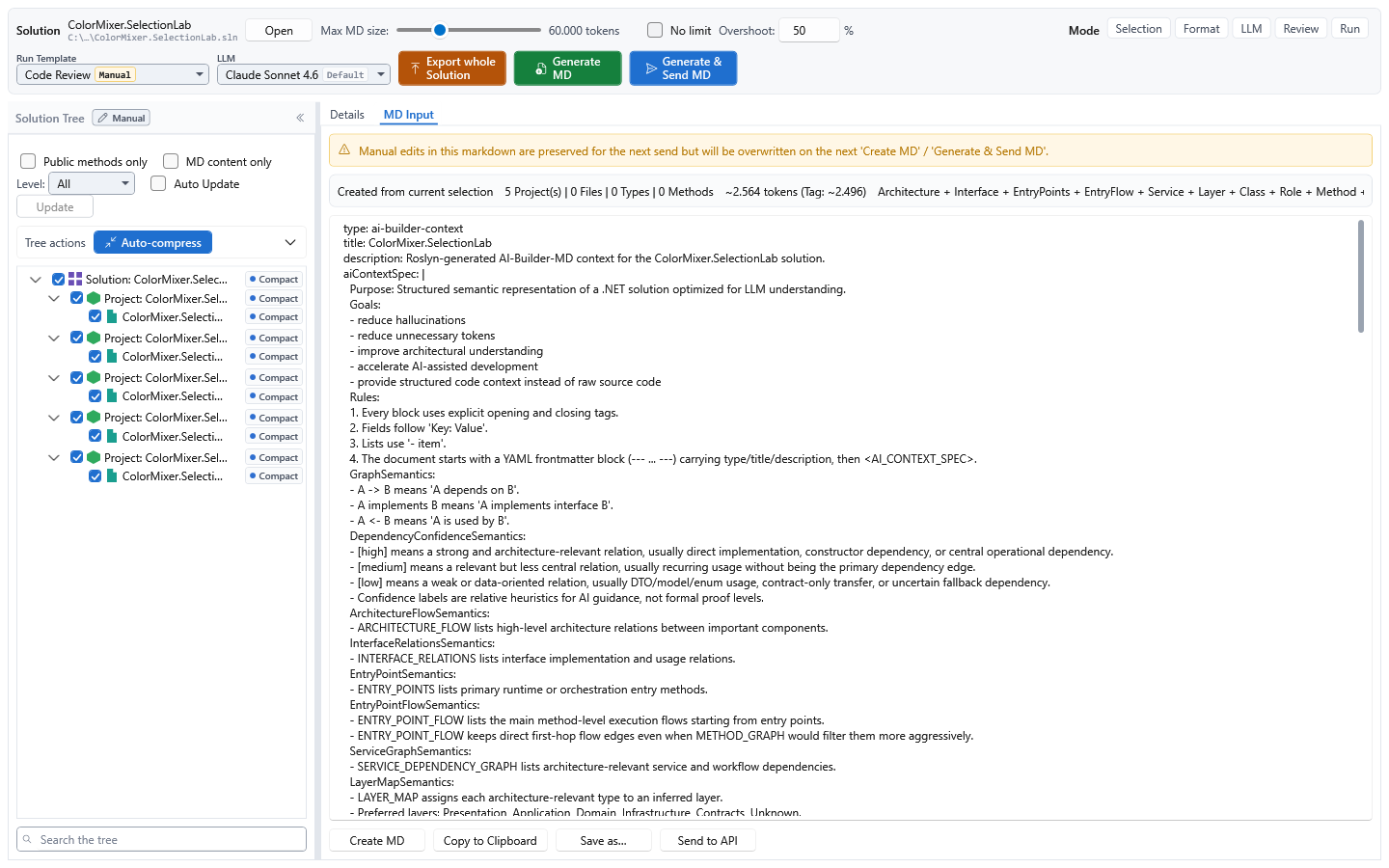
| Curate context visually | The Windows app adds a solution tree, manual context selection, detail and token controls, AI-Builder-MD preview/export, snapshots, Insights, LLM runs and a source editor. |
Configuration precedence is explicit tool argument → local configuration database
→ committed .aicb.json → built-in heuristic. A running session keeps the
configuration it was analyzed with; after editing the sidecar, start a new analysis
instead of assuming refresh_session re-reads it.
Install
Install one form per machine:
The .NET tool needs the .NET 8 SDK:
dotnet tool install -g AIContextBuilder
aicb --version
Update it later with dotnet tool update -g AIContextBuilder.
The Windows downloads are self-contained, but analyzing a solution still needs
MSBuild from a .NET SDK or Visual Studio. The installer is not code-signed yet, so
Windows SmartScreen displays a warning; every release provides SHA-256 checksums.
Connect a coding agent
Run this from the project you want the agent to work on:
aicb init
It writes the MCP configuration and the aicb-csharp-context agent skill without
overwriting existing files. If it detects Claude Code, Codex or OpenCode project
configuration, it also installs a symbol guard that blocks C# symbol searches
by grep and redirects the agent to the semantic tool. This intentionally changes
agent behaviour. Opt out with:
aicb init --hooks none
Client-specific status:
| Claude Code | .mcp.json written by aicb init | Skill and optional guard installed |
| Codex | Add aicb mcp through the client's MCP configuration | Optional guard supported; skill location is not guessed |
| OpenCode | Add aicb mcp to opencode.json | Optional guard supported; skill location is not guessed |
| Cursor / Cline / other stdio clients | Add command aicb with argument mcp | Use the published skill if the client supports Agent Skills |
Manual .mcp.json configuration for clients that read it:
{
  "mcpServers": {
    "aicb": {
      "command": "aicb",
      "args": ["mcp"]
    }
  }
}
Verify the connection by asking the client to call server_info. Every analysis
tool accepts an absolute .sln, .slnx or .slnf path as its session, so no
separate analyze step is required. See the five-minute guide
for setup, first questions and troubleshooting.
Tool sets and Agent Skills
| Default MCP profile | 54 tools | Curated semantic and structural tools for normal agent work |
| Full analysis profile | 72 tools | Default set plus the measured long tail |
| Complete server surface | 82 tools | Full profile plus opt-in infrastructure tools |
Start the full analysis profile with
aicb mcp --mcp-profile mcp-profile/full. Set AICB_MCP_TOOLS=all to add
the infrastructure tools. The generated tool reference documents
the default set; the MCP server manual
documents all 82 tools and their parameters, and alongside them sessions and
staleness, profiles, pools and facets, and what aicb init writes — twelve
chapters in Markdown, readable in the browser and by an agent, and also
published as a PDF.
Four Agent Skills ship in skills/:
aicb-csharp-context routes semantic C# questions to the right tool.aicb-code-review checks a completed change for correctness.aicb-code-simplifier looks for unnecessary complexity.aicb-usage-check reports what this server was actually reached for.
The last three are opt-in: aicb init --skills=all.
CLI at a glance
aicb init      Connect a project to the MCP server and install the agent skill.
aicb analyze   Analyze a solution and emit context Markdown.
aicb export    Re-render Markdown from an existing session database.
aicb import    Import a constellation JSON.
aicb list      List built-in and custom profiles and presets.
aicb mcp       Start the stdio MCP server.
aicb call      Invoke one MCP tool without an MCP client.
Run aicb <command> --help for options.
Local by default
- The CLI and MCP server have no outbound network capability and do not modify
the source code they analyze.
- There is no outbound telemetry, analytics, update check, account or licence
server. The MCP server records tool calls locally for
usage_report and the
desktop app's MCP Usage page; that log never leaves the machine.
- The desktop app contacts only an LLM endpoint you configure: for a manual run,
a connection test, or armed first-load proposals. The endpoint may be a local
model. Its Details tab is also a real editor and saves only when you use Save.
- Opening a solution runs its MSBuild logic to resolve references. Analyze only
solutions you trust. AICB does not run third-party Roslyn analyzers or source
generators.
A small number of explicitly named tools can write configuration or an export;
their tool descriptions state this. The complete threat model and private
reporting route are in SECURITY.md.
Licence at a glance
Use is free for:
- private, hobby and educational use by natural persons,
- accredited educational institutions for teaching, learning and
non-commercial research,
- organizations that reach none of these thresholds: 100 employees,
EUR 10 million annual turnover, 21 developers.
The thresholds apply to your organization, not to your clients. After first
reaching any one threshold, you have 90 days to agree a commercial licence; use
remains free during that period. The 90 days are contractual text only: AICB
starts no licence timer, sends no threshold or deadline data, blocks no feature
and does not technically stop working when the period ends. Commercial licences
start at EUR 25 per licensed developer per month; the exact price and scope depend
on the number of users, the requested support level and any agreed priority for
improvement requests. A commercial agreement can include support, defined response
or maintenance commitments, prioritized consideration or
implementation of improvements—for example, making a generally useful analyzer
handle patterns found in the customer's code more accurately. Such work improves
the general AICB product; it does not create a customer-specific fork or specialize
AICB to one codebase. Customer code is never collected or used for improvement
automatically; examining it requires material or access deliberately provided by
the customer and a separate agreement on scope and confidentiality. Exact
deliverables, priorities and guarantees exist only when written into the individual
agreement. Connecting AICB to MCP clients, agent harnesses, scripts, build systems
and CI through its documented interfaces is permitted. Redistributing, modifying,
repackaging, reselling or offering the AICB binaries as a hosted service is not.
Contact aicb@dadera.de. See the plain-language guide,
LICENSE.txt and the full bilingual EULA.md.
Documentation and support
- Getting started — install, connect and ask the first question
- Tool reference — generated reference for the default MCP profile
- Architecture, limits and evidence — in-memory model, refresh, context selection, static-analysis boundaries and benchmark status
- MCP server manual — the full reference in twelve Markdown chapters: connecting a client,
aicb init, sessions and staleness, profiles and facets, every tool, troubleshooting
- General reference manual — the full reference in twelve Markdown chapters, with the printable PDF in the same folder
- Desktop app reference manual — the full reference in eleven Markdown chapters, with the printable PDF in the same folder
- Changelog and latest release
Questions and feature requests are welcome in
GitHub Discussions. Report bugs
through GitHub Issues; if GitHub does
not offer a New issue button, use Discussions. Include aicb --version and,
for MCP problems, the output of server_info. Report security issues privately as
described in SECURITY.md.
"AIContextBuilder" and "AIContextBuilder for .NET" are product names used by
Gregor Dadera; no registration is claimed.



