
VS Code Official Extension
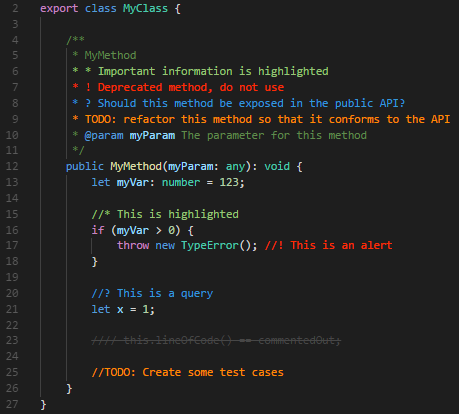
Better Comments helps you create human-friendly, beautiful annotations in your code!
Organize and visually distinguish your comments as:
- Alerts
- Queries
- TODOs
- Highlights
- Commented-out code
- Custom annotation styles (fully configurable)
Make your comments eye-catching and purposeful with custom tags and color coding.
Configuration
Easily customize Better Comments to your workflow through VS Code settings.
-
"better-comments.multilineComments": true
Enable or disable tag highlighting in multiline comments.
-
"better-comments.highlightPlainText": false
Highlight tags in plain text files if enabled.
-
better-comments.tags
Define your own tags, colors, and decorations. Example:
"better-comments.tags": [
  { "tag": "!", "color": "#FF2D00" },
  { "tag": "?", "color": "#3498DB" },
  { "tag": "//", "color": "#474747", "strikethrough": true },
  { "tag": "todo", "color": "#FF8C00" },
  { "tag": "*", "color": "#98C379" }
]
Supported Languages
A wide range of languages are supported, including but not limited to:
Ada, C, C#, C++, Dart, Elixir, Elm, Go, Groovy, Haskell, HTML, Java, JavaScript, Julia, Kotlin, LaTex, Lisp, Lua, Markdown, MATLAB, Objective-C, Pascal, Perl, PHP, PowerShell, Python, R, Ruby, Rust, Scala, Shell, SQL, Swift, TypeScript, XML, YAML ... and many more!
You can find the full list on our
GitHub or
Marketplace pages.




