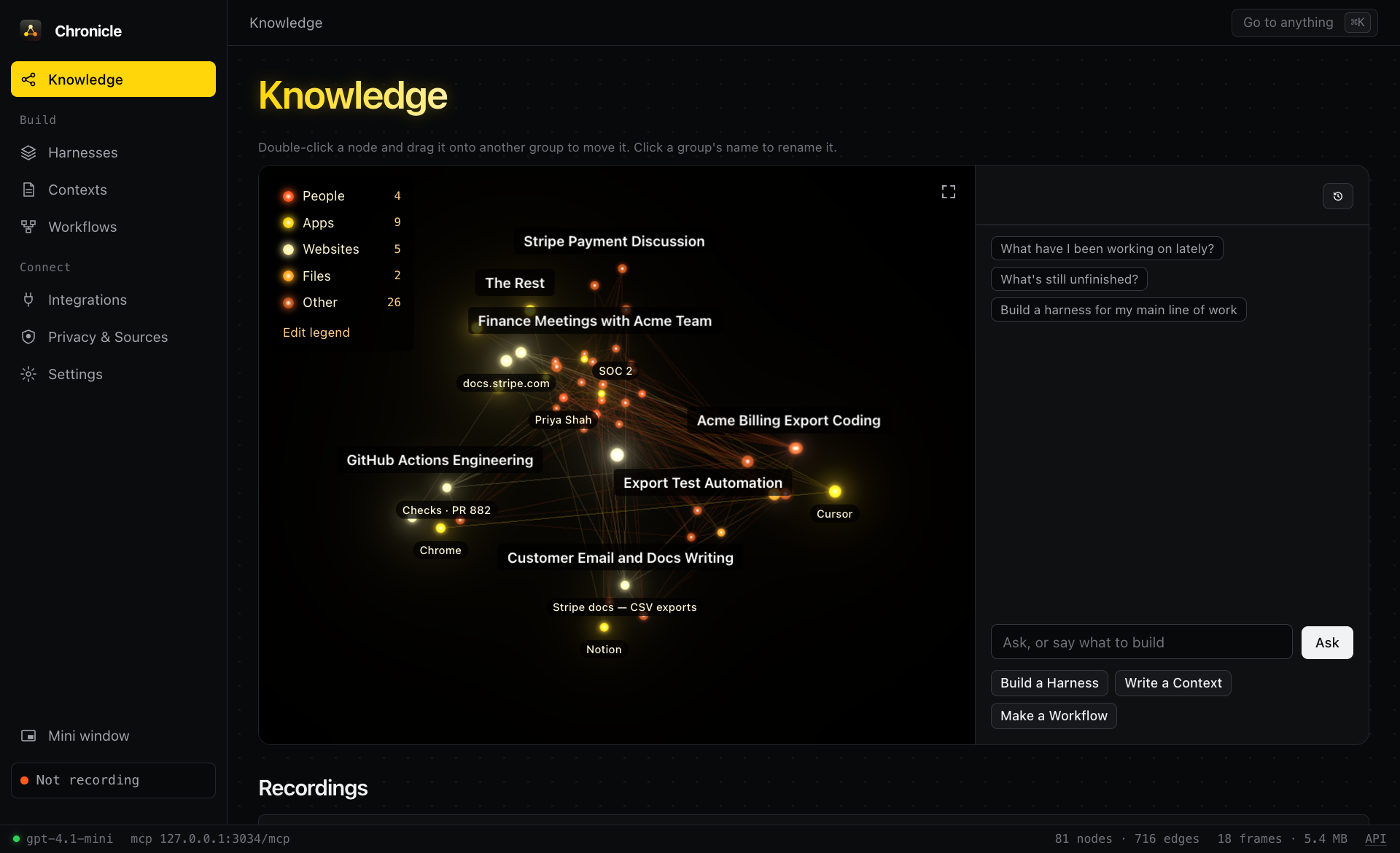
A recording open on its knowledge graph, using the synthetic sample workday that chronicle demo loads. No real screen data is shown.
Chronicle
Chronicle records your screen and system events on your machine, writes context files and workflows from them, and builds them into agent harnesses that plug into any AI over MCP. Full documentation is at aniketxdey.github.io/chronicle.
Agents usually start every task knowing nothing about your computer. They don't know which ticket you were on, which file you had open, or what you looked up ten minutes ago. So you end up pasting context in by hand. Chronicle keeps that memory locally and lets the agent ask for it:
- Pick up where you left off. "Finish the Acme export" works because the agent can see you were editing
export.ts, that PR 882 is waiting on review, and what the export spec in Notion said.
- Teach by showing. Record yourself doing a task once, and the agent gets the apps, pages, and steps in order so it can repeat it.
- Hand it to tools that don't speak MCP. Download a harness as a zip or one Markdown file for ChatGPT or Claude Projects, NotebookLM, Neo4j, or a RAG pipeline.
Everything is stored in one local folder (~/.chronicle), with no account and no telemetry. The only data that leaves the machine goes to model providers you give a key to (see Privacy).
Quick start
Requires Python 3.10+. macOS is the main platform; Linux (X11) and Windows support is best effort.
uv tool install "chronicle-context[graph]"
chronicle demo
chronicle context "finish the Acme export"
chronicle mcp install cursor
chronicle context prints the same Markdown that the get_context MCP tool returns. On the sample workday it begins like this (trimmed):
# Computer context (Chronicle)
Task: finish the Acme export

## What you were doing
- 15:34-15:56 writing Acme Export spec · amount_usd (22m) [topic 1]
- 16:28-16:48 coding export.ts · amount_usd (20m) [topic 2]
- 16:50-17:02 coding Checks passed · Merge (12m) [topic 3]

## On screen now
- Chrome · Checks · PR 882 at Sun 16:50 (frame 18)
- URL: https://github.com/northwind/billing/actions
- Visible text: ... Merge is waiting on Priya's second review. Acme export is still due Friday.

## Knowledge graph (all)
- [topic] Acme export (`topic:acme-export`, 1h58m, frames 18, 16, 13)
- [pr] PR 882 (`pr:882`, 2h42m, frames 18, 17, 16)
- [file] export.ts (`file:export.ts`, 1h48m, frames 17, 11, 6)
- [person] Maya Chen (`person:maya-chen`, 2h28m, frames 16, 14, 12)
To record your own work, run chronicle doctor to check permissions, then chronicle record 30m or chronicle serve and use the UI at http://127.0.0.1:3030.
Permissions and platform tools
- macOS: grant Screen Recording and Accessibility, under System Settings › Privacy & Security, to whatever runs Chronicle: your terminal, or the MCP host app such as Claude Desktop or Cursor. Browser URLs need a one-time Automation prompt per browser. Supported browsers are Safari, Chrome, Arc, Brave, Edge, Vivaldi, and Opera.
- Linux: needs
xdotool and xprop. For screenshots install one of grim, gnome-screenshot, scrot, or ImageMagick import. Add xclip or wl-paste for the clipboard and xprintidle for idle time.
- Windows: reads the window, idle time, screenshots, and clipboard through user32 and PowerShell.
- OCR (optional):
brew install tesseract or apt install tesseract-ocr.
The only required dependencies are FastAPI and uvicorn. The graph extra adds scikit-learn and scipy for better duplicate merging, and llm adds the OpenAI SDK and python-dotenv.
How it works
Record. A session runs for a set duration (90s, 30m, 2h) or until stopped. Every 5 seconds by default, the recorder samples the front app and window, the browser URL and tab title, and a screenshot. It also logs the system events app_switch, window_focus, url_change, clipboard, idle_start/idle_end, and session_start/session_stop. Screen text comes from the macOS Accessibility tree, and from tesseract OCR on the screenshot when an app exposes no text. Keystrokes are never recorded. Password managers, System Settings, and private browsing windows are skipped, and emails, API keys, JWTs, and card numbers are redacted before anything is written.
Build the graph. Each session gets its own graph shard. The shard is extended while recording and rebuilt once when the session ends, and frames captured outside a session go into hourly shards. The all-history graph is a SQL aggregation over the shards in which older shards count less (72-hour half-life by default). That keeps it focused on current work, and deleting a session just drops its shard.
- Nodes: apps, windows, sites, pages, search queries, topics, files, tickets (
BILL-142), PRs, code identifiers, people, projects, customers, meetings, sessions, and tasks. Topics are keyphrases such as "Acme export", scored by frequency, spread, casing, position, and dwell time. Tasks are activity segmented by topic.
- Edges:
has_window, visited, on_site, shows, searched, about, co_occurs, switched_to and then (workflow transitions), spoke_in, discussed, copied, typed (text pushed through POST /add), and captured.
Every node and edge records the time spent on it and the frames it came from, so an agent can cite its evidence. If an OpenAI key is available, a model also refines each recording when it ends (see LLM refinement).
Serve. get_context(task) returns a context pack with these parts:
- the current screen;
- recent activity blocks and system events;
- habitual app transitions;
- the subgraph relevant to the task;
- cited frames.
Agents then drill down with query_graph, get_entity, search_history, and get_frame, which can return the screenshot itself.
Connect an agent
Packaged installs
These need uv on the PATH. Each runs uvx chronicle-context mcp and tells the model to call get_context before acting.
- Claude Code, Claude Desktop, Cowork:
claude plugin marketplace add aniketxdey/chronicle, then claude plugin install chronicle@chronicle.
- Gemini CLI:
gemini extensions install https://github.com/aniketxdey/chronicle.
- MCP Registry clients: search for
io.github.aniketxdey/chronicle.
Local clients (stdio)
chronicle mcp install <client> merges the server into the client's config and keeps a .chronicle-backup copy of the old file. chronicle mcp config <client> prints the snippet instead, and chronicle mcp clients lists them all.
| Claude Desktop | chronicle mcp install claude-desktop | claude_desktop_config.json → mcpServers |
| Claude Code | chronicle mcp install claude-code | runs claude mcp add --scope user chronicle -- … |
| Cursor | chronicle mcp install cursor | ~/.cursor/mcp.json |
| VS Code (Copilot agent mode) | chronicle mcp install vscode | user mcp.json → servers |
| Windsurf | chronicle mcp install windsurf | ~/.codeium/windsurf/mcp_config.json |
| OpenAI Codex CLI | chronicle mcp install codex | ~/.codex/config.toml → [mcp_servers.chronicle] |
| Gemini CLI | chronicle mcp install gemini-cli | ~/.gemini/settings.json |
| Cline, LM Studio | chronicle mcp install cline / lm-studio | their mcpServers JSON |
| Zed, Continue, Goose | chronicle mcp config zed / continue / goose | paste the snippet |
For any other client:
{ "mcpServers": { "chronicle": { "command": "chronicle", "args": ["mcp"] } } }
A stdio server can record on its own. Only one Chronicle process captures at a time: whichever holds ~/.chronicle/capture.lock. So an agent can call start_recording without chronicle serve running. Pass --no-record to turn this off.
Hosted agents and model APIs (Streamable HTTP)
chronicle serve exposes MCP at POST /mcp and supports protocol versions 2025-06-18, 2025-03-26, and 2024-11-05. Hosted agents need a public HTTPS URL, so put it behind a tunnel and set a token:
export CHRONICLE_TOKEN=$(openssl rand -hex 16)
export CHRONICLE_PUBLIC_URL=https://<your-tunnel-host>
chronicle serve &
cloudflared tunnel --url http://127.0.0.1:3030
With a token set, every route except the UI shell and /health requires it. Open the UI once with ?token=… and it remembers the token. Requests with a non-local Origin header are rejected.
- ChatGPT (Settings › Connectors › Developer mode › Create): paste the
/mcp/<token> URL with no authentication. The search and fetch tools return the shapes that connectors and deep research expect.
- OpenAI Responses API:
tools=[{"type": "mcp", "server_label": "chronicle", "server_url": URL, "require_approval": "never"}]. See examples/openai_responses.py.
- Anthropic Messages API (MCP connector beta
mcp-client-2025-04-04): mcp_servers=[{"type": "url", "url": URL, "name": "chronicle"}], alongside the computer-use tool. See examples/anthropic_computer_use.py.
- Gemini API (
google-genai): pass an MCP ClientSession connected to chronicle mcp as a tool. chronicle mcp config gemini-api prints the snippet.
- Anything else:
chronicle mcp config http prints a curl call.
Provider model names and beta flags change often, so treat these snippets as starting points and check the provider's MCP docs.
MCP tools
get_context | Context pack for a task: current screen, recent activity and events, transitions, relevant subgraph, cited frames. An optional preset (such as coding or job-applications) focuses it on that work and opens it with instructions to follow |
search_history | Full-text search over screen text, events, transcripts, and memories |
query_graph / get_entity / graph_summary | Find entities, walk their neighbors with evidence frames, and get counts and top transitions |
list_tasks | Timeline of tasks, segmented from activity and grouped by topic |
get_frame | One frame with nearby events and audio; include_image=true attaches the screenshot |
list_harnesses / get_harness / read_harness_file / search_harness_graph | Use a harness: its AGENTS.md, its files, and its graph engine |
get_context_file / get_workflow / get_graph | Use one context file, workflow, or graph on its own |
start_recording / stop_recording / list_sessions | Let the agent record a demonstration for a set duration |
rebuild_graph / activity_summary / list_meetings | Maintenance and summaries |
tune_graph | Run the LLM refinement pass on a scope |
graph_review / graph_apply | Let the connected agent curate the graph itself, with no separate model or API key |
search / fetch | ChatGPT connector and deep-research interface |
Resources: chronicle://context/current, chronicle://graph/summary, chronicle://sessions, and the templates chronicle://harness/{id}, chronicle://context-file/{id}, chronicle://workflow/{id}, chronicle://context/session/{id}, and chronicle://frame/{id}.
Prompts: use_my_computer_context(task), and learn_from_recording(session_id), which turns a recorded demonstration into steps an agent can repeat:
chronicle record 5m --label "file an expense report"
chronicle context --session 1
Then ask the agent: "Use the learn_from_recording prompt for session 1 and do it again for this receipt."
Web UI and REST API
chronicle serve runs the UI at http://127.0.0.1:3030:
- Recordings: start a recording, then open any of them. Each one opens on its knowledge graph with a chat beneath it. A model writes its context files and workflows when it ends.
- Harnesses: agent setups built from your own work. A harness is general ("Recruiting") and holds context files, workflows, and a knowledge graph engine merged from the recordings you pick. Design one in steps, then edit it in an IDE-style view, by hand or by chat with your model.
- Contexts: general instructions for one kind of session, like "Researching job companies". Each has its own small graph and works alone or inside a harness.
- Workflows: short, action-oriented procedures for one job, like "Customize resume bullets to keep their length". Each has a trigger, inputs, steps, what to confirm first, and its own small graph.
- Integrations: MCP client setup and file exports.
The REST API is documented at http://127.0.0.1:3030/docs. The most useful routes:
POST /sessions {duration, label} | Start a recording |
GET /context?task=&format=markdown | The get_context pack |
GET /graph, GET /graph/node?id= | Graph and single-node lookups |
GET /contexts/file?preset=… | A context file, plus which model wrote it |
POST /contexts/compose | Write one context file from the recordings, earlier contexts, and workflows you pick |
POST /workflows/generate | Have the model write workflows from the recordings and context files you pick |
POST /harnesses | Build a harness from recordings, context files, and workflows |
POST /harnesses/{id}/chat | Edit a harness by chat with your model |
GET /harnesses/{id}/export | Download a harness as a zip or one Markdown file |
GET /graph/download/{recording,context,workflow}/{id} | One knowledge graph as JSON, text, GraphML, or Cypher |
POST /clients/{id}/install / uninstall | Connect or disconnect a local client |
GET /sessions/{id}/stats | Live storage, frame, event, page, and app totals for a recording |
GET /contexts/export?format=md|json|graphml|cypher | Exports |
POST /add | Push frames, events, or transcripts from your own capture, such as a Whisper audio pipeline |
CLI
chronicle serve [--host --port]                       web UI, REST API, and HTTP MCP
chronicle record <duration> [--label --interval --detach]
chronicle stop [id] · chronicle sessions
chronicle graph build|show|find|node|export [--session N]   (build --full re-extracts every shard)
chronicle graph tasks [--session N --since "2h ago" --json]
chronicle graph merges [--session N --threshold --json]     (near-duplicate nodes the build merges)
chronicle graph tune [--session N --rounds 2 --force --reset]
chronicle context [task] [--minutes N --session N --json]
chronicle mcp [stdio|clients|config <client>|install <client> [--path --dry-run]]
chronicle search <q> · chronicle ask <question> · chronicle status · chronicle doctor · chronicle demo
Configuration
CHRONICLE_HOME | ~/.chronicle | Database, screenshots, and lock file |
CHRONICLE_TOKEN | unset | Require this token on the HTTP API and MCP |
CHRONICLE_PUBLIC_URL | http://127.0.0.1:3030 | Base URL for links and remote client snippets |
CHRONICLE_DEMO=1 | off | Load the sample workday into an empty database on start |
CHRONICLE_DISABLE_CAPTURE=1 | off | Never record from this process |
CHRONICLE_HALF_LIFE_HOURS | 72 | Decay half-life for the all-history graph; 0 or off disables it |
CHRONICLE_LLM | unset (automatic) | openai, anthropic, gemini, openrouter, local, or off. Unset uses the first provider with a key. Settings › Model beats it, except off, which always keeps models off |
CHRONICLE_LLM_MODEL | gpt-4.1-mini / claude-sonnet-5-5 | Model for graph refinement, context files, and Ask. Required for local |
OPENAI_API_KEY / OPENAI_BASE_URL | unset / OpenAI | Credentials and endpoint for the openai provider |
ANTHROPIC_API_KEY | unset | Credentials for the anthropic provider |
GEMINI_API_KEY / OPENROUTER_API_KEY | unset | Credentials for the gemini and openrouter providers |
CHRONICLE_LLM_BASE_URL | http://localhost:11434/v1 | OpenAI-compatible endpoint for the local provider |
Capture interval, idle threshold, screenshots, OCR, clipboard, redaction, and retention are settings, edited in the UI or through POST /settings. Two settings mirror environment variables: graph_half_life_hours overrides CHRONICLE_HALF_LIFE_HOURS, while CHRONICLE_LLM takes precedence over llm_provider.
LLM refinement
The heuristic graph knows apps, pages, tickets, files, and identifiers, but it can't tell that "Crusoe" is a company or that a page is a job posting. When a model is set up, it names the graph's nodes, works out what you did from system events and pages, and writes the context files. Set one up under Settings › Model with an OpenAI or Anthropic key, or point it at a local server such as Ollama or LM Studio. Without one, Chronicle runs fully offline: the graph stays heuristic and context files are assembled from the recording directly.
uv tool install "chronicle-context[graph,llm]"
echo "OPENAI_API_KEY=sk-..." >> ~/.chronicle/.env
chronicle graph tune --session 1
chronicle graph show --session 1
The key can also come from the environment or a .env in the current directory. A .env never overrides variables that are already set. Settings › Model or CHRONICLE_LLM=off turns the model off. GET /llm/status reports the provider and model in use and the last error.
Graph patches. The model reads the heaviest nodes along with their evidence: window titles, URLs and search queries, redacted screen text, and dwell time. It replies through strict function calls: add_entity, retype_node, rename_node, merge_nodes, add_relation, add_trait, record_action, drop_action, set_activity, and drop_node. A final pass over every named node merges what separate batches named twice. Actions must cite real frames and carry a status (completed, worked on, discussed, or viewed), because a screen shows state, not what you did. Actions and the system events behind them are kept inside each node, so the graph shows named things and the detail stays one click away. add_relation supports is_a, part_of, works_on, competes_with, located_in, researching, mentions, listed_in, uses, and related_to.
- Each op is validated against the schema and the node ids that exist at that point. Rejected ops go back to the model in the next round. A run makes up to
--rounds passes (default 2) and stops early when nothing new is proposed.
- Accepted ops are stored in
kg_llm_patches and replayed after every rebuild, so refinement survives graph build. --reset removes them.
- Model-made nodes and edges carry
source: "llm", and relations carry a confidence and an evidence quote. get_context lists activities first, then relations such as Crusoe —is_a→ company.
Context files. For each of the eight presets, the model writes a document with the sections that kind of work needs and an "Open threads" list, citing frames. The evidence it was given is appended under "Recorded evidence".
Caching and failures.
- Responses are cached by a hash of the prompt and model, and a scope whose graph hasn't changed is skipped unless you pass
--force.
- Rate limits, timeouts, and API errors are tried up to three times. An account with no credits fails on the first call.
- Errors are recorded in
last_llm_error and never stop a recording. A failed context file falls back to the offline version.
Other providers can be added with chronicle.llm.register(name, factory). A provider implements call_tools(system, user, tools) -> [{"name", "arguments"}] and complete(system, user) -> str.
Privacy
Recordings, screenshots, and the graph stay in CHRONICLE_HOME. Data leaves the machine in three cases:
- MCP clients: an agent you connect receives the tool results it asks for.
- LLM refinement: when it's enabled, window titles, URLs, and redacted screen text are sent to OpenAI.
- Ask:
chronicle ask and the Ask box send the matching history to the provider you configure in Settings.
PRIVACY.md has the details.
Development
git clone https://github.com/aniketxdey/chronicle && cd chronicle
uv pip install -e ".[dev,graph,llm]"
pytest
python examples/stdio_client.py "finish the Acme export"
npx @modelcontextprotocol/inspector --cli chronicle mcp --method tools/list
chronicle/probe.py | Reads the machine: windows, URLs, screenshots, Accessibility text, OCR |
capture.py, sessions.py | The recorder and timed sessions |
graph.py | Shard building, aggregation, and decay |
tuner.py, llm.py | LLM patch pass and providers |
context.py, contexts.py | Context packs and context files |
mcp_server.py, clients.py | JSON-RPC core, stdio transport, and per-client setup |
main.py, web/ | HTTP server and UI |
Releases are described in docs/PUBLISHING.md. The OSWorld benchmark harness is in bench/, and bench/PROTOCOL.md describes the evaluation. It hasn't been run yet, so there are no results.
License
MIT



