


Security News
Deno Goes the Way of the Dinosaur
Cloudflare is acquiring Deno’s team, which will provide another year of bug fixes and security updates before ending support for the runtime.
By Sarah Gooding - Oct 16, 2026
google-ecommerce-mcp
Advanced tools
Multi-client MCP server for online shops: read GA4, Search Console, Merchant Center, Tag Manager, PageSpeed, Google Ads, Meta Ads and ChatGPT Ads, and prepare controlled, human-approved changes (off by default, plan then approve then apply, never tested on a real account).
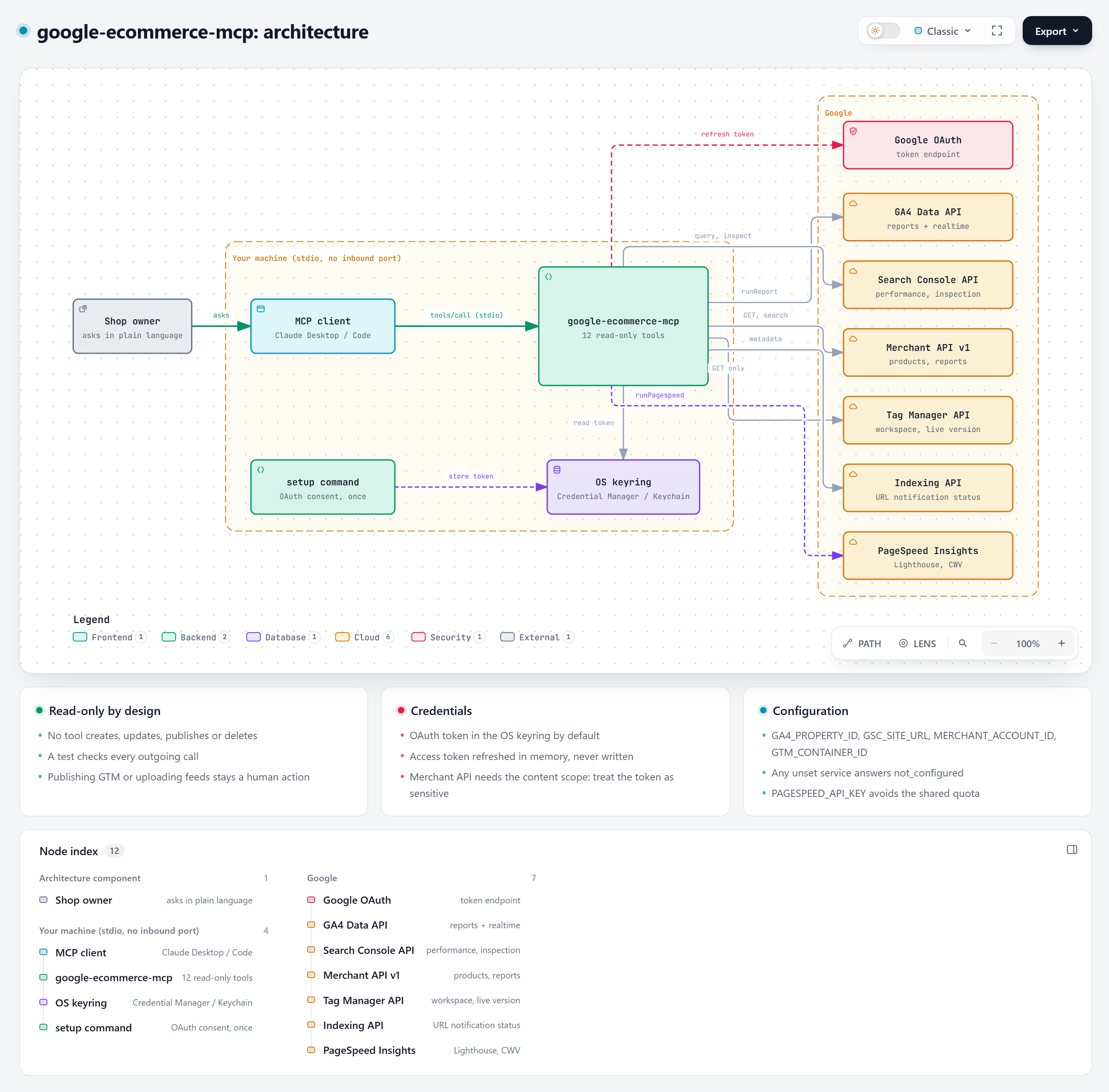
One MCP server for the data an online shop decides from, for one shop or for many clients: GA4, Search Console, Merchant Center, Tag Manager, Indexing API, PageSpeed, the ad platforms Google Ads, Meta Ads and ChatGPT Ads, and the Meta pixel, catalog, Instagram and Page. It reads by default, and can also prepare controlled changes that you approve (pause a campaign, change a budget, submit a sitemap, add a tag in a workspace).
Ask your AI assistant "how much organic traffic did we get this month?", "which products are disapproved in Merchant Center?", "is GA4 loaded twice on my site?" or "what did each ad platform claim last month, and what does GA4 say?" and it answers from your own accounts. Out of the box it reads and reports and changes nothing. If you turn writing on for a client, the assistant can propose a change as a plan; nothing is sent until you approve it, and anything that costs money needs your approval in a terminal, outside the chat.
Built by MoonEyes, a small French shop selling 3D-printed tabletop terrain, because no existing MCP server covered GA4, Search Console and Merchant Center together.
Writing is off by default and has never been tested on a real account. The write tools exist in this version, but they were checked offline only, against fake answers written from each platform's documentation. Turning them on is opt-in per client and per platform, creations are always paused, and some risks cannot be removed (for example a Google Ads token or a ChatGPT Ads key cannot be limited to reading). Read docs/SECURITY.md and docs/WRITE.md before you turn it on, and try it first on a test account. New here? docs/QUICKSTART.md: your first client in 10 minutes.
The paid media connectors are new and tested offline only. The Google Ads, Meta Ads and ChatGPT Ads tools were checked against fake responses written from each platform's documentation. They have not been run against real ad accounts yet: compare the first figures with each platform's own interface. Details: docs/ADS.md.


| Page | What is in it |
|---|---|
| Quickstart | Your first client in 10 minutes: four commands |
| Several clients | The client registry clients.json, secrets per client, isolation, an agency example |
| Writing: plan, approve, apply | Turn writing on in 5 steps, three full examples, every lock, every refusal and its fix |
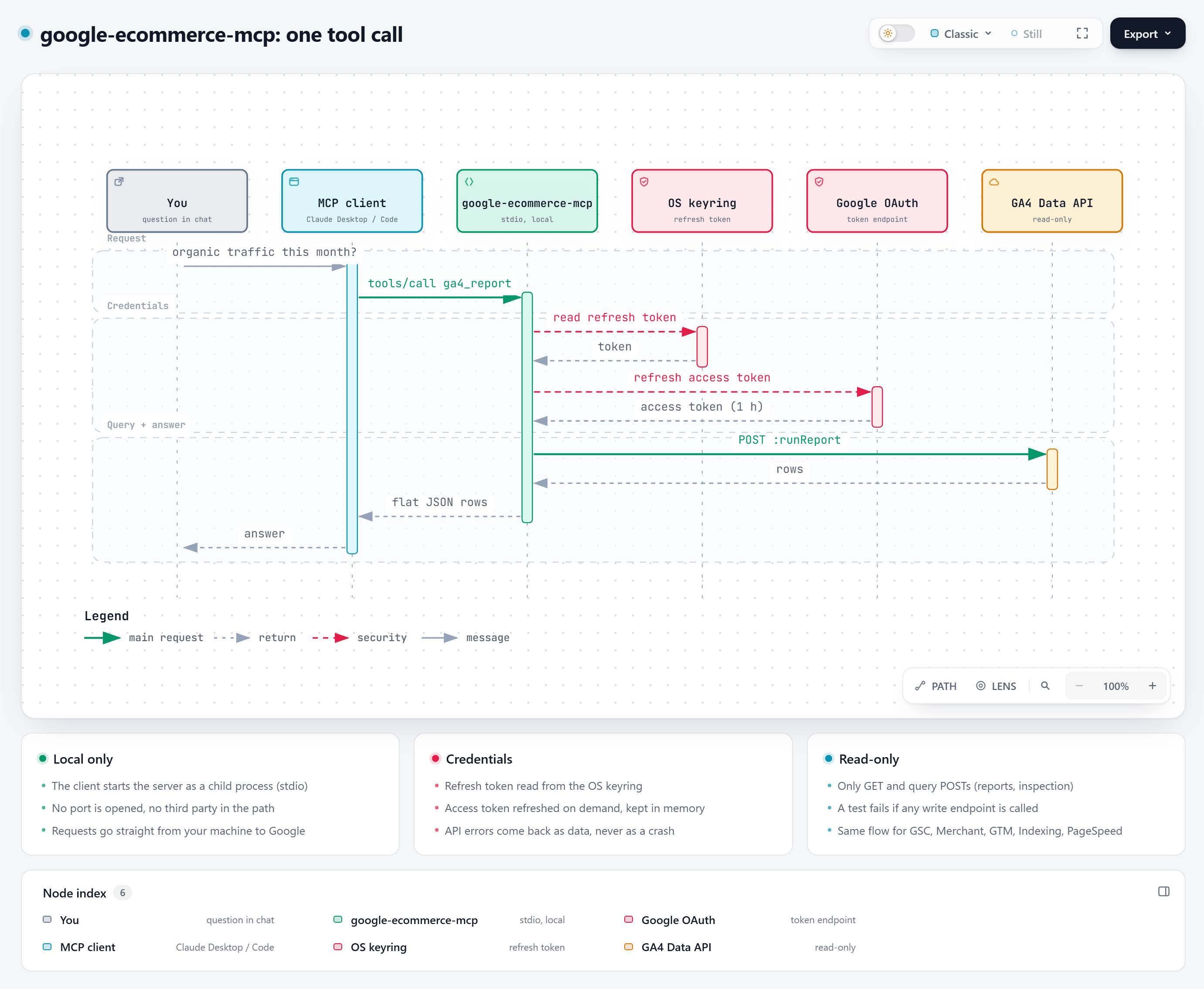
| Architecture | Components, the write path, a tool call step by step, design choices, sequence diagrams |
| Tool reference | Every tool (78): parameters, output, example questions |
| Setup, one service at a time | Which services you need, access checklist and e-mail template for a client, install order with doctor checks, revocation |
| Client reporting | Monthly report plan, KPI formulas, the report command and its input contract |
| Guided install prompts | A prompt to paste into Claude to be guided step by step (French) |
| Third-party notices | Code ported from OpenGSC (MIT); ideas credited to other open-source projects (no code copied) |
| Easy setup guide for ad platforms | Google Ads, Meta Ads, ChatGPT Ads: client e-mail, numbered steps, ids, checks, revocation |
| Paid media guide | Google Ads, Meta Ads, ChatGPT Ads: prerequisites step by step, GAQL rules, errors, what is untested |
| Google Cloud setup | OAuth client, APIs to enable, where to find each id |
| Security model | What writing changes, the real guardrails, the known limits, scopes, token storage, how to revoke |
| Troubleshooting | Every error we have met and its fix |
| Example prompts | Questions that work well, by use case |
| Client configs | Claude Desktop (one or two shops), Claude Code |
Each case gives the question, the tools the assistant usually calls, what you learn, and the decision it supports. The decision stays yours: by default the server shows data and changes nothing, and any change it prepares needs your approval. Ready-to-paste prompts are in examples/PROMPTS.md.
Traffic, search, feed, tracking
ga4_report. You learn which channels bring revenue and which only bring visits. Decision: where to put the next hour or euro.gsc_performance. You learn which pages already earn impressions but few clicks. Decision: which titles, descriptions and internal links to rewrite first.merchant_product_issues, gsc_performance. You learn which feed errors hit pages people still visit. Decision: fix those products before the rest.gtm_inventory, ga4_realtime. You learn whether purchases or page views may be double counted and whether unpublished changes exist. Decision: publish, remove a duplicate tag, or leave it.ga4_report (dimension landingPage), gsc_performance, gsc_inspect_url, pagespeed. You learn which URLs to preserve, which redirects to plan, and the before-numbers to compare with after. Decision: the redirect map and what must not change.Paid media (needs the connectors below)
ads_overview, ga4_report. You learn how far each platform's claim is from what GA4 recorded. Decision: which figure to trust less, and which attribution settings to review in that platform's interface.ads_overview, ga4_report. You learn the value each platform claims and the revenue GA4 saw. The server does not compute an overall return on ad spend (MER): you compare the two yourself. Decision: whether the claimed values are plausible together.gads_performance or meta_insights, ga4_report (dimension sessionCampaignName). You learn which campaigns spend while neither the platform nor GA4 shows a sale. Decision: pause, fix the tracking or wait, done by you in the ad platform.Why platform numbers differ. Meta defaults to a 7-day click plus 1-day view window, ChatGPT Ads, as this server requests it by default, to 30-day click plus 1-day view, and Google Ads to the setting of each conversion action. Platforms attach a conversion to different dates, count the same order independently, and may report modelled conversions when visitors decline cookies (Consent Mode). GA4 adds its own thresholds. What the tools cannot tell you: whether an ad caused a sale (incrementality), your real number of orders (your shop's back office is not read), or your consent rate.
Findings from MoonEyes' own accounts and from one anonymised small-business account. They show the kind of problem the data revealed, not a promised result. Each states its period and how it was measured. They are single cases, not a benchmark, and a fix that coincides with a better number is a correlation, not a guarantee.
| Finding | Period | Measured by |
|---|---|---|
| Merchant Center: 2,544 listings, 112 disapproved. 224 "weight too high" refusals came from a grams-to-kilograms unit error in the feed (packs sent as about 2 tonnes), since corrected. One false "alcoholic drink" refusal was caused by a product name and went away after renaming 3 products. A duplicate feed source created by the Google for WooCommerce plugin was removed. | Audit of 1-2 June 2026 (MoonEyes) | Merchant Center product statuses and feed sources (the data merchant_product_issues and merchant_data_sources read) |
| A purchase counted twice: the same Google Ads conversion id was sent both by a WordPress snippet and by Google Tag Manager. The snippet was disabled and GTM stays the single source. The number of gtag occurrences in the served HTML went from 18 to 12 on one page and from 6 to 3 on another. | 2 June 2026 (MoonEyes) | Counting gtag occurrences in the served HTML |
| GA4 over-counted conversions: 265 conversions for 201 sessions, because phone, e-mail and contact clicks were marked as key events. | The 28 days before the 1-2 June 2026 audit (MoonEyes) | GA4 conversions and sessions |
| Search Console: 0 clicks and 708 submitted URLs for 0 indexed, the starting point of an indexing work item. | 1 June 2026 (MoonEyes) | Search Console |
A Google Ads account showed 96 conversions at EUR 2.16 each for 10 real bookings. Real cost: EUR 207.57 / 10 = about EUR 20.76 per booking, 9.6 times the displayed figure. Cause: page_view and a page event were marked as key events under a target-CPA bid strategy; fixed by keeping only the booking event. Small local-services business, anonymised. | 26 August to 22 September 2026 | Google Ads console (read in the Ads interface, not with these tools) |
78 tools in total. Full parameters and outputs: docs/TOOLS.md. Most only read. The *_plan_* tools prepare a change and write nothing. Only four tools write, and only for a client where writing is on: gads_apply, meta_apply, openai_ads_apply, google_apply.
| Platform | Reads | Prepares a change (plan) | What the plans can do (all behind the locks of WRITE.md) |
|---|---|---|---|
| All | server_status, clients_list, client_profile, client_check, plan_get, plan_list, audit_log, ads_overview | rollback_plan | Undo a plan with a new plan |
| GA4 | ga4_report, ga4_realtime, ga4_properties, ga4_custom_definitions, ga4_key_events | ga4_plan_key_event_create, ga4_plan_custom_dimension_create | Create a key event or a custom dimension |
| Search Console | gsc_performance, gsc_inspect_url, gsc_sitemaps, gsc_sites | gsc_plan_sitemap_submit | Submit a sitemap |
| Merchant Center | merchant_data_sources, merchant_product_issues, merchant_report_query, merchant_products, merchant_account_issues | merchant_plan_product_patch | Change title, description, link, availability or price of a product |
| Tag Manager | gtm_inventory, gtm_workspace_status, gtm_get_tag, gtm_get_trigger, gtm_get_variable, gtm_versions | gtm_plan_workspace_create, gtm_plan_tag_upsert, gtm_plan_trigger_upsert, gtm_plan_variable_upsert, gtm_plan_quick_preview | Edit a non-default workspace. Nothing goes live: no version, no publish |
| Indexing, PageSpeed | indexing_status, pagespeed | none | none |
| Google Ads | gads_accounts, gads_performance, gads_query, gads_conversion_actions | gads_plan_pause_entities, gads_plan_budget_change, gads_plan_add_negatives, gads_plan_create_campaign | Pause, daily budget, negative keywords, one new Search campaign (paused) |
| Meta ads | meta_ad_accounts, meta_insights, meta_campaigns, meta_adsets, meta_ads_list | meta_plan_pause, meta_plan_budget_change, meta_plan_create_campaign, meta_plan_create_adset, meta_plan_create_ad | Pause, daily budget, new campaign, ad set and ad (paused) |
| Meta pixel, catalog, Instagram, Page | meta_pixel_health, meta_dataset_quality, meta_catalog_diagnostics, meta_catalog_products, meta_ig_insights, meta_page_insights | meta_eco_plan_catalog_item_update | Price, sale price, availability, stock of one catalog item |
| ChatGPT Ads | openai_ads_account, openai_ads_insights, openai_ads_conversions, openai_ads_campaigns, openai_ads_ad_groups, openai_ads_ads | openai_ads_plan_pause, openai_ads_plan_budget_change, openai_ads_plan_create_campaign | Pause, daily budget, new campaign (paused) |
What the main read tools answer:
| Tool | Service | What it answers |
|---|---|---|
ga4_report | GA4 | Any report: channels, landing pages, purchases, revenue, by period |
gsc_performance | Search Console | Clicks, impressions, CTR, position by query, page, country, device, date |
gsc_inspect_url | Search Console | Is this URL indexed, which canonical did Google pick, last crawl |
merchant_product_issues | Merchant Center | Products with disapprovals or warnings, all pages |
gtm_inventory | Tag Manager | Tags, triggers, variables, live version |
pagespeed | PageSpeed Insights | Lighthouse performance and SEO scores, Core Web Vitals |
gads_performance | Google Ads | Spend, clicks, conversions, value, ROAS by account, campaign or ad group |
gads_query | Google Ads | One read-only GAQL SELECT on reporting resources |
meta_insights | Meta Ads | Spend, reach, purchases, value, ROAS by level, with breakdowns |
openai_ads_insights | ChatGPT Ads | Impressions, clicks, spend, conversions, attributed sales |
ads_overview | Google Ads, Meta, ChatGPT Ads | The three platforms side by side for one period |
Optional. Configure one, two or all three; the others answer not_configured. The table lists the original reading tools; the full list, with the plan tools, is above.
| Platform | Tools | You need |
|---|---|---|
| Google Ads | gads_accounts, gads_performance, gads_query | A customer id (GADS_CUSTOMER_ID), a manager id if you use one, and a separate authorization: google-ecommerce-mcp setup-ads --client-secret client_secret.json. No developer token (Google ended them on 9 September 2026) |
| Meta Ads | meta_ad_accounts, meta_insights | A system user token with only ads_read (google-ecommerce-mcp set-secret meta-access-token) and META_AD_ACCOUNT_ID |
| ChatGPT Ads | openai_ads_account, openai_ads_insights, openai_ads_conversions | An advertiser API key from Ads Manager (google-ecommerce-mcp set-secret openai-ads-key). One key is one account |
| All | ads_overview | At least one of the above |
Step by step, with the GAQL rules, every error and the known limits: docs/ADS.md.
Attribution warning. Each platform attributes conversions independently, with its own windows, dates and model, so the same order can be counted by several of them. The sum of the platforms' conversions is not deduplicated and overstates real orders. ads_overview repeats this in every answer. Read the figures as "what each platform claims", and compare them with GA4 and, outside this server, with your orders.
Reads by default, with one caveat. The Google Ads permission (adwords) can write and Google offers no read-only version. Without writing turned on, the server only sends read requests, but the token itself could write, so it is stored apart from your other Google token. ChatGPT Ads documents no read-only key either, and the same key serves reading and writing. See Security notes.
Tested offline only, reading and writing. All behaviour was checked against fake responses; real-account trials are still to do, and no write has ever been sent to a real account. Not yet confirmed: the timezone ChatGPT Ads returns with time_granularity=none, Meta's longer view windows (7d_view, 28d_view; the tool does not offer them), and whether a ChatGPT Ads key can be limited to reading.
google-ecommerce-mcp report turns the tools' JSON results into one static HTML file in your client's brand (name, logo, accent colour), printable to PDF. It needs no network and no configured service, shows comparisons with the previous month and last year, and never invents a cause: a cause appears only if you supply it.
# the assistant runs the tools for each period and saves their raw JSON; you assemble report.json from them
google-ecommerce-mcp report --input report.json --output report.html --brand-name "Client name" --accent "#1F6F5B" --logo logo.png
# open report.html in a browser, then Ctrl+P > Save as PDF
The plan, the input contract, the colour rules, the KPI formulas and common mistakes are in docs/REPORTING.md; a ready prompt is in examples/PROMPTS.md. Tested on sample data only, not yet on real client accounts. Margin, targets and annotations come from you, and some figures (impression share, Shopping product reports, MER) need extra GAQL or a calculation by the assistant.
google-ecommerce-mcp approve yourself. This does not protect you from an assistant that has a shell on your machine (see docs/SECURITY.md).Create your Google OAuth client first (step 1 below), then run the installer. It installs uv if needed, asks your ids, opens the Google consent screen and adds the server to Claude Desktop (your previous config is backed up). It installs the exact package version it was released with (google-ecommerce-mcp==0.5.0).
Recommended: download, read, run. The URLs name an exact commit, not a branch, so the script cannot change under you.
Windows (PowerShell):
Invoke-WebRequest https://raw.githubusercontent.com/MoonEyes/google-ecommerce-mcp/480f7460ee7beea4e2f566c3b9120efbe53295d4/install.ps1 -OutFile install.ps1
Get-Content .\install.ps1            # read it
(Get-FileHash .\install.ps1 -Algorithm SHA256).Hash   # compare with the SHA-256 below
.\install.ps1
macOS / Linux:
curl -LsSf -o install.sh https://raw.githubusercontent.com/MoonEyes/google-ecommerce-mcp/480f7460ee7beea4e2f566c3b9120efbe53295d4/install.sh
cat install.sh                       # read it
shasum -a 256 install.sh             # compare with the SHA-256 below
sh install.sh
SHA-256 of the pinned scripts:
install.ps1: 794f1b8a6ba31a5dde6baa68c61b5f7088a85ebe555b9a0856e79a7a7795d8e5install.sh: d518a856546fb766eddeced1a9da210f0b54b45026bcde8d08ecaad22b00b15dOne line, if you accept to run it without reading (same pinned commit; this way the SHA-256 is not checked):
irm https://raw.githubusercontent.com/MoonEyes/google-ecommerce-mcp/480f7460ee7beea4e2f566c3b9120efbe53295d4/install.ps1 | iex
curl -LsSf https://raw.githubusercontent.com/MoonEyes/google-ecommerce-mcp/480f7460ee7beea4e2f566c3b9120efbe53295d4/install.sh | sh
The installer has an optional Paid media step (Google Ads, Meta Ads, ChatGPT Ads); skip it with --skip-ads. It never takes a secret as an argument: Google Ads uses the browser consent (the same OAuth client file, a separate token), and the Meta token and ChatGPT Ads key are typed at a hidden prompt into the OS keyring. The Claude Desktop config only receives non-secret ids. Non-secret options: --gads-customer-id (exactly 10 digits, dashes allowed), --gads-login-customer-id, --meta-account-id (3 to 20 digits), and --corporate-proxy (sets ADS_TRUST_ENV=1; it is enough on its own to add it to an existing entry). All checks run before any consent or secret prompt; a conflicting value stops with exit code 3 and changes nothing, and --force replaces a value but never deletes a variable. With --yes, ChatGPT Ads is skipped (no id to give): add it interactively (install --skip-auth) or with set-secret openai-ads-key. The PageSpeed key is read from --pagespeed-key (not recommended: it stays in your shell history), else PAGESPEED_API_KEY, else a hidden prompt.
Guided install. To be walked through it one step at a time, paste examples/INSTALL-PROMPT.md (English) or INSTALL-PROMPT.fr.md (French) into Claude. Install one service at a time and the access checklist for your client are in docs/SETUP.md.
Then quit Claude Desktop completely and reopen it. To pass options, save the script first, for example .\install.ps1 --ga4 123456789 --gsc sc-domain:example.com --client-secret client_secret.json. Run google-ecommerce-mcp install --help for every option. Maintainers: each release bumps the version in both scripts, then refreshes the commit in these URLs and the checksums (tests/test_installer_scripts.py fails until they match).
If you used the quick install, you only need step 1. The steps below are the manual path.
Full walkthrough with every click explained: docs/SETUP-GOOGLE-CLOUD.md. Short version:
# with uv (recommended): nothing to install, uvx fetches the package from PyPI
uvx google-ecommerce-mcp setup --client-secret path/to/client_secret.json --with-merchant
# read scopes only by default; --with-merchant / --with-indexing add the write-capable ones you need

# or with pip
pip install google-ecommerce-mcp
google-ecommerce-mcp setup --client-secret path/to/client_secret.json
Latest development version: uvx --from git+https://github.com/MoonEyes/google-ecommerce-mcp google-ecommerce-mcp.
Your browser opens the Google consent screen. The token is then stored in your OS keyring. Check everything with google-ecommerce-mcp check.
Check each service with doctor:
google-ecommerce-mcp doctor                          # offline: Service, Set up, Secret, Token, Status, Account
google-ecommerce-mcp doctor --only gads --live       # one service, plus one minimal read call
google-ecommerce-mcp doctor --live --json            # no secret in the output; ids masked (123***890)
--only takes ga4,gsc,merchant,gtm,pagespeed,gads,meta,openai (comma-separated). doctor reads this shell's environment and the server entry of your Claude Desktop config (--config and --name point it elsewhere). The table is followed by "To fix" (the exact command for each problem), "Not set up", a Result: line and a Next command:. Exit code 0 means all configured services work, 1 that a configured service fails, 2 that nothing is configured. --live does not test PageSpeed (it is shown as skipped: it needs a page address and about 30 seconds); ask the assistant to run pagespeed instead.
Set up Google Ads with google-ecommerce-mcp setup-ads --client-secret client_secret.json (or install with --gads-customer-id), Meta with google-ecommerce-mcp set-secret meta-access-token plus the ad account id (install --yes --skip-auth --meta-account-id <id>), ChatGPT Ads with google-ecommerce-mcp set-secret openai-ads-key, then check each with doctor --only <service> --live. Prerequisites: docs/ADS.md. Overall procedure, access checklist and an e-mail template for your client: docs/SETUP.md.
Claude Desktop (claude_desktop_config.json):
{
  "mcpServers": {
    "google-ecommerce": {
      "command": "uvx",
      "args": ["google-ecommerce-mcp"],
      "env": {
        "GA4_PROPERTY_ID": "123456789",
        "GSC_SITE_URL": "sc-domain:example.com",
        "MERCHANT_ACCOUNT_ID": "1234567890",
        "GTM_CONTAINER_ID": "GTM-XXXXXXX",
        "PAGESPEED_API_KEY": ""
      }
    }
  }
}
Claude Code:
claude mcp add google-ecommerce -e GA4_PROPERTY_ID=123456789 -e GSC_SITE_URL=sc-domain:example.com \
  -e MERCHANT_ACCOUNT_ID=1234567890 -e GTM_CONTAINER_ID=GTM-XXXXXXX \
  -- uvx google-ecommerce-mcp
Every variable is optional: a tool for a service you did not configure simply answers not_configured. These variables describe one shop (legacy mode). For several clients, create a registry instead and leave the ids out of this config: docs/QUICKSTART.md, docs/MULTI-CLIENT.md. Once a registry exists, the id variables below are ignored. For the ad platforms, put ids in the config (GADS_CUSTOMER_ID, META_AD_ACCOUNT_ID) and secrets in the keyring with the commands below the table.
| Variable | Example | Used by |
|---|---|---|
GA4_PROPERTY_ID | 123456789 (numeric property id) | GA4 tools |
GSC_SITE_URL | sc-domain:example.com or https://www.example.com/ | Search Console tools |
MERCHANT_ACCOUNT_ID | 1234567890 | Merchant tools |
GTM_CONTAINER_ID | GTM-XXXXXXX | gtm_inventory |
PAGESPEED_API_KEY | API key | pagespeed |
GOOGLE_TOKEN_FILE | ~/.config/google-ecommerce-mcp/token.json | store the token in a file instead of the keyring |
GADS_CUSTOMER_ID | 1234567890 | Google Ads tools |
GADS_LOGIN_CUSTOMER_ID | 1234567890 | manager (MCC) id, only if you reach the account through one |
GADS_DEVELOPER_TOKEN | not needed since 9 September 2026; sent only when set | |
GADS_TOKEN_FILE | ~/.config/google-ecommerce-mcp/ads-token.json | store the Google Ads token in a file instead of the keyring (must differ from GOOGLE_TOKEN_FILE) |
GADS_API_VERSION | v26 (default) | Google Ads REST version |
GADS_ALLOW_SENSITIVE_QUERIES | 1 | lifts the resource lists of gads_query (personal data possible) |
META_ACCESS_TOKEN | Meta token (ads_read only). Prefer set-secret meta-access-token to keep it out of the config | |
META_AD_ACCOUNT_ID | act_1234567890 or 1234567890 | meta_insights |
META_API_VERSION | v26.0 (default) | Graph API version |
OPENAI_ADS_API_KEY | ChatGPT Ads key. Prefer set-secret openai-ads-key | |
ADS_TRUST_ENV | 1 (exactly) | use HTTPS_PROXY, NO_PROXY and REQUESTS_CA_BUNDLE for the Ads connectors (corporate proxy) |
GEM_CLIENT | acme | pin this server process to one client of the registry |
GEM_CLIENTS_FILE | a path | use another client registry file than the default clients.json |
GEM_WRITE | 1 (exactly) | allow writing at all. Unset means every apply is refused. See docs/WRITE.md |
GEM_STATE_DIR | a path | where plans, approvals and the journal are kept |
Command for the client report: google-ecommerce-mcp report --input report.json --output report.html [--lang fr|en] [--brand-name NAME] [--accent #RRGGBB] [--logo FILE] [--force] (see docs/REPORTING.md).
Commands for the paid media connectors (details in docs/ADS.md):
google-ecommerce-mcp setup-ads --client-secret path/to/client_secret.json [--token-file path]   # Google Ads only, separate token
google-ecommerce-mcp set-secret meta-access-token      # hidden prompt, stored in the OS keyring
google-ecommerce-mcp set-secret openai-ads-key         # hidden prompt, stored in the OS keyring
Details, the full list of guardrails and the known limits: docs/SECURITY.md.
readOnlyHint is only a hint.GEM_WRITE=1, enabled for the client and platform, an allowed account, budget caps, paused creations, a field allow-list, a signed single-use token bound to the exact plan, a journal that must be writable, and, for money, personal data, irreversible or high-risk plans, your approval in a terminal. It never activates, deletes or publishes.setup requests read scopes only. Google has no read-only scope for Merchant Center (content) or the Indexing API (indexing); they are requested only with --with-merchant / --with-indexing. Write scopes for GA4, Tag Manager, Search Console and Merchant Center live in a separate token created by setup --client <name> --write.ADS_TRUST_ENV=1.setup-ads requests the adwords scope, which can write and cannot be limited. It is stored in its own keyring entry, apart from the Google read token. ChatGPT Ads documents no read-only key, and a Meta system user token is long-lived: dedicate each credential to this server and revoke it when you stop.fetched_at and freshness; report tools return the date_range queried, resolved in the data's timezone, with data_complete.ga4_report. Each ad platform has its own quotas, returned as rate_limited; nothing is retried automatically.v26, Meta v26.0; both are settable). Open an issue if a call breaks.customer_id and account_id parameters read other accounts the credential can see, but a client can only plan changes on its own accounts.max_plan_budget_micros is not usable.See CONTRIBUTING.md. Security reports: SECURITY.md.
pip install -e ".[dev]"
pytest
Tests run offline with a fake HTTP session; no Google, Meta or OpenAI account needed. Maintainers: see docs/RELEASING.md.
MIT, see LICENSE.
FAQs
Multi-client MCP server for online shops: read GA4, Search Console, Merchant Center, Tag Manager, PageSpeed, Google Ads, Meta Ads and ChatGPT Ads, and prepare controlled, human-approved changes (off by default, plan then approve then apply, never tested on a real account).
We found that google-ecommerce-mcp demonstrated a healthy version release cadence and project activity because the last version was released less than a year ago. It has 1 open source maintainer collaborating on the project.
Security News
Cloudflare is acquiring Deno’s team, which will provide another year of bug fixes and security updates before ending support for the runtime.

Security News
Anthropic’s free OSS Scanner uses Mythos and other Claude models to find open source vulnerabilities and send maintainers reports with proposed fixes.

Security News
On Front Lines’ Early Adopters: CISO podcast, Andrew Becherer shares lessons from Datadog, weighs the long-term costs of AI-built tools, and explains how founders can actually gain a CISO’s trust.