

Company News
AWS Security Hub Adds Socket for Supply Chain Security
Socket is now in the AWS Security Hub Extended plan. Adopt it through AWS, apply committed spend, and block malicious open source packages.
By Feross Aboukhadijeh - Aug 04, 2026
hypruse
Advanced tools
Computer use for Hyprland: semantic desktop state over IPC plus vision and native Wayland input, in one MCP server
Computer use for Hyprland. An MCP server that gives AI agents native hands on your Wayland desktop: workspaces, windows, mouse, keyboard, screenshots.
No ydotool daemon. No root. No portals. No X11.
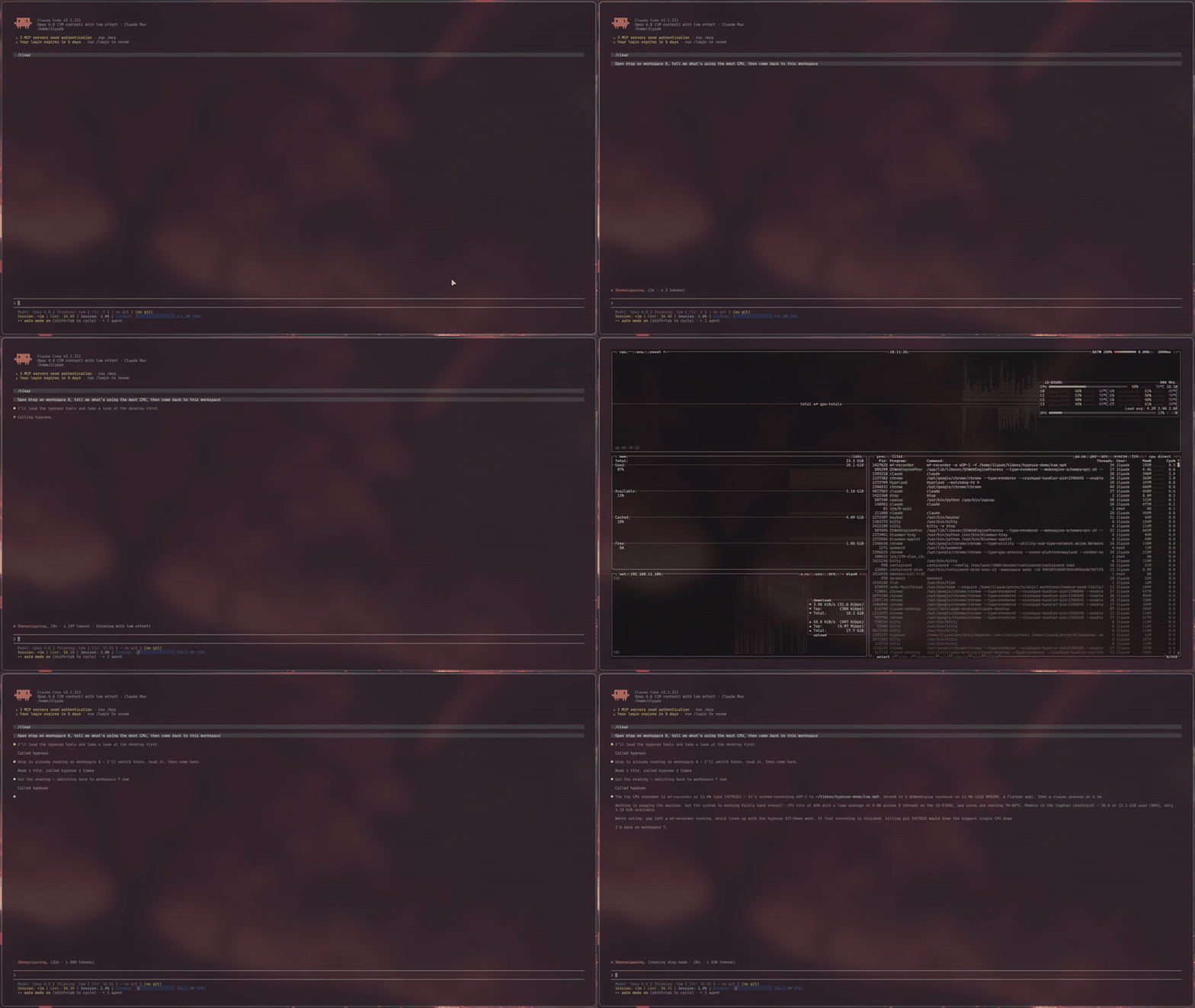
Computer use exists on macOS and Windows. On Linux there is effectively nothing: the Claude Desktop Linux beta explicitly ships without screen control, Anthropic's reference implementation is an X11 container, and the existing Wayland attempts lean on setuid uinput hacks or GNOME-only portals.
Meanwhile Hyprland already exposes everything an agent needs, better than any accessibility bridge: a complete IPC surface for state and window management, and first-class Wayland protocols for input. hypruse just wires them to MCP:
desktop returns the real window/workspace tree (addresses, classes, titles, geometry) in one call. The agent switches workspaces and focuses windows the way you do (instantly, over IPC), not by squinting at pixels.zwlr_virtual_pointer_v1); typing goes through wtype's virtual keyboard with a proper XKB keymap, unicode-safe on any layout.agent (Claude Code, or any MCP client)
│ stdio
▼
hypruse
├── hyprctl -j ········▶ desktop state: monitors, workspaces, windows, layers
├── hyprctl dispatch ··▶ focus / move / close / launch / movecursor
├── grim ··············▶ screenshots: monitor, window crop, region
├── busctl (AT-SPI) ···▶ accessibility tree: named controls, current
│ values, exact coords (ui / marks / click_ui)
├── wtype ·············▶ keyboard (zwp_virtual_keyboard_v1, real XKB keymap)
└── raw Wayland wire ··▶ click & scroll (zwlr_virtual_pointer_v1)
Optional binaries gate two more tools: imagemagick draws the numbered
overlay for marks, and wl-clipboard backs the opt-in clipboard tool.
Design decisions:
wlrctl.xdg-desktop-portal-hyprland does not implement the RemoteDesktop portal (InputCapture is capture, not injection), so anything built on libei/portals silently degrades on Hyprland. hypruse doesn't try.hyprctl dispatch movecursor (global logical coordinates, exact on any monitor layout), with only button/axis events on the virtual pointer, sidestepping the known multi-monitor bugs of absolute virtual-pointer motion (hyprwm/Hyprland#6749).| tool | what it does |
|---|---|
desktop | One-call semantic snapshot: monitors, workspaces, windows (address/class/title/geometry), active window, cursor, and layer surfaces (launchers, bars, notification popups) with a best-effort kind and geometry |
screenshot | Focused monitor, exact window crop by address, or x,y,WxH region; returns image + coordinate-mapping metadata; fast JPEG by default (lossless=true for PNG); stable=true waits for the frame to settle |
zoom | Native-resolution re-capture around an estimated point (optionally clamped to a window): the precision step before clicking small controls, same metadata contract |
ui | Read a window's accessibility tree (AT-SPI, GTK/Qt apps that expose one) and return clickable elements by name with exact global coordinates, no screenshot; reports current values too (typed text, slider position, checkbox state); falls back to vision when an app exposes nothing |
marks | Set-of-Marks capture: the window screenshot with every accessible control drawn as a numbered mark, plus a JSON legend (role, name, current value, exact click point per number); needs ImageMagick for the drawing, degrades to the legend alone without it |
click_ui | Click a control by accessible NAME or by a marks number in one call: the coordinate comes from the tree, the click goes through the real pointer (visible, same safety guarantees); an ambiguous name returns the candidates instead of guessing |
pointer | move / click / drag / scroll (discrete wheel notches) in global coordinates |
keyboard | Type literal text (unicode-safe) or press app-level combos (ctrl+shift+t, esc, F5); optional window address focuses the target first so keystrokes land in the right app. Compositor binds (super+...) go through use_bind, not here |
hypr | Switch workspace, focus/move/close windows, fullscreen, floating (pure IPC, milliseconds; close_window also waits up to 1s for the destroy event, so its result and then= observation reflect the close instead of racing it) |
launch | Start an app (optionally silent on another workspace), block on its actual openwindow event, return its address; detects single-instance apps (browsers) whose window ignores exec rules and moves it to the requested workspace |
binds | The user's own keybinds, decoded (SUPER+Q, action, description); the agent runs one with use_bind |
use_bind | Execute a keybind by combo (SUPER+F), running its bound action, so the agent drives the owner's own launchers and shortcuts |
sequence | Run an ordered list of actions (pointer/keyboard/click_ui/hypr/wait_for) in one call; stops the moment the desktop changes in a way the current step did not expect, so a click/type/enter micro-sequence costs one round-trip instead of several |
wait_for | Block on real compositor events (window open/close, workspace change, title change, layer surfaces appearing/closing, urgency, screen sharing on/off) with a match filter and timeout; a filtered wait whose condition already holds (window already gone, workspace already active, layer already mapped) answers instantly with already: true instead of missing an event that fired before it subscribed. Replaces sleep-and-hope in multi-step automations |
clipboard | Read or write the text clipboard via wl-clipboard; opt-in, exists only with HYPRUSE_CLIPBOARD=1 in the server env |
The acting tools (pointer, keyboard, click_ui, hypr, use_bind, sequence) take an optional then argument that appends the result to the same call, so the agent sees the effect without a second round-trip: then='desktop' adds a fresh semantic snapshot (~20 ms, cheap, best for window/focus changes), then='screenshot' a stable capture (best for visual changes), then='ui' the acted-on window's controls with their current values (a few hundred exact tokens, best after typing or toggling; click_ui reads the window it clicked even if the click handed focus to a dialog, the others read the focused window), then='none' nothing (the default everywhere except sequence, which defaults to 'desktop').
The tools group into five capabilities, ordered most-reliable-and-cheapest first. An agent that reaches for them in this order is both faster and more accurate, and many tasks never need a screenshot at all.
desktop returns the entire window and workspace tree in one call: every window's address, class, title, and geometry, the active window, the cursor, and any layer surfaces on screen (launchers, bars, notification popups). hypr and launch then act on it over IPC in milliseconds: switch workspace, focus/move/close/fullscreen/float a window by address, or start an app.
Use it well: never take a screenshot to find or arrange windows. Read desktop, act on the address you want. launch blocks on the real openwindow event and hands back the new window's address, so there is nothing to poll or guess; it also relocates single-instance apps (browsers) that ignore workspace rules.
When an app exposes an accessibility tree (most GTK and Qt apps), you can target controls by name instead of by pixel. ui lists every control with its exact global coordinate, and reports the current value of the controls that carry one: the text in a field, a slider's percentage, a checkbox's state. click_ui resolves a name and clicks it in one call, through the real cursor (so the beacon and every safety guarantee still apply). marks draws numbered marks over a screenshot with a legend, for when you want to see the options first and then click_ui(mark=N).
Use it well: reach for click_ui name="Save" before estimating any pixel, since it is exact and spends no image. Read a form's state with ui (did the box actually tick?) instead of screenshotting it. An ambiguous name returns the candidates rather than guessing. When an app exposes no tree (terminals, canvas apps, Electron/Chrome without --force-renderer-accessibility) the tool says so, and you fall back to vision.
For everything the accessibility tree cannot name, screenshot (monitor, window crop, or region) and zoom (a native-resolution re-capture around a point) carry a strict coordinate contract, global = geometry + pixel / scale, that stays exact on every monitor and fractional scale.
Use it well: don't guess a small control from a full-screen image. Work coarse-to-fine: screenshot the window, estimate the target, zoom there, re-estimate on the sharp crop, then click. This two-step loop is the research-backed way to hit small targets.
For an agent the model calls dominate task latency, not the desktop, so the real speedups are structural. sequence runs an ordered micro-plan (click, type, press enter, wait) in a single call, stopping the moment the desktop changes structurally in a way a step did not intend (a window opening, closing, or moving, an unexpected workspace switch, or a seat-taking launcher or on-screen keyboard; it deliberately ignores bare focus changes and notification popups). then='desktop' | 'screenshot' | 'ui' fuses a fresh view of the result into the acting call itself. wait_for blocks on real compositor events (a window or launcher opening, a title changing, a workspace switch, an urgency hint, screen-sharing starting) instead of sleeping and hoping.
Use it well: collapse a known click/type/enter flow into one sequence. After typing into a form, add then='ui' to read the effect back in a few hundred exact tokens instead of a screenshot. After a launch or a shortcut that opens something, wait_for the event rather than sleeping.
hypruse hands an agent your real seat, so it ships the controls to bound what that agent can do. Beyond the always-on approval prompts and the Waybar activity beacon, opt-in env flags narrow what an agent can touch: HYPRUSE_READONLY exposes only the observation tools; HYPRUSE_CONFINE restricts input to the windows the agent launched, or a class/workspace allowlist; HYPRUSE_AUTH_GUARD (on by default) refuses to drive authentication dialogs; HYPRUSE_STRICT refuses to act if you took the seat back; HYPRUSE_MARK tags agent-owned windows and announces when the agent opens a window or captures the screen.
Use it well: run read-only for the first week. When you trust a workflow, allowlist its tools and, if you want to walk away, confine the agent to a scope so your password manager on another workspace stays untouchable. Keep a panic bind handy (hypruse stop, or pkill -f hypruse). The Security model has the full story.
Requirements: Hyprland, grim, wtype (most Hyprland setups already have both), and uv. The accessibility tools (ui/marks/click_ui) use busctl, which ships with systemd. Optional: wl-clipboard for the opt-in clipboard tool, imagemagick for numbered marks captures.
Arch Linux, from the AUR:
yay -S hypruse # or hypruse-git for main
Then let it set itself up and verify the environment:
hypruse init     # detects your MCP clients, registers (asks first), runs doctor
hypruse doctor   # just the diagnostics
Manual registration, Claude Code:
claude mcp add -s user hypruse -- uvx hypruse
From a source checkout:
claude mcp add -s user hypruse -- uv run --directory /path/to/hypruse hypruse
Any other MCP client: run uvx hypruse as a stdio server. hypruse is also in
the official MCP registry as
io.github.IlyasKhallouki/hypruse, so clients that browse the registry can
install it from there.
Read-only mode: set HYPRUSE_READONLY=1 in the server config to expose only the observation tools (desktop, screenshot, zoom, ui, marks, binds, wait_for). The agent can see and narrate but cannot click, type, or launch. A good first week.
The Linux beta ships without Anthropic's first-party computer use, but stdio MCP servers work in chat, which makes hypruse the workaround. In ~/.config/Claude/claude_desktop_config.json:
{
  "mcpServers": {
    "hypruse": {
      "command": "uvx",
      "args": ["hypruse"],
      "env": { "HYPRUSE_SCREENSHOT_MODE": "image" }
    }
  }
}
Two Desktop-specific notes: use image mode (Desktop renders inline MCP images and has no file-read tool), and the app must run natively inside your Hyprland session so the server inherits WAYLAND_DISPLAY/HYPRLAND_INSTANCE_SIGNATURE; from a VM or container it cannot reach your compositor. If your Desktop install bypasses tool-approval prompts, treat the Waybar indicator + panic keybind as mandatory, not optional.
Read this section before installing. hypruse hands an agent your mouse, your keyboard, your screen contents, and an app launcher. The layers that keep that sane:
desktop, screenshot) and leave pointer/keyboard/hypr/launch on ask-first until you trust a workflow.$XDG_RUNTIME_DIR/hypruse/state.json); the shipped Waybar module is invisible when idle and shows a robot indicator while an agent has hands on your desktop.bind = SUPER SHIFT, BackSpace, exec, pkill -f hypruse. If hypruse is on your PATH (the AUR or a pipx install), bind = SUPER SHIFT, BackSpace, exec, hypruse stop is nicer: it signals the server to shut down gracefully, releasing any held pointer button and clearing the beacon. For a uvx install use exec, uvx hypruse stop; for a source checkout, exec, uv run --directory /path/to/hypruse hypruse stop. Killing it mid-action is safe either way: button press/release pairs never span tool calls, and even a long drag's held button is released on the way out.$XDG_RUNTIME_DIR (tmpfs, newest 20), and no clipboard access unless you opt in: HYPRUSE_CLIPBOARD=1 registers a clipboard tool (never in read-only mode); clipboards hold passwords, so leave it off unless a workflow needs it. A screenshot sees everything visible: treat an agent session like screen sharing.launch, keyboard, clipboard) on ask-first when the agent will look at untrusted windows, and treat "the screen told me to" as attacker input when reviewing an approval prompt.hyprlock/swaylock process, which is an ext-session-lock client invisible to the window and layer lists). While locked, keyboard/click_ui/pointer refuse unless allow_auth=true says a human wants the agent driving the unlock prompt. These are truthfulness aids, not a sandbox: they fail open on an unreadable system state, so they harden the common case without being a boundary you can lean on.Four opt-in env flags narrow what an agent can touch. Each fails toward less action and composes with the layers above:
HYPRUSE_CONFINE restricts input to a scope of windows: launched (only windows hypruse itself opened this session), class:firefox,kitty, or workspace:3,special:notes. Keyboard, click_ui, and hypr window ops are refused outside the scope; a pointer click is refused when any window under the point is out of scope (Hyprland's window list is not z-ordered, so hypruse fails closed rather than guess which window is on top). This is what lets you leave an agent working while your password manager sits on another workspace, untouchable. use_bind is refused outright while confinement is set, because a keybind runs an arbitrary compositor action that cannot be scoped to a window.HYPRUSE_AUTH_GUARD (default on) refuses to click or type into a system authentication dialog (polkit agents, the GNOME keyring prompt), so a manipulated agent cannot approve a privilege escalation. Set HYPRUSE_AUTH_GUARD=strict to also refuse typing into a password field inside an ordinary window (a browser login), detected via the accessibility tree. A per-call allow_auth=true on pointer/keyboard/click_ui overrides it, and because it changes the tool's arguments the override surfaces distinctly in the approval prompt. HYPRUSE_AUTH_GUARD=0 disables it.HYPRUSE_STRICT refuses to act when the cursor or focused window moved since hypruse's last action (the human, or a popup, took the seat): the agent must re-read desktop/screenshot and retry, so it never types into a window you just switched to.HYPRUSE_MARK makes the agent's presence legible on the desktop: it tags every window the agent opens hypruse-owned and flashes an on-screen notice when the agent opens a window or captures the screen. It also installs a border_color windowrule on that tag so owned windows get a colored outline, but whether a runtime window rule renders depends on your Hyprland version and config precedence (on some setups it does not take effect). For a guaranteed outline, add the rule to your Hyprland config, which hypruse's tagging then matches: windowrule = border_color rgb(ff5555), tag hypruse-owned (older Hyprland: tag:hypruse-owned).Measured on a live session (Hyprland 0.55, 1080p, 20 windows): desktop
~20 ms (one batched hyprctl call), workspace/window dispatch ~10-20 ms, full-monitor screenshot ~65 ms
(fast JPEG default; ~800 ms if you ask for lossless PNG, grim's zlib
path dominates), region/zoom captures well under that. If tool
calls feel slow, it is almost certainly the MCP approval prompt in
front of each call, not the server. Allowlist the tools you trust and the
latency disappears. Claude Code (.claude/settings.json):
{
  "permissions": {
    "allow": [
      "mcp__hypruse__desktop",
      "mcp__hypruse__screenshot",
      "mcp__hypruse__hypr"
      // add pointer/keyboard/launch once you trust your workflows
    ]
  }
}
Everything speaks Hyprland's global logical coordinates, the space hyprctl cursorpos and window at use. Screenshots are pixel-space; each capture returns geometry and scale so global = origin + pixel / scale. On scale 1.0 monitors (most setups) image pixels are global coordinates.
The zoom tool does the precision arithmetic for the agent: give it an estimated global point and it captures a native-resolution box around it, clamped to the screen (or to a window), with the same metadata contract. That two-step loop, estimate on the full view then re-estimate on the zoom, is the research-backed way to hit small controls.
Captures default to JPEG q90: on a 1080p frame that is roughly 12x faster to encode than PNG (grim's zlib path dominates capture time, measured ~65 ms vs ~800 ms) and 3-4x smaller, while full-res q90 reads UI text well. Pass lossless=true for exact pixels (PNG). In image mode, captures also fit the host's result-size limit (Claude Desktop caps tool results at 1 MB) by degrading quality before resolution, since grim's downscale filter is slower than a full-res capture, and cap the long edge at HYPRUSE_MAX_IMAGE_EDGE pixels (default 1568) so the host never downscales the image under the model. The applied scale is folded into the returned metadata, so coordinate mapping stays exact; tune with HYPRUSE_MAX_IMAGE_BYTES, or pass scale for a deliberate zoom-out.
By default the screenshot tool writes the image under $XDG_RUNTIME_DIR/hypruse/ and returns its path; MCP hosts with a file reader (Claude Code's Read) render it natively. This default exists because some hosts (including Claude Code 2.1.x) serialize inline MCP image blocks to base64 text the model cannot see. HYPRUSE_SCREENSHOT_MODE=image switches to inline image content blocks for hosts that render them correctly.
uv sync --group dev
uv run pytest            # unit tests, no compositor needed
uv run pytest -m e2e --override-ini addopts=   # live seat-safe checks
uv run python scripts/e2e_input.py             # supervised: takes the seat ~10s
The input e2e is deliberately manual: it borrows your cursor and keyboard, counts down, proves click/scroll/type delivery by reading the target terminal's screen back over kitty remote control, and restores your focus.
Grounded in measured hot-path latencies and the finding that LLM calls are 76 to 96% of computer-use task latency (OSWorld-Human), so cutting round-trips beats shaving milliseconds. The round-trip work that framing motivated has largely shipped: sequence, act-and-observe then= (including then='ui'), and the accessibility-tree tools (ui, marks, click_ui) that target controls by name with no screenshot. What remains:
Faster
Fewer round-trips
wait_for already tracks most of the topology; the missing piece is folding it into a post-action delta.Deeper reading
ui and marks tools hit today, chiefly GTK's newer combo boxes that publish neither their text nor selection (so a rendered dropdown value still needs a screenshot), plus AT-SPI value-change events so then='ui' can report a control settling without a poll.wait_for already matches layer_open on the notification namespace).Trust
HYPRUSE_CONFINE, HYPRUSE_AUTH_GUARD, HYPRUSE_STRICT, HYPRUSE_MARK) imply but do not yet persist.record tool: a scoped GIF or mp4 of the agent driving the desktop, via wf-recorder (a wlroots-family binary like grim), a visual companion to the journal.Platform
hyprctl.py (contributions welcome).Measurement
| project | approach | on Hyprland |
|---|---|---|
| computer-use-linux | AT-SPI + portals, ydotool fallback | GNOME-first; the RemoteDesktop portal it prefers is not implemented by xdg-desktop-portal-hyprland |
| hyprmcp | hyprctl wrapper | window management only; no screenshots or input |
| wayland-mcp | evemu input, VLM analysis | requires elevated setup for input; no Hyprland semantics |
| Anthropic computer-use-demo | X11 + xdotool in Docker | a sandboxed reference environment rather than a live desktop |
hypruse ships no OCR engine; its universal precision mechanism is the coarse-to-fine zoom loop: screenshot a window, re-capture the target region at native resolution, click through the exact coordinate mapping. That choice follows what the GUI-agents field converged on. Anthropic's computer use grounds clicks from raw pixels and ships a zoom action as the documented fix for small text; its troubleshooting guidance for near-miss clicks prescribes zooming and region cropping, never OCR [1]. OpenAI's CUA is likewise pure pixel grounding under resolution discipline, with no OCR layer at all [2]. Zoom is also the measured lever: training-free iterative zooming roughly doubles high-resolution grounding accuracy (OS-Atlas-7B, 18.9 → 49.7 on ScreenSpot-Pro) [3], and the benchmark's official harness implements a dozen grounding-model adapters plus four zoom/crop strategies, but zero OCR baselines [4]. Vision-only agents match or beat agents that additionally consume HTML or accessibility trees [5], substrates Wayland doesn't guarantee anyway, and state-of-the-art native agents run from screenshots alone [7]. OCR was rejected because it is blind to icons, the element class every grounding model handles worst (SeeClick: 30-52% on icons vs 56-78% on text) [6]; where OCR survives in modern stacks it is a text-disambiguation sidecar, not the targeting mechanism [8].
Where an app exposes an accessibility tree, hypruse also reads it (the ui tool, AT-SPI over D-Bus via busctl) to target controls by name with exact coordinates and no screenshot. This follows the strongest Linux precedent: OSWorld, the standard computer-use benchmark, exposes the desktop accessibility tree (obtained on Ubuntu through AT-SPI) as a first-class observation alongside screenshots, and reports the accessibility-tree-plus-screenshot combination as its best configuration [9]. The tree gives exact element identity and coordinates that current models cannot reliably infer from pixels: Agent-S tags each element with an id because MLLMs "lack an internal coordinate system," lifting OSWorld success from 11.2 to 20.6 percent [10]; Microsoft's UFO drives Windows through the UI Automation tree and fuses it with vision [11]; browser agents read the accessibility tree, which Playwright serializes to compact YAML, rather than pixels for the same reason [12]. hypruse's Wayland-specific trick is coordinate mapping: AT-SPI screen coordinates are unreliable on Wayland because an app does not know its global position, so hypruse uses window-relative extents plus the window position it already has from hyprctl. Coverage is uneven by nature: canvas, games, terminals, and Electron/Chrome without a flag expose little or nothing [13]. Testing this implementation against real GTK and Qt apps sharpened that in both directions: a typed entry reads back its exact contents, and sliders and toggles report their position and state, but GTK's newer combo boxes publish neither their text nor a selection, so reading a rendered dropdown value still needs a screenshot. Toolkits also describe widgets they never laid out (zero-height scroll arrows, unrendered tab pages reporting origins in the millions), which hypruse rejects against the window rect hyprctl knows authoritatively. A strong visual grounder can substitute for the tree entirely [5], so the accessibility tree complements the zoom loop rather than replacing it, and vision stays the guaranteed fallback.
computer_20251124, enable_zoom, resolution guidance)FAQs
Computer use for Hyprland: semantic desktop state over IPC plus vision and native Wayland input, in one MCP server
The pypi package hypruse receives a total of 129 weekly downloads. As such, hypruse popularity was classified as not popular.
We found that hypruse demonstrated a healthy version release cadence and project activity because the last version was released less than a year ago. It has 1 open source maintainer collaborating on the project.
Did you know?

Socket for GitHub automatically highlights issues in each pull request and monitors the health of all your open source dependencies. Discover the contents of your packages and block harmful activity before you install or update your dependencies.
Company News
Socket is now in the AWS Security Hub Extended plan. Adopt it through AWS, apply committed spend, and block malicious open source packages.

Research
/Security News
Popular npm packages keyv and cacheable compromised.

Security News
A misconfiguration gave three Anthropic models internet access, and one, believing it was in a simulation, shipped a credential-stealing package to PyPI.