

Security News
Happy Birthday, Shai-Hulud
It has been one year since Shai-Hulud made its first appearance on npm.
By Sarah Gooding - Sep 18, 2026
mcptoon
Advanced tools
MCP tools + agent skills for every AI agent, with no hand-written config. Sync both across agents. Token-efficient CLI: 99.2% fewer tokens on tool discovery. Zero dependencies.
Add 1,000 MCP tools and 1,000 agent skills locally — your token context never feels it. (measured on my own machine: 255 tools / 371 skills)
mcptoon is a 189KB CLI — think of it as a steward that takes over every MCP tool and skill on your machine, and keeps both out of your context window.
① Token — it keeps both MCP tool schemas and skill files out of your agent's context. Tools: 71,929 → 581 tokens (−99.2% measured). Skills: 926,000 → 501 tokens to find the right one, with only 39 resident (−99.9% measured). Call results shrink another ~34% with --toon.
② Setup — install mcptoon once, and every AI on your machine gets all your MCP tools and skills. Add a tool or a skill later and it goes live immediately — no agent restart.









👉 Your own numbers, 30s: pip install mcptoon && mcptoon bench — it measures what your tools and skills cost, on your machine.
👉 Or just watch it work: uvx mcptoon demo --quick — 255 tools, 71,929 tokens of schemas → a 581-token name list (−99.2%). (demo needs Node)
👉 中文 · Developer docs · Issues
pip install mcptoon

# 30-second proof, on your machine — none of your servers, no API key:
mcptoon demo --quick
Those numbers are ours, but "loading every tool schema into context is expensive" is not a claim only we make:
We're not the only ones who measured this. mcptoon is the one you can use today, covering every agent at once.
pip install mcptoon                          # pure stdlib, 189KB, zero dependencies

# Add any MCP server — one command:
mcptoon add everything --stdio npx -y @modelcontextprotocol/server-everything

# See every tool available (names-only by default; 255 tools cost 581 tokens):
mcptoon manifest

# Call a tool (JSON output by default; add --toon to save more):
mcptoon call everything echo '{"message":"hi"}'
These are the numbers people doubt first — "926,000 tokens?" — so measure them yourself
before believing them. No API key, no MCP server of yours, nothing to configure, and
nothing to clone: bench ships in the wheel.
pip install mcptoon          # bench is built in — nothing to clone
pip install tiktoken         # optional: without it, bench says "estimate", not "measured"
mcptoon bench
mcptoon bench --roots <dir> points it at any catalog. The tool rows are your cached
schemas, so they will differ; the skill rows below are one root (~/.claude/skills).
It measures both halves in one table — tool schemas against the name index, and every
SKILL.md against the resident pointer and one lookup — so you can see which number is
which instead of taking a headline on faith. On the machine this README was written on:
  half          what the agent loads                        tokens   vs native
  ----------------------------------------------------------------------------
  MCP tools (1109) native: every full schema                  139,863           -
                manifest (name index)                        5,406       96.1%
                manifest --slim                             16,396       88.3%

  Agent skills (371) native: every SKILL.md, full text          926,232           -
                skills manifest (pointer)                       39      100.0%
                skills resolve --k 5 (one lookup)              501       99.9%
(The footer — the query used, the caliber, and the 128K-window count — is elided. query matters: the resolve row is measured against make a PDF.)
Watch what it replaces. Ask an agent to "find the right skill" without mcptoon and it
has no index — it reads SKILL.md files until it finds one. On this catalog the whole set
is 926,232 tokens: it does not fit in a 128K window, so it gets truncated, and the skill
that falls off is the one you wanted. With mcptoon the same question costs 501 tokens
— and mcptoon bench points at your own folders to check that yourself.
Two calibers in one table, on purpose: the tool rows are your cached schemas, while
Bill 1 quotes the fixed 255-tool benchmark so that number cannot drift. The skill rows
count one level deep with _index excluded, and de-duplicate roots by real path — so a
machine whose agent folders are junctions onto one catalog is not counted four times.
mcptoon demo actually printsNo API key, no MCP server of yours, nothing to configure: it boots the official "everything" reference server, calls one tool, and shows the token math on your screen. This is that output, verbatim (Windows, Python 3.12) — only the ASCII banner and the closing star-ask are cut:
$ mcptoon demo --quick

  Starting demo server...
  ✓ Demo server ready

  📊  SAME data, 19% fewer tokens:
              21  →          17   (SLIM)

  Format         Tokens    Savings
  ────────── ────────── ──────────
  JSON               21          -
  TOON               17        19%
  SLIM               17        19%

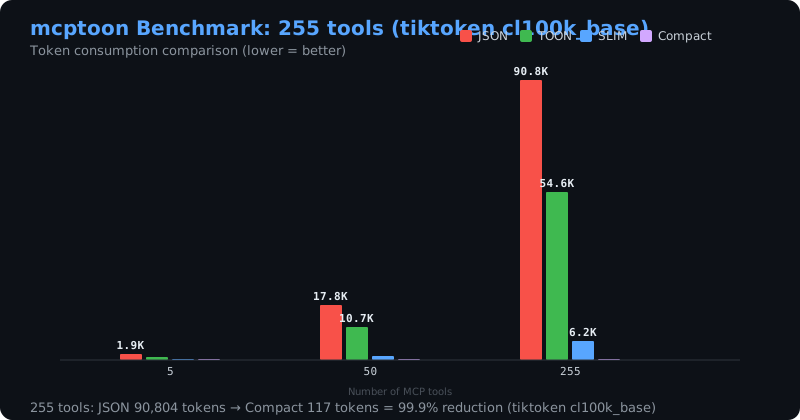
  Official benchmark: 255 tools, 50 servers, tiktoken cl100k_base:

  Format           Tokens    Savings
  ──────────── ────────── ──────────
  JSON             71,929          -
  TOON             47,438        34%
  SLIM              8,282      88.5%
  Compact             581      99.2%

  Now you can:
  ✓ connect every agent with ONE config   →  mcptoon sync
  ✓ expose ALL servers as ONE stdio server →  mcptoon serve
  ✓ never paste tool schemas again         →  mcptoon manifest --slim

  Schemas are fetched, not injected — you pay for a listing, not for every turn
  255 tools listed once: 581 tokens (71,929 → 581, −99.2%, measured)
Column padding follows your terminal width; the numbers do not. The first table is one
live tool call measured on your machine; the second is the repo's committed 255-tool
benchmark (docs/tiktoken-benchmarks.md), reproduced identically on every run.
No Node on the machine? mcptoon demo-server is the same proof with nothing to
download: an MCP server of 11 standard-library tools, no network, no API key.
Claude Code user? Skip the terminal entirely:
/plugin marketplace add activeing123/mcptoon
The plugin auto-installs the CLI (SessionStart hook), wires the mcptoon serve bridge via .mcp.json, and ships a skill that teaches the agent when
to compress. /mcptoon-setup is the manual fallback.
Or let mcptoon auto-discover servers already on your machine:
mcptoon quickstart # discover + configure + list tools — one command
That's it. No hand-written JSON config. No MCP protocol debugging. No polluted context window. The wheel is 189KB with zero dependencies, and mcptoon itself needs no API key and phones nothing home — $0 in service fees, everything runs on your machine.
An agent skill is a SKILL.md file, and your agent loads it the same way it loads MCP
tool schemas: into the context window, before it does any work. On the machine this
README was written on, 371 skills cost 926,232 tokens — more than seven 128K context
windows. It cannot all fit, so something gets dropped, and what gets dropped is
whatever skill you needed that day.
mcptoon skills fixes the half of the problem nobody else touches. There are a dozen
tools that organize skills — install, browse, sync across IDEs. Not one of them
measures what the catalog costs, and not one keeps it out of context. mcptoon does
both, with the same one-source-of-truth model it uses for MCP servers:
mcptoon skills list                      # what's in the catalog (--usage adds hit counts)
mcptoon skills resolve "make a PDF"      # BM25 shortlist — offline, no LLM, no tokens
mcptoon skills sync ~/skills             # distribute to every agent's skill folder
mcptoon skills sync ~/skills --dry       # preview the plan; nothing is written
mcptoon skills add my-skill --desc "…"   # create a skill in the source
mcptoon skills remove my-skill           # retire it — moved to a dated archive
Views are links (a junction on Windows, no admin needed), so one edit at the
source is live everywhere and there is no second copy to fall out of sync. Three
safety rules hold: a real directory where a link belongs is archived, never
deleted; a view that is itself a link to the source is left completely alone;
and remove moves the skill into an archive, so a wrong removal is a mv
back rather than a re-clone. Add the lifecycle flags when you need them —
--version-gate refuses a skill whose content changed but whose version did
not, --derived roo|opencode|all regenerates the flat .md views some agents
read, --archive DIR parks drift in a graveyard you choose, and
remove --tombstone commits the removal (path-scoped) so a two-way git sync
cannot resurrect it.
Every MCP agent (Claude Code, Cursor, Codex, …) stuffs every tool's full schema into your context window before doing any work:
50 tools  → 14,113 tokens of schema → a 128K context: 11% gone
255 tools → 71,929 tokens of schema → a 128K context: 56% gone
So you unload servers you aren't using and reload them when you are. Back and forth. Adding one new server still means hand-writing a JSON config — one missing comma and everything breaks.
mcptoon fixes this. Your MCP servers stay configured, but their schemas never
enter the agent's context by default. The agent just runs mcptoon commands, and
only the compact result you asked for enters context — the name index weighs 581
tokens (114 for 50 tools, −99.2%).
Without mcptoon: 255 tools → 71,929 tokens, over half the window
With mcptoon:    255 tools → 581 tokens. 99.2% saved.
Both rows are measured configurations, not one number scaled up and down (tiktoken
cl100k_base, assets/benchmark_tiktoken.json). Your mix will differ —
compute your own numbers in the browser,
30 seconds, nothing uploaded.
Token-heavy tool context is no longer a niche complaint — it is an official engineering problem. But every serious fix so far ships inside somebody else's platform, which for the agents you actually run is the same as not shipping it:
| The fix | Where it runs | The catch |
|---|---|---|
| Anthropic's Tool Search Tool / PTC | Claude-platform betas | Claude only — other agents still pay for results token by token |
| MuleSoft's MCP Payload Optimization | MuleSoft enterprise gateway | behind a gateway; MCP spec one generation behind |
| mcptoon | any agent that can run a shell command | none — 189KB, no key, no proxy, MCP 2026-07-28 GA |
Every one of those is a wall. mcptoon is the same answer with no wall: it runs today, on every agent at once — the results-side discipline without the platform or the gateway toll.
# Install from npm (most MCP servers live here):
mcptoon install brave-search --npm @modelcontextprotocol/server-brave-search

# Install from pip:
mcptoon install my-tool --pip mcp-my-tool

# HTTP/SSE servers:
mcptoon install remote-api --url https://example.com/mcp

# List installed:
mcptoon install --list

# Uninstall:
mcptoon install --remove brave-search
mcptoon connects, discovers tools, generates the handler, registers it. No restart needed. Each install adds 0 KB to mcptoon itself — the CLI stays 189KB with zero dependencies, because servers are external processes your machine runs directly, not code bundled into mcptoon. Four steps, one command, no agent restart.
Any MCP server works:
mcptoon add my-server --stdio npx -y @any/mcp-package
mcptoon manifest    # usable immediately
Teach your agent to use mcptoon through the open agent-skills ecosystem — the skill is picked up by Claude Code, Cursor, Codex, Cline, Windsurf and 75 more:
npx skills add https://github.com/activeing123/mcptoon --skill mcptoon
Don't want to hand-edit configs? ToonDeck is a local console for mcptoon: every MCP server and tool in one place with a real health check, one skill folder synced to all your agents, agent launching with live logs, and API keys stored in your OS keychain — never in a plaintext file.
pip install toondeck # ships the web UI inside the wheel — no node, no build
Pre-alpha; free (Apache-2.0). ToonDeck drives the engine — mcptoon stays the single source of truth underneath.
mcptoon is a CLI. If your agent can run a shell command, it can use mcptoon. No plugins, no SDK, no per-agent setup.
| Agent | How |
|---|---|
| Claude Code | put mcptoon commands in SKILL.md |
| Codex (OpenAI) | add mcptoon to AGENTS.md |
| Cursor | add mcptoon to .cursorrules |
| OpenCode | use mcptoon in custom commands |
| Any agent | can run shell commands → can call mcptoon |
Configure once in ~/.mcptoon/config.json; every agent that can run shell commands
shares the same servers, tools and skills. GUI agents that can't? mcptoon sync writes native
JSON into each one's own location.
export MCPTOON_AGENT_TYPE=claude   # call results auto-select --toon
# export MCPTOON_AGENT_TYPE=openai   # or keep the default JSON
Your AI can even add tools by itself — no human in the loop:
# Agent needs GitHub access mid-task? It just runs:
mcptoon add github --stdio npx -y @modelcontextprotocol/server-github
mcptoon call github search_repos '{"query":"mcp"}'
# Done. No JSON editing. No restart. No lost context.
mcptoon's token savings are three separate bills — know which one you're reading before
comparing numbers. Tool discovery: at 255 tools, native discovery costs 71,929 tokens —
over half of a 128K context — while the same toolset reads back at 581 through the name
index, a 99.2% cut. Call results: --toon saves 34.0–34.2% versus JSON. Skill catalog:
926,232 tokens of SKILL.md text becomes a 39-token resident pointer plus 501 tokens per
lookup. All rows are measured configurations (tiktoken cl100k_base with
assets/benchmark_tiktoken.json for the tool rows, mcptoon bench for both), not
scaled estimates.
manifest): 99.2% saved by defaultThis bill comes due before your agent decides "which tool do I use". Native MCP shoves every tool's full schema into context (50 tools: 14,113 tokens; 255 tools: 71,929 tokens). mcptoon sends only the name index — that's where "114, not 14,113" comes from.
| Tools | Native schema (JSON) | mcptoon name index (default) | Saved |
|---|---|---|---|
| 5 | 1,519 | 11 | −99.3% |
| 50 | 14,113 | 114 | −99.2% |
| 255 | 71,929 | 581 | −99.2% |
Zero action, on by default: mcptoon manifest with no flags is this tier.
Want more per tool? --slim (names + parameter types) costs 8,282 tokens (−88.5%);
--full adds descriptions on top; --json (full schema) is the baseline.
We measured both rows ourselves — not one number scaled up and down (tiktoken
cl100k_base, assets/benchmark_tiktoken.json). Your mix will differ —
compute your own numbers in the browser,
30 seconds, nothing uploaded.
call): optional, --toon saves ~34%This bill comes due after a tool returns its result to your agent. mcptoon call
outputs JSON by default — yes, the default saves nothing. To shrink results too, add
--toon (structured encoding, reversible):
Default:  mcptoon call fetch fetch '{"url":"https://example.com"}'   → JSON (baseline)
Leaner:   mcptoon call fetch fetch '{"url":"https://example.com"}' --toon   → ~34% saved
34% is the measured toon_save value in assets/benchmark_tiktoken.json
(34.0–34.2%), not a marketing number.
One line to remember: 99.2% is what you save seeing which tools exist; 34% is what you can further save on results.
skills): 926,232 → 39 resident + 501 per lookupThe same bill, charged for the other half of the toolbox. An agent that reads its skill
catalog pays for every SKILL.md it loads. These are the real numbers from the catalog
on the machine this README was written on — 371 skill files, same tiktoken
cl100k_base encoding as above.
| What the agent loads | Tokens | vs loading everything |
|---|---|---|
Every SKILL.md, full text | 926,232 | — |
Every skill's description only | 27,292 | −97.1% |
| Every skill name only (a names-only index) | 1,413 | −99.85% |
mcptoon skills resolve "<task>" --k 5 (returns the 5 that matter) | 501 | −99.95% |
mcptoon skills manifest (the pointer that stays resident) | 39 | −99.996% |
Read the top row again: 926,232 tokens is 7.07 full 128K context windows. The catalog does not fit in the window, which is why agents silently drop skills and then "forget" a capability you installed months ago. The fix is the same as Bill 1 — fetch on demand, never preload:
mcptoon skills manifest                      # 39 tokens, stays resident
mcptoon skills resolve "make a PDF" --k 5    # 501 tokens, returns the 5 that matter
Read the two bottom rows as different jobs, because they are. The 39-token
manifest is a pointer — it tells the agent how to ask, and holds no skill names. The
501-token resolve is the actual work: it returns the five skills that matter for
your request. If you want a skills-as-tool manifest instead (every name resident), that
costs 1,413 tokens — still −99.85% against loading the catalog. Either way you never
pay the 926,232.
Measured, not estimated. mcptoon bench reproduces both rows from your own catalog —
the same way it reproduces Bill 1's tool rows, in the same table. Full method, caliber and
the count-caliber table:
docs/skill-token-benchmarks.md.
Your catalog differs; the ratio will not.
Scale check: indexing and routing a 1,000-skill catalog takes under half a second
(index 0.49s, list 0.32s, resolve 0.33s — measured on a synthetic 1,000-skill
catalog, real bodies). The 371 above is just the catalog on this machine.
One tool's schema costs 37 tokens as native JSON but only 2 tokens as an
mcptoon name-index entry — a 95% cut on a single tool. We measured it with tiktoken
(cl100k_base).
Without mcptoon (what every MCP client stuffs into context — 37 tokens, measured with tiktoken):
[{"name":"search_web","description":"Search the web for information",
"inputSchema":{"type":"object","properties":{"query":{"type":"string","description":"Search query"}}}}]
With mcptoon (2 tokens):
search_web
With mcptoon --slim (6 tokens, names + parameter types):
search_web|query:s*
Three layers, all built in:
| Layer | What it does | Example |
|---|---|---|
| Destructive-action block | dangerous actions blocked unless you pass --destructive | db query '{"sql":"DROP TABLE users"}' → blocked |
| Prompt-injection guard | scans results for injection patterns | "ignore previous instructions" → blocked |
| Credential-leak detection | scans results for exposed keys/tokens | sk-abc...xyz → blocked, never enters agent context |
mcptoon quickstart              # one-shot start (discover + configure + list tools)
mcptoon discover                # scan this machine for MCP servers (--write to keep, --health to probe)
mcptoon init                    # create a sample config (--auto to discover and fill it)
mcptoon list                    # show configured servers
mcptoon manifest                # all tool names (compact by default; 255 tools = 581 tokens)
mcptoon manifest --slim         # names + param types (8,282 vs 71,929 = −88.5%)
mcptoon manifest --compact      # names only (581 vs 71,929 = −99.2%, measured)
mcptoon inspect <server> <tool> # inspect one tool's schema
mcptoon search <query>          # search tools across servers
mcptoon call <server> <tool> '{"args":"here"}'   # call a tool
mcptoon call --auto <tool> '{"args":"here"}'     # auto-find the server
mcptoon call <server> <tool> --stdin             # read large args from stdin
mcptoon add <name> --stdio|--http <cmd|url>     # add any MCP server
mcptoon remove <name>           # remove a server
mcptoon install <name> --npm|--pip|--url <pkg>  # install + auto-generate handler
mcptoon install --list          # list installed
mcptoon install --remove <name> # uninstall
mcptoon sync                    # sync native config to every detected agent
mcptoon health                  # health-check every MCP server (--json exits 1 if any is dead)
mcptoon policy                  # per-tool compression policy (raw / toon / slim)
mcptoon skills index [ROOT ...] # build the on-disk index (required before list/resolve)
mcptoon skills list             # list the skill catalog (--usage adds hit counts)
mcptoon skills resolve "<task>" # BM25 shortlist of skills (offline, no LLM)
mcptoon skills route "<task>"   # shortlist, then let an LLM pick (--model, --endpoint)
mcptoon skills stats            # catalog health (dupes, aliases, missing description)
mcptoon skills manifest         # the one-line resident pointer (39 tokens)
mcptoon skills sync <src>       # distribute a skill catalog to every agent's folder
mcptoon skills add|remove <name> # create a skill in the source / retire it to the archive
mcptoon bench                   # prove the savings on this machine (tools + skills, one table)
mcptoon plugin install <dir>    # install an Agent Plugins 1.0.0 plugin
mcptoon serve                   # run as an MCP server (stdio/HTTP) — MCP 2026-07-28: stateless-first, server/discover, cacheable list results
mcptoon demo                    # one command, live demo on your machine
mcptoon doctor                  # self-check: Python, config, connectivity
mcptoon usage                   # local call statistics
mcptoon completion ps           # shell completion (bash/zsh/fish/powershell)
Discovery and call results each have a set of formats — all optional, and the default is already the leanest tier:
manifest (discovery): compact by default, upgrade only if you want more
| Tier | Output | vs native schema | Origin |
|---|---|---|---|
| compact (default) | names only search_web | 99.2% smaller | common design |
| slim | name + param types search_web|query:s* | 88.5% smaller | mcptoon original |
| full | full schema with params | baseline | native MCP |
Why compact by default, not full? Deciding "which tool do I use" only needs names
(581 tokens for 255 tools); parameter details matter at call time, fetched on demand
via inspect or manifest --full. Defaulting to full schemas hands the 99.2% right
back.
The recommended loop (and why it's load-bearing). Compact names are a catalog,
not a calling contract. Measured on 41 live tools (full-schema gold standard, one
inference model per condition): an agent that guesses arguments from names alone lands
4/41 ≈ 10% valid calls — the killers are non-guessable names like account and
pageId — while an agent that runs inspect <server> <tool> once for the 2–3 tools a
turn actually uses hits 41/41 ≈ 100%, identical to injecting every schema. A turn
touches a handful of tools, so a few on-demand inspect calls stay far below the cost
of a full-schema dump: you keep ~99% of the token savings and full call accuracy. The
rule for agents: use manifest to choose, inspect before you call.
call (results): JSON by default, --toon to save
| Tier | Output | vs JSON | Origin |
|---|---|---|---|
| (default) | JSON | baseline | common |
| --toon | structured encoding (reversible) | ~34% smaller | open TOON standard |
| --mcptoon | legacy pipe format | — | mcptoon original (legacy) |
Where these formats come from
name|param:type* signatures): an mcptoon original, implemented in
output.py (slim_toon, Apache 2.0); noted in NOTICE.Everything here is checkable against mcptoon --version and the files mcptoon reads.
Both halves of the toolbox share one engine, one config and one index format.
| MCP tools | Agent skills | |
|---|---|---|
| Unit | one tool = one JSON Schema | one skill = one SKILL.md (YAML frontmatter + body) |
| Source of truth | ~/.mcptoon/config.json (servers) | one skills root (default ~/.claude/skills, ~/.agents/skills, ~/.codex/skills, ~/.cursor/skills) |
| Kept out of context by | names-only manifest (581 tokens @ 255 tools) | BM25 index + a 39-token pointer (501 tokens per lookup) |
| Discovery | mcptoon manifest · inspect · search | mcptoon skills resolve · route |
| Distribution | mcptoon sync (native JSON per agent) | mcptoon skills sync (links per agent) |
| Add / remove | install · add · remove | skills add · skills remove --tombstone |
| Health | mcptoon health | mcptoon skills stats |
Runtime. Python ≥ 3.10 (CI: 3.10–3.13 × Linux, Windows, macOS). 25 modules,
15,697 lines of Python, a 189KB wheel, zero third-party dependencies — standard
library only, enforced in CI by scripts/check_zero_deps.py. No daemon, no listening
port, no telemetry, no stored credentials.
Tool formats. compact (names only, default) · slim (name|param:type*, an
mcptoon original) · full (native JSON Schema) · toon (the open TOON standard,
reversible). All of them live in the output layer — the wire protocol is always
standard JSON-RPC, so servers never see a non-standard byte.
Skill internals.
~/.mcptoon/skills-index.json (version: 1), built by
mcptoon skills index, which is required before list / resolve / route /
stats (without it: no skills index yet. Run: mcptoon skills index).description + trigger words, merged
with every alias that points at it, so an alias name still reaches the canonical
entry. Offline: no LLM, no network. --k defaults to 5.mcptoon skills manifest prints one line and contains no skill
names; it is the instruction that tells the agent how to ask, not an index.remove moves the skill into a dated
archive, so a wrong removal is an mv back, not a re-clone.--version-gate refuses content that changed while version did
not; --derived roo|opencode|all regenerates the flat .md views some agents read;
--archive DIR chooses where drift is parked; remove --tombstone commits the
removal (path-scoped) so a two-way git sync cannot revive it.Environment overrides (used by the tests and by anyone running more than one
catalog): MCPTOON_SKILLS_ROOTS, MCPTOON_SKILLS_VIEWS, MCPTOON_SKILLS_INDEX,
MCPTOON_SKILLS_USAGE, MCPTOON_SKILLS_ENDPOINT, MCPTOON_SKILLS_MODEL,
MCPTOON_SKILLS_LEDGER, MCPTOON_SKILLS_DERIVED, MCPTOON_CONFIG_FILE,
MCPTOON_AGENT_TYPE.
Reproduce the numbers. mcptoon bench — both halves in one table, shipped in the
wheel. From a clone, scripts/bench_tokens.py and scripts/bench_skills.py are the
repository-side equivalents (tiktoken-only, exact). Method and caliber:
docs/tiktoken-benchmarks.md
and
docs/skill-token-benchmarks.md.
"Proprietary format = compatibility bomb" is a fair worry. It doesn't apply here:
1 · The protocol layer is always standard JSON-RPC; formats live only in the
presentation layer.
mcptoon speaks standard MCP to servers (initialize / tools/list / tools/call —
and since the 2026-07-28 GA bridge, server/discover and stateless requests
too; the initialize handshake remains for legacy clients).
compact/slim/toon only affect the "mcptoon → agent" output rendering — not a single
byte toward the server. Servers always see standard JSON; they don't even know these
formats exist.
2 · --toon isn't proprietary; it's an open standard.
TOON (Token-Oriented Object Notation) is an external open standard
(toon-format/toon v4.1, MIT, official
TypeScript reference implementation). We integrate python-toon (MIT);
tests/test_toon_cross_validate.py verifies decode(encode(x)) == x case by case.
3 · There's a fallback; worst case you fall back to JSON.
If --toon decoding fails it falls back to JSON automatically (--fallback-json);
and call results are JSON by default anyway — --toon is optional. Want the full
schema back? One --full is native MCP. No lock-in.
In one line: zero protocol changes, formats live in the output layer, worst case falls back to JSON. The feared "server can't understand the custom format" can't happen — servers always hear standard JSON-RPC.
mcptoon is a CLI tool, not an MCP client library. Your agent doesn't connect to
MCP servers — it runs mcptoon commands. Schemas live on disk in
~/.mcptoon/config.json, out of the context window by default.
The skill catalog is the same shape, deliberately: one source root, a BM25 index on
disk (~/.mcptoon/skills-index.json), and a 39-token pointer in context. Same
one-source-many-views model, same "fetch on demand, never preload" rule — the whole
toolbox behaves like one thing because it is one thing.
Two-layer decoupling:
Layer 1: mcptoon CLI (189KB, zero deps)
         runs in the agent's shell. schemas stay out of context by default.
                    │
Layer 2: the actual MCP servers (npm/pip packages)
         start only when a tool is called. Zero cost when idle.
mcptoon demo-server, a self-demo you opt into)MCP's premise: every capability is a server, and your agent must be configured to reach it. That premise is why one new tool means editing per-agent JSON in a different format for each, restarting everything — and why every agent re-pays the full schema cost before doing anything.
A command line is the one interface every agent already has. And the form factor is measurably cheaper, independent of anything mcptoon does:
If you truly need the proxy form, mcptoon serve is that mode — all configured
servers behind one MCP endpoint, with connection pooling and per-agent API keys.
git clone https://github.com/activeing123/mcptoon.git
cd mcptoon
pip install -e . --no-build-isolation
pip install pytest pytest-cov
python -m pytest tests/ -v   # 1069 passed, 1 skipped
Zero dependencies is a hard rule — our test suite gates every change (1069 tests green before merge). See CONTRIBUTING.md and DEVELOPERS.md.
The codebase: 15,697 lines of Python across 25 modules, zero third-party dependencies.
mcptoon is an independent third-party MCP client, not affiliated with Anthropic.
If mcptoon cut your context bill, star it — that's how other builders find small tools.
FAQs
MCP tools + agent skills for every AI agent, with no hand-written config. Sync both across agents. Token-efficient CLI: 99.2% fewer tokens on tool discovery. Zero dependencies.
The pypi package mcptoon receives a total of 1,176 weekly downloads. As such, mcptoon popularity was classified as popular.
We found that mcptoon demonstrated a healthy version release cadence and project activity because the last version was released less than a year ago. It has 1 open source maintainer collaborating on the project.
Security News
It has been one year since Shai-Hulud made its first appearance on npm.

Research
/Security News
Operators behind PolinRider used a compromised GitHub account to plant malware in four development versions of a Packagist package with 700,000+ downloads.

Security News
GitHub Actions now supports cache-mode, a least-privilege control on the Actions cache aimed at the cache poisoning technique behind recent compromises.