

Security News
Deno Goes the Way of the Dinosaur
Cloudflare is acquiring Deno’s team, which will provide another year of bug fixes and security updates before ending support for the runtime.
By Sarah Gooding - Oct 16, 2026
memory-boost
Advanced tools
Memory that reviews itself: a markdown wiki for coding agents over MCP, plus drift reports on the wiki and digests of your own sessions.
Memory for coding agents that reviews itself.



drift, mine and lessons on the bundled example data · everything runs locally
Try it · What it answers · Connect your agent · How it works · vs. alternatives
Your agents write everything down. Nobody reads it back.
Every memory tool for coding agents helps them remember more. None of them mention that half of what they remember expired in July. memory-boost keeps a plain-markdown memory your agents read and write over MCP, and then does the unglamorous part: it audits that memory and your own sessions, and tells you what drifted. Politely, with numbers.
Think of it as a code review for what your agents remember and a fitness tracker for how you work
with them. Mostly the fitness tracker: mine told me my most-failed command was cd. Sixty-nine
times.
| You wonder… | memory-boost answers |
|---|---|
| Which decisions quietly expired while we were busy shipping? | drift: review_by 2026-07-08, 78 days ago |
| Which "active" projects actually died months ago? | drift: last session 161 days ago; still listed as live |
| We fixed this exact bug in another repo. How? | lessons: the fix follows you to every project with the same stack |
| Why does my agent keep re-reading the same file? | mine: one file, read 18 times |
| Is my agent spawning 20 subagents behind my back? | mine: yes, and in which session |
Where was I before /compact ate my context? | The session-start hook puts your checkpoint back |
No install needed; the wiki lands in ~/.local/share/memory-boost:
uvx memory-boost==0.2.0 init --example   # sample wiki with five kinds of rot + four synthetic transcripts
uvx memory-boost==0.2.0 drift            # what in that memory is stale, orphaned or never written down
uvx memory-boost==0.2.0 mine             # now on your real ~/.claude/projects: aggregates only
To keep it in Claude Code, install the plugin. It brings the MCP server, the session-start brief and the skills in one step; it only needs uv on your PATH.
/plugin marketplace add arnaugonzalez/memory-boost
/plugin install memory-boost@memory-boost
Other agents, or the CLI on its own: uv tool install memory-boost==0.2.0 (or
pipx install memory-boost==0.2.0). Or let your agent do it: see Install from your agent.
Paste this into Claude Code, Codex, Cline or Cursor:
Install memory-boost 0.2.0 by following https://github.com/arnaugonzalez/memory-boost/blob/main/llms-install.md : install the CLI with
uv tool install memory-boost==0.2.0, runmemory-boost init, registermemory-boost serveas a stdio MCP server namedmemory, check that it answers with ninememory_*tools, then runmemory-boost driftand show me the output. Ask me before writing outside the memory home (~/.local/share/memory-boost) or editing any global agent config.
The agent-oriented steps (stdio and serve --http, per harness, with checks) are in
llms-install.md.
Five weeks of the author's own daily use: 29 decisions, 24 projects, 657 Claude Code transcripts. Output as produced; only project and file names are replaced.
$ memory-boost drift
# Drift report — 2026-09-24
29 decisions · 24 projects · 204 log entries · 33 open checkpoints · **20 findings**

## decision-expired (9)
- deploy-via-bastion — review_by 2026-07-08 (78 days ago); revisit or mark historic
- bot-guardrails — review_by 2026-07-08 (78 days ago); revisit or mark historic
  …
## project-no-decisions (2)
- thesis-solver — 20 sessions logged, 0 decisions tagged 'thesis-solver': the learning lives only in transcripts
## project-silent (5)
- mood-api — last session 2026-04-16 (161 days ago); still listed as live
  …

$ memory-boost mine
# Session digest — 2026-09-24
sessions      80 with ≥20 turns
tools         Bash 5956 · Edit 860 · Read 692 · Write 493 · Agent 203 · ToolSearch 138
bash          5956 calls, 159 failed (2.7%); most failed: cd (69), sleep (12), ssh (9), pkill (8), ls (7)
bash/edit     4.4x; extreme: crm-wt-f11 107.5x, sandbox 70.0x, sandbox 54.0x
reads         692 calls, 131 re-reads of a file already read (19%); top: …/apply_email.py ×18
discipline    62 long sessions (≥60 turns): 47 never checkpointed, 29 never saved
subagents     203 spawned in 44 sessions; max in one session: 20
Every line is a habit to change, a decision to revisit, or a rule worth writing down. None of it needed a new tool: the data was already on disk. It needed a reader.
projects/*.md, decisions/*.md, concepts/*.md, log.md. Plain
markdown; edit by hand, keep it in git. SQLite FTS5 index as a disposable cache. Nine MCP
tools for any harness: memory_brief, memory_recall, memory_page, memory_save,
memory_checkpoint, memory_resume, memory_drift, memory_lesson, memory_shelf.
memory_shelf (CLI: memory-boost shelf "idea") appends a dated one-line idea to
concepts/idea-shelf.md without the agent reading the page back.status: and review_by:. Search results are tagged
current / unclassified / review / historic / superseded, current first./compact, with one line per other active session on
the same project so parallel agents don't collide.drift reads the wiki and reports what expired, what went silent, what was never written
down and what was left half-done. The current project's top findings go into every session brief.mine reads your local Claude Code transcripts and reports tool usage, failed commands,
re-reads, subagent fan-out and checkpoint discipline. Aggregates only: no prompt, command or
file content is stored or printed, so the digest is safe to paste anywhere.lessons: concepts/ pages with applies_when: [tags]. A project page that lists
matching tags: gets those lessons in its brief, so what worked in one repo reaches the next.
The /retro skill writes them at session end.MCP server (all harnesses): command memory-boost, args ["serve"].
To share one server between several sessions, run it over streamable HTTP (stateless, JSON
responses) and point each harness at http://127.0.0.1:8765/mcp:
memory-boost serve --http                      # --host 127.0.0.1 --port 8765 are the defaults
claude mcp add --transport http memory -s user http://127.0.0.1:8765/mcp
It binds to loopback by default and has no authentication: keep it there.
| Harness | MCP registration | Context at session start |
|---|---|---|
| Claude Code (plugin) | /plugin install memory-boost@memory-boost | Included: hook, MCP server, skills |
| Claude Code (manual) | claude mcp add memory -s user -- memory-boost serve | Hook below (startup, resume, compact); mine reads its transcripts |
| Codex CLI | codex mcp add memory -- memory-boost serve | AGENTS.md: "call memory_brief first" |
| Cursor / VS Code / Gemini CLI | stdio entry in their mcp.json / settings.json | Same line in rules (hook adapters: roadmap) |
Manual Claude Code hook (~/.claude/settings.json), not needed with the plugin:
{ "hooks": { "SessionStart": [ { "hooks": [ { "type": "command", "command": "memory-boost hook session-start" } ] } ] } }
On startup/resume it injects ~1k tokens: catalog, the project's context and last sessions,
its drift, lessons from other projects, your open checkpoint. On compact only this session's
checkpoint. It never blocks session start: on any error it prints nothing.
Skills: /memory-boost (router: when to run what), /save-session, /restore-session,
/retro. The plugin installs them as /memory-boost:retro and so on; without it, copy
skills/* into ~/.claude/skills/. The first session after installing the plugin takes a few
extra seconds while uv fetches memory-boost==0.2.0 and its dependencies from PyPI (the only
network access the plugin makes); later sessions start in about 0.2 s.
CLI contract for agents: data on stdout, errors on stderr with a fix: line, --json on every
reading command (with a version field), exit 0 = trust stdout, 1 = not found, 2 = bad input.
Reports end with a next: line naming the exact command to run.
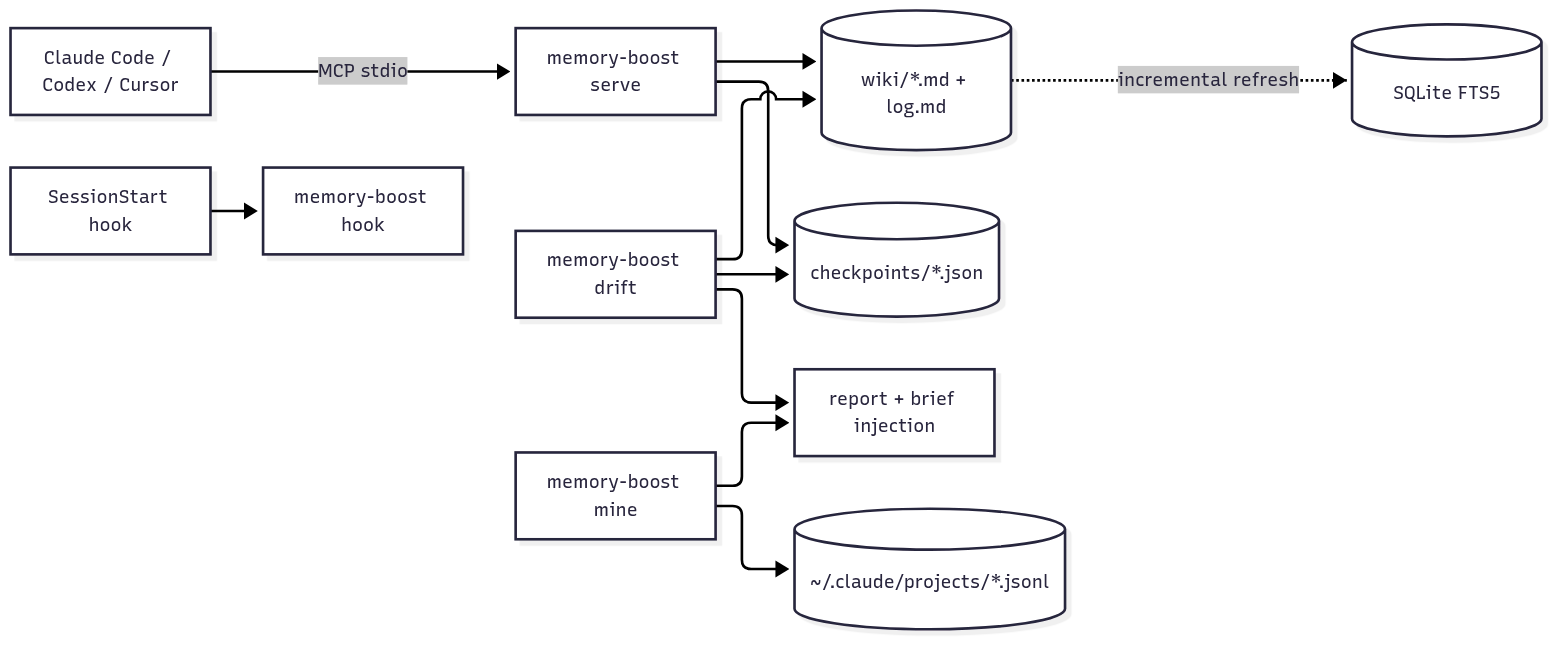
Source: docs/architecture.mmd
The project is resolved from the working directory name (~/work/acme-api → projects/acme-api.md);
map other names in aliases.json. Under 1,900 lines of Python, one dependency (mcp), no
embeddings unless you opt into semantic recall, no daemon unless you run serve --http.
Off by default: memory_recall is full-text only and the base install stays one dependency.
To also match paraphrases and other languages, run a local embedding model:
pip install "memory-boost[semantic]==0.2.0"   # adds sqlite-vec
ollama pull embeddinggemma
export MEMORY_BOOST_SEMANTIC=1
memory-boost index                       # embeds the wiki once; later runs embed only changes
The first index of a large wiki on CPU can take minutes: as a rough guide, about 15 minutes for some
850 documents on a laptop without a GPU (one measurement, not a benchmark). memory-boost index and
recall show embedding N/M chunks… on stderr while it runs; later runs re-embed only what changed.
Default mode when on is hybrid (full-text and vectors fused by weighted reciprocal rank); override
with MEMORY_BOOST_RECALL_MODE=fts|semantic|hybrid or memory-boost recall --mode. If Ollama is down,
recall falls back to full-text and logs a warning. On a private 64-query set (39 literal, 25 paraphrase)
with a warm index on CPU: paraphrase nDCG@10 0.46 to 0.76, literal 0.80 to 0.85, p50 about 110 ms per query.
The query set is not published.
| Variable | Default | Purpose |
|---|---|---|
MEMORY_BOOST_HOME | $XDG_DATA_HOME/memory-boost | Wiki, events, checkpoints, aliases.json |
MEMORY_BOOST_WIKI | $MEMORY_BOOST_HOME/wiki | Point at an existing wiki (e.g. a git repo) |
MEMORY_BOOST_INDEX | $XDG_CACHE_HOME/memory-boost/index-<hash>.db | Search index |
MEMORY_BOOST_CHECKPOINTS | $MEMORY_BOOST_HOME/checkpoints | Checkpoint directory |
MEMORY_BOOST_TRANSCRIPTS | ~/.claude/projects | Where mine looks (several dirs: a:b) |
MEMORY_BOOST_TODAY | today (UTC) | Pin the date for reproducible reports |
| memory-boost | basic-memory | claude-mem | agent-retro | |
|---|---|---|---|---|
| Store | Markdown wiki you edit | Markdown | Captured observations | None (prompt skill) |
| Search | FTS5 (+ optional local vectors) | FTS + vectors | FTS + vectors | — |
| Freshness / review dates | Yes | No | No | — |
| Drift report over memory | Yes | No | No | No |
| Session analytics | Yes (aggregates, local) | No | No | LLM reads the conversation |
| Parallel-session awareness | Yes | No | No | — |
| License | MIT | AGPL-3.0 | Apache-2.0 | ? |
Want better search, more integrations and a community? Use basic-memory. Want everything captured automatically? claude-mem. Use memory-boost if you want to learn from what your agents already wrote down.
[semantic] extra and a local Ollama.mine understands Claude Code transcripts today. Codex is on the roadmap.drift.MIT
FAQs
Memory that reviews itself: a markdown wiki for coding agents over MCP, plus drift reports on the wiki and digests of your own sessions.
The pypi package memory-boost receives a total of 30 weekly downloads. As such, memory-boost popularity was classified as not popular.
We found that memory-boost demonstrated a healthy version release cadence and project activity because the last version was released less than a year ago. It has 1 open source maintainer collaborating on the project.
Security News
Cloudflare is acquiring Deno’s team, which will provide another year of bug fixes and security updates before ending support for the runtime.

Security News
Anthropic’s free OSS Scanner uses Mythos and other Claude models to find open source vulnerabilities and send maintainers reports with proposed fixes.

Security News
On Front Lines’ Early Adopters: CISO podcast, Andrew Becherer shares lessons from Datadog, weighs the long-term costs of AI-built tools, and explains how founders can actually gain a CISO’s trust.