

Company News
AWS Security Hub Adds Socket for Supply Chain Security
Socket is now in the AWS Security Hub Extended plan. Adopt it through AWS, apply committed spend, and block malicious open source packages.
By Feross Aboukhadijeh - Aug 04, 2026
memwright
Advanced tools
Production-grade memory infrastructure for multi-agent systems. Namespace isolation, RBAC, provenance, ranked retrieval.

Production-grade memory infrastructure for multi-agent systems.




Agent systems lose state the moment a session ends. Single agents rediscover the same facts every run. Multi-agent pipelines are worse — the planner's decisions never reach the executor, the researcher's findings never reach the reviewer, and teams end up stuffing giant prompts between agents to paper over the gap.
Most memory "solutions" are either flat files loaded wholesale into context, or SaaS endpoints with opaque ranking and per-seat pricing. Neither is something you ship to production.
Memwright is the memory tier for agent systems that need to run in production — with ranked retrieval, namespace isolation, RBAC, provenance, and contradiction handling built in.
poetry add memwright
from agent_memory import AgentMemory

mem = AgentMemory("./store")
mem.add("Architecture decision: event sourcing for order service",
        category="technical", entity="order-service", tags=["arch", "decision"])
results = mem.recall("how is the order service structured?", budget=2000)
pip install memwright
memwright api --host 0.0.0.0 --port 8080
That's it. Starlette ASGI on http://localhost:8080. SQLite + ChromaDB + NetworkX provision automatically under ~/.memwright. No Docker, no API keys, no cloud account. Point every agent in your stack at the same URL — they share memory instantly. Air-gap it behind your firewall and walk away.
# smoke test
curl -X POST http://localhost:8080/add \
  -H "Content-Type: application/json" \
  -d '{"content":"test","category":"note"}'

curl -X POST http://localhost:8080/recall \
  -H "Content-Type: application/json" \
  -d '{"query":"test","budget":1000}'
Same command deploys to AWS App Runner, GCP Cloud Run, or Azure Container Apps — see Cloud Deployment.
{
  "mcpServers": {
    "memory": {
      "command": "memwright",
      "args": ["mcp"]
    }
  }
}
Works with Claude Code, Cursor, Windsurf, and any stdio-based MCP client.
memwright doctor ~/.memwright
All four checks should return healthy: Document Store, Vector Store, Graph Store, Retrieval Pipeline.
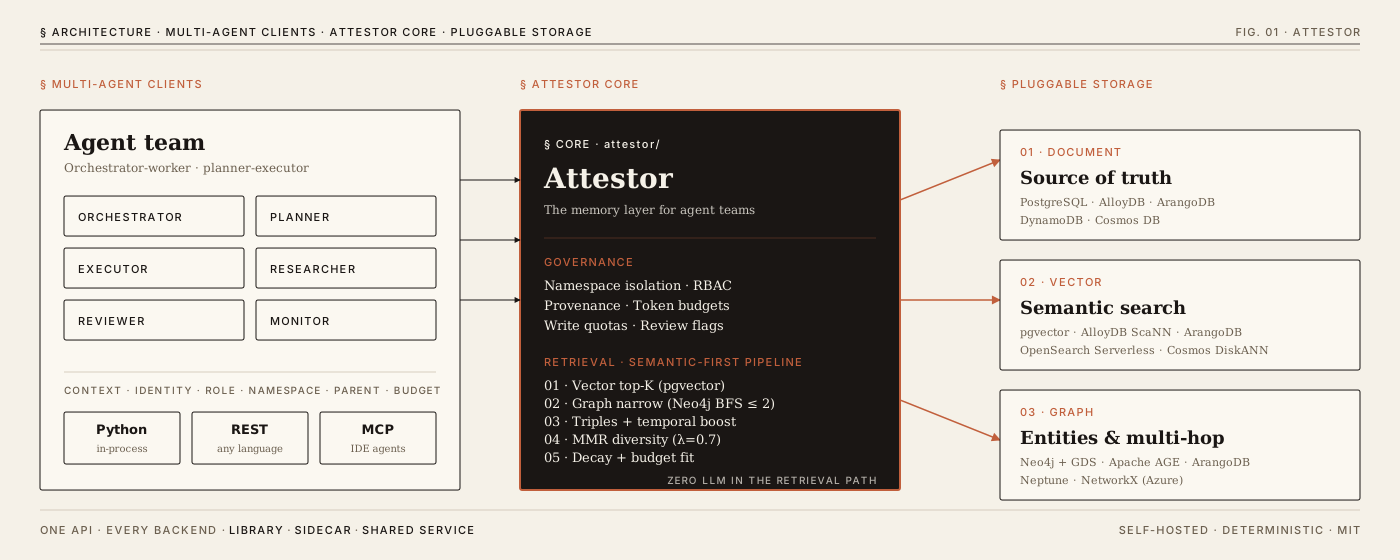
agent_memory/
├── core.py                    # AgentMemory — main orchestrator
├── models.py                  # Memory + RetrievalResult dataclasses
├── context.py                 # AgentContext — multi-agent provenance & RBAC
├── client.py                  # MemoryClient — HTTP client for distributed mode
├── cli.py                     # CLI entry point (19 commands)
├── api.py                     # Starlette ASGI REST API (8 routes)
├── store/
│   ├── base.py                # Abstract interfaces: DocumentStore, VectorStore, GraphStore
│   ├── sqlite_store.py        # SQLite storage (WAL, 17 columns, 8 indexes)
│   ├── chroma_store.py        # ChromaDB vector search (local sentence-transformers)
│   ├── schema.sql             # SQLite schema definition
│   ├── postgres_backend.py    # PostgreSQL (pgvector + Apache AGE)
│   ├── arango_backend.py      # ArangoDB (native doc + vector + graph)
│   ├── aws_backend.py         # AWS (DynamoDB + OpenSearch + Neptune)
│   └── azure_backend.py       # Azure (Cosmos DB DiskANN + NetworkX)
├── graph/
│   ├── networkx_graph.py      # NetworkX MultiDiGraph with PageRank + BFS
│   └── extractor.py           # Entity/relation extraction (50+ known tools)
├── retrieval/
│   ├── orchestrator.py        # 3-layer cascade with RRF fusion
│   ├── tag_matcher.py         # Stop-word filtered tag extraction
│   └── scorer.py              # Temporal, entity, PageRank, MMR, confidence decay
├── temporal/
│   └── manager.py             # Contradiction detection + supersession
├── extraction/
│   └── extractor.py           # Rule-based + LLM memory extraction
├── mcp/
│   └── server.py              # MCP server (8 tools, 2 resources, 2 prompts)
├── hooks/
│   ├── session_start.py       # Context injection (20K token budget)
│   ├── post_tool_use.py       # Auto-capture from Write/Edit/Bash
│   └── stop.py                # Session summary generation
├── utils/
│   └── config.py              # MemoryConfig dataclass + load/save
└── infra/                     # Terraform + Docker for cloud deployments
    ├── apprunner/             # AWS App Runner
    ├── cloudrun/              # GCP Cloud Run
    └── containerapp/          # Azure Container Apps
Every backend implements one or more of these roles:
| Role | Purpose | Local Default | Cloud Options |
|---|---|---|---|
| Document | Core storage, CRUD, filtering | SQLite | PostgreSQL, ArangoDB, DynamoDB, Cosmos DB |
| Vector | Semantic similarity search | ChromaDB | pgvector, ArangoDB, OpenSearch, Cosmos DiskANN |
| Graph | Entity relationships, BFS traversal | NetworkX | Apache AGE, ArangoDB, Neptune |
Cloud backends fill all 3 roles in a single service. If any optional component fails, the system degrades gracefully to document-only.
Memwright runs as a separate tier — a library, a container, or a cloud service — that agents query on demand. Stored memories never enter the context window until an agent explicitly calls recall() with a token budget. Retrieval cost stays constant as the store grows from 100 to 5,000,000 memories; only the ranking candidate pool expands.
Naive context-injection approach:
  Month 1:   2K tokens loaded every message
  Month 6:  15K tokens loaded every message  ← context crowded

Memwright:
  Month 1:   ≤2K tokens returned per recall  (ranked from 100 memories)
  Month 6:   ≤2K tokens returned per recall  (ranked from 5,000 memories)
                                             ← bounded cost, deeper recall
When an agent calls memory_recall("deployment setup", budget=2000):
Store: 5,000 memories

  Tag search finds:     15 memories tagged "deployment"
  Graph search finds:    8 memories linked to "AWS", "Docker" entities
  Vector search finds:  20 semantically similar memories

  After dedup + RRF fusion:  30 unique candidates, scored and ranked

  Budget fitting (2,000 tokens):
    Memory A (score 0.95):  500 tokens → in   (total: 500)
    Memory B (score 0.90):  600 tokens → in   (total: 1,100)
    Memory C (score 0.88):  400 tokens → in   (total: 1,500)
    Memory D (score 0.85):  300 tokens → in   (total: 1,800)
    Memory E (score 0.80):  400 tokens → SKIP (exceeds 2,000)

  Result: 4 memories, 1,800 tokens. 4,996 memories never entered context.
Memwright ships an MCP server so any MCP-compatible client (Claude Code, Cursor, Windsurf, custom agents) can store and retrieve memories. Start it with memwright mcp.
| Tool | Purpose | Key Parameters |
|---|---|---|
memory_add | Store a fact | content, tags[], category, entity, namespace, event_date, confidence |
memory_recall | Smart multi-layer retrieval | query, budget (default: 2000), namespace |
memory_search | Filter with date ranges | query, category, entity, namespace, status, after, before, limit |
memory_get | Fetch by ID | memory_id |
memory_forget | Archive (soft delete) | memory_id |
memory_timeline | Chronological entity history | entity, namespace |
memory_stats | Store size, counts | — |
memory_health | Health check (call first!) | — |
core_belief · preference · career · project · technical · personal · location · relationship · event · session · general
memwright://entity/{name} — Entity details + related entities from graphmemwright://memory/{id} — Full memory objectrecall — Search memories for relevant contexttimeline — Chronological history of an entityThe retrieval system uses a 5-layer cascade with multi-signal fusion:
Query: "deployment setup"
  │
  ├─ Layer 0: Graph Expansion
  │  Extract entities from query → BFS traversal (depth=2)
  │  "deployment" → finds "AWS", "Docker", "Terraform" connections
  │
  ├─ Layer 1: Tag Match (SQLite)
  │  extract_tags(query) → tag_search() → score 1.0
  │
  ├─ Layer 2: Entity-Field Search
  │  Memories about graph-connected entities → score 0.5
  │
  ├─ Layer 3: Vector Search (ChromaDB)
  │  Semantic similarity → score = 1 - cosine_distance
  │
  ├─ Layer 4: Graph Relation Triples
  │  Inject relationship context → score 0.6
  │
  ▼ FUSION
  ├─ Reciprocal Rank Fusion (RRF, k=60)
  │  score = Σ 1/(k + rank_in_source)
  │  OR Graph Blend: 0.7 * norm_vector + 0.3 * norm_pagerank
  │
  ▼ SCORING
  ├─ Temporal Boost: +0.2 * max(0, 1 - age_days/90)
  ├─ Entity Boost:   +0.30 exact match, +0.15 substring
  ├─ PageRank Boost:  +0.3 * entity_pagerank_score
  │
  ▼ DIVERSITY
  ├─ MMR Rerank: λ*relevance - (1-λ)*max_jaccard_similarity (λ=0.7)
  │
  ▼ CONFIDENCE
  ├─ Time Decay:    -0.001 per hour since last access
  ├─ Access Boost:  +0.03 per access_count
  ├─ Clamp:         [0.1, 1.0]
  │
  ▼ BUDGET
  └─ Greedy selection by score until token budget filled
Querying "Python" also finds memories about "FastAPI" if they're connected in the entity graph. Multi-hop reasoning through relationship traversal.
from agent_memory import AgentMemory

mem = AgentMemory("./my-agent")  # auto-provisions all backends

# Store
mem.add("User prefers Python over Java",
        tags=["preference", "coding"],
        category="preference",
        entity="Python")

# Recall with token budget
results = mem.recall("what language?", budget=2000)

# Formatted context for prompt injection
context = mem.recall_as_context("user background", budget=4000)

# Search with filters
memories = mem.search(category="project", entity="Python", limit=10)

# Timeline
history = mem.timeline("Python")

# Contradiction handling — automatic
mem.add("User works at Google", tags=["career"], category="career", entity="Google")
mem.add("User works at Meta", tags=["career"], category="career", entity="Meta")
# ^ Google memory auto-superseded

# Namespace isolation
mem.add("Team standup at 9am", namespace="team:alpha")
results = mem.recall("standup time", namespace="team:alpha")

# Maintenance
mem.forget(memory_id)             # Archive
mem.forget_before("2025-01-01")   # Archive old memories
mem.compact()                     # Permanently delete archived
mem.export_json("backup.json")    # Export
mem.import_json("backup.json")    # Import (dedup by content hash)

# Health & stats
mem.health()  # → {sqlite: ok, chroma: ok, networkx: ok, retrieval: ok}
mem.stats()   # → {total: 500, active: 480, ...}

# Context manager
with AgentMemory("./store") as mem:
    mem.add("auto-closed on exit")
@dataclass
class Memory:
    id: str                    # UUID
    content: str               # The actual fact/observation
    tags: List[str]            # Searchable tags
    category: str              # Classification (preference, career, project, ...)
    entity: str                # Primary entity (company, tool, person)
    namespace: str             # Isolation key (default: "default")
    created_at: str            # ISO timestamp
    event_date: str            # When the fact occurred
    valid_from: str            # Temporal validity start
    valid_until: str           # Set when superseded
    superseded_by: str         # ID of replacement memory
    confidence: float          # 0.0-1.0
    status: str                # active | superseded | archived
    access_count: int          # Times recalled
    last_accessed: str         # Last recall timestamp
    content_hash: str          # SHA-256 for dedup
    metadata: Dict[str, Any]   # Arbitrary JSON
Memwright is built for production multi-agent pipelines — orchestrator-worker, planner-executor, researcher-reviewer, and hierarchical swarms. Every recall and write is scoped to an AgentContext that carries identity, role, namespace, parent trail, token budget, write quota, and visibility policy. Contexts are immutable; spawning a sub-agent returns a new context with inherited provenance.
from agent_memory.context import AgentContext, AgentRole, Visibility

# Create a root context
ctx = AgentContext.from_env(
    agent_id="orchestrator",
    namespace="project:acme",
    role=AgentRole.ORCHESTRATOR,
    token_budget=20000,
)

# Spawn child contexts for sub-agents (immutable — returns new instance)
planner = ctx.as_agent("planner", role=AgentRole.PLANNER, token_budget=5000)
researcher = ctx.as_agent("researcher", role=AgentRole.RESEARCHER, read_only=True)

# Provenance tracking — metadata auto-enriched
planner.add_memory("Architecture decision: use event sourcing",
                   category="technical", visibility=Visibility.TEAM)
# metadata includes: _agent_id, _session_id, _namespace, _visibility, _role

# Recall is scoped to namespace + cached within session
results = researcher.recall("architecture decisions")

# Token budget tracked
print(researcher.token_budget - researcher.token_budget_used)

# Governance
researcher.flag_for_review("Need human approval for deployment plan")
researcher.add_compliance_tag("SOC2")

# Session introspection
summary = ctx.session_summary()
# → {agent_trail, memories_written, memories_recalled, token_usage, review_flags}
| Feature | Description |
|---|---|
| Namespace isolation | Each agent/project gets isolated memory partition |
| RBAC roles | ORCHESTRATOR, PLANNER, EXECUTOR, RESEARCHER, REVIEWER, MONITOR |
| Read-only mode | Agents can recall but not write |
| Write quotas | max_writes_per_agent (default: 100) |
| Token budgets | Per-agent budget tracking |
| Recall cache | Dedup redundant queries within a session |
| Scratchpad | Inter-agent data passing |
| Provenance | Agent trail, parent tracking, visibility levels |
| Compliance | Review flags, compliance tags for audit |
| Distributed mode | Set memory_url to use HTTP client instead of local |
Each cloud backend fills all three roles (document, vector, graph) in a single service:
Uses pgvector for vectors, Apache AGE for graph. AGE is optional — without it, graph gracefully degrades.
mem = AgentMemory("./store", config={
    "backends": ["postgres"],
    "postgres": {"url": "postgresql://user:pass@host:5432/memwright"}
})
Native document, vector, and graph support in one database.
mem = AgentMemory("./store", config={
    "backends": ["arangodb"],
    "arangodb": {"url": "https://instance.arangodb.cloud:8529", "database": "memwright"}
})
Cosmos DB with DiskANN vector indexing. Graph via NetworkX persisted to Cosmos containers.
mem = AgentMemory("./store", config={
    "backends": ["azure"],
    "azure": {"cosmos_endpoint": "https://account.documents.azure.com:443/"}
})
Extends PostgreSQL backend with AlloyDB Connector (IAM auth) and Vertex AI embeddings (768D).
mem = AgentMemory("./store", config={
    "backends": ["gcp"],
    "gcp": {"project_id": "my-project", "cluster": "memwright", "instance": "primary"}
})
poetry add "memwright[postgres]"    # PostgreSQL
poetry add "memwright[arangodb]"    # ArangoDB
poetry add "memwright[aws]"         # AWS (DynamoDB + OpenSearch + Neptune)
poetry add "memwright[azure]"       # Azure Cosmos DB
poetry add "memwright[gcp]"         # GCP AlloyDB + Vertex AI
poetry add "memwright[all]"         # Everything
Deploy Memwright as an HTTP API on any cloud with a single command:
./scripts/deploy.sh aws        # App Runner (2 CPU / 4GB, auto-scale)
./scripts/deploy.sh gcp        # Cloud Run (auto-scale 0–3, 2 CPU / 4GB)
./scripts/deploy.sh azure      # Container Apps (scale-to-zero, 2 CPU / 4GB)

./scripts/deploy.sh aws --teardown   # Destroy everything
Prerequisites: Docker, Terraform, cloud CLI (aws/gcloud/az), backend credentials in .env.
| Cloud | Infrastructure | Terraform |
|---|---|---|
| AWS | ECR + App Runner (2 CPU, 4GB) | agent_memory/infra/apprunner/main.tf |
| GCP | Artifact Registry + Cloud Run (2 CPU, 4GB) | agent_memory/infra/cloudrun/main.tf |
| Azure | ACR + Log Analytics + Container Apps (2 CPU, 4GB) | agent_memory/infra/containerapp/main.tf |
All deployments expose the same Starlette ASGI API:
| Method | Endpoint | Description |
|---|---|---|
GET | /health | Component health check |
GET | /stats | Store statistics |
POST | /add | Add a memory |
POST | /recall | Smart retrieval with budget |
POST | /search | Filtered search |
POST | /timeline | Entity chronological history |
POST | /forget | Archive a memory |
GET | /memory/{id} | Get memory by ID |
Response envelope: {"ok": true, "data": {...}} or {"ok": false, "error": "message"}
Memwright auto-detects the best available embedding provider:
| Priority | Provider | Model | Dimensions | Trigger |
|---|---|---|---|---|
| 1 | Cloud-native | Bedrock Titan / Azure OpenAI / Vertex AI | 768-1536 | Cloud backend configured |
| 2 | OpenAI / OpenRouter | text-embedding-3-small | 1536 | OPENAI_API_KEY or OPENROUTER_API_KEY set |
| 3 | Local (default) | all-MiniLM-L6-v2 | 384 | Always available, no API key |
The local fallback downloads ~90MB on first use. All providers implement the same interface — switching is transparent.
Both memwright and agent-memory work as entry points:
memwright mcp                          # Start MCP server (uses ~/.memwright)
memwright mcp --path /custom/path      # Custom store location
agent-memory add ./store "User prefers Python" --tags "pref,coding" --category preference
agent-memory recall ./store "what language?" --budget 4000
agent-memory search ./store --category project --entity Python --limit 20
agent-memory list ./store --status active --category technical
agent-memory timeline ./store --entity Python
agent-memory get ./store <memory-id>
agent-memory forget ./store <memory-id>
agent-memory doctor ~/.memwright       # Health check (SQLite, ChromaDB, NetworkX, Retrieval)
agent-memory stats ./store             # Memory counts, DB size, breakdowns
agent-memory export ./store -o backup.json
agent-memory import ./store backup.json
agent-memory compact ./store           # Permanently delete archived memories
agent-memory inspect ./store           # Raw DB inspection
memwright hook session-start           # Inject context at agent session start
memwright hook post-tool-use           # Auto-capture tool observations
memwright hook stop                    # Generate session summary on exit
Hooks integrate with any harness that supports session lifecycle callbacks.
agent-memory locomo --max-conversations 5 --verbose
agent-memory mab --categories AR,CR --max-examples 10
Default: ~/.memwright/. Configurable with --path on any CLI command.
~/.memwright/
├── memory.db        # SQLite database (core storage)
├── config.json      # Retrieval tuning parameters
├── graph.json       # NetworkX entity graph
└── chroma/          # ChromaDB vector store + embeddings
All fields optional. Defaults apply if the file doesn't exist:
{
  "default_token_budget": 2000,
  "min_results": 3,
  "backends": ["sqlite", "chroma", "networkx"],
  "enable_mmr": true,
  "mmr_lambda": 0.7,
  "fusion_mode": "rrf",
  "confidence_gate": 0.0,
  "confidence_decay_rate": 0.001,
  "confidence_boost_rate": 0.03
}
| Parameter | Default | Description |
|---|---|---|
default_token_budget | 2000 | Max tokens returned per recall |
min_results | 3 | Minimum results to return |
enable_mmr | true | Maximal Marginal Relevance diversity reranking |
mmr_lambda | 0.7 | Relevance vs diversity balance (0=diverse, 1=relevant) |
fusion_mode | "rrf" | "rrf" (parameter-free) or "graph_blend" (weighted) |
confidence_decay_rate | 0.001 | Score penalty per hour since last access |
confidence_boost_rate | 0.03 | Score boost per access count |
confidence_gate | 0.0 | Minimum confidence threshold to include in results |
| Variable | Purpose |
|---|---|
MEMWRIGHT_PATH | Default store path |
MEMWRIGHT_URL | Remote API URL (distributed mode) |
MEMWRIGHT_NAMESPACE | Default namespace |
MEMWRIGHT_TOKEN_BUDGET | Default token budget |
MEMWRIGHT_SESSION_ID | Session ID for provenance tracking |
# All unit tests — no Docker, no API keys
poetry run pytest tests/ -v

# With coverage
poetry run pytest tests/ -v --cov=agent_memory --cov-report=term-missing

# Live integration tests (need credentials)
NEON_DATABASE_URL='postgresql://...' poetry run pytest tests/test_postgres_live.py -v
AZURE_COSMOS_ENDPOINT='https://...' poetry run pytest tests/test_azure_live.py -v
| Backend | Stack | P50 | P95 | P99 |
|---|---|---|---|---|
| PG + pgvector + AGE (Docker) | PostgreSQL 16 + pgvector + Apache AGE | 1.4ms | 5.5ms | 39ms |
| SQLite + ChromaDB + NetworkX (local) | SQLite 3 + ChromaDB 1.x + NetworkX 3 | 9.1ms | 31ms | 75ms |
| ArangoDB (Docker) | ArangoDB 3.12 (doc + vector + graph) | 40ms | 57ms | 68ms |
| GCP Cloud Run (us-central1) | Starlette + Uvicorn → ArangoDB Oasis | 156ms | 245ms | 271ms |
| Azure Container Apps (eastus) | Starlette + Uvicorn → ArangoDB Oasis | 293ms | 466ms | 480ms |
| AWS App Runner (us-west-2) | Starlette + Uvicorn → ArangoDB Oasis | 621ms | 792ms | 813ms |
| System | Stack | P50 | Notes |
|---|---|---|---|
| Memwright (PG Docker) | PG 16 + pgvector + AGE | 1.4ms | Full 3-layer pipeline, 81.2% LOCOMO |
| Ruflo | In-process HNSW | 2-3ms | Vector lookup only, not full retrieval |
| Memwright (local) | SQLite + ChromaDB + NX | 9.1ms | Embedded, no Docker, no API keys |
| Memwright (GCP Cloud Run) | Starlette → ArangoDB Oasis | 156ms | Full cloud API, scale-to-zero |
| Mem0 | Cloud + LLM judge | 200ms | LLM in retrieval path |
| Zep | Neo4j + embeddings | <200ms | P95 ~632ms under concurrency |
| Mem0 Graph | Cloud + LLM + graph | 660ms | Graph variant, much slower |
Full methodology, per-backend add/search latency, and reproduction scripts live in the repository under benchmarks/.
| System | Accuracy |
|---|---|
| MemMachine | 84.9% |
| Memwright | 81.2% |
| Zep | ~75% |
| Letta | 74.0% |
| Mem0 (Graph) | 66.9% |
| OpenAI Memory | 52.9% |
Scores are self-reported across vendors. Methodology is disputed.
Retrieval is fully local — tag matching, graph traversal, vector search with RRF fusion. No LLM re-ranking. Only benchmark answer synthesis uses an LLM.
| Client | Config File |
|---|---|
| Any MCP client | Standard MCP stdio transport |
| Claude Code | .mcp.json (project) or ~/.claude/.mcp.json (global) |
| Cursor | .cursor/mcp.json |
| Windsurf | MCP config in settings |
Same memwright mcp command for every client.
Delete the memory entry from your MCP client's config file.
poetry remove memwright
# Export first if you want a backup
agent-memory export ~/.memwright -o memwright-backup.json

# Then delete
rm -rf ~/.memwright
Apache 2.0
mcp-name: io.github.bolnet/memwright
FAQs
Production-grade memory infrastructure for multi-agent systems. Namespace isolation, RBAC, provenance, ranked retrieval.
We found that memwright demonstrated a healthy version release cadence and project activity because the last version was released less than a year ago. It has 1 open source maintainer collaborating on the project.
Did you know?

Socket for GitHub automatically highlights issues in each pull request and monitors the health of all your open source dependencies. Discover the contents of your packages and block harmful activity before you install or update your dependencies.
Company News
Socket is now in the AWS Security Hub Extended plan. Adopt it through AWS, apply committed spend, and block malicious open source packages.

Research
/Security News
Popular npm packages keyv and cacheable compromised.

Security News
A misconfiguration gave three Anthropic models internet access, and one, believing it was in a simulation, shipped a credential-stealing package to PyPI.