

Research
/Security News
Miasma Mini Shai-Hulud Hits ImmobiliareLabs npm Packages
Miasma Mini Shai-Hulud hits @immobiliarelabs Backstage plugins, targeting GitLab and LDAP auth packages on npm.
By Socket Research Team - Jun 26, 2026
pdflinkcheck
Advanced tools
A purpose-built tool for comprehensive analysis of hyperlinks and GoTo links within PDF documents. Users may choose between three different PDF analysis libraries. Use the CLI or the GUI or the localhost webapp to leverage this cross-platform PDF hyperlink and navigation analysis toolkit.

The recommended way to use pdflinkcheck is to either install the CLI with pipx or to download the appropriate latest binary for your system from Releases.
For the most user-typical experience, download the single-file binary matching your OS.
| File Type | Primary Use Case | Recommended Launch Method |
|---|---|---|
| Executable (.exe, .elf) | GUI | Double-click the file. |
| PYZ (Python Zip App) | CLI or GUI | Run using your system's python command: python pdflinkcheck-VERSION.pyz --help |
For an isolated environment where you can access pdflinkcheck from any terminal:
# Ensure you have pipx installed first (if not, run: pip install pipx)
pipx install pdflinkcheck[pdfium,pymupdf]

# On Termux
pipx install pdflinkcheck
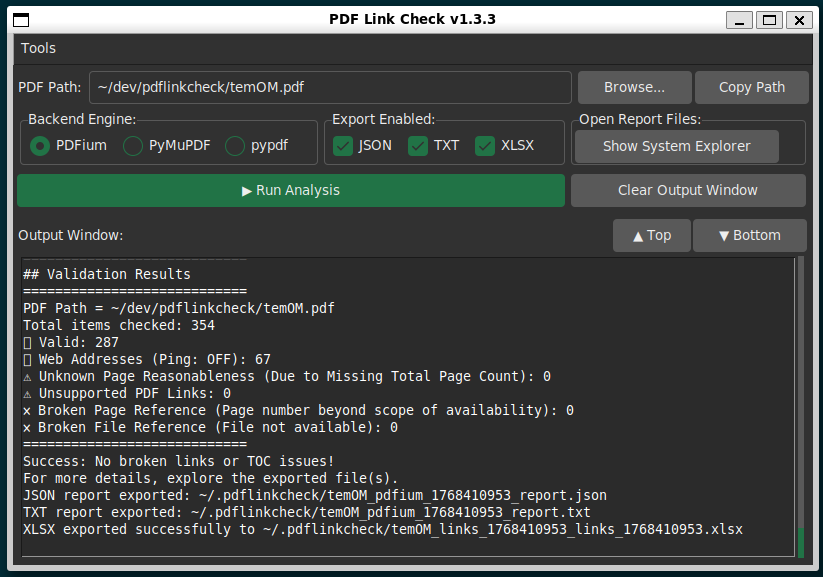
The tool can be run as simple cross-platform graphical interface (Tkinter).
Ways to launch the GUI interface:
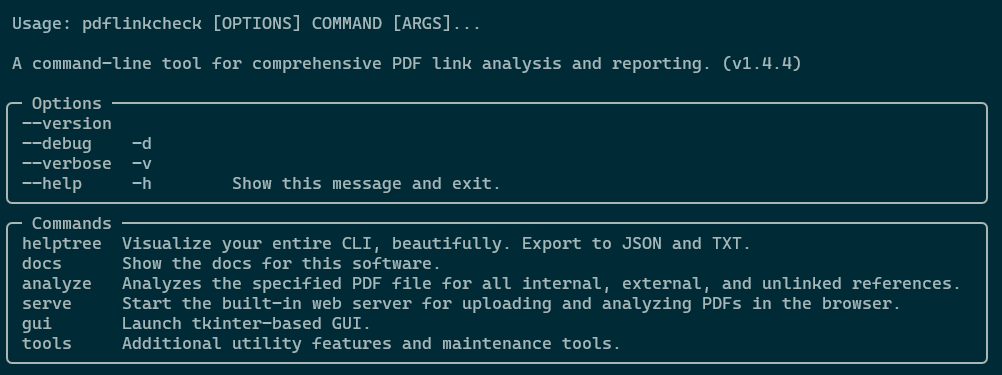
pdflinkcheck gui).The core functionality is accessed via the analyze command.
pdflinkcheck --help:
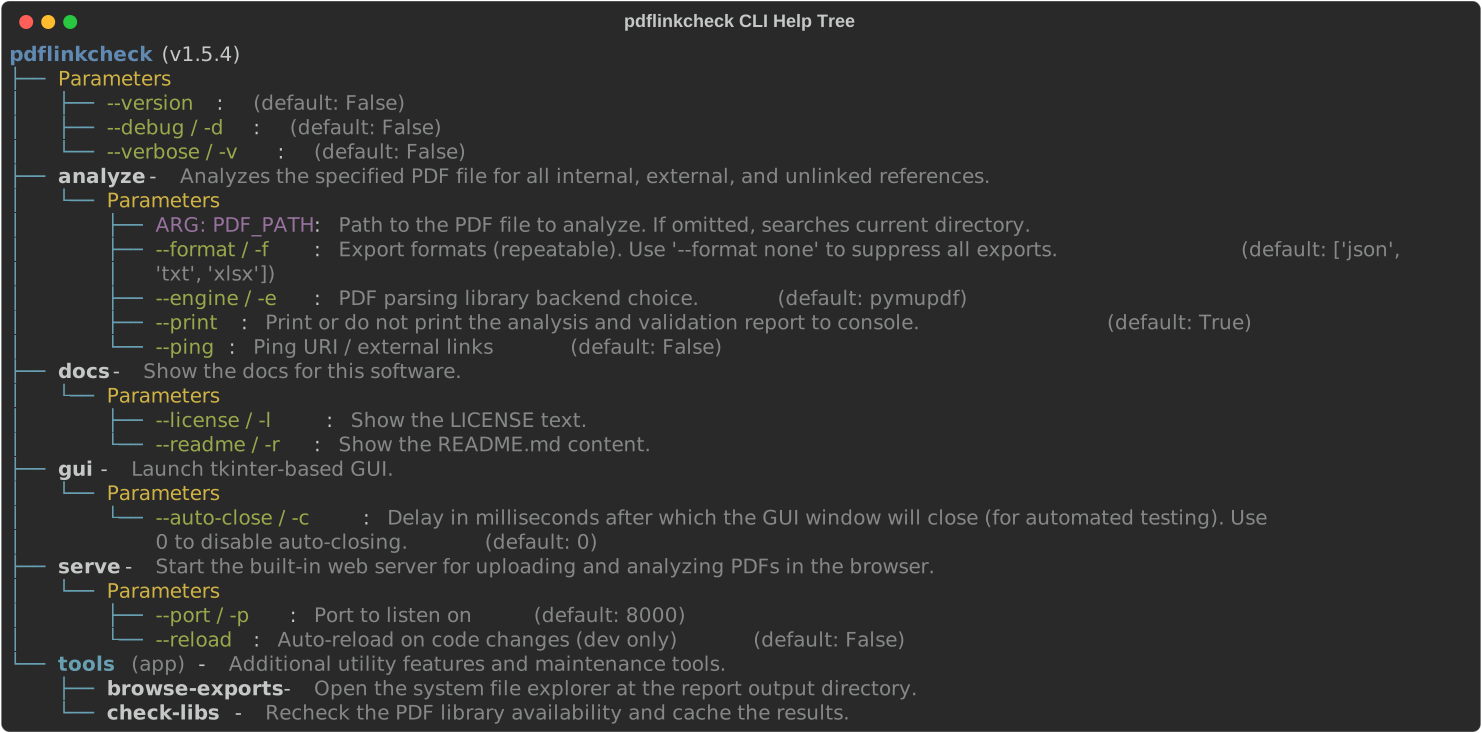
See the pdflinkcheck Typer CLI structure.
pdflinkcheck helptree
| Command | Description |
|---|---|
pdflinkcheck analyze | Analyzes a PDF file for links and validates their reasonableness. |
pdflinkcheck gui | Explicitly launch the Graphical User Interface. |
pdflinkcheck docs | Access documentation, including the README and AGPLv3+ license. |
pdflinkcheck serve | Serve a basic local web app which uses only the Python standard library. |
pdflinkcheck tools | Access additional tools, like --clear-cache. |
analyze Command Options| Option | Description | Default |
|---|---|---|
<PDF_PATH> | Required. The path to the PDF file to analyze. | N/A |
--pdf-library / -p | Select engine: pymupdf or pypdf. | pypdf |
--format / -f | Export to JSON, TXT, XLSX, and/or None to suppress file output. | JSON |
gui Command Options| Option | Description | Default |
|---|---|---|
--auto-close INTEGER | (For testing/automation only). Delay in milliseconds after which the GUI window will automatically close. | 0 (Disabled) |
# Analyze a document, show all links, and save the report as XLSX, JSON, and TXT
pdflinkcheck analyze "TE Maxson WWTF O&M Manual.pdf" --format xlsx -f json -f txt

# Show the GUI for only a moment, like in a build check
pdflinkcheck gui --auto-close 3000

# Show both the LICENSE and README.md docs
pdflinkcheck docs --license --readme
For developers importing pdflinkcheck into other Python projects, the core analysis functions are exposed directly in the root namespace. The various analysis_pdf_* functions each use a different library to extract the target PDF's internal TOC, external links, and metadata.
| Function | Library | Description |
|---|---|---|
run_report() | pdflinkcheck | (Primary function) Performs the full analysis, prints to console, and handles file export. |
analyze_pdf_pdfium() | pypdfium2 | Fast, ~10 mb, Permissively licensed |
analyze_pdf_pymupdf() | PyMuPDF | Fast, ~30 mb, AGPL3+ licensed |
analyze_pdf_pypdf() | pypdf library | Slow, ~2 mb, Permissively licensed |
Example:
from pdflinkcheck import ( run_report,
                          analyze_pdf_pymupdf,
                          analyze_pdf_pypdf,
                          analyze_pdf_pdfium,
                          )

file = "document1.pdf"
report_data = run_report(file)
links_pdfium = analyze_pdf_pdfium(file)
links_pypdf = analyze_pdf_pypdf(file)
For users who prefer exploring tools interactively—especially those coming from MATLAB or other REPL‑first environments—pdflinkcheck includes an optional Easter egg that exposes the GUI launcher directly in the library namespace.
This feature is disabled by default and has no effect on normal imports.
Set the environment variable before importing the library:
export PDFLINKCHECK_GUI_EASTEREGG=true
or
import os
os.environ["PDFLINKCHECK_GUI_EASTEREGG"] = "true"
and then
import pdflinkcheck
pdflinkcheck.start_gui()
Accepted values include: true, 1, yes, on (case‑insensitive).
This opt‑in behavior is designed to make the library feel welcoming to beginners who are experimenting in a Python REPL for the first time. When enabled, the start_gui() function becomes available at the top level:
pdflinkcheck.start_gui()
If the PDFLINKCHECK_GUI_EASTEREGG environment variable is not set—or if GUI support is unavailable—pdflinkcheck behaves as a normal library with no GUI functions exposed.
A key goal of City-of-Memphis-Wastewater is to release all software as Termux-compatible.
Termux compatibility is important in the modern age, because Android devices are common among technicians, field engineers, and maintenance staff. Android is the most common operating system in the Global South. We aim to produce stable software that can do the most possible good.
Now pdflinkcheck can run on Termux by using the pypdf engine and the pdfium engine.
Benefits:
pypdf-only artifacts, to reduce size to about 6% compared to artifacts that include PyMuPDF.PyMuPDF is an optional dependency. All testing comparing pypdf and PyMuPDF has shown identical validation performance. However PyMuPDF is much faster. The benefit of pypdf is small size of packages and cross-platform compatibility. We have recently added a PDFium option, which circumvents the AGPL3+.
It is expected that all binaries and artifacts contain PyMuPDF, unless they are built on Android. The GUI and CLI interfaces both allow selection of the library; if PyMuPDF is selected but is not available, the user will be warned.
To install the complete version use one of these options:
pip install "pdflinkcheck[pymupdf]"
pipx install "pdflinkcheck[pdfium]"
uv tool install "pdflinkcheck[pdfium]"
uv add "pdflinkcheck[pdfium]"
Not all PDF files can be processed successfully. This tool is designed primarily for digitally generated (vector-based) PDFs.
Processing may fail or yield incomplete results for:
git clone http://github.com/city-of-memphis-wastewater/pdflinkcheck.git
cd pdflinkcheck

# To include the PyMuPDF dependency in the installation:
uv sync --extras pdfium --extra pymupdf

# On Termux, to not include PyMuPDF:
uv sync --extra pdfium

# To include developer dependencies:
uv sync --all-extras --group dev

# Run the CLI
uv run python -m pdflinkcheck.cli --help

# Run a basic webapp and Termux-facing browser-based interface
uv run python -m pdflinkcheck.stdlib_server
Please see the LICENSE file, the NOTICE file, and the PyMuPDf sourcecode.
| Build Type | License Outcome |
|---|---|
| Core + pypdf | MIT |
| Core + PDFium | MIT |
| Core + PyMuPDF | AGPL obligations apply |
It is entirely optional to include PyMuPDF as a dependency of pdflinkcheck. Leverage pyproject.toml --extra flags to choose what is included.
The source code itself for pdflinkcheck is licensed under the MIT.
Before deploying or modifying this tool for organizational use, especially for internal web services or distribution, please ensure compliance with the PyMuPDG terms.
Because of the strong copyleft AGPLv3+ license associated with PyMuPDF, which is an optional, extra dependency of this project, any version of pdflinkcheck that includes AGPL‑licensed components (such as PyMuPDF) must be distributed as a whole under AGPLv3+. This means that for those versions, anyone who distributes the application — or makes a modified version available over a network — must also provide the complete corresponding source code under the same terms.
Links:
FAQs
A purpose-built PDF link analysis and reporting tool with GUI and CLI.
The pypi package pdflinkcheck receives a total of 2,177 weekly downloads. As such, pdflinkcheck popularity was classified as popular.
We found that pdflinkcheck demonstrated a healthy version release cadence and project activity because the last version was released less than a year ago. It has 1 open source maintainer collaborating on the project.
Did you know?

Socket for GitHub automatically highlights issues in each pull request and monitors the health of all your open source dependencies. Discover the contents of your packages and block harmful activity before you install or update your dependencies.
Research
/Security News
Miasma Mini Shai-Hulud hits @immobiliarelabs Backstage plugins, targeting GitLab and LDAP auth packages on npm.

Security News
Rolldown paused Rust React Compiler integration after a 5MB binary size increase raised concerns about shipping React-specific code to all Vite users.

Security News
/Research
Mini Shai-Hulud expands into the Go ecosystem after hitting LeoPlatform npm packages and targeting GitHub Actions workflows.