


Product
PHP and Composer Support Is Now in Beta
Socket’s PHP and Composer support is now in Beta for all customers, with PHP reachability analysis generally available.
By Trevor Norris, Benjamin Barslev - Aug 21, 2026
wb-mcp-server
Advanced tools
MCP server for Wildberries Seller API: 202 tools for products, prices, orders, ads, supplies, reviews, finance and analytics



Run your Wildberries stores from a chat with an AI assistant. 202 tools covering the Wildberries Seller API — product cards, prices, ads, shipments, reviews, finance, analytics — exposed to Claude, Cursor, Copilot, Gemini CLI and any other MCP client. Built for WB sellers (Wildberries is Russia's largest marketplace) who run one or several seller accounts and would rather ask a question than click through the seller portal.
Selling on Ozon too? There is the same server for Ozon.
The server has been in daily use for more than five months across roughly twenty WB seller accounts, with 202 tools. It is the author's own working tool and is updated as the author needs it — details here.
You: Which of my product cards are blocked, and why?
You: Show ad cost share for every campaign this week and pause the ones above 15%.
You: Which warehouses currently have an intake coefficient of 0 or 1?
You: Reply to every new 5-star review with a thank-you note.
202 tools, grouped by Wildberries Seller API area. The full numbered list with a description of each one is in docs/tools.md.
| Area | Tools | What it covers |
|---|---|---|
| Product cards | 26 | card list and details, create and update, SEO text, attributes, barcodes, media, tags, trash bin, cards with errors and blocks |
| Prices and discounts | 7 | current prices, setting prices and discounts, price quarantine, WB Club (WB's paid membership discounts), B2B, upload status |
| Promotions | 7 | promotion calendar, auto-promotions, an audit of "where WB has already enrolled your products", joining and leaving a promotion |
| Advertising | 22 | campaign list and creation, statistics and ad cost share, bids and bid recommendations, keyword clusters and negative phrases, balance and top-ups |
| Analytics | 25 | sales funnel v3 (per-product views → cart → order conversion), day-by-day history, stock, anti-fraud, paid intake, measurement penalties, brand share, sales by region, search queries |
| Statistics | 3 | sales, orders, stock (statistics-api) |
| FBS orders | 29 | new and all assembly tasks, statuses, cancellation, labels, supplies, boxes, warehouse passes, KIZ marking codes (Russia's mandatory product marking). FBS = fulfilled by seller from WB warehouse pickup |
| DBS orders | 10 | delivery by seller: orders, statuses, actions, delivery dates, metadata |
| Click & collect | 9 | pickup orders, buyer identity confirmation, actions and metadata |
| FBW supplies | 6 | shipments into WB warehouses, goods in a shipment, warehouses, intake coefficients for the next 14 days |
| Seller warehouses and stock | 8 | seller warehouses, updating and reading stock |
| Finance | 7 | sales reports, detailed breakdown, acquiring, balance, seller profile |
| Tariffs and storage | 6 | box and pallet tariffs, return tariffs, commissions, FBW transit, paid storage |
| Reviews and questions | 18 | reviews and questions, replies, per-period counters, archive, pinned reviews, seller rating |
| Returns | 3 | return requests, answering a request, returns report |
| Buyer chats | 4 | chats, events, sending messages, downloading attachments |
| Documents | 4 | document categories, list, single and bulk download |
| Users | 2 | staff members and invitations |
| WB Jam | 1 | WB Jam subscription status (WB's paid analytics add-on) |
| Shops | 1 | list of connected seller accounts |
| Diagnostics | 4 | self-diagnostics, token inspection, tool degradations, WB API news |
Three things similar servers usually do not have:
shop_id, so two WB seller accounts live in one
conversation. With a single store you can omit shop_id entirely.The server speaks stdio, which is how Claude Desktop, Cursor, VS Code and other MCP clients connect to it. Nothing to build:
uvx wb-mcp-server
Or via pip:
pip install wb-mcp-server
wb-mcp
Client configuration (for example claude_desktop_config.json):
{
  "mcpServers": {
    "wildberries": {
      "command": "uvx",
      "args": ["wb-mcp-server"],
      "env": {
        "WB_API_TOKEN": "your Wildberries API token",
        "DATA_DIR": "~/.wb-mcp"
      }
    }
  }
}
Point DATA_DIR at any writable directory — it holds stores, keys and statistics.
The default is /data, which is the path used inside Docker.
Use this if you want the dashboard, WB API diagnostics and browser-based store management. You need Docker (Docker Desktop or OrbStack) and a Wildberries Seller API token.
git clone https://github.com/DeviceIngineering/wb-mcp-server.git
cd wb-mcp-server
cp .env.example .env          # fine as-is for a local run
docker compose up -d --build
Check:
curl -s http://localhost:8001/api/health
# {"status":"ok","auth_enabled":false,"health_check_interval_min":30,...}
What you now have:
| Address | What it is |
|---|---|
| http://localhost:8001 | dashboard: tool calls, errors, response times |
| http://localhost:8001/shops | stores: add a WB seller account, test its token |
| http://localhost:8001/diagnostics | diagnostics: tokens, WB host pings, probes, history |
| http://localhost:8001/api/health | JSON summary for external monitoring |
http://localhost:8001/sse | the MCP endpoint — this is what you give to the client |
Next:
wb_list_shops tool should fire.The start command, flag by flag:
| Flag | Why |
|---|---|
up | start the service described in docker-compose.yml |
-d | in the background, without holding the terminal |
--build | build the image from Dockerfile — needed on the first run and after code updates |
Stop it with docker compose down (data stays in the wb_data volume).
Logs: docker compose logs -f.
git clone https://github.com/DeviceIngineering/wb-mcp-server.git
cd wb-mcp-server
python3 -m venv .venv && source .venv/bin/activate
pip install .
DATA_DIR=./data PORT=8001 python -m wb_mcp.app
DATA_DIR is mandatory here: by default the server writes to /data, a path that only
exists inside the container.
The server speaks MCP over SSE: GET /sse is the event stream, POST /messages
carries the client's messages. SSE support differs from client to client, so each one
has its own guide — with config paths for macOS, Linux and Windows, ready-to-paste JSON,
and variants with and without an auth token.
The per-client guides in
docs/are currently in Russian only. The configuration in them is ready-made JSON with file paths and flags, which is readable regardless of language.
| Client | SSE directly | Guide |
|---|---|---|
| Claude Code | yes | docs/install-claude-code.md |
| Claude Desktop | no → mcp-remote bridge or local stdio | docs/install-claude-desktop.md |
| Cursor | yes | docs/install-cursor.md |
| Windsurf | yes | docs/install-windsurf.md |
| VS Code (GitHub Copilot) | yes | docs/install-vscode-copilot.md |
| Cline | yes | docs/install-cline.md |
| Continue.dev | yes | docs/install-continue.md |
| Zed | by URL; SSE support is not officially stated | docs/install-zed.md |
| JetBrains AI Assistant | yes (SSE as legacy) | docs/install-jetbrains.md |
| Gemini CLI | yes | docs/install-gemini-cli.md |
| Codex CLI | no → mcp-remote bridge | docs/install-codex.md |
Overview and compatibility table: docs/README.md.
Where a client has a command that configures the connection by itself, the guide starts with that command and treats editing JSON as the second option. The shortest setup of all — Claude Code:
claude mcp add --transport sse wildberries http://localhost:8001/sse
claude mcp list      # expected: wildberries ... ✔ Connected
Several seller accounts. Stores are added on /shops; each one gets its own shop_id.
wb_list_shops returns the list, and 200 of the 202 tools take shop_id as their first
parameter (the exceptions are wb_list_shops and wb_degradations).
With a single store the parameter can be omitted — the server substitutes the only one available.
The point is not "it supports two accounts" but that a strategy is written once and rolled out to every account: a pricing rule, a review-reply template, an advertising bid ceiling apply to all stores inside one conversation — no account switching, no scattering API keys across different clients' configs.
How many accounts you can connect. There is no limit in the code: shops.json is a plain
dictionary, add as many as you like. The ceiling is set by Wildberries, not by this server:
all accounts reach WB from a single IP address — the one running this server — and rate
limits are counted per address as well. The author's own estimate: around twenty accounts per
address stay in the safe zone. Beyond that, split them across several servers with different
addresses.
Why this matters more than it looks — see the WB limits: several methods allow 3 requests per minute, and any 4XX response counts as 10 requests. With a dozen accounts on one server, a handful of malformed requests in a row burns the quota ten times faster — and every store hits the wall at once, not just the one that erred.
There are ways to watch for it:
/ping per host per run (the limit is 3 requests per
30 seconds per host) and record failed checks and warnings into a history. You see the limit
approaching in advance, instead of learning about it from a block.Where the tokens live. In the wb_data volume (/data inside the container):
shops.json — stores, with tokens encrypted using Fernet;.encryption_key — the encryption key, generated on first start;stats.db — SQLite with call statistics and diagnostics history.The key sits next to the encrypted data, so the encryption protects against an accidental
leak of the single shops.json file (a backup, a copy-paste) but not against anyone who
gets access to the whole volume. Move the data as a whole volume — see DEPLOY.md.
MCP authorization. The MCP_AUTH_TOKEN variable in .env:
openssl rand -hex 32   # put the value into .env → MCP_AUTH_TOKEN=
docker compose up -d
/sse is open to anyone with network access to the port;Authorization: Bearer <token> or ?token=<token>
in the URL. The second form rescues clients that cannot send custom headers.The token is checked on both MCP endpoints — on GET /sse and on POST /messages.
What the server does not do:
/, /shops, /diagnostics) is not protected by the token — it is open
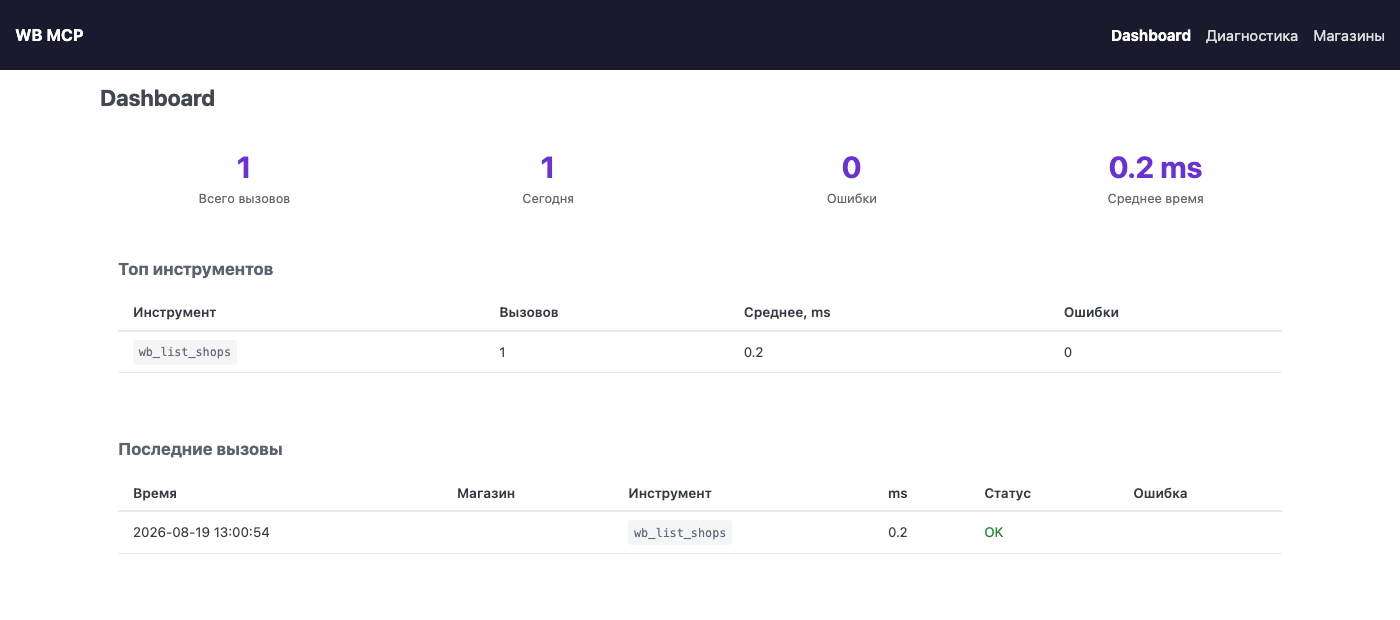
to anyone with network access to the port.With a typical MCP server, calls vanish into thin air: you cannot see what the assistant actually did, how long it took or what the marketplace answered, and you learn about a problem only when something fails. Here every call has a record and every store has a state. For a tool that moves real money in a real shop, this is a precondition for trust, not decoration. Five months of daily use across some twenty accounts is precisely what filled these pages — and produced the WB limits section further down.
/The screenshot is at the top of this page.
A summary of all tool calls (stats.get_summary()):
/shops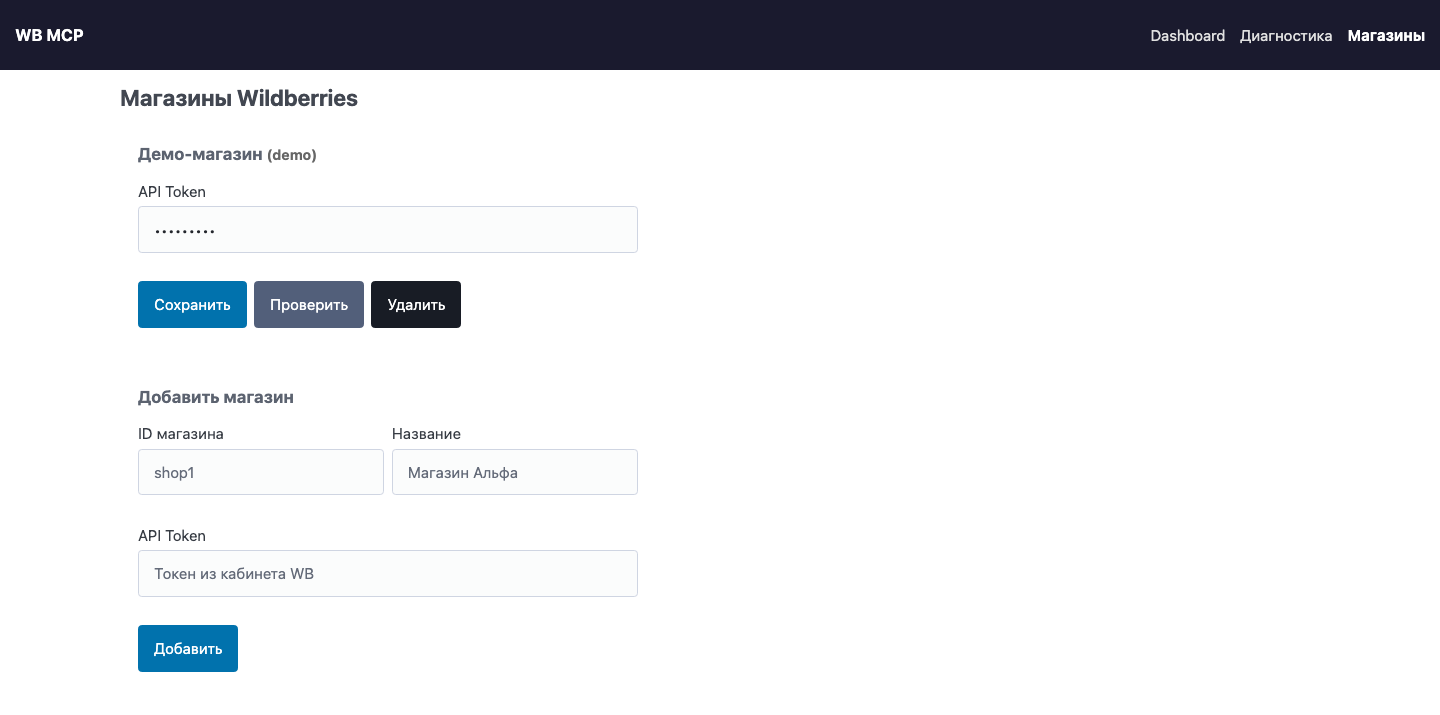
Accounts are added and removed right in the browser, with no file editing and no container
restart. Each store has a Проверить ("Test") button: it makes one cheap real request to WB
and tells you immediately whether the token is alive — instead of letting you find out during
the first real call. Tokens are shown masked in the list (abc***xyz).
Tokens are encrypted with Fernet and stored in shops.json inside the data volume; the key
is in .encryption_key next to it. The HTTP client pool is reset when a store is saved or
deleted, so a new token takes effect immediately.
/diagnostics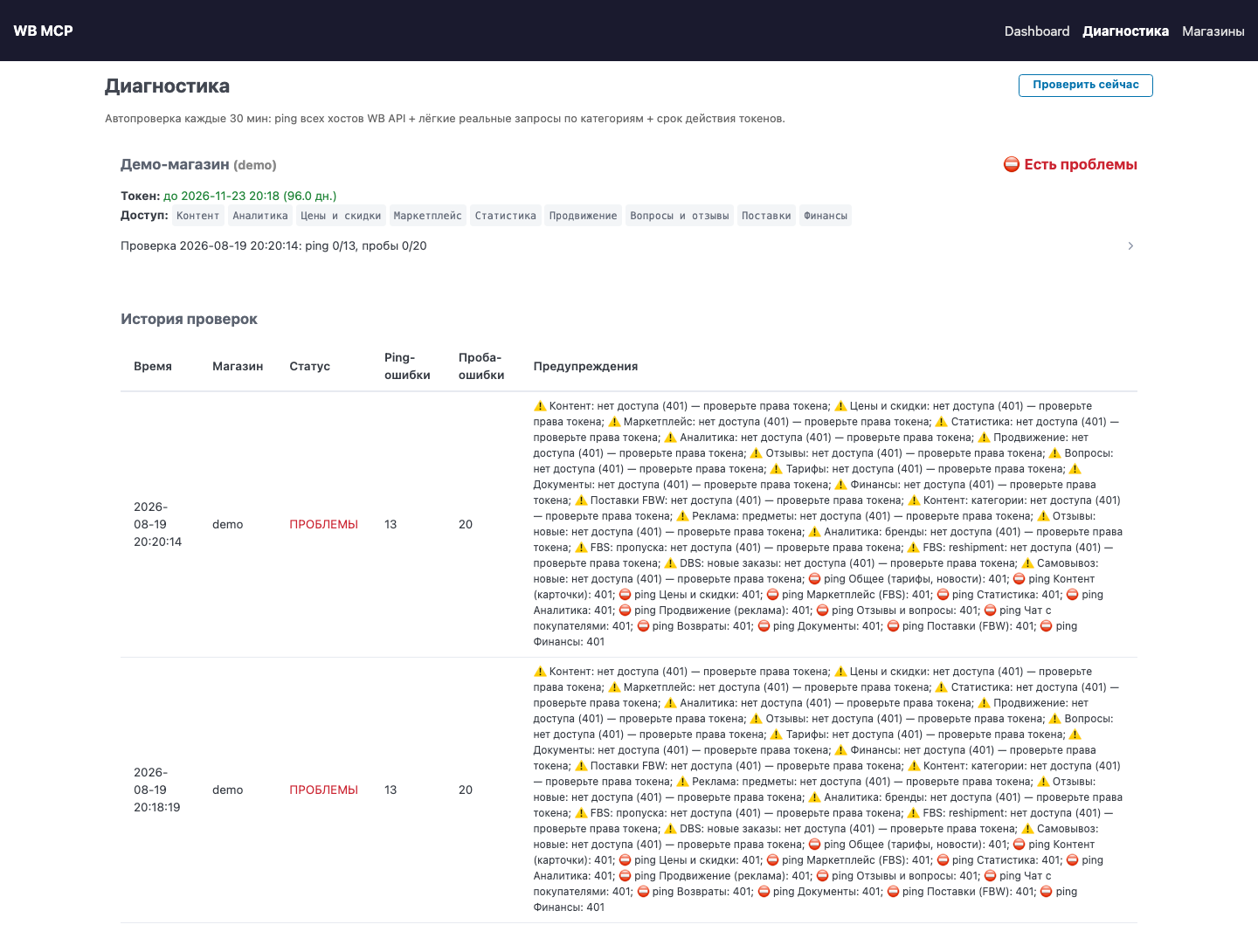
(the screenshot shows a demo store with a made-up token: WB answers 401 to every ping and
every probe, so the whole page is red. That is what a failed check looks like — the server
itself is fine. With a working token the "Проверка …" line reads ping 13/13, пробы 20/20
and the store status is "✅ Здоров".)
A background check every HEALTH_CHECK_INTERVAL_MIN minutes (30 by default), per store:
The most useful thing the accumulated statistics give you. The server finds, by itself, tools that used to work and now fail consistently: the last three calls failed while successful calls exist in the history. For each such tool it shows the time of the last successful call, the number of consecutive errors, the text of the latest error and the moment things broke.
In other words, the server detects from its own statistics that Wildberries broke or switched off an endpoint — and tells you before you run into it at work. Next to the section on limits and endpoint shutdown dates this is its practical continuation: that section lists what WB announced, this one catches what WB did quietly.
You can look at it on the dashboard, or call wb_degradations straight from the chat.
Everything visible to a human is also readable by a machine:
| Endpoint | What it returns |
|---|---|
GET /api/health | service status, whether authorization is on, the check interval, the last 5 health checks, the list of degraded tools |
GET /api/stats | the same summary as the dashboard; accepts ?shop=<shop_id> |
POST /api/diagnostics/run | run diagnostics for all stores now and return the result |
GET /api/diagnostics/<shop_id> | full live diagnostics of a single store |
So the server can be wired into Uptime Kuma, Zabbix or any other monitoring system, and you learn about a dead token before the assistant tells you about it.
One Docker container running a FastAPI application that plays two roles at once: an MCP server over SSE, and a small web UI. One paragraph per file:
wb_mcp/server.py — the MCP server itself. The TOOLS list of 202 Tool objects
(name, description, JSON schema of arguments) is exactly what the client receives in
response to tools/list. Calls are routed by three dictionaries: NO_CLIENT_DISPATCH
(no WB access needed), CLIENT_DISPATCH (needs the store's HTTP client) and
SHOP_DISPATCH (needs the shop_id as well). The stdio entry point main() lives here
too, for clients that only speak stdio.wb_mcp/client.py — HTTP clients for the 14 Wildberries hosts. One WBClient per
store, wrapping an httpx.AsyncClient with the token; clients are cached in a pool keyed
by shop_id.wb_mcp/app.py — FastAPI: GET /sse and POST /messages for MCP, the dashboard,
stores and diagnostics pages, the /api/* JSON API, the MCP_AUTH_TOKEN check, and the
background health-check loop.wb_mcp/settings.py — stores and keys: reading and writing shops.json, Fernet
encryption, migration of the old single-store settings.json, masking tokens for the UI.
There is a fallback: if WB_API_TOKEN is set, a store named default appears.wb_mcp/diagnostics.py — pinging WB hosts, decoding the JWT token (expiry, scopes,
sandbox flag), "probes" — one cheap real request per API category — and WB news.wb_mcp/stats.py — SQLite via aiosqlite: every tool call is recorded with its
duration, success flag and shop_id; this feeds the degradation detector and the
health-check history.wb_mcp/templates/ — three PicoCSS pages, no frontend build step.Non-obvious details:
shop_id is filled in automatically while there is only one store. Convenient day
to day, but the moment you add a second account, calls without shop_id start returning
"Укажите shop_id" ("specify shop_id").wb_degradations or the dashboard.HEALTH_CHECK_INTERVAL_MIN=0 in .env.POST /messages is mounted as a separate ASGI app (Mount) rather than as an
ordinary FastAPI route: handle_post_message sends the ASGI response itself, and inside
a route the framework would send it a second time — the connection would be dropped on
every POST. That is why authorization for this endpoint is checked manually inside the app.mcp library version is pinned to >=1.0.0,<2. The server is written against
the decorator API of mcp 1.x (@app.list_tools()), removed in mcp 2.0. Do not lift
the upper bound in pyproject.toml: with mcp 2.x the server crashes on start with
AttributeError: 'Server' object has no attribute 'list_tools'.| Variable | Default | Meaning |
|---|---|---|
WB_API_TOKEN | empty | token for the default store; adding stores via /shops is more convenient |
MCP_AUTH_TOKEN | empty | Bearer token for /sse; empty means authorization is off |
HEALTH_CHECK_INTERVAL_MIN | 30 | background diagnostics interval, 0 disables it |
DATA_DIR | /data | directory holding shops.json, .encryption_key, stats.db |
PORT | 8001 | HTTP server port |
These are limits of WB itself, not of this server — but the assistant will hit them regularly, and it is better to know them in advance. This list was not copied out of the documentation: it comes from five months of daily calls across some twenty accounts, plus the diagnostics log.
GET /adv/v3/fullstats (advertising statistics) — 3 requests per minute, period
no longer than 31 days./ping — 3 requests per 30 seconds per host (the background diagnostics accounts for this).reportDetailByPeriod was removed by Wildberries on 2026-07-15. The server calls
finance-api; the fallback to the old endpoint is gone, since it is dead anyway. The
realization report needs the Finance category in the token — without it you get a
clear error telling you what to reissue, not an opaque refusal.wb_fbw_* tools are informational.wb_token_info and the /diagnostics page show
the remaining time.429 from WB means a rate limit, not a failure. Retry in a minute.Verified against the dev.wildberries.ru documentation August 2026.
| API | Base URL |
|---|---|
| Content | content-api.wildberries.ru |
| Marketplace (FBS/DBS/DBW) | marketplace-api.wildberries.ru |
| Supplies (FBW) | supplies-api.wildberries.ru |
| Statistics | statistics-api.wildberries.ru |
| Analytics | seller-analytics-api.wildberries.ru |
| Prices | discounts-prices-api.wildberries.ru |
| Promotions calendar | dp-calendar-api.wildberries.ru |
| Advert | advert-api.wildberries.ru |
| Finance | finance-api.wildberries.ru |
| Feedbacks + Questions | feedbacks-api.wildberries.ru |
| Returns | returns-api.wildberries.ru |
| Tariffs / News / Seller | common-api.wildberries.ru |
| Buyer Chat | buyer-chat-api.wildberries.ru |
| Documents | documents-api.wildberries.ru |
/diagnostics page — per store: token expiry and scopes, pings of all WB API
hosts, per-category probes, check history, and a "check now" button.HEALTH_CHECK_INTERVAL_MIN minutes.wb_diagnostics, wb_token_info, wb_degradations, wb_api_news.GET /api/health — JSON summary for external monitoring.POST /api/diagnostics/run — run a check of all stores right now.GET /api/diagnostics/<shop_id> — full diagnostics of a single store.wb-mcp-server/
├── docker-compose.yml # port 8001, wb_data volume
├── Dockerfile # python:3.12-slim
├── pyproject.toml
├── DEPLOY.md # deploying to a dedicated machine, moving the data
├── docs/ # client setup guides + tool reference
└── wb_mcp/
├── server.py # MCP server: 202 tools, dispatch tables, stdio mode
├── client.py # HTTP clients for the 14 Wildberries APIs
├── app.py # FastAPI: SSE + web UI + auth + health loop
├── diagnostics.py # pings, JWT decoder, probes, API news
├── settings.py # stores and keys (Fernet)
├── stats.py # call statistics and check history (SQLite)
└── templates/ # PicoCSS: dashboard, diagnostics, shops
Moving the server to a dedicated machine, migrating stores, setting up autostart — see DEPLOY.md (in Russian).
DeviceIngineering/ozon-mcp-server
is the same tool for the other marketplace (Ozon is Russia's other large marketplace):
same architecture, same web UI with dashboard and diagnostics, same multi-store handling via
shop_id, same SSE transport, same ways of connecting clients. Once you have set up one,
the second one follows the same instructions; only the port and the tool set differ.
| WB MCP Server | Ozon MCP Server | |
|---|---|---|
| Port | 8001 | 8000 |
| Tools | 202 | 151 |
| API | Wildberries Seller API | Ozon Seller API + Performance API (advertising) |
They can run side by side on one machine: different ports, different Docker volumes, no conflict.
Living on the same server does not hurt on the rate-limit side either: both go out through one IP, but Wildberries and Ozon count their limits separately — they are different platforms. The per-address ceiling on the number of accounts, described in the multi-store section, applies within each platform on its own.
Wildberries changes its API constantly: endpoints are added, renamed and switched off — the limits section above lists what has already been caught in practice. This server is the author's working tool: more than five months of daily use across roughly twenty seller accounts. It is updated as the author needs it — when the next change breaks something in his own stores, not on a schedule. That is why the gaps between commits can be long: it means WB broke nothing in the meantime. There is no commitment on timing.
If you need a fix urgently, write to d0371153@gmail.com. Issues and pull requests are welcome and do get reviewed.
MIT — see LICENSE.
Published in the official MCP Registry:
mcp-name: io.github.DeviceIngineering/wb-mcp-server
FAQs
MCP server for Wildberries Seller API: 202 tools for products, prices, orders, ads, supplies, reviews, finance and analytics
We found that wb-mcp-server demonstrated a healthy version release cadence and project activity because the last version was released less than a year ago. It has 1 open source maintainer collaborating on the project.
Product
Socket’s PHP and Composer support is now in Beta for all customers, with PHP reachability analysis generally available.

Product
Socket is bringing experimental protection to Firefox, scanning 97,000+ extensions in Mozilla's official directory for malware and risky updates.

Research
/Security News
Three compromised Rust crates pulled in a malicious dependency that downloaded and executed cross-platform malware during Cargo builds.