

Product
Introducing Repository Access Permissions and Custom Roles
Socket now supports Custom Roles and Repository Access Permissions so organizations can control who can access specific repositories and actions.
By Joe Werle - Jun 19, 2026
@raphaeltorquat0/map-3d-deck
Advanced tools
Framework agnóstico para mapas 3D multi-nível com Deck.gl + MapLibre
Enterprise-grade 3D multi-level map visualization framework





Features • Demo • Quick Start • Docs • Examples • Contributing

Demo: 3D urban visualization with zoning, buildings, and underground infrastructure
map-3d-deck is a framework-agnostic library for building immersive 3D map visualizations with multi-level support. It combines the power of Deck.gl for high-performance WebGL rendering with MapLibre GL for beautiful base maps.
Built for urban planning, smart city applications, and geospatial analysis, it enables visualization of data from underground infrastructure (-50m) to skyscrapers (+200m) in a single, unified view.
Works anywhere in the world — Just provide GeoJSON data following the documented schema. The library handles coordinates, projections, and rendering automatically for any geographic location.
| Challenge | Solution |
|---|---|
| Complex urban data at multiple elevations | Unified elevation system from -50m to +200m |
| Framework lock-in | Framework-agnostic — works with React, Vue, Angular, or Vanilla JS |
| Performance with large datasets | WebGL-powered rendering via Deck.gl handles 100k+ features |
| Learning curve | Simple API — get started in 3 lines of code |
| Layer | Description | Use Case |
|---|---|---|
ZoningLayer | Urban zoning polygons with 3D extrusion | Land use visualization, urban planning |
BuildingLayer | 3D building footprints with height data | Skyline analysis, shadow studies |
SubsurfaceLayer | Underground network lines | Utility mapping, infrastructure planning |
InfrastructureLayer | Unified factory for infrastructure networks | Water, gas, sewage, electric networks |
| Controller | Description | Feature |
|---|---|---|
PopupController | Framework-agnostic popup/tooltip system | Hover tooltips, click popups, reverse geocode |
LegendController | Auto-updating legend based on active layers | Visibility toggles, feature counts |
| Preset | Range | Content |
|---|---|---|
subsurface | -50m → 0m | Metro lines, utilities, foundations |
surface | -5m → 5m | Zoning, lots, geotechnical data |
buildings | 0m → 200m | Building heights, aerial structures |
all | -50m → 200m | Complete vertical profile |
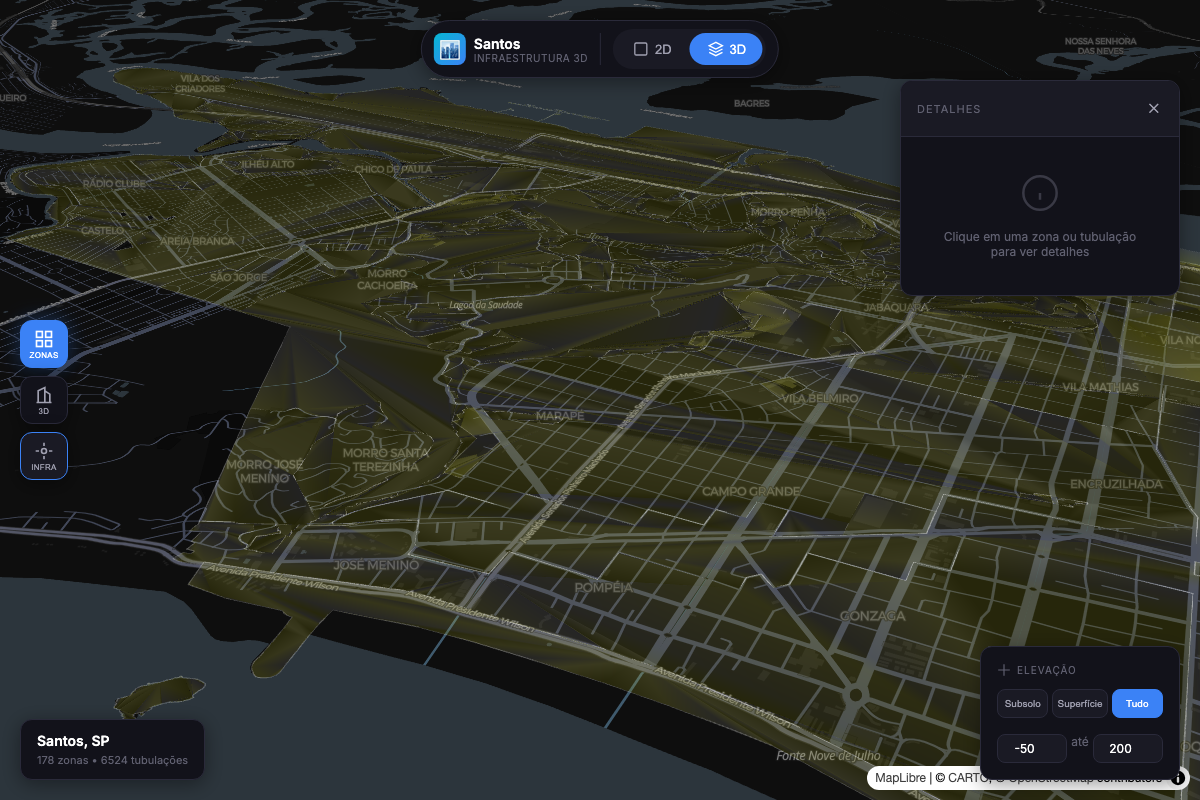
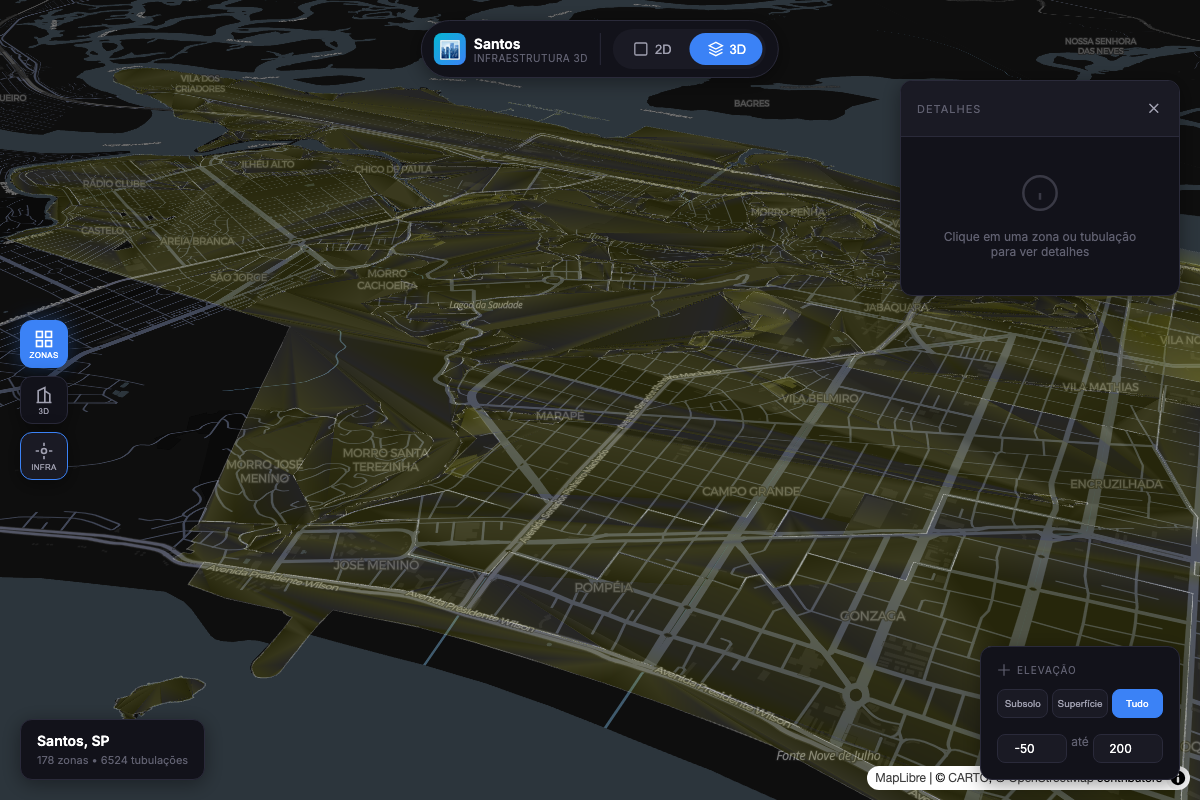
Urban Zoning |
3D Buildings |
Underground Infrastructure |
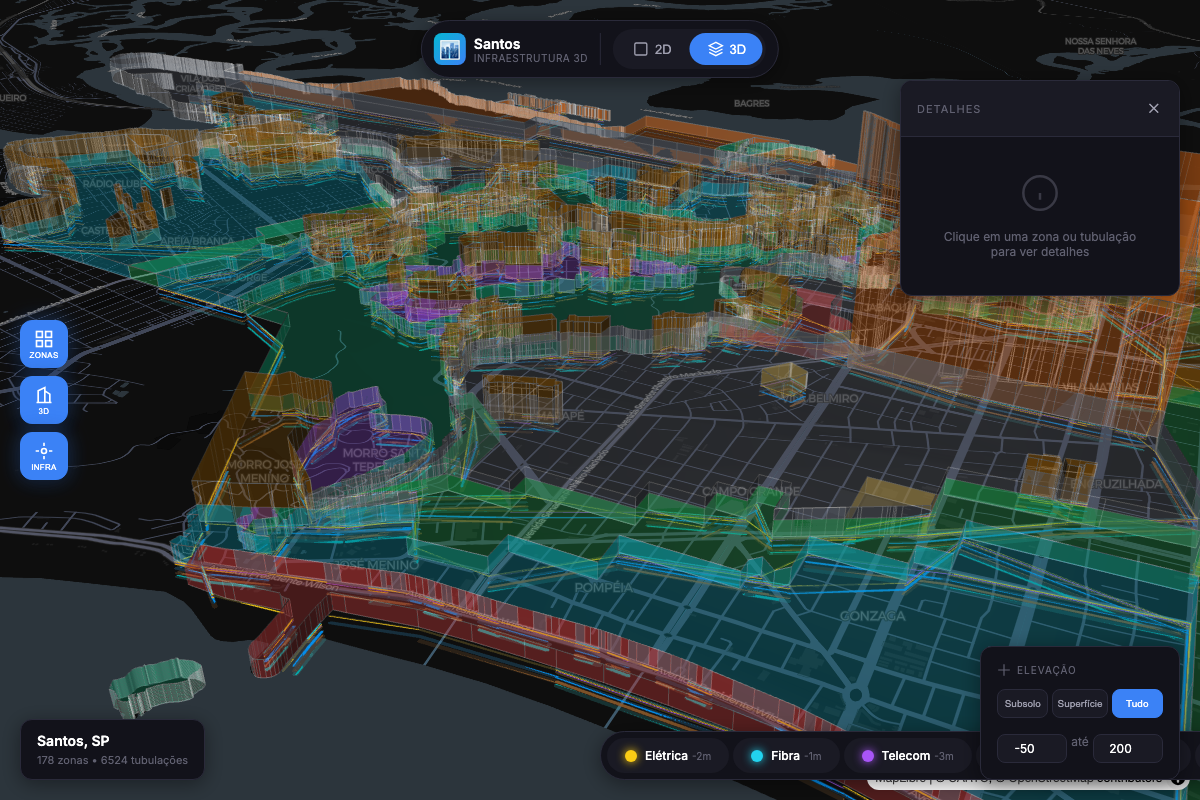
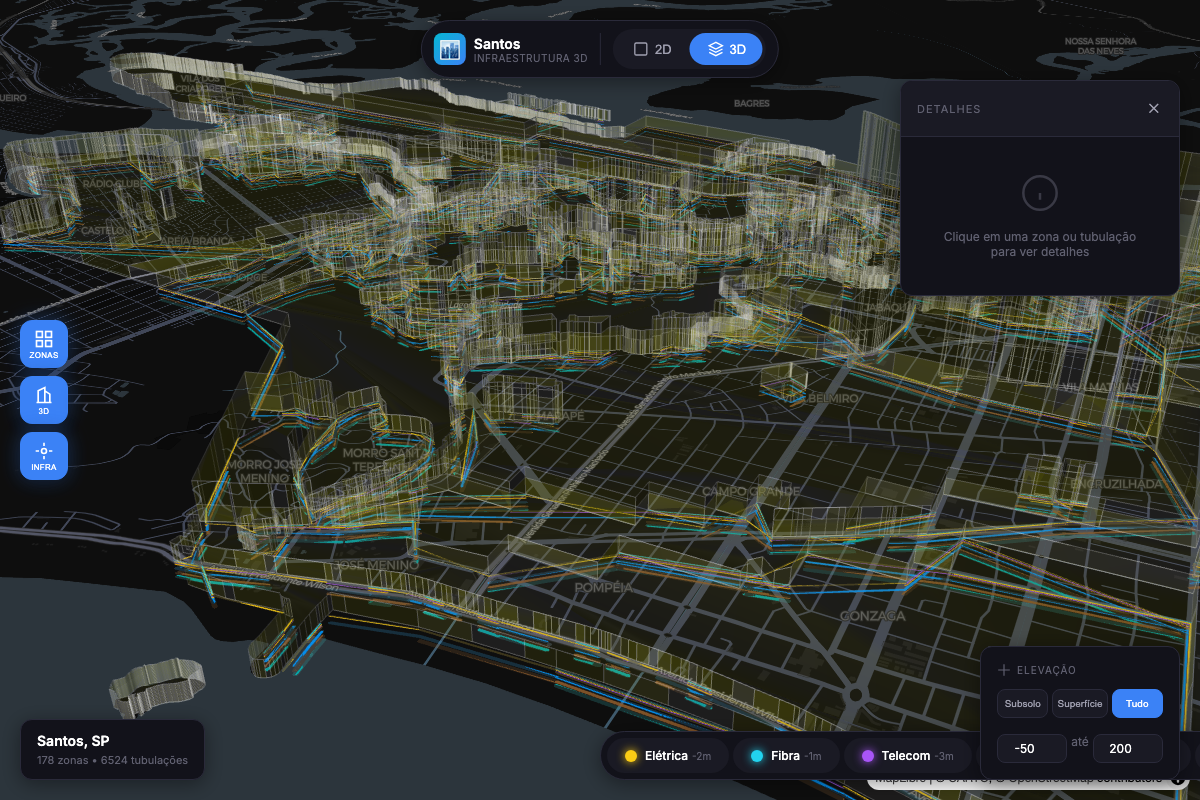
Combined Multi-Level View |
npm install @raphaeltorquat0/map-3d-deck maplibre-gl
import { Map3D, createZoningLayer } from '@raphaeltorquat0/map-3d-deck'
import 'maplibre-gl/dist/maplibre-gl.css'

// Create the map with integrated popup and legend (v0.2.0)
const map = new Map3D({
  container: 'map',
  initialViewState: {
    longitude: -46.3289,
    latitude: -23.9608,
    zoom: 14,
    pitch: 45,
  },
  popup: { enabled: true, showOnHover: true },
  legend: { enabled: true, position: 'top-right' },
})

// Add a zoning layer with 3D extrusion
const zoningLayer = createZoningLayer({
  id: 'zoning',
  data: '/data/zoning.geojson',
  extruded: true,
  pickable: true,
})

map.addLayer(zoningLayer)

// Register layer in legend
map.legend.registerLayer({
  id: 'zoning',
  label: 'Zoneamento',
  color: '#3B82F6',
  type: 'polygon',
})

// React to popup/legend events
map.popup.onOpen((info) => console.log('Popup:', info))
map.legend.onChange((items) => console.log('Legend:', items))
That's it! You now have an interactive 3D map with popups and a legend.
The main class for creating and managing 3D maps.
const map = new Map3D({
  // Required
  container: string | HTMLElement,

  // View State
  initialViewState: {
    longitude: number,
    latitude: number,
    zoom: number,        // default: 12
    pitch: number,       // default: 0 (2D), 45+ for 3D
    bearing: number,     // default: 0
  },

  // Styling
  mapStyle?: string,     // MapLibre style URL

  // Popup Configuration (v0.2.0)
  popup?: {
    enabled?: boolean,        // default: true
    showOnHover?: boolean,    // default: true
    showOnClick?: boolean,    // default: true
    reverseGeocode?: boolean, // default: false
    hoverDelay?: number,      // default: 200ms
    formatContent?: (feature, layerId) => string | Record<string, string>,
  },

  // Legend Configuration (v0.2.0)
  legend?: {
    enabled?: boolean,        // default: true
    position?: 'top-left' | 'top-right' | 'bottom-left' | 'bottom-right',
    showFeatureCount?: boolean,
    showToggle?: boolean,
    title?: string,
  },

  // Events
  onClick?: (info: PickInfo) => void,
  onHover?: (info: PickInfo) => void,
  onViewStateChange?: (viewState: MapViewState) => void,
  onLoad?: () => void,
  onError?: (error: Error) => void,
})
Methods:
| Method | Description |
|---|---|
addLayer(layer) | Add a layer to the map |
removeLayer(id) | Remove a layer by ID |
setLayers(layers) | Replace all layers |
setElevationRange(range) | Filter visible elevation range |
flyTo(options) | Animate to a location |
toggle3D(enabled) | Switch between 2D/3D view |
destroy() | Clean up resources |
Properties (v0.2.0):
| Property | Type | Description |
|---|---|---|
popup | PopupController | Integrated popup/tooltip controller |
legend | LegendController | Integrated legend controller |
// Zoning polygons with optional 3D extrusion
createZoningLayer({
  id: string,
  data: FeatureCollection | string,
  extruded?: boolean,      // default: false
  opacity?: number,        // default: 0.7
  elevationScale?: number, // default: 1
  getFillColor?: (f) => [r, g, b, a],
  getHeight?: (f) => number,
})

// 3D building footprints
createBuildingLayer({
  id: string,
  data: FeatureCollection | string,
  extruded?: boolean,      // default: true
  wireframe?: boolean,     // default: false
})

// Underground utility networks
createSubsurfaceLayer({
  id: string,
  data: FeatureCollection | string,
  networkTypes?: string[], // filter: ['water', 'sewage', ...]
  widthMinPixels?: number, // default: 2
})

// Infrastructure networks (unified factory) - v0.2.0
createInfrastructureLayer({
  id: string,
  data: FeatureCollection | string,
  networkType?: 'water' | 'sewage' | 'gas' | 'electric' | 'telecom' | 'drainage' | 'metro',
  preset?: 'utility-line' | 'utility-point' | 'risk-line', // apply pre-defined styles
  pickable?: boolean,
  onClick?: (info) => void,
  onHover?: (info) => void,
})
Manage visible elevation ranges programmatically.
import { ElevationController } from '@raphaeltorquat0/map-3d-deck'

const controller = new ElevationController({
  onChange: (range) => map.setElevationRange(range),
})

// Apply presets
controller.applyPreset('subsurface') // -50m to 0m
controller.applyPreset('surface') // -5m to 5m
controller.applyPreset('buildings') // 0m to 200m
controller.applyPreset('all') // -50m to 200m

// Custom range
controller.setRange({ min: -20, max: 50 })

// Query
controller.isVisible(25) // true
controller.getVisibleLevels() // ElevationLevel[]
controller.getCurrentPreset() // 'surface' | null
Integrated popup/tooltip system that works with any UI framework.
const map = new Map3D({
  container: 'map',
  popup: {
    enabled: true,
    showOnHover: true, // Show tooltip on hover
    showOnClick: true, // Show popup on click
    reverseGeocode: true, // Fetch address automatically
    hoverDelay: 200, // ms before showing tooltip
    formatContent: (feature, layerId) => {
      return formatFeatureProperties(feature.properties, SUBSURFACE_FORMATTERS)
    },
  },
})

// Programmatic control
map.popup.open({ coordinate: [-46.6, -23.5], content: 'Hello World' })
map.popup.close()

// UI callbacks (framework-agnostic)
map.popup.onOpen((info) => {
  // info: { position, feature, layerId, content, address, trigger }
  renderPopupUI(info)
})
map.popup.onClose(() => hidePopupUI())

// Check state
map.popup.isOpen() // boolean
map.popup.getInfo() // PopupInfo | null
Auto-updating legend that reflects active map layers.
const map = new Map3D({
  container: 'map',
  legend: {
    enabled: true,
    position: 'top-right', // 'top-left' | 'bottom-left' | 'bottom-right'
    showFeatureCount: true, // Show count per layer
    showToggle: true, // Enable visibility toggles
    title: 'Camadas',
  },
})

// Register layers for legend
map.legend.registerLayer({
  id: 'water',
  label: 'Rede de Água',
  color: '#3B82F6',
  type: 'line',
  order: 1,
})

map.legend.registerLayer({
  id: 'gas',
  label: 'Rede de Gás',
  color: '#F59E0B',
  type: 'line',
  order: 2,
})

// UI callbacks
map.legend.onChange((items) => {
  // items: [{ layerId, label, color, visible, count, type }]
  renderLegendUI(items)
})

map.legend.onToggle((layerId, visible) => {
  // Update your layer visibility
  const layer = map.getLayer(layerId)
  if (layer) {
    map.updateLayer(layer.clone({ visible }))
  }
})

// Programmatic control
map.legend.toggleLayer('water') // Toggle visibility
map.legend.setLayerCount('water', 150) // Update feature count
map.legend.showAll() // Show all layers
map.legend.hideAll() // Hide all layers
Declarative system for formatting feature properties.
import {
  createFieldFormatters,
  formatFeatureProperties,
  formatDepth,
  formatDiameter,
  formatYear,
  SUBSURFACE_FORMATTERS,
  BUILDING_FORMATTERS,
} from '@raphaeltorquat0/map-3d-deck'

// Create custom formatters
const formatters = createFieldFormatters({
  diameter: { label: 'Diâmetro', format: formatDiameter, order: 1 },
  depth: { label: 'Profundidade', format: formatDepth, order: 2 },
  year_installed: { label: 'Ano', format: formatYear, order: 3 },
  status: {
    label: 'Status',
    format: (v) => ({ active: 'Ativo', inactive: 'Inativo' })[v] || v,
    order: 4,
  },
})

// Format feature properties
const formatted = formatFeatureProperties(feature.properties, formatters)
// Result: [
//   { key: 'diameter', label: 'Diâmetro', value: '150 mm', order: 1 },
//   { key: 'depth', label: 'Profundidade', value: '5 m', order: 2 },
//   ...
// ]

// Use pre-configured formatters
const infraFormatted = formatFeatureProperties(
  feature.properties,
  SUBSURFACE_FORMATTERS
)
const buildingFormatted = formatFeatureProperties(
  feature.properties,
  BUILDING_FORMATTERS
)
Pre-defined layer styles for common use cases.
import {
  LAYER_PRESETS,
  getPreset,
  getLinePreset,
  getPolygonPreset,
  mergePresetWithOptions,
} from '@raphaeltorquat0/map-3d-deck'

// Available presets
const presets = {
  'utility-line':   // Lines: width 2-8px, rounded caps, opacity 0.85
  'utility-point':  // Points: radius 4-12px, stroked, opacity 0.9
  'risk-area':      // Polygons: filled, stroked, opacity 0.6
  'building-3d':    // Polygons: extruded, material lighting
  'building-flat':  // Polygons: filled, stroked, no extrusion
  'zoning-3d':      // Polygons: extruded, wireframe, opacity 0.7
  'zoning-flat':    // Polygons: filled, stroked, opacity 0.6
}

// Use with InfrastructureLayer
const waterLayer = createInfrastructureLayer({
  id: 'water',
  data: waterGeoJSON,
  networkType: 'water',
  preset: 'utility-line',  // Applies pre-defined styles
})

// Get and customize preset
const lineConfig = getLinePreset('utility-line')
const customConfig = mergePresetWithOptions(lineConfig, {
  widthMinPixels: 4,
  opacity: 1,
})
This example demonstrates the full power of v0.2.0 features - reducing ~600 lines of boilerplate to ~50 lines.
import {
  Map3D,
  createInfrastructureLayer,
  createFieldFormatters,
  formatFeatureProperties,
  formatDepth,
  formatDiameter,
  formatYear,
  INFRASTRUCTURE_NETWORK_COLORS,
} from '@raphaeltorquat0/map-3d-deck'
import 'maplibre-gl/dist/maplibre-gl.css'

// 1. Create formatters for popup content
const formatters = createFieldFormatters({
  diameter: { label: 'Diâmetro', format: formatDiameter, order: 1 },
  depth: { label: 'Profundidade', format: formatDepth, order: 2 },
  material: { label: 'Material', order: 3 },
  year_installed: { label: 'Ano', format: formatYear, order: 4 },
})

// 2. Create map with integrated popup and legend
const map = new Map3D({
  container: 'map',
  initialViewState: {
    longitude: -46.3289,
    latitude: -23.9608,
    zoom: 15,
    pitch: 45,
  },
  popup: {
    enabled: true,
    showOnHover: true,
    showOnClick: true,
    reverseGeocode: true,
    formatContent: (feature) => {
      const fields = formatFeatureProperties(feature.properties, formatters)
      return fields.reduce((acc, f) => ({ ...acc, [f.label]: f.value }), {})
    },
  },
  legend: {
    enabled: true,
    position: 'top-right',
    showFeatureCount: true,
  },
})

// 3. Add infrastructure layers with presets
const networks = ['water', 'gas', 'sewage', 'electric'] as const

networks.forEach((networkType, index) => {
  const layer = createInfrastructureLayer({
    id: networkType,
    data: `/api/geo/infrastructure/${networkType}`,
    networkType,
    preset: 'utility-line',
    pickable: true,
  })

  map.addLayer(layer)

  // Register in legend
  map.legend.registerLayer({
    id: networkType,
    label: networkType.charAt(0).toUpperCase() + networkType.slice(1),
    color: INFRASTRUCTURE_NETWORK_COLORS[networkType],
    type: 'line',
    order: index,
  })
})

// 4. Wire up UI callbacks
map.popup.onOpen((info) => {
  document.getElementById('popup')!.innerHTML = `
    <h3>${info.layerId}</h3>
    <p>${info.address || ''}</p>
    <pre>${JSON.stringify(info.content, null, 2)}</pre>
  `
  document.getElementById('popup')!.style.display = 'block'
})

map.popup.onClose(() => {
  document.getElementById('popup')!.style.display = 'none'
})

map.legend.onChange((items) => {
  document.getElementById('legend')!.innerHTML = items
    .map(
      (item) => `
      <div style="display:flex;align-items:center;gap:8px">
        <span style="width:12px;height:12px;background:${item.color};border-radius:2px"></span>
        <span>${item.label}</span>
        ${item.count ? `<span>(${item.count})</span>` : ''}
      </div>
    `
    )
    .join('')
})

map.legend.onToggle((layerId, visible) => {
  const layer = map.getLayer(layerId)
  if (layer) {
    map.updateLayer(layer.clone({ visible }))
  }
})
import { useEffect, useRef } from 'react'
import { Map3D, createZoningLayer } from '@raphaeltorquat0/map-3d-deck'

export function MapComponent({ data }) {
  const containerRef = useRef<HTMLDivElement>(null)
  const mapRef = useRef<Map3D | null>(null)

  useEffect(() => {
    if (!containerRef.current) return

    mapRef.current = new Map3D({
      container: containerRef.current,
      initialViewState: {
        longitude: -46.63,
        latitude: -23.55,
        zoom: 12,
        pitch: 45,
      },
    })

    return () => mapRef.current?.destroy()
  }, [])

  useEffect(() => {
    if (!mapRef.current || !data) return

    mapRef.current.setLayers([
      createZoningLayer({ id: 'zoning', data, extruded: true }),
    ])
  }, [data])

  return <div ref={containerRef} style={{ width: '100%', height: '100vh' }} />
}
<script setup lang="ts">
import { ref, onMounted, onUnmounted, watch } from 'vue'
import { Map3D, createZoningLayer } from '@raphaeltorquat0/map-3d-deck'

const props = defineProps<{ data: FeatureCollection }>()
const container = ref<HTMLDivElement>()
let map: Map3D | null = null

onMounted(() => {
  if (!container.value) return

  map = new Map3D({
    container: container.value,
    initialViewState: {
      longitude: -46.63,
      latitude: -23.55,
      zoom: 12,
      pitch: 45,
    },
  })
})

onUnmounted(() => map?.destroy())

watch(
  () => props.data,
  (data) => {
    map?.setLayers([createZoningLayer({ id: 'zoning', data, extruded: true })])
  }
)
</script>

<template>
  <div ref="container" class="w-full h-screen" />
</template>
'use client'

import dynamic from 'next/dynamic'

const Map = dynamic(() => import('./Map'), { ssr: false })

export default function Page() {
  return <Map />
}
┌─────────────────────────────────────────────────────────────────────────┐
│                            map-3d-deck v0.2.0                            │
├─────────────────────────────────────────────────────────────────────────┤
│                                                                          │
│  ┌──────────────────────────────────────────────────────────────────┐   │
│  │                           Map3D (Core)                            │   │
│  │  ┌────────────────┐  ┌────────────────┐  ┌────────────────────┐  │   │
│  │  │ PopupController│  │LegendController│  │ElevationController │  │   │
│  │  │  (Integrated)  │  │  (Integrated)  │  │   (Standalone)     │  │   │
│  │  └────────────────┘  └────────────────┘  └────────────────────┘  │   │
│  └──────────────────────────────────────────────────────────────────┘   │
│                                    │                                     │
│  ┌─────────────────┐  ┌────────────┴────────────┐  ┌─────────────────┐  │
│  │     Layers      │  │       Formatters        │  │     Presets     │  │
│  │  Zoning         │  │  formatDepth()          │  │  utility-line   │  │
│  │  Building       │  │  formatDiameter()       │  │  building-3d    │  │
│  │  Subsurface     │  │  formatFeatureProps()   │  │  zoning-flat    │  │
│  │  Infrastructure │  │  SUBSURFACE_FORMATTERS  │  │  risk-area      │  │
│  └─────────────────┘  └─────────────────────────┘  └─────────────────┘  │
│                                    │                                     │
│  ┌──────────────────────────────────────────────────────────────────┐   │
│  │                      Deck.gl + MapLibre                           │   │
│  │  ┌────────────────────────────────────────────────────────────┐  │   │
│  │  │   WebGL Rendering  |  GPU Acceleration  |  Interleaving    │  │   │
│  │  └────────────────────────────────────────────────────────────┘  │   │
│  └──────────────────────────────────────────────────────────────────┘   │
│                                                                          │
└─────────────────────────────────────────────────────────────────────────┘

Elevation Levels:
  +200m ┤ ████████ High Elevation (Skyscrapers)
   +50m ┤ ████████ Medium Elevation
   +15m ┤ ████████ Low Elevation (Buildings)
     0m ┤ ████████ Surface (Zoning, Lots)
   -20m ┤ ████████ Shallow Subsurface (Utilities)
   -50m ┤ ████████ Deep Subsurface (Metro, Foundations)
Benchmarked on MacBook Pro M1 (2021):
| Features | FPS | Memory |
|---|---|---|
| 10,000 | 60 | 45 MB |
| 50,000 | 60 | 120 MB |
| 100,000 | 55 | 250 MB |
| 250,000 | 35 | 480 MB |
Run with npm run benchmark:
| Operation | Features | ops/sec | Mean (ms) |
|---|---|---|---|
| Zoning Layer Creation | 1,000 | 749,458 | 0.0013 |
| Zoning Layer Creation | 10,000 | 752,929 | 0.0013 |
| Building Layer Creation | 1,000 | 2,008,615 | 0.0005 |
| Building Layer Creation | 10,000 | 1,999,642 | 0.0005 |
| Subsurface Layer Creation | 1,000 | 1,958,089 | 0.0005 |
| Subsurface Layer Creation | 10,000 | 1,954,733 | 0.0005 |
| Elevation Filtering | 10,000 | 2,850 | 0.35 |
| Group by Network | 10,000 | 3,544 | 0.28 |
| ElevationController setRange | - | 5,284,545 | 0.0002 |
| isFeatureVisible (10k checks) | - | 220,372 | 0.0045 |
Key Takeaways:
elevationRange to filter non-visible featuresminZoom/maxZoom on layers for LOD| Browser | Version |
|---|---|
| Chrome | 90+ |
| Firefox | 88+ |
| Safari | 14+ |
| Edge | 90+ |
Requires WebGL 2.0 support.
This library collects anonymous usage data to help improve the product. We track:
What we DON'T collect:
You can disable telemetry in several ways:
// Option 1: Disable globally
import { disableTelemetry } from '@raphaeltorquat0/map-3d-deck'
disableTelemetry()

// Option 2: Via localStorage (persists across sessions)
localStorage.setItem('map3d_telemetry_optout', 'true')

// Option 3: Browser Do Not Track
// Telemetry respects navigator.doNotTrack
Telemetry requires posthog-js. If not installed, telemetry is automatically
disabled with no impact on library functionality.
# To enable telemetry, install posthog-js
npm install posthog-js
We welcome contributions! Please see our Contributing Guide for details.
# Clone the repository
git clone https://github.com/raphaeltorquat0/map-3d-deck.git
cd map-3d-deck

# Install dependencies
npm install

# Start development
npm run dev

# Run tests
npm test

# Build
npm run build
MIT © Raphael Torquato
Built with Deck.gl, MapLibre GL, and TypeScript



FAQs
Framework agnóstico para mapas 3D multi-nível com Deck.gl + MapLibre
The npm package @raphaeltorquat0/map-3d-deck receives a total of 3 weekly downloads. As such, @raphaeltorquat0/map-3d-deck popularity was classified as not popular.
We found that @raphaeltorquat0/map-3d-deck demonstrated a healthy version release cadence and project activity because the last version was released less than a year ago. It has 1 open source maintainer collaborating on the project.
Did you know?

Socket for GitHub automatically highlights issues in each pull request and monitors the health of all your open source dependencies. Discover the contents of your packages and block harmful activity before you install or update your dependencies.
Product
Socket now supports Custom Roles and Repository Access Permissions so organizations can control who can access specific repositories and actions.

Product
Socket MCP now lets AI assistants review org alerts, investigate threats using the Socket threat feed, and inspect package files in addition to dependency scoring.

Product
Socket Firewall blocks malicious VS Code and Open VSX extensions before install, protecting developers from compromised editor marketplaces.