██████╗ ███████╗ ██████╗ ███╗ ██╗ ████████╗ ███████╗
██╔════╝ ██╔════╝ ██╔═══██╗ ████╗ ██║ ╚══██╔══╝ ██╔════╝
██║ █████╗ ██║ ██║ ██╔██╗ ██║ ██║ ███████╗
██║ ██╔══╝ ██║ ██║ ██║╚██╗██║ ██║ ╚════██║ ╔╗╔ ╔═╗ ╔╦╗ ╔═╗ ╦ ╔═╗
╚██████╗ ██║ ╚██████╔╝ ██║ ╚████║ ██║ ███████║ ║║║ ║ ║ ║║ ║╣ ║ ╚═╗
╚═════╝ ╚═╝ ╚═════╝ ╚═╝ ╚═══╝ ╚═╝ ╚══════╝ ╝╚╝ ╚═╝ ═╩╝ ╚═╝ ╚╝ ╚═╝
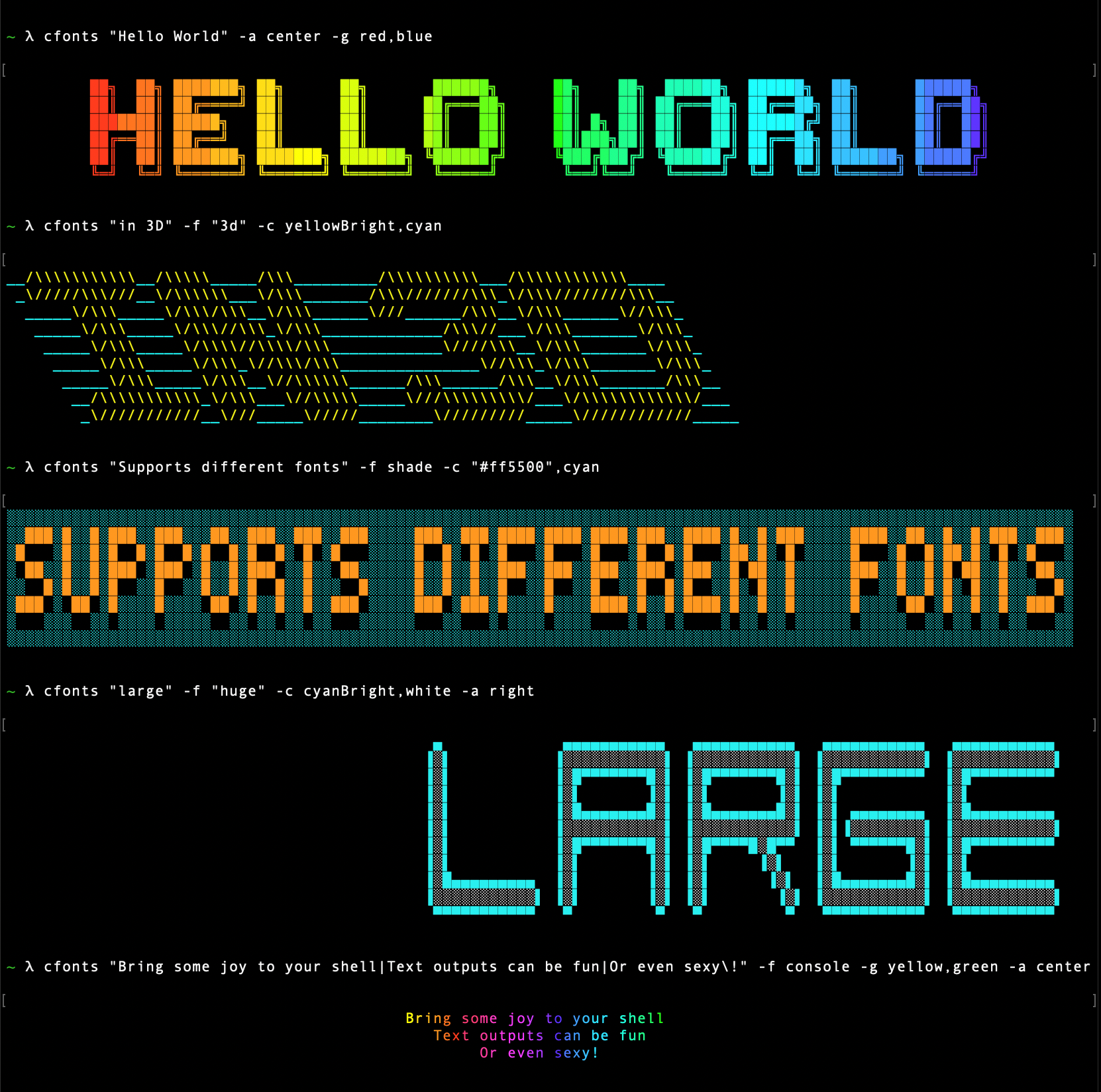



This is a silly little command line tool for sexy ANSI fonts in the console. Give your cli some love.
Installing
npm i cfonts -g
yarn global add cfonts
To use it in your shell:
$ cfonts "Hello|World\!"
💡 Remember to escape the ! character with \ in the shell
Or use it in your project:
const cfonts = require('cfonts');
cfonts.say('Hello|world!', {
font: 'block',
align: 'left',
colors: ['system'],
background: 'transparent',
letterSpacing: 1,
lineHeight: 1,
space: true,
maxLength: '0',
gradient: false,
independentGradient: false,
transitionGradient: false,
rawMode: false,
env: 'node'
});
All settings are optional and shown here with their default
You can use cfonts in your project without the direct output to the console:
const cfonts = require('cfonts');
const prettyFont = cfonts.render('Hello|world!', {});
prettyFont.string
prettyFont.array
prettyFont.lines
prettyFont.options
CLI Usage
Read more in the root repo.
Tests
This package is tested on the below platform and node combinations as part of our CI.
| Linux | v12 |
| Linux | v14 |
| Linux | v16 |
| Linux | v18 |
| Linux | v20 |
| Linux | v22 |
| MacOS | v16 |
| MacOS | v18 |
| MacOS | v20 |
| MacOS | v22 |
| Windows | v12 |
| Windows | v14 |
| Windows | v16 |
| Windows | v18 |
| Windows | v20 |
| Windows | v22 |
Unit tests
The package comes with a bunch of unit tests that aim to cover 100% of the code base.
For more details about the code coverage check out coveralls.
npm run test:unit
Type tests
Since the code base uses JSDocs we use typescript to test the inferred types from those comments.
Typescript supports JSDocs and we use it in our test.
npm run test:types
Font file test
There is also a test suite for font files.
npm run test:fonts
This tool checks:
- the existence of the font
- all attributes of a font
- each character for:
- existence
- consistent width
- consistent lines
All tests
Run all tests via:
npm run test
Contributing
To build the repo install dependencies via:
(Since we ship a yarn.lock file please use yarn for development.)
yarn
and run the watch to continuously transpile the code.
yarn watch
Please look at the coding style and work with it, not against it ;)
Release History
- 3.3.1 - Fixed ts types, bumped dependencies
- 3.3.0 - Added raw-mode flag, bumped dependencies
- 3.2.0 - Added TS type to the published npm package
- 3.1.1 - Fixed #58 gradient color bug, added
gray to gradient colors
- 3.1.0 - Added support for -V flag fallback
- 3.0.0 - Added rust library port, aligned APIs, added hex background colors, fixed minor alignment bugs, updated license from GPLv2 to GPLv3
- 2.10.1 - bumped dependencies
- 2.10.0 - bumped dependencies, added typescript definitions into npm bundle
- 2.9.3 - bumped dependencies
- 2.9.2 - bumped dependencies
- 2.9.1 - bumped dependencies
- 2.9.0 - added
top and bottom align options
- 2.8.6 - bumped dependencies
- 2.8.5 - renamed branches
- 2.8.4 - fixed block double quote
- 2.8.3 - bumped dependencies
- 2.8.2 - bumped dependencies, added linting, fixed #22 (again)
- 2.8.1 - bumped dependencies
- 2.8.0 - added environment support, added font
tiny
- 2.7.0 - added font
slick, grid and pallet, added double quote to all fonts
- 2.6.1 - fixed console
maxLength, gradient and lineHeight, added more end-to-end tests
- 2.6.0 - added transition gradients and sets
- 2.5.2 - fixed jsDocs, added typescript type test
- 2.5.1 - fixed array output to include everything including colors
- 2.5.0 - added gradient option, separated code into files, added 100% unit testing coverage
- 2.4.8 - removed
ansi-styles from direct dependencies
- 2.4.7 - fixed bug from adopting chalk v3 and hex colors
- 2.4.6 - bumped dependencies, removed
change-case dependency, added UpperCaseFirst with tests
- 2.4.5 - bumped dependencies, moved to relative links for fonts for webpack support (#22)
- 2.4.4 - bumped dependencies
- 2.4.3 - bumped dependencies
- 2.4.2 - bumped dependencies
- 2.4.1 - updated to babel 7, removed runtime from dependencies
- 2.4.0 - added font
shade, added hex color support
- 2.3.1 - added tests, fixed options, updated dependencies
- 2.3.0 - added apostrophe support in all fonts
- 2.2.3 - bumped dependencies
- 2.2.2 - bumped dependencies
- 2.2.1 - bumped dependencies
- 2.2.0 - inside the API you can use line breaks as well as the pipe
- 2.1.3 - refactored some loops
- 2.1.2 - made WinSize more robust
- 2.1.1 - fixed size detection in non-tty environments
- 2.1.0 - rebuilt
cfonts with pure functions, made colors case-insensitive
- 2.0.1 - fixed terminal width detection
- 2.0.0 - added tests, split into more pure functions
- 1.2.0 - added
transparent and system as default background and color option, added backgroundColor as alias for background, upgraded deps
- 1.1.3 - fixed help text, removing old -t option
- 1.1.2 - fixed issue with older commander version #3, updated docs
- 1.1.1 - moved from
babel-polyfill to babel-plugin-transform-runtime, added files to package.json, added images to docs, fixed dependencies
- 1.1.0 - transpiled code to support node 0.12.15 and up
- 1.0.2 - fixed background in
console font, added comma, added font huge, added render method, added candy color
- 1.0.1 - added
chrome font, fonttest
- 1.0.0 - refactor, added alignment and line height option, new cli commands, added
simpleBlock
- 0.0.13 - fixed
simple3d
- 0.0.12 - fixed
simple3d and added to grunt test
- 0.0.11 - added
simple3d font
- 0.0.10 - added npmignore, added to docs
- 0.0.9 - added
console font
- 0.0.8 - fixed bugs, docs
- 0.0.7 - changed to settings object
- 0.0.6 - added
3d font
- 0.0.5 - added grunt test
- 0.0.4 - fixed
simple font
- 0.0.3 - fixes, added
simple font
- 0.0.2 - fixed paths
- 0.0.1 - alpha test
License
Copyright (c) Dominik Wilkowski.
Licensed under the GNU GPL-3.0-or-later.





