


Product
Socket for ClickUp Is Now Available
Create ClickUp tasks from Socket alerts, automate ticketing with custom rules, and keep alert and task status synchronized.
By Jeppe Hasseriis - Aug 26, 2026
Config-driven project check runner. Define your lint/format/typecheck/test/custom steps in greenly.config.ts and run them with one command.
 greenly




Config-driven project check runner. Define your lint / format / typecheck / test / custom steps once in
greenly.config.tsand run them with a single command.
greenly runs all your lint, format, typecheck, test, build, and custom checks from one config file with a single command.
Instead of pushing and waiting for CI to catch a formatting slip or a type error, run
pnpm greenly before you open a PR. It puts your CI checks and local checks in the same
place, so if everything is green locally, it is green in CI. Checks run in order with
their output streamed live, and greenly offers to auto-fix the ones that have a fixer.
It works where your tools do. In an interactive terminal greenly prompts before running a
fixer; in an agent terminal or CI (non-TTY) it skips prompts and just reports pass or
fail, so it never hangs and an agent can run greenly directly.
Run this and greenly sets everything up for you, based on the tools your project already uses:
pnpx greenly init
# or: npx greenly init
Or set it up manually:
pnpm add -D greenly
Create a greenly.config.ts at your project root:
import { defineConfig } from "greenly";

export default defineConfig({
  name: "MyProject",
  checks: [
    { name: "TypeScript", command: "pnpm tsc --noEmit" },
    { name: "Format", command: "pnpm oxfmt --check", onFail: "pnpm oxfmt" },
    { name: "Lint", command: "pnpm oxlint" },
    { name: "Build", command: "pnpm build", optional: true },
  ],
});
Run it:
pnpm greenly
Or wire it into your scripts so pnpm check works too:
{
  "scripts": {
    "check": "greenly"
  }
}
command runs in your shell with its output streamed live, so failures show up immediately.onFail, greenly asks Yes/No whether to run the fixer, then continues.optional: true warn on failure but never fail the overall run.1 if any non-optional check is still failing, otherwise 0.The same command you run locally is the command CI runs. Replace your separate check steps with one:
       - run: pnpm install --frozen-lockfile

-      - name: TypeScript
-        run: pnpm tsc --noEmit
-
-      - name: Oxfmt
-        run: pnpm fmt:check
-
-      - name: Oxlint
-        run: pnpm lint
-
-      - name: Tests
-        run: pnpm test
-
-      - name: Build
-        run: pnpm build
-
-      - name: Version
-        run: node --no-warnings scripts/version-check.ts
-
+      # pnpm greenly
+      - name: Run checks
+        run: pnpm check
Real greenly.config.ts files that mix the usual checks with project-specific ones:
| Field | Type | Description |
|---|---|---|
name | string? | Project name shown in the banner. |
checks | Check[] | Ordered list of checks. |
checks[].name | string | Label shown while running and in the summary. |
checks[].command | string | () => void | Promise<void> | Shell command (e.g. "pnpm tsc --noEmit"), or a function run in-process. |
checks[].onFail | string | (ctx) => void | Promise<void> | Fixer run (after a Yes/No prompt) when the check fails. |
checks[].optional | boolean? | When true, a failure warns instead of failing the run. |
command can be a function instead of a shell string. It may be async, and it must throw (or reject) to mark the check as failed. When it throws, greenly prints only the error's message (and its cause if present) - not a stack trace - so make the message descriptive:
export default defineConfig({
  checks: [
    {
      name: "Env vars",
      command: () => {
        if (!process.env.API_KEY) throw new Error("API_KEY is not set");
      },
    },
  ],
});
onFail can also be a function, useful for custom fix logic:
export default defineConfig({
  checks: [
    {
      name: "Generated files",
      command: "pnpm verify:generated",
      onFail: async ({ check }) => {
        await regenerate();
        console.log(`Regenerated files for ${check.name}`);
      },
    },
  ],
});
Any of these are auto-discovered (first match wins, in this order):
greenly.config.ts   greenly.config.mts   greenly.config.cts
greenly.config.js   greenly.config.mjs   greenly.config.cjs
greenly.config.json
| Command / Flag | Description |
|---|---|
greenly | Run the checks from greenly.config.*. |
greenly init | Set up a config by answering a few questions, then install greenly. |
-y, --yes, --fix | Auto-run every onFail fixer without prompting (great for CI / agents). |
--no-fix | Run all checks, never prompt or fix, just report. |
-v, --version | Print the version. |
-h, --help | Show help. |
When stdout is not a TTY (CI, piped output), greenly is non-interactive by default, so it never prompts and nothing hangs. Use --yes there to auto-apply fixes.
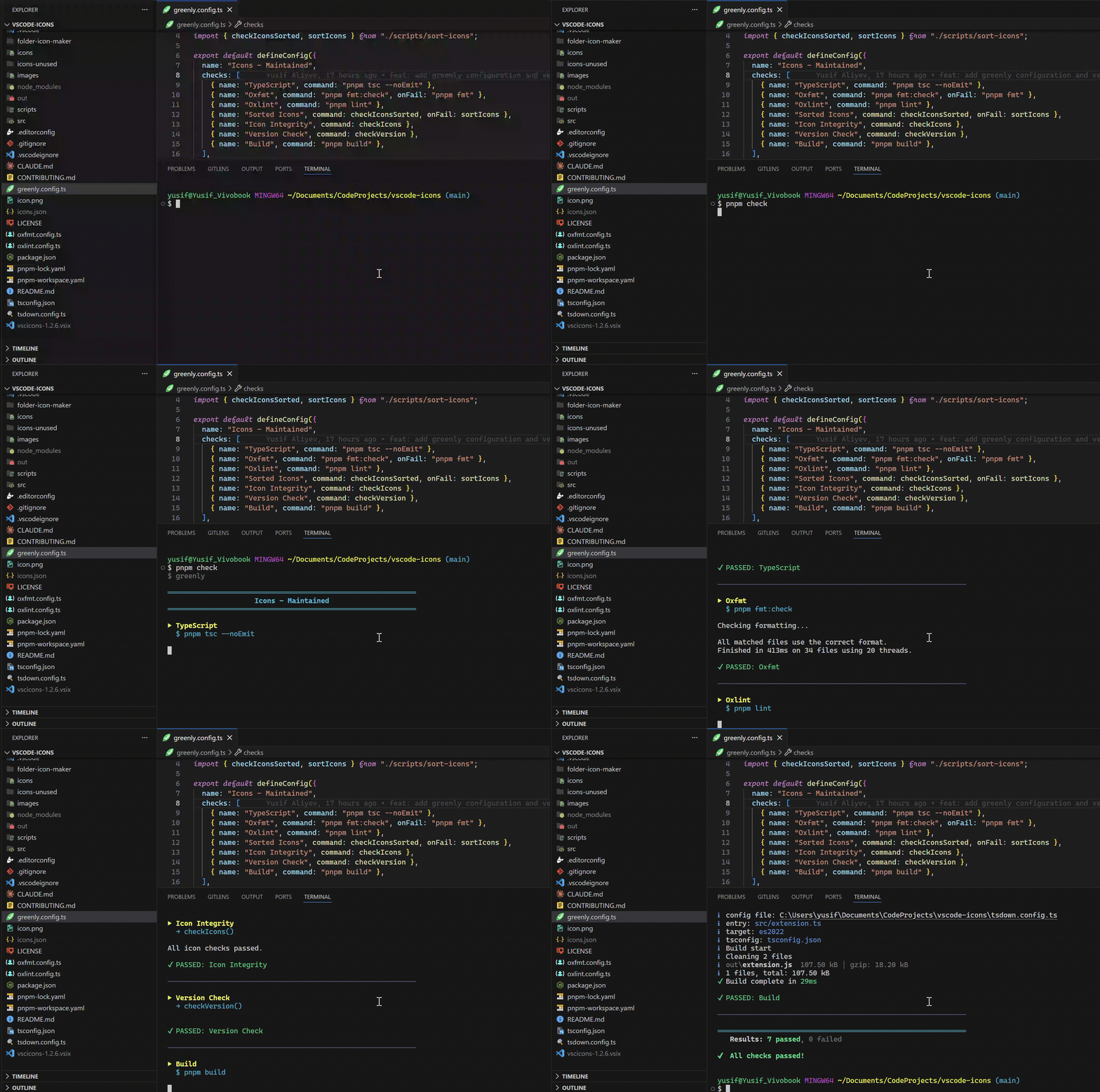
Here is pnpm check running greenly on a real project (vscode-icons):
If you face any problem, please open a PR or issue according to CONTRIBUTING.md.
LGPL-2.1-or-later © Yusif Aliyev
FAQs
Config-driven project check runner. Define your lint/format/typecheck/test/custom steps in greenly.config.ts and run them with one command.
The npm package greenly receives a total of 138 weekly downloads. As such, greenly popularity was classified as not popular.
We found that greenly demonstrated a healthy version release cadence and project activity because the last version was released less than a year ago. It has 1 open source maintainer collaborating on the project.
Product
Create ClickUp tasks from Socket alerts, automate ticketing with custom rules, and keep alert and task status synchronized.

Product
Create and manage Asana tasks directly from Socket alerts, with manual task creation, automated ticketing rules, and two-way sync.

Security News
Open VSX has removed three extension IDs from its malicious-extension list as the legitimate publishers they impersonated move to claim the names for themselves.