


Product
Socket for ClickUp Is Now Available
Create ClickUp tasks from Socket alerts, automate ticketing with custom rules, and keep alert and task status synchronized.
By Jeppe Hasseriis - Aug 26, 2026
Fast local and network IPC with Node.js-only JavaScript and aligned dependency-free Rust and C# implementations.
node-ipc 14.0.0 source for the aligned npm, NuGet, and crates.io release
Fast local and remote process communication for Node.js, C#, and Rust on Linux, macOS, and Windows. The aligned implementations share the normal node-ipc event envelope and delimiter framing across local sockets, TCP, and UDP.
A great solution for complex multiprocess Neural Networking in Node.JS
npm install --save-exact node-ipc@14.0.0
Rust: cargo add node-ipc@14.0.0 --exact
C#: dotnet add package node-ipc --version 14.0.0
Use an exact, reviewed version. Do not use a mutable tag or version range for security-sensitive deployments.
Version 14 requires Node.js 22.13.0 or newer. The native ports require Rust 1.85 or newer and .NET 8 or newer. Version 12 remains the legacy Node release line; version 13 was never published.
node-ipc ships native ES modules only. Node.js loads the same entry point through import or synchronous require(); no transpiled CommonJS bundle is generated.
The node-ipc JavaScript package is Node.js-only. It uses Node's raw TCP,
TLS, UDP, Unix-domain socket, Windows named-pipe, filesystem, OS, process, and
Buffer APIs. It is not supported in browsers, with or without a bundler.
“Native ESM” means that Node loads the one JavaScript implementation without a
transpiler; it does not mean native-browser ESM. The documentation website's
browser code is separate and is not part of the npm package runtime.
The Node.js implementation selects its parser and hot-path handlers once, when each client or server is created. It does not poll a security flag for every message. Set the profile before calling connect*() or serve*().
| Profile | Work on every message | Intended boundary |
|---|---|---|
raw | No node-ipc framing, JSON parsing, or message checks. Buffers pass through the data event. | Trusted peers using a caller-owned binary or text protocol. |
fast | JSON event-envelope encoding/decoding and delimiter framing. Malformed JSON becomes a protocol error; stream connections close. | Default for trusted local peers where the application owns payload validity. |
guarded | Fast framing plus frame-size, stream pending-write, event-name, reserved/prototype-name, envelope, and incomplete-message-time controls. | Mixed-trust local services and authenticated network applications. |
assured | Guarded controls plus a required event allow-list. Network use requires mutually authenticated TLS; each Unix local server endpoint must be a direct child of the secure socket root. Built-in Windows local service is rejected because node-ipc cannot prove its named-pipe ACL. | Hostile-network building block with verified peer certificates and application authorization; not a certification. |
ipc.config.parser = 'guarded';
ipc.config.maxMessageSize = 1024 * 1024;
ipc.config.maxPendingBytes = 8 * 1024 * 1024;
These transport guarantees are Node.js-specific. Rust shares the four codec profiles but requires the caller to establish and verify the transport boundary. See Profiles, Parsers, and Security before choosing a network-facing configuration.
The paired Rust crate requires Rust 1.85 or newer and has no runtime or build
dependencies. Its sole development dependency is exact vanilla-test 2.1.0.
use node_ipc::{tcp, CodecConfig, Connection, Event};

fn main() -> node_ipc::Result<()> {
    let stream = tcp::connect(("127.0.0.1", 9763))?;
    let mut connection = Connection::new(stream, CodecConfig::fast())?;
    connection.send(&Event::new("app.message", "hello"))?;
    Ok(())
}
Rust supplies TCP, UDP, Unix-domain sockets, Windows named pipes, raw bytes, and the Fast, Guarded, and Assured codecs. Applications supply their own verified TLS stream; the crate does not choose or reimplement cryptography. See the Rust engineer guide and native examples.
The aligned C# package targets .NET 8, has no NuGet dependencies, and mirrors
the JavaScript facade: IPCModule, config, of, server, serve*,
connect*, event subscriptions, targeted emit, and broadcast. It supplies
async TCP, TLS, UDP4/UDP6, Unix-domain sockets, Windows named pipes, Raw, Fast,
Guarded, Assured, reconnect, and sync request queues.
using NodeIpc;

await using var ipc = new IPCModule();
ipc.config.silent = true;
var client = ipc.connectToNet("service", "127.0.0.1", 9763)!;
await client.waitForConnectAsync();
await client.emitAsync("app.message", new { text = "hello" });
See the C# package guide and native examples.
ESM: import ipc from 'node-ipc';
CommonJS: const ipc = require('node-ipc').default;
CommonJS loading uses Node.js 22.13+'s native require(esm) support.
npm info : See npm trends and stats for node-ipc







GitHub info :



Code Coverage Info :
Run npm run coverage to host a local version of the coverage report on 127.0.0.1:8080.
Testing done with vanilla-test
vanilla-test provides native V8 coverage for the ESM test suite without transpilation or bundling.
Package details websites :
This work is licenced via the MIT Licence.
npm test runs 195 Node correctness cases, native V8 coverage, both module
loaders, installed-package smoke, and benchmark validation. Reports are written
to coverage/node/.
cargo test --manifest-path rust/node-ipc/Cargo.toml --all-targets runs the 38
Rust-native VanillaTest cases. node rust/node-ipc/interop/vanilla-test.js runs
the separate two-direction Node/Rust interoperability gate.
dotnet run --project csharp/node-ipc/tests/NodeIpc.Tests -c Release runs the
exact C# native case inventory. node csharp/node-ipc/interop/vanilla-test.js
runs the separate two-direction Node/C# interoperability gate, and
pwsh -File csharp/node-ipc/package-smoke.ps1 validates the NuGet boundary.
npm run test:behavioral runs the shared black-box Fast TCP transcript across
all nine JavaScript, Rust, and C# server/client pairings. Seven pipelined
payload-shape and ordering cases must pass before a separate finish handshake
and two-sided clean stream boundary in every pair, including both Rust/C#
directions. Each native encoder also has to match one canonical Fast frame byte
for byte. This gate makes no performance assertions; the deeper
language-specific profile and transport checks remain in their native suites.
The same command adds 12 raw fault-injection cases: each language, in both client and server roles, must reject complete and incomplete frames after the finish boundary. Together with the nine positive pairings, the behavioral gate contains 21 cases.
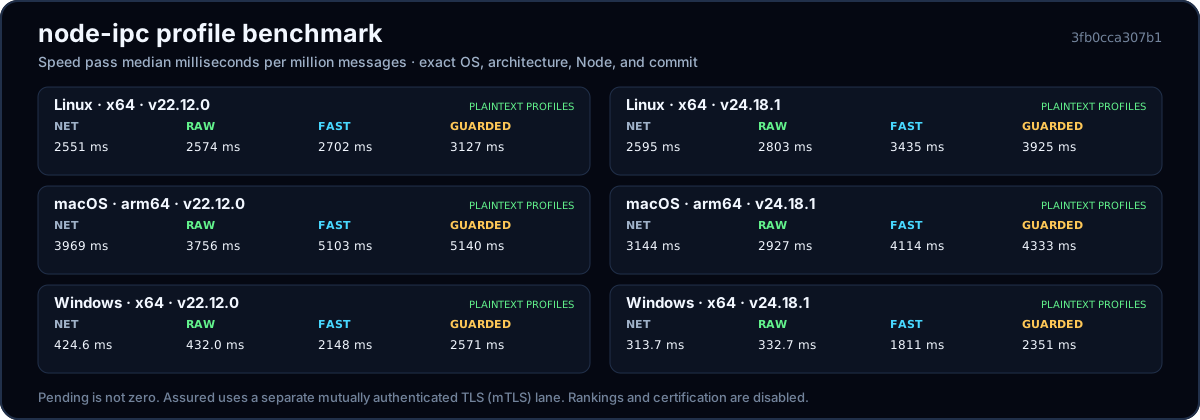
The chart is generated from tracked, clean profile runs. Results stay separated by operating system, architecture, Node version, compiler, and commit; Assured remains pending until comparable mTLS evidence passes the same gates. See the benchmark overview, profile results, resource results, methodology, and run records.
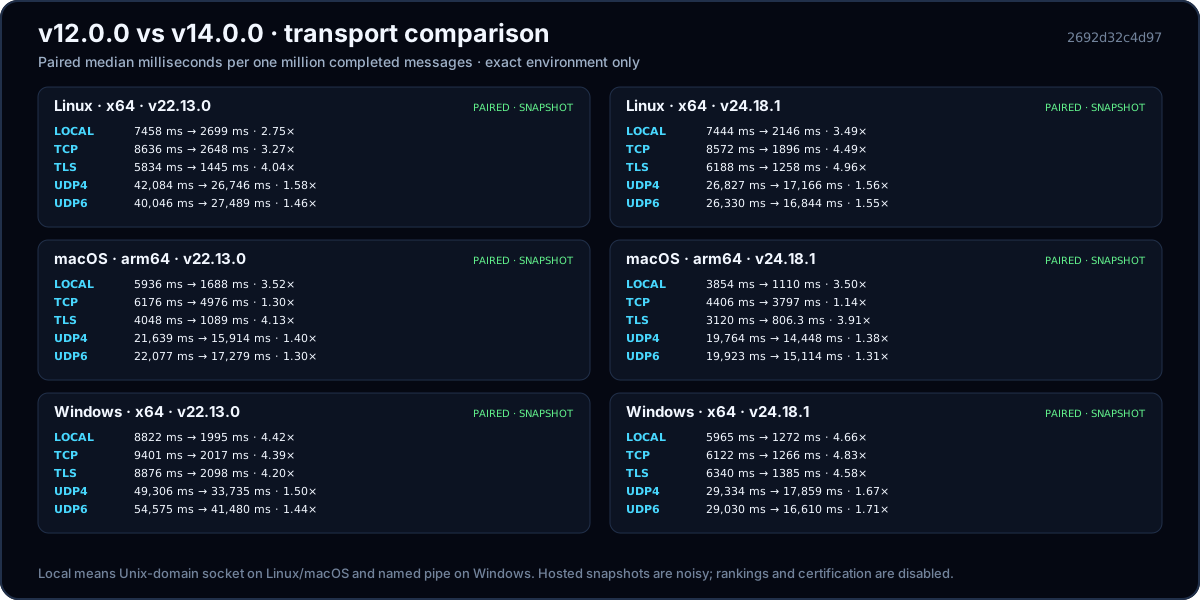
The accepted 2692d32 CI cohort reports median time for 1,000,000 completed messages through native local IPC, TCP, TLS, UDP4, and UDP6 on Windows, macOS, and Linux with Node.js 22.13.0 and 24.18.1. v14.0.0 was faster than v12.0.0 in all 30 exact environment/transport pairs, with paired median speedups from 1.14× to 4.96×. Local IPC, TCP, and TLS use the Node byte reflector; UDP4 and UDP6 use the standard-C exact-count reflector. Both versions use the same oracle within every pair, and C-oracle source, binary, compiler, flags, target provenance, exact counts, and cleanup are retained. TLS is an encryption-only throughput lane with peer verification disabled and its handshake outside timing. Hosted results remain grouped by operating system, Node version, and transport; they are directional snapshots, not a universal ranking. See the transport comparison, raw manifest, and accepted workflow run.
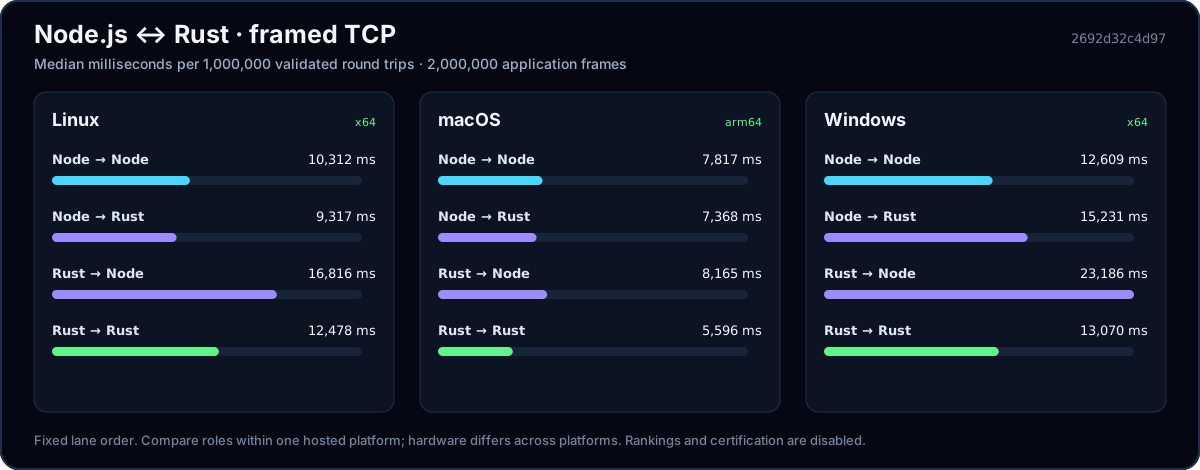
The accepted 2692d32 hosted-runner batch used Node.js 24.18.1 and Rust 1.85.0.
Fixed lane order is Node→Node / Node→Rust / Rust→Node / Rust→Rust: Linux measured
10,312 / 9,317 / 16,816 / 12,478 ms, macOS 7,817 / 7,368 / 8,165 / 5,596 ms,
and Windows 12,609 / 15,231 / 23,186 / 13,070 ms per 1,000,000 validated round
trips. One round trip is two application frames. Each full sample also uses
100,000 warm-up round trips, a 64-byte payload, 64 maximum requests in flight,
release-built Rust, fresh peers, a fresh loopback port, and exact cleanup.
Hosted platforms have different hardware; this is fixed-order evidence, not a
cross-platform ranking. See the engineer benchmark page,
raw manifest,
or run npm run benchmark:rust:quick for a non-publishable four-lane smoke.
| Type | Stability | Definition |
|---|---|---|
| Unix socket or Windows named pipe | Stable | Local IPC without the TCP/IP stack. Measure it against TCP on the target system rather than assuming a fixed latency difference. Local Unix socket and Windows named-pipe examples |
| TCP Socket | Stable | Reliable ordered byte streams for local loopback or remote networks. Local or remote TCP examples |
| TLS Socket | Stable | Encrypted network socket. It is secure only when certificate identities are verified; use mTLS or application authentication when clients must be identified. TLS documentation |
| UDP Sockets | Stable | Unordered datagrams for workloads that can own loss, duplication, reordering, and authentication. Compare measured latency and throughput on the target network before choosing it over TCP or local IPC. Local or remote UDP examples |
| OS | Supported Sockets |
|---|---|
| Linux | Unix, Posix, TCP, TLS, UDP |
| Mac | Unix, Posix, TCP, TLS, UDP |
| Win | Windows, TCP, TLS, UDP |
ipc.config
Set these variables in the ipc.config scope to overwrite or set default values.
    {
        appspace        : 'app.',
        socketRoot      : '<secure per-user runtime directory>/',
        id              : os.hostname(),
        networkHost     : '127.0.0.1', //or ::1 when IPv6 is selected
        networkPort     : 8000,
        IPType          : '<detected IPv4 or IPv6>',
        tls             : false,
        readableAll     : false,
        writableAll     : false,
        secureSocketRoot: true,
        encoding        : 'utf8',
        rawBuffer       : false,
        parser          : 'fast',
        identifyPeer    : false,
        delimiter       : '\f',
        sync            : false,
        silent          : false,
        logInColor      : true,
        logDepth        : 5,
        logger          : console.log,
        logPayloads     : false,
        maxConnections  : 100,
        maxMessageSize  : 1024 * 1024,
        maxPendingBytes : 8 * 1024 * 1024,
        maxEventNameLength: 256,
        messageTimeout  : 30000,
        allowReservedEvents: false,
        allowedEvents   : false,
        retry           : 500,
        maxRetries      : Infinity,
        stopRetrying    : false,
        unlink          : true,
        interface       : {
            localAddress: false,
            localPort   : false,
            family      : false,
            hints       : false,
            lookup      : false
        }
    }
| variable | documentation |
|---|---|
| appspace | used for Unix Socket (Unix Domain Socket) namespacing. If not set specifically, the Unix Domain Socket will combine the socketRoot, appspace, and id to form the Unix Socket Path for creation or binding. This is available in case you have many apps running on your system, you may have several sockets with the same id, but if you change the appspace, you will still have app specic unique sockets. |
| socketRoot | owner-only directory in which to create or bind a Unix Socket. On Unix the default is $XDG_RUNTIME_DIR/node-ipc when available, otherwise an owner-only node-ipc-<uid> directory below the OS temporary directory. Windows uses a per-user logical pipe prefix. The configured root is created and verified as owner-only by default. |
| id | the id of this socket or service |
| networkHost | the local or remote host on which TCP, TLS or UDP Sockets should connect |
| networkPort | the default port on which TCP, TLS, or UDP sockets should connect |
| readableAll | makes the pipe readable for all users including windows services |
| writableAll | makes the pipe writable for all users including windows services |
| secureSocketRoot | create and verify an owner-only Unix socket root. Defaults to true and is required by Assured. For other profiles, disabling it transfers directory ownership and permission checks to the application. An Assured local server must bind directly inside that root and is Unix-only; clients must verify endpoint ownership. On Windows use Assured mutual TLS or an application-owned named-pipe ACL outside the built-in profile. |
| encoding | encoding for non-Buffer Raw writes. Built-in framed profiles use UTF-8 so both wire directions remain symmetric. Custom parsers should return a Buffer when they own another wire encoding. |
| rawBuffer | compatibility switch for the raw profile. When true, node-ipc performs no framing, JSON parsing, or message validation; incoming Buffer values are delivered through data. The caller owns the complete wire protocol and its security. |
| parser | parser profile or custom parser. Defaults to fast; accepts raw, fast, guarded, assured, a parser class, or a parser object. Selection happens once for each new client or server. |
| identifyPeer | legacy server behavior that copies a received payload's data.id onto the socket. Defaults to false so Fast does not inspect every payload. Selected once when the server is created; never treat this caller-supplied value as authenticated identity. |
| delimiter | frame terminator used by the fast, guarded, and assured profiles. |
| sync | synchronous requests. Clients will not send new requests until the server answers. |
| silent | turn on/off logging default is false which means logging is on |
| logInColor | turn on/off util.inspect colors for ipc.log |
| logDepth | set the depth for util.inspect during ipc.log |
| logger | the function which receives the output from ipc.log; should take a single string argument |
| logPayloads | include application payloads in automatic transport logs. Defaults to false. Do not pass keys, passphrases, tokens, or other secrets to ipc.log; application-supplied log values are not redacted. |
| maxConnections | maximum number of concurrent connections accepted by a stream socket. Defaults to 100. |
| maxMessageSize | guarded and assured maximum framed-message size in bytes. Defaults to 1 MiB. Fast and Raw do not read this option. |
| maxPendingBytes | guarded and assured maximum bytes queued for a stream socket write. Defaults to 8 MiB; exceeding it closes that connection. Fast and Raw write directly. |
| maxEventNameLength | guarded and assured maximum accepted wire event-name length. Defaults to 256 characters. |
| messageTimeout | guarded and assured time allowed for an incomplete stream frame. Defaults to 30000 ms; set to 0 to disable the timer. |
| allowReservedEvents | guarded compatibility escape hatch for lifecycle names. Defaults to false. Assured always rejects reserved names. |
| allowedEvents | required non-empty Array or Set of event names for assured. The allow-list applies to sent and received events. Defaults to false for the other profiles. |
| retry | this is the time in milliseconds a client will wait before trying to reconnect to a server if the connection is lost. This does not effect UDP sockets since they do not have a client server relationship like Unix Sockets and TCP Sockets. |
| maxRetries | if set, it represents the maximum number of retries after each disconnect before giving up and completely killing a specific connection |
| stopRetrying | Boolean switch. true stops scheduled and future reconnect attempts; false permits retries up to maxRetries. Set maxRetries to 0 to disable reconnects. |
| unlink | Defaults to true meaning that the module will take care of deleting the IPC socket prior to startup. If you use node-ipc in a clustered environment where there will be multiple listeners on the same socket, you must set this to false and then take care of deleting the socket in your own code. |
| interface | primarily used when specifying which interface a client should connect through. see the socket.connect documentation in the node.js api |
| IPType | detected IP family used to choose the initial loopback host. |
| tls | TLS options object or false. Assured network clients require a key, certificate, trusted CA, and rejectUnauthorized:true; servers also require a trusted client CA, requestCert:true, and rejectUnauthorized:true. |
Security boundaries:
fast is the default because the trusted hot path stays direct. It contains malformed JSON, but it does not enforce message size, event-name, reserved-name, timeout, allow-list, or pending-write limits. Use guarded or assured when peers are not fully trusted.key and cert, or the existing private and public file-path aliases. There is no bundled certificate fallback. Keep private keys outside the package and source tree.rejectUnauthorized: false disables certificate identity verification and is vulnerable to man-in-the-middle attacks. Use it only for isolated local development, never on an external or untrusted network.The official node-ipc/parsers/message export keeps js-message ecosystem compatibility as an explicit opt-in parser. It maps malformed envelopes to an error message and is not a hardened decoder. Use Guarded or Assured for node-ipc protocol controls, or provide a custom parser that implements your required policy.
For the complete upgrade contract, see MIGRATION.md.
These methods are available in the IPC Scope.
ipc.log(a,b,c,d,e...);
ipc.log will accept any number of arguments and if ipc.config.silent is not set, it will concat them all with a single space ' ' between them and then log them to the console. This is fast because it prevents any concatenation from happening if the ipc.config.silent is set true. That way if you leave your logging in place it should have almost no effect on performance.
The log also uses util.inspect You can control if it should log in color, the log depth, and the destination via ipc.config
    ipc.config.logInColor=true; //default
    ipc.config.logDepth=5; //default
    ipc.config.logger=console.log.bind(console); // default
ipc.connectTo(id,path,callback);
Used for connecting as a client to local Unix sockets and Windows named pipes. This avoids IP framing and routing, but the fastest same-machine transport depends on the operating system, workload, and message shape, so compare it with loopback TCP on the target system.
| variable | required | definition |
|---|---|---|
| id | required | is the string id of the socket being connected to. The socket with this id is added to the ipc.of object when created. |
| path | optional | is the path of the Unix Domain Socket File, if the System is Windows, this will automatically be converted to an appropriate pipe with the same information as the Unix Domain Socket File. If not set this will default to ipc.config.socketRoot+ipc.config.appspace+id |
| callback | optional | this is the function to execute when the socket has been created. |
examples arguments can be ommitted so long as they are still in order.
ipc.connectTo('world');
or using just an id and a callback
    ipc.connectTo(
        'world',
        function(){
            ipc.of.world.on(
                'hello',
                function(data){
                    ipc.log(data.debug);
                    //if data was a string, it would have the color set to the debug style applied to it
                }
            )
        }
    );
or explicitly setting the path
    ipc.connectTo(
        'world',
        'myapp.world'
    );
or explicitly setting the path with callback
    ipc.connectTo(
        'world',
        'myapp.world',
        function(){
            ...
        }
    );
ipc.connectToNet(id,host,port,callback)
Used to connect as a client to a TCP or TLS socket over loopback or a remote IP network. For same-machine peers, compare this path with connectTo; the better choice depends on the target system and workload.
For TLS and SSL Sockets see the node-ipc TLS and SSL docs. They have a few additional requirements, and things to know about and so have their own doc.
| variable | required | definition |
|---|---|---|
| id | required | is the string id of the socket being connected to. For TCP & TLS sockets, this id is added to the ipc.of object when the socket is created with a reference to the socket. |
| host | optional | is the host on which the TCP or TLS socket resides. This will default to ipc.config.networkHost if not specified. |
| port | optional | the port on which the TCP or TLS socket resides. |
| callback | optional | this is the function to execute when the socket has been created. |
examples arguments can be ommitted so long as they are still in order.
So while the default is : (id,host,port,callback), the following examples will still work because they are still in order (id,port,callback) or (id,host,callback) or (id,port) etc.
ipc.connectToNet('world');
or using just an id and a callback
    ipc.connectToNet(
        'world',
        function(){
            ...
        }
    );
or explicitly setting the host and path
    ipc.connectToNet(
        'world',
        'myapp.com',serve(path,callback)
        3435
    );
or only explicitly setting port and callback
    ipc.connectToNet(
        'world',
        3435,
        function(){
            ...
        }
    );
ipc.disconnect(id)
Used to disconnect a client from a Unix, Windows, TCP or TLS socket. The socket and its refrence will be removed from memory and the ipc.of scope. This can be local or remote. UDP clients do not maintain connections and so there are no Clients and this method has no value to them.
| variable | required | definition |
|---|---|---|
| id | required | is the string id of the socket from which to disconnect. |
examples
ipc.disconnect('world');
ipc.serve(path,callback);
Used to create local Unix Socket Server or Windows Socket Server to which Clients can bind. The server can emit events to specific Client Sockets, or broadcast events to all known Client Sockets.
| variable | required | definition |
|---|---|---|
| path | optional | This is the path of the Unix Domain Socket File, if the System is Windows, this will automatically be converted to an appropriate pipe with the same information as the Unix Domain Socket File. If not set this will default to ipc.config.socketRoot+ipc.config.appspace+id |
| callback | optional | This is a function to be called after the Server has started. This can also be done by binding an event to the start event like ipc.server.on('start',function(){}); |
examples arguments can be omitted so long as they are still in order.
ipc.serve();
or specifying callback
    ipc.serve(
        function(){...}
    );
or specify path
    ipc.serve(
        ipc.config.socketRoot+'myapp.myservice'
    );
or specifying everything
    ipc.serve(
        ipc.config.socketRoot+'myapp.myservice',
        function(){...}
    );
serveNet(host,port,UDPType,callback)
Used to create TCP, TLS or UDP Socket Server to which Clients can bind or other servers can send data to. The server can emit events to specific Client Sockets, or broadcast events to all known Client Sockets.
Binding to a non-loopback interface exposes the service to the network. Use application authentication and authorization for TCP/UDP, or mutually authenticated TLS when both peers must have cryptographic identities.
| variable | required | definition |
|---|---|---|
| host | optional | If not specified this defaults to ipc.config.networkHost, which is loopback (127.0.0.1 or ::1). An explicit non-loopback host creates an external network boundary. |
| port | optional | The port on which the TCP, UDP, or TLS Socket server will be bound, this defaults to 8000 if not specified |
| UDPType | optional | If set this will create the server as a UDP socket. 'udp4' or 'udp6' are valid values. This defaults to not being set. When using udp6 make sure to specify a valid IPv6 host, like ::1 |
| callback | optional | Function to be called when the server is created |
examples arguments can be ommitted solong as they are still in order.
default tcp server
ipc.serveNet();
default udp server
ipc.serveNet('udp4');
or specifying TCP server with callback
    ipc.serveNet(
        function(){...}
    );
or specifying UDP server with callback
    ipc.serveNet(
        'udp4',
        function(){...}
    );
or specify port
    ipc.serveNet(
        3435
    );
or specifying everything TCP
    ipc.serveNet(
        'MyMostAwesomeApp.com',
        3435,
        function(){...}
    );
or specifying everything UDP
    ipc.serveNet(
        'MyMostAwesomeApp.com',
        3435,
        'udp4',
        function(){...}
    );
| variable | definition |
|---|---|
| ipc.of | This is where socket connection refrences will be stored when connecting to them as a client via the ipc.connectTo or iupc.connectToNet. They will be stored based on the ID used to create them, eg : ipc.of.mySocket |
| ipc.server | This is a refrence to the server created by ipc.serve or ipc.serveNet |
| method | definition |
|---|---|
| start | start serving need to call serve or serveNet first to set up the server |
| stop | close the server and stop serving |
| event name | params | definition |
|---|---|---|
| error | err obj | triggered when an error has occured |
| connect | triggered when socket connected | |
| disconnect | triggered by client when socket has disconnected from server | |
| socket.disconnected | socket destroyedSocketID | triggered by server when a client socket has disconnected |
| destroy | triggered when socket has been totally destroyed, no further auto retries will happen and all references are gone. | |
| data | buffer | triggered when ipc.config.rawBuffer is true and a message is received. |
| your event type | your event data | triggered when a JSON message is received. The event name will be the type string from your message and the param will be the data object from your message eg : { type:'myEvent',data:{a:1}} |
The Guarded and Assured profiles reject the lifecycle names start, connect, disconnect, destroy, close, socket.disconnected, error, and data, plus names inherited from Object.prototype. Guarded can restore lifecycle-name compatibility with ipc.config.allowReservedEvents=true; Assured cannot. The default Fast profile does not perform either name check, so use it only with trusted peers.
Sometimes you might need explicit and independent instances of node-ipc. Just for such scenarios we have exposed the core IPC class on the IPC singleton.
    import {IPCModule} from 'node-ipc';

    const ipc=new IPCModule;
    const someOtherExplicitIPC=new IPCModule;


    //setting explicit configs

    //keep one silent and the other verbose
    ipc.config.silent=true;
    someOtherExplicitIPC.config.silent=true;

    //make one a raw binary and the other json based ipc
    ipc.config.rawBuffer=false;

    someOtherExplicitIPC.config.rawBuffer=true;
    someOtherExplicitIPC.config.encoding='hex';
You can find Advanced Examples in the examples folder. In the examples you will find more complex demos including multi client examples.
The server is the process keeping a socket for IPC open. Multiple sockets can connect to this server and talk to it. It can also broadcast to all clients or emit to a specific client. This is the most basic example which will work for local Unix and Windows Sockets as well as local or remote network TCP Sockets.
    import ipc from 'node-ipc';

    ipc.config.id   = 'world';
    ipc.config.retry= 1500;

    ipc.serve(
        function(){
            ipc.server.on(
                'message',
                function(data,socket){
                    ipc.log('got a message : '.debug, data);
                    ipc.server.emit(
                        socket,
                        'message',  //this can be anything you want so long as
                                    //your client knows.
                        data+' world!'
                    );
                }
            );
			ipc.server.on(
				'socket.disconnected',
				function(socket, destroyedSocketID) {
					ipc.log('client ' + destroyedSocketID + ' has disconnected!');
				}
			);
        }
    );

    ipc.server.start();
The client connects to the servers socket for Inter Process Communication. The socket will receive events emitted to it specifically as well as events which are broadcast out on the socket by the server. This is the most basic example which will work for both local Unix Sockets and local or remote network TCP Sockets.
    import ipc from 'node-ipc';

    ipc.config.id   = 'hello';
    ipc.config.retry= 1500;

    ipc.connectTo(
        'world',
        function(){
            ipc.of.world.on(
                'connect',
                function(){
                    ipc.log('## connected to world ##'.rainbow, ipc.config.delay);
                    ipc.of.world.emit(
                        'message',  //any event or message type your server listens for
                        'hello'
                    )
                }
            );
            ipc.of.world.on(
                'disconnect',
                function(){
                    ipc.log('disconnected from world'.notice);
                }
            );
            ipc.of.world.on(
                'message',  //any event or message type your server listens for
                function(data){
                    ipc.log('got a message from world : '.debug, data);
                }
            );
        }
    );
UDP Sockets are different than Unix, Windows & TCP Sockets because they must be bound to a unique port on their machine to receive messages. For example, A TCP, Unix, or Windows Socket client could just connect to a separate TCP, Unix, or Windows Socket sever. That client could then exchange, both send and receive, data on the servers port or location. UDP Sockets can not do this. They must bind to a port to receive or send data.
This means a UDP Client and Server are the same thing because in order to receive data, a UDP Socket must have its own port to receive data on, and only one process can use this port at a time. It also means that in order to emit or broadcast data the UDP server will need to know the host and port of the Socket it intends to broadcast the data to.
This is the most basic example which will work for both local and remote UDP Sockets.
    import ipc from 'node-ipc';

    ipc.config.id   = 'world';
    ipc.config.retry= 1500;

    ipc.serveNet(
        'udp4',
        function(){
            console.log(123);
            ipc.server.on(
                'message',
                function(data,socket){
                    ipc.log('got a message from '.debug, data.from.variable ,' : '.debug, data.message.variable);
                    ipc.server.emit(
                        socket,
                        'message',
                        {
                            from    : ipc.config.id,
                            message : data.message+' world!'
                        }
                    );
                }
            );

            console.log(ipc.server);
        }
    );

    ipc.server.start();
note we set the port here to 8001 because the world server is already using the default ipc.config.networkPort of 8000. So we can not bind to 8000 while world is using it.
    ipc.config.id   = 'hello';
    ipc.config.retry= 1500;

    ipc.serveNet(
        8001,
        'udp4',
        function(){
            ipc.server.on(
                'message',
                function(data){
                    ipc.log('got Data');
                    ipc.log('got a message from '.debug, data.from.variable ,' : '.debug, data.message.variable);
                }
            );
            ipc.server.emit(
                {
                    address : '127.0.0.1', //any hostname will work
                    port    : ipc.config.networkPort
                },
                'message',
                {
                    from    : ipc.config.id,
                    message : 'Hello'
                }
            );
        }
    );

    ipc.server.start();
Binary or Buffer sockets can be used with any of the above socket types, however the way data events are emit is slightly different. These may come in handy if working with embedded systems or C / C++ processes. You can even make sure to match C or C++ string typing.
When setting up a rawBuffer socket you must specify it as such :
ipc.config.rawBuffer=true;
You can also specify its encoding type. The default is utf8
ipc.config.encoding='utf8';
emit string buffer :
    //server
    ipc.server.emit(
        socket,
        'hello'
    );

    //client
    ipc.of.world.emit(
        'hello'
    )
emit byte array buffer :
    //hex encoding may work best for this.
    ipc.config.encoding='hex';

    //server
    ipc.server.emit(
        socket,
        [10,20,30]
    );

    //client
    ipc.server.emit(
        [10,20,30]
    );
emit binary or hex array buffer, this is best for real time data transfer, especially whan connecting to C or C++ processes, or embedded systems :
    ipc.config.encoding='hex';

    //server
    ipc.server.emit(
        socket,
        [0x05,0x6d,0x5c]
    );

    //client
    ipc.server.emit(
        [0x05,0x6d,0x5c]
    );
Writing explicit buffers, int types, doubles, floats etc. as well as big endian and little endian data to raw buffer nostly valuable when connecting to C or C++ processes, or embedded systems (see more detailed info on buffers as well as UInt, Int, double etc. here)[https://nodejs.org/api/buffer.html]:
    ipc.config.encoding='hex';

    //make a 6 byte buffer for example
    const myBuffer=Buffer.alloc(6).fill(0);

    //fill the first 2 bytes with a 16 bit (2 byte) short unsigned int

    //write a UInt16 (2 byte or short) as Big Endian
    myBuffer.writeUInt16BE(
        2, //value to write
        0 //offset in bytes
    );
    //OR
    myBuffer.writeUInt16LE(0x2,0);
    //OR
    myBuffer.writeUInt16LE(0x02,0);

    //fill the remaining 4 bytes with a 32 bit (4 byte) long unsigned int

    //write a UInt32 (4 byte or long) as Big Endian
    myBuffer.writeUInt32BE(
        16772812, //value to write
        2 //offset in bytes
    );
    //OR
    myBuffer.writeUInt32BE(0xffeecc,0)

    //server
    ipc.server.emit(
        socket,
        myBuffer
    );

    //client
    ipc.server.emit(
        myBuffer
    );
cluster Modulenode-ipc can be used with Node.js' cluster module to provide the ability to have multiple readers for a single socket. Doing so simply requires you to set the unlink property in the config to false and take care of unlinking the socket path in the master process:
    import fs  from 'fs';
    import ipc from 'node-ipc';
    import {cpus}  from 'os';
    import cluster  from 'cluster';

    const cpuCount=cpus().length;

    const socketPath=ipc.config.socketRoot+'ipc.sock';

    ipc.config.unlink = false;

    if (cluster.isMaster) {
       if (fs.existsSync(socketPath)) {
           fs.unlinkSync(socketPath);
       }

       for (let i = 0; i < cpuCount; i++) {
           cluster.fork();
       }
    }else{
       ipc.serve(
         socketPath,
         function() {
           ipc.server.on(
             'currentDate',
             function(data,socket) {
               console.log(`pid ${process.pid} got: `, data);
             }
           );
         }
      );

      ipc.server.start();
      console.log(`pid ${process.pid} listening on ${socketPath}`);
    }
    import fs  from 'fs';
    import ipc  from 'node-ipc';

    const socketPath = ipc.config.socketRoot+'ipc.sock';

    //loop forever so you can see the pid of the cluster sever change in the logs
    setInterval(
      function() {
        ipc.connectTo(
          'world',
          socketPath,
          connecting
         );
      },
      2000
    );

    function connecting(socket) {
      ipc.of.world.on(
        'connect',
        function() {
          ipc.of.world.emit(
            'currentDate',
            {
                 message: new Date().toISOString()
            }
          );
          ipc.disconnect('world');
        }
      );
    }
See the MIT license file.
I'm sorry.
Socket.IO is a popular library for real-time web applications. It enables real-time, bidirectional communication between web clients and servers. Unlike node-ipc, which focuses on inter-process communication, Socket.IO is designed for web applications and provides features like automatic reconnection, multiplexing, and broadcasting.
Dnode is a library for asynchronous, bidirectional RPC (Remote Procedure Call) in Node.js. It allows you to call functions in another process or even on another machine as if they were local. Dnode is more focused on RPC, whereas node-ipc provides a broader range of IPC mechanisms.
ZeroMQ (also known as ØMQ) is a high-performance asynchronous messaging library. It provides a message queue but unlike traditional message brokers, it can be used for various messaging patterns like pub-sub, request-reply, and push-pull. ZeroMQ is more complex and powerful compared to node-ipc, which is simpler and easier to use for basic IPC needs.
FAQs
Fast local and network IPC with Node.js-only JavaScript and aligned dependency-free Rust and C# implementations.
The npm package node-ipc receives a total of 531,790 weekly downloads. As such, node-ipc popularity was classified as popular.
We found that node-ipc demonstrated a healthy version release cadence and project activity because the last version was released less than a year ago. It has 1 open source maintainer collaborating on the project.
Product
Create ClickUp tasks from Socket alerts, automate ticketing with custom rules, and keep alert and task status synchronized.

Product
Create and manage Asana tasks directly from Socket alerts, with manual task creation, automated ticketing rules, and two-way sync.

Security News
Open VSX has removed three extension IDs from its malicious-extension list as the legitimate publishers they impersonated move to claim the names for themselves.