

Product
Introducing Repository Access Permissions and Custom Roles
Socket now supports Custom Roles and Repository Access Permissions so organizations can control who can access specific repositories and actions.
By Joe Werle - Jun 19, 2026
react-native-surveys
Advanced tools
Build your own forms, surveys and polls for your React Native apps.
We created NativeForms to save you countless hours of boring development of forms. Our product offers advanced solutions to all your problems and let you focus on things that are really important in your app.
npm install native-forms --save
// or
yarn add native-forms
import NativeForms from 'native-forms';
<NativeForms
  form="https://my.nativeforms.com/vVDct0mcvZWPmZic4JlRvpmNy0Db"
/>
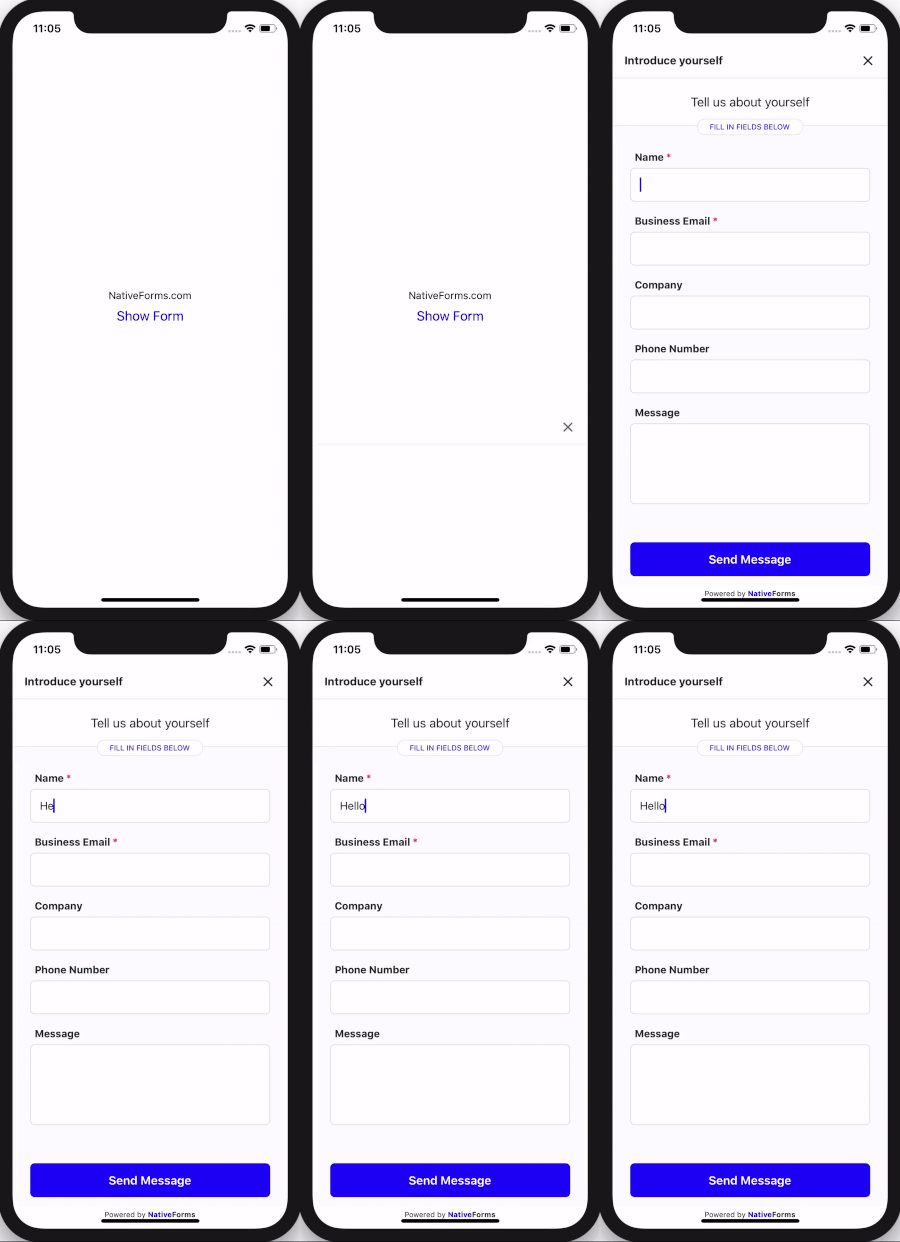
This code will display form in your application. Replace form prop with your form's address. You can create your own forms here.
Basic flow of NativeForms in your application.
import React, {useState} from 'react';
import { Button, StyleSheet, Text, View } from 'react-native';
import NativeForms from 'native-forms';

const App = () => {
  const [hasForm, showForm] = useState(false);
  const show = () => showForm(true);
  const hide = () => showForm(false);

  return (
    <View style={styles.container}>
      <Text>NativeForms.com</Text>

      <Button title="Show Form" onPress={show} color="#20f" />

      {hasForm && (
    	<NativeForms
      	  form="https://my.nativeforms.com/vVDct0mcvZWPmZic4JlRvpmNy0Db"
      	  onClose={hide}
     	/>
      )}
    </View>
  );
};

const styles = StyleSheet.create({
  container: {
    flex: 1,
    backgroundColor: '#fff',
    alignItems: 'center',
    justifyContent: 'center',
  },
 });

export default App;
Replace form prop with your form's address. You can create your own forms here.
| Name | Type | Required | Note |
|---|---|---|---|
| form | String | Yes | URL of form to display. |
| onClose | Function | No | Called when user decides to close the form. |
| onSend | Function | No | Called when user completes form. |
| onBeforeSend | Function | No | Called before sending form. Can be used to provide extra data based on user's input. |
| String | No | Email of person that will complete form (it will be displayed in admin panel). | |
| name | String | No | Name of person that will complete form. |
| extraData | Object | No | Extra data fields that will be send along with completed form. This data will not be visible by user. |
Example of using props:
<NativeForms
  form="https://my.nativeforms.com/vVDct0mcvZWPmZic4JlRvpmNy0Db"
  onSend={formData => console.log("Completed form data", formData)}
  onClose={() => console.log("User cancels forms")}
  onBeforeSend={formData => {
    //extra data that will be added to form
    return {
      "Account Type": "Free"
    };
  }}
  name="John Smith"
  email="customer@gmail.com"
  extraData={{
    "Account Type": "Premium"
  }}
/>
Uploading files for React Native is a little bit tricky.
If you are using Expo you have to add this component: https://docs.expo.io/versions/latest/sdk/webview/
Adding it is as simple as running this command:
expo install react-native-webview
If you created your project with React Native Cli you need to install this library:
https://github.com/react-native-community/react-native-webview
It is as simple as running those 2 commands:
npm install --save react-native-webview
// and
react-native link react-native-webview
import React, { useState } from "react";
import { Button, StyleSheet, Text, View } from "react-native";
import { NativeFormsWebView } from "native-forms";
import { WebView } from "react-native-webview";

const App = () => {
  const [hasForm, showForm] = useState(false);
  const show = () => showForm(true);
  const hide = () => showForm(false);

  return (
    <View style={styles.container}>
      <Text>NativeForms.com</Text>

      <Button title="Show Form" onPress={show} color="#20f" />

      {hasForm && (
        <NativeFormsWebView onClose={hide}>
          <WebView
            source={{
              uri: "https://my.nativeforms.com/AdnJHOt0mcvZWPmZic4JlRvpmNy0Db"
            }}
          />
        </NativeFormsWebView>
      )}
    </View>
  );
};

const styles = StyleSheet.create({
  container: {
    flex: 1,
    backgroundColor: "#fff",
    alignItems: "center",
    justifyContent: "center"
  }
});

export default App;
That's all :)
Full code examples are available here:
In case of any questions or problems, please contact me at: hello@nativeforms.com
FAQs
Build your own forms, surveys and polls for your React Native apps.
The npm package react-native-surveys receives a total of 2 weekly downloads. As such, react-native-surveys popularity was classified as not popular.
We found that react-native-surveys demonstrated a not healthy version release cadence and project activity because the last version was released a year ago. It has 1 open source maintainer collaborating on the project.
Did you know?

Socket for GitHub automatically highlights issues in each pull request and monitors the health of all your open source dependencies. Discover the contents of your packages and block harmful activity before you install or update your dependencies.
Product
Socket now supports Custom Roles and Repository Access Permissions so organizations can control who can access specific repositories and actions.

Product
Socket MCP now lets AI assistants review org alerts, investigate threats using the Socket threat feed, and inspect package files in addition to dependency scoring.

Product
Socket Firewall blocks malicious VS Code and Open VSX extensions before install, protecting developers from compromised editor marketplaces.