🦞 SybilClaw — Stable, Multi-User AI with Advanced Memory Management
A security-first fork of OpenClaw for households, research teams, and small organizations. We don't YOLO upstream changes — every merge is screened for security and stability.





OpenClaw is a personal AI assistant you run on your own devices.
It answers you on the channels you already use. It can speak and listen on macOS/iOS/Android, and can render a live Canvas you control. The Gateway is just the control plane — the product is the assistant.
What Is SybilClaw?
OpenClaw is a self-hosted AI assistant that runs on your own devices and connects to the messaging channels you already use (Telegram, WhatsApp, Discord, Signal, iMessage, Slack, and many more). It can speak, listen, render a live Canvas, and control a browser — all from a single local gateway.
SybilClaw extends OpenClaw with two core capabilities that OpenClaw doesn't support out of the box. We also follow a conservative merge policy: security patches and critical stability fixes are cherry-picked promptly; feature merges happen only against vetted upstream LTS releases. We'd rather be a week late than deploy a broken system.
Why SybilClaw over OpenClaw?
- Security screen: every upstream change is classified before it lands — security/stability first, features later
- Targeted merges only: no blind main-branch pulls; we wait for upstream LTS branches
- Proven config: the same multi-user + memory architecture you trust, hardened by daily upstream monitoring
1. True Multi-User Support
OpenClaw is designed around a single user. SybilClaw makes it a first-class multi-user system:
- One personality, many people. A single
SOUL.md defines the AI's character, expertise, and values. Every user interacts with the same coherent entity — not a blank chatbot.
- Per-user memory isolation. Each user gets their own
MEMORY.md and personal document store. Alice's context, history, and preferences never bleed into Bob's.
- Shared household/team knowledge. A separate shared memory layer holds facts everyone should know — schedules, household logistics, team context — accessible to all users without polluting personal memory.
- Role-based access. Route different users (or different messaging channels) to isolated agents with their own workspaces and permission levels.
Who is this for?
- Households where multiple family members want their own relationship with a shared AI assistant
- Research teams or small business units that want a domain-expert AI with per-user context
- Anyone running a single AI service for a small group (2–10 people) without wanting to maintain separate instances
2. Advanced Memory Management
Context windows are finite. Most AI assistants either forget everything between sessions or dump everything into a context that grows until it breaks. SybilClaw takes a structured approach:
Tiered memory architecture:
| Personal MEMORY.md | Long-term curated facts, preferences, decisions | Per-user |
| Personal topics/ | Typed subdirectories: projects, tools, feedback, context | Per-user |
| Shared household/ | Schedules, logistics, shared decisions | All users |
| Daily logs | Session-by-session notes | Per-user |
| Context graph | Semantic tag-based retrieval across sessions | Per-user |
Key behaviors:
- Memory is written to files — it survives session restarts and context compaction
- A graduated compaction strategy (tool pruning → checkpoints → session extraction → hard compact) means important context is preserved even under pressure
- The context graph layer provides tag-based semantic retrieval, so the AI can find relevant prior context without scanning everything
- Session summaries are automatically archived for long-term searchability
SybilClaw Quick Links
OpenClaw Foundation
SybilClaw inherits the full OpenClaw platform. Everything below is available in SybilClaw:
Supported channels include: WhatsApp, Telegram, Slack, Discord, Google Chat, Signal, iMessage, BlueBubbles, IRC, Microsoft Teams, Matrix, Feishu, LINE, Mattermost, Nextcloud Talk, Nostr, Synology Chat, Tlon, Twitch, Zalo, Zalo Personal, WeChat, QQ, WebChat.
Website · Docs · Vision · DeepWiki · Getting Started · Updating · Showcase · FAQ · Onboarding · Nix · Docker · Discord
New install? Start here: Getting started
Preferred setup: run sybilclaw onboard in your terminal.
SybilClaw Onboard guides you step by step through setting up the gateway, workspace, channels, and skills. It is the recommended CLI setup path and works on macOS, Linux, and Windows (via WSL2; strongly recommended).
Works with npm, pnpm, or bun.
Stability & Security
SybilClaw follows a conservative merge strategy:
| Tier 1 (ASAP) | Security patches, crash fixes, CVEs — cherry-picked within 24 hours |
| Tier 2 (Maintenance) | Stability, performance, bug fixes — merged in planned maintenance windows |
| Tier 3 (Track) | Features, experiments — logged and tracked, merged only against LTS releases |
| LTS target | Full merges only against upstream LTS branches — never chasing HEAD |
Daily upstream monitoring runs automatically and produces a prioritized report. See docs/sybilclaw/stability-policy.md for details.
Subscriptions (OAuth):
Model note: while many providers and models are supported, prefer a current flagship model from the provider you trust and already use. See Onboarding.
Install (recommended)
Runtime: Node 24 (recommended) or Node 22.16+.
npm install -g sybilclaw@latest
sybilclaw onboard --install-daemon
SybilClaw Onboard installs the Gateway daemon (launchd/systemd user service) so it stays running.
Quick start (TL;DR)
Runtime: Node 24 (recommended) or Node 22.16+.
Full beginner guide (auth, pairing, channels): Getting started
sybilclaw onboard --install-daemon
sybilclaw gateway --port 18789 --verbose
sybilclaw message send --to +1234567890 --message "Hello from SybilClaw"
sybilclaw agent --message "Ship checklist" --thinking high
Upgrading? Just run sybilclaw update (or npm update -g sybilclaw), and run sybilclaw doctor to verify your setup.
Models config + CLI: Models. Auth profile rotation + fallbacks: Model failover.
Security defaults (DM access)
OpenClaw connects to real messaging surfaces. Treat inbound DMs as untrusted input.
Full security guide: Security
Default behavior on Telegram/WhatsApp/Signal/iMessage/Microsoft Teams/Discord/Google Chat/Slack:
- DM pairing (
dmPolicy="pairing" / channels.discord.dmPolicy="pairing" / channels.slack.dmPolicy="pairing"; legacy: channels.discord.dm.policy, channels.slack.dm.policy): unknown senders receive a short pairing code and the bot does not process their message.
- Approve with:
sybilclaw pairing approve <channel> <code> (then the sender is added to a local allowlist store).
- Public inbound DMs require an explicit opt-in: set
dmPolicy="open" and include "*" in the channel allowlist (allowFrom / channels.discord.allowFrom / channels.slack.allowFrom; legacy: channels.discord.dm.allowFrom, channels.slack.dm.allowFrom).
Run sybilclaw doctor to surface risky/misconfigured DM policies.
Highlights
- Local-first Gateway — single control plane for sessions, channels, tools, and events.
- Multi-channel inbox — WhatsApp, Telegram, Slack, Discord, Google Chat, Signal, BlueBubbles (iMessage), iMessage (legacy), IRC, Microsoft Teams, Matrix, Feishu, LINE, Mattermost, Nextcloud Talk, Nostr, Synology Chat, Tlon, Twitch, Zalo, Zalo Personal, WeChat, QQ, WebChat, macOS, iOS/Android.
- Multi-agent routing — route inbound channels/accounts/peers to isolated agents (workspaces + per-agent sessions).
- Voice Wake + Talk Mode — wake words on macOS/iOS and continuous voice on Android (ElevenLabs + system TTS fallback).
- Live Canvas — agent-driven visual workspace with A2UI.
- First-class tools — browser, canvas, nodes, cron, sessions, and Discord/Slack actions.
- Companion apps — macOS menu bar app + iOS/Android nodes.
- Onboarding + skills — onboarding-driven setup with bundled/managed/workspace skills.
Security model (important)
- Default: tools run on the host for the
main session, so the agent has full access when it is just you.
- Group/channel safety: set
agents.defaults.sandbox.mode: "non-main" to run non-main sessions inside sandboxes. Docker is the default sandbox backend; SSH and OpenShell backends are also available.
- Typical sandbox default: allow
bash, process, read, write, edit, sessions_list, sessions_history, sessions_send, sessions_spawn; deny browser, canvas, nodes, cron, discord, gateway.
- Before exposing anything remotely, read Security, Sandboxing, and Configuration.
Operator quick refs
- Chat commands:
/status, /new, /reset, /compact, /think <level>, /verbose on|off, /trace on|off, /usage off|tokens|full, /restart, /activation mention|always
- Session tools:
sessions_list, sessions_history, sessions_send
- Skills registry: ClawHub
- Architecture overview: Architecture
Docs by goal
- New here: Getting started, Onboarding, Updating
- Channel setup: Channels index, WhatsApp, Telegram, Discord, Slack
- Apps + nodes: macOS, iOS, Android, Nodes
- Config + security: Configuration, Security, Sandboxing
- Remote + web: Gateway, Remote access, Tailscale, Web surfaces
- Tools + automation: Tools, Skills, Cron jobs, Webhooks, Gmail Pub/Sub
- Internals: Architecture, Agent, Session model, Gateway protocol
- Troubleshooting: Channel troubleshooting, Logging, Docs home
Apps (optional)
The Gateway alone delivers a great experience. All apps are optional and add extra features.
If you plan to build/run companion apps, follow the platform runbooks below.
macOS (OpenClaw.app) (optional)
- Menu bar control for the Gateway and health.
- Voice Wake + push-to-talk overlay.
- WebChat + debug tools.
- Remote gateway control over SSH.
Note: signed builds required for macOS permissions to stick across rebuilds (see macOS Permissions).
iOS node (optional)
- Pairs as a node over the Gateway WebSocket (device pairing).
- Voice trigger forwarding + Canvas surface.
- Controlled via
sybilclaw nodes ….
Runbook: iOS connect.
Android node (optional)
- Pairs as a WS node via device pairing (
sybilclaw devices ...).
- Exposes Connect/Chat/Voice tabs plus Canvas, Camera, Screen capture, and Android device command families.
- Runbook: Android connect.
From source (development)
Prefer pnpm for builds from source. Bun is optional for running TypeScript directly.
For the dev loop:
git clone https://github.com/openclaw/openclaw.git
cd sybilclaw
pnpm install
pnpm sybilclaw setup
pnpm ui:build
pnpm gateway:watch
If you need a built dist/ from the checkout (for Node, packaging, or release validation), run:
pnpm build
pnpm ui:build
pnpm sybilclaw setup writes the local config/workspace needed for pnpm gateway:watch. It is safe to re-run, but you normally only need it on first setup or after resetting local state. pnpm gateway:watch does not rebuild dist/control-ui, so rerun pnpm ui:build after ui/ changes or use pnpm ui:dev when iterating on the Control UI. If you want this checkout to run onboarding directly, use pnpm sybilclaw onboard --install-daemon.
Note: pnpm sybilclaw ... runs TypeScript directly (via tsx). pnpm build produces dist/ for running via Node / the packaged sybilclaw binary, while pnpm gateway:watch rebuilds the runtime on demand during the dev loop.
Stability channels
SybilClaw inherits OpenClaw's release channels but applies its own screening:
- stable: tagged releases that have passed SybilClaw's security review
- beta: prerelease tags for testing — not recommended for production
- dev: moving head — not supported by SybilClaw; use OpenClaw upstream directly for bleeding-edge features
Switch channels: sybilclaw update --channel stable|beta
Details: Development channels.
Note: SybilClaw deliberately does not track upstream main. If you want the latest experimental features, use OpenClaw directly. SybilClaw is for people who value stability.
Development channels
- stable: tagged releases (
vYYYY.M.D or vYYYY.M.D-<patch>), npm dist-tag latest.
- beta: prerelease tags (
vYYYY.M.D-beta.N), npm dist-tag beta (macOS app may be missing).
- dev: moving head of
main, npm dist-tag dev (when published).
Switch channels (git + npm): sybilclaw update --channel stable|beta|dev.
Details: Development channels.
Agent workspace + skills
- Workspace root:
~/.sybilclaw/workspace (configurable via agents.defaults.workspace).
- Injected prompt files:
AGENTS.md, SOUL.md, TOOLS.md.
- Skills:
~/.sybilclaw/workspace/skills/<skill>/SKILL.md.
Configuration
Minimal ~/.sybilclaw/sybilclaw.json (model + defaults):
{
  agent: {
    model: "<provider>/<model-id>",
  },
}
Full configuration reference (all keys + examples).
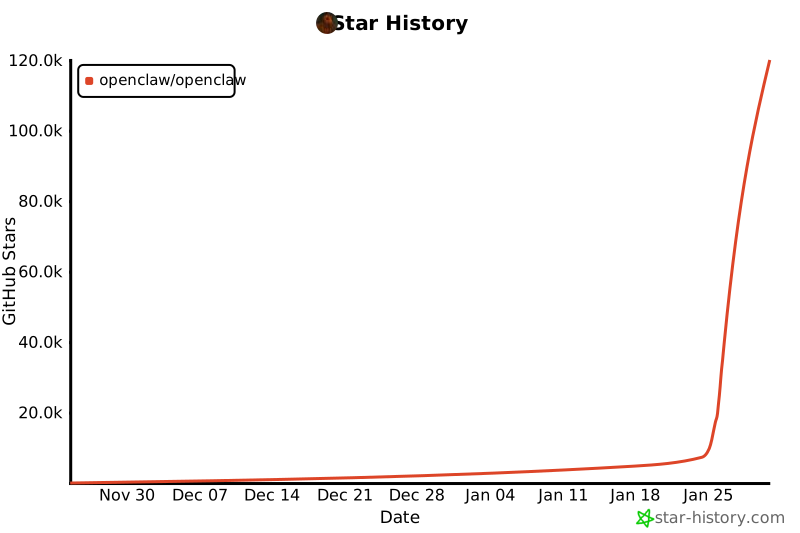
Star History
Molty & Heritage
OpenClaw was built for Molty, a space lobster AI assistant. 🦞
by Peter Steinberger and the community.
SybilClaw inherits this heritage but carries its own identity — named for Sybil, the oracle who saw the future clearly. We see stability coming, and we don't ship until it arrives.
See CONTRIBUTING.md for guidelines, maintainers, and how to submit PRs.
AI/vibe-coded PRs welcome! 🤖
Special thanks to Mario Zechner for his support and for
pi-mono.
Special thanks to Adam Doppelt for the lobster.bot domain.
Thanks to all clawtributors:


![github-actions[bot]](https://avatars.githubusercontent.com/in/15368?v=4&s=48)


![clawdinator[bot]](https://avatars.githubusercontent.com/in/2607181?v=4&s=48)


![google-labs-jules[bot]](https://avatars.githubusercontent.com/in/842251?v=4&s=48)








