

Product
Introducing Repository Access Permissions and Custom Roles
Socket now supports Custom Roles and Repository Access Permissions so organizations can control who can access specific repositories and actions.
By Joe Werle - Jun 19, 2026
#weg
基于fis3+express+swig的前端和后端集成解决方案工程解决方案。在阅读此文档之前,希望你最好对fis、swig、express 、mysql有一定的了解。
html、head、body、widget、script、style 等扩展标签。基于这些标签后端可以自动完成对页面的性能优化。widget 标签,可以轻松实现组件化,同名tpl、 css、js自动关联加载。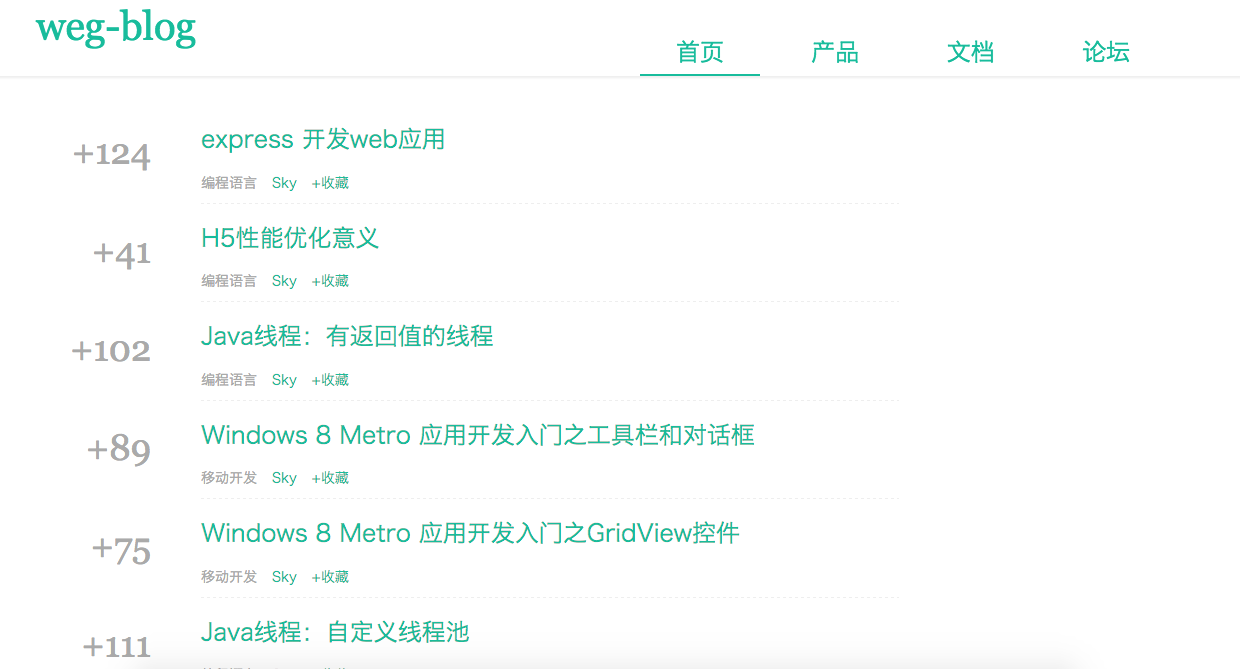
# 安装 fis 到全局
npm install -g weg

# 下载工程.
git clone https://github.com/hubcarl/weg-blog.git


# 进入 weg-blog  目录, release 后就可以预览了。
cd weg-blog


#工程运行
weg release -w 文件修改监控
weg release -m  资源文件md5签名
weg release --optimize --md5 --watch --pack # fis release -omwp
weg release -omwp   o 资源压缩  m 资源文件md5签名  w 文件修改监控   p打包合并
weg server start --timeout 10000  --port 9000   --type node
所有页面级别的模板文件,放在此目录。此tpl 可以直接在浏览器中预览。比如 page/index.tpl 可以通过 http://127.0.0.1:9000 访问。 需要强调的的是,模板引擎采用的是 swig, 可以采用模板继承机制来实现模板复用。
layout.tpl
<!doctype html>
{% html lang="en" framework="public/static/js/mod.js"  %}
    {% head %}
        <meta charset="utf-8">
        <meta http-equiv="X-UA-Compatible" content="IE=edge">
        <meta name="viewport" content="width=device-width, initial-scale=1">
        <meta name="description" content="">
        <meta name="author" content="">
        <link rel="icon" href="/static/favicon.ico">
        <title>{{ title }}</title>

        {% require "public/static/css/normalize.css" %}
        {% require "public/static/css/bootstrap.css" %}
        {% require "public/static/css/app.css" %}


    {% endhead %}

    {% body %}

        {% widget "widget/menu/menu.tpl" %}


            {% block beforecontent %}
            {% endblock %}

            <div class="container">
                {% block content %}
                {% endblock %}
            </div>

        {% block aftercontent %}
        {% endblock %}

    {% endbody %}

{% endhtml %}
news/index/index.tpl
{% extends 'page/layout.tpl' %}

{% block content %}

<div class="container smart-container">
    <div class="row row-offcanvas row-offcanvas-right">
        <div class="col-xs-12 col-sm-9">
            <ul class="smart-artiles" id="articleList">
                {% for item in list %}
                <li>
                    <div class="point">+{{item.hits}}</div>
                    <div class="card">
                        <h2><a href="/detail/{{item.id}}" target="_blank">{{item.title}}</a></h2>
                        <div>
                            <ul class="actions">
                                <li>
                                    <time class="timeago">{{item.createDate}}</time>
                                </li>
                                <li class="tauthor">
                                    <a href="#" target="_blank" class="get">Sky</a>
                                </li>
                                <li><a href="#" class="kblink-8007">+收藏</a></li>
                            </ul>
                        </div>
                    </div>
                </li>
                {% endfor %}
            </ul>
            <div id="pagerBottom" class="smart-pager"></div>
        </div>
    </div>
</div>

{% require "client/views/page/news/index/index.js" %}

{% script %}
    console.log('>>>>test>>>>>');
    require('client/views/page/news/index/index.js');
{% endscript %}


{% endblock %}
用来存放所有静态资源文件,css, js, images ,组件等等。如:
├── css
│   ├── bootstrap-theme.css
│   ├── bootstrap.css
│   └── style.css
└── js
    ├── bootstrap.js
    └── mod.js
用来存放各类组件代码。组件分成3类。
模板类文件,可以在模板中通过 widget 标签引用。如
{% widget "widget/menu/menu.tpl" %}
此类组件,可以在 tpl 或者 js 中通过 require 标签引用。
  {% require "client/views/page/news/index/index.js" %}

  {% script %}
      console.log('>>>>test>>>>>');
      require('client/views/page/news/index/index.js');
  {% endscript %}
采用 bigpipe 方案,允许你在渲染页面的时候,提前将框架输出,后续再把耗时的 pagelet 通过 chunk 方式输出到页面,以加速网页渲染。
sync 默认就是此模式,直接输出。
quicking 此类 widget 在输出时,只会输出个壳子,内容由用户自行决定通过 js,另起请求完成填充,包括静态资源加载。
async 此类 widget 在输出时,也只会输出个壳子,但是内容在 body 输出完后,chunk 输出 js 自动填充。widget 将忽略顺序,谁先准备好,谁先输出。
pipeline 与 async 基本相同,只是它会严格按顺序输出。
{% widget "widget/header/header.html" mode="pipeline" id="header" %}
要让 bigpipe 正常运行,需要前端引入 bigpipe.js, 另外 pagelet 为 quickling 模式,是不会自动加载的,需要用户主动去调用 BigPipe.load 方法,才会加载并渲染
编译配置文件,详情请查看配置 API。
FAQs
Unknown package
The npm package weg receives a total of 40 weekly downloads. As such, weg popularity was classified as not popular.
We found that weg demonstrated a not healthy version release cadence and project activity because the last version was released a year ago. It has 1 open source maintainer collaborating on the project.
Did you know?

Socket for GitHub automatically highlights issues in each pull request and monitors the health of all your open source dependencies. Discover the contents of your packages and block harmful activity before you install or update your dependencies.
Product
Socket now supports Custom Roles and Repository Access Permissions so organizations can control who can access specific repositories and actions.

Product
Socket MCP now lets AI assistants review org alerts, investigate threats using the Socket threat feed, and inspect package files in addition to dependency scoring.

Product
Socket Firewall blocks malicious VS Code and Open VSX extensions before install, protecting developers from compromised editor marketplaces.